The UC-2 Connecticut form plays a crucial role in ensuring that employers accurately report and correct their payroll information. This form is specifically designed for making corrections to both the Employer Contribution Return and the Employee Quarterly Earnings Report. If an employer discovers an error in previously submitted wage reports, the UC-2 form provides a structured way to amend those mistakes. It is important to note that each correction must be filed separately for each quarter, and the form should only list employees whose wages are being corrected. Employers should refrain from using this form to address issues related to social security numbers or employee names; instead, a detailed letter should be sent to the Department of Labor explaining the nature of the correction. The UC-2 form consists of several sections that require specific information, including registration numbers, contribution rates, and wage details, all of which help the Department of Labor process the corrections efficiently. Completing the form accurately is essential, as it not only impacts the employer’s tax obligations but also ensures compliance with state regulations.
FORM CONN
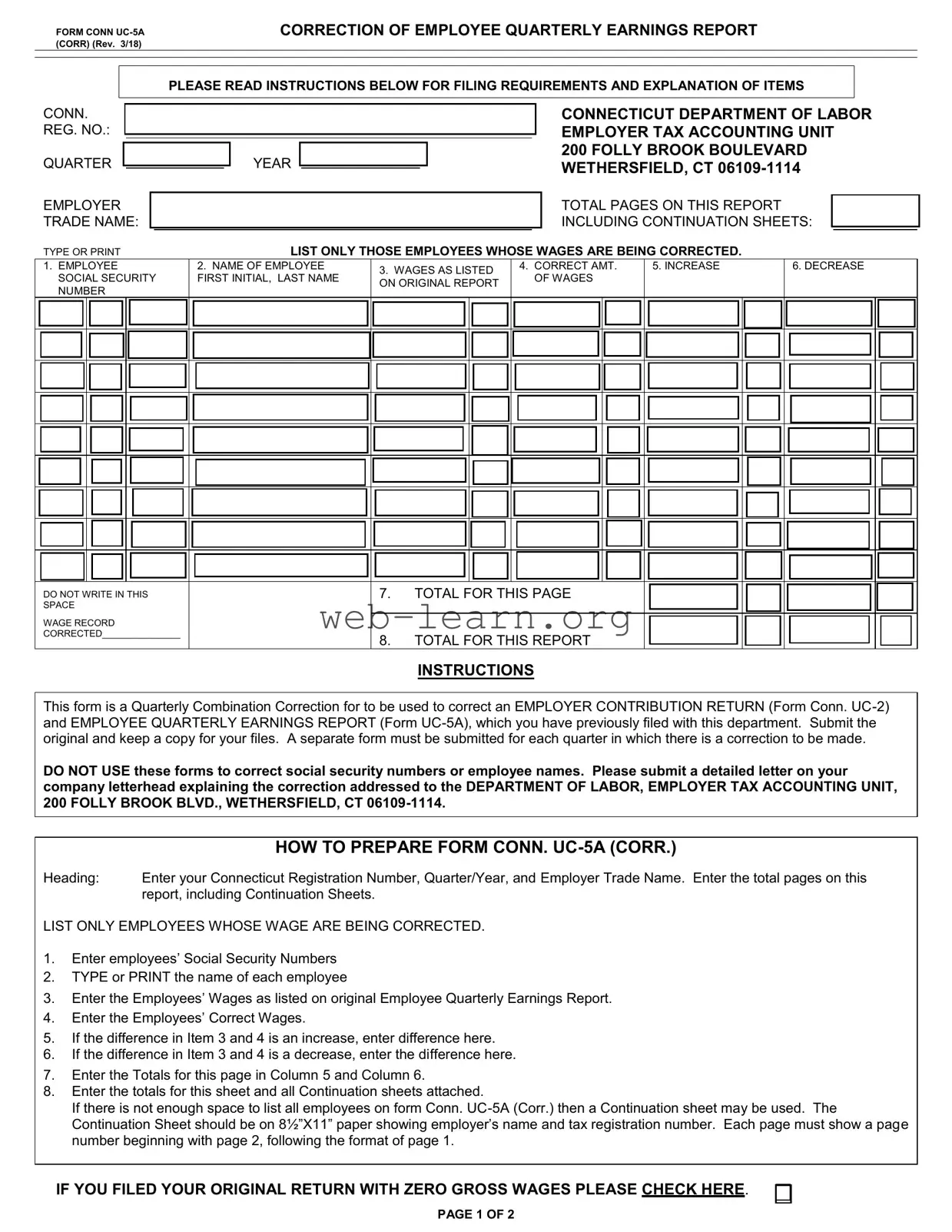
CORRECTION OF EMPLOYEE QUARTERLY EARNINGS REPORT
PLEASE READ INSTRUCTIONS BELOW FOR FILING REQUIREMENTS AND EXPLANATION OF ITEMS
CONN.
REG. NO.:
QUARTER
EMPLOYER TRADE NAME:
YEAR
CONNECTICUT DEPARTMENT OF LABOR EMPLOYER TAX ACCOUNTING UNIT 200 FOLLY BROOK BOULEVARD WETHERSFIELD, CT
TOTAL PAGES ON THIS REPORT INCLUDING CONTINUATION SHEETS:
TYPE OR PRINT |
LIST ONLY THOSE EMPLOYEES WHOSE WAGES ARE BEING CORRECTED. |
1.EMPLOYEE SOCIAL SECURITY NUMBER
2.NAME OF EMPLOYEE
FIRST INITIAL, LAST NAME
3.WAGES AS LISTED ON ORIGINAL REPORT
4.CORRECT AMT. OF WAGES
5. INCREASE
6. DECREASE
DO NOT WRITE IN THIS SPACE
WAGE RECORD
CORRECTED_______________
7.TOTAL FOR THIS PAGE
8.TOTAL FOR THIS REPORT
INSTRUCTIONS
This form is a Quarterly Combination Correction for to be used to correct an EMPLOYER CONTRIBUTION RETURN (Form Conn.
DO NOT USE these forms to correct social security numbers or employee names. Please submit a detailed letter on your company letterhead explaining the correction addressed to the DEPARTMENT OF LABOR, EMPLOYER TAX ACCOUNTING UNIT, 200 FOLLY BROOK BLVD., WETHERSFIELD, CT
|
HOW TO PREPARE FORM CONN. |
Heading: |
Enter your Connecticut Registration Number, Quarter/Year, and Employer Trade Name. Enter the total pages on this |
|
report, including Continuation Sheets. |
LIST ONLY EMPLOYEES WHOSE WAGE ARE BEING CORRECTED.
1.Enter employees’ Social Security Numbers
2.TYPE or PRINT the name of each employee
3.Enter the Employees’ Wages as listed on original Employee Quarterly Earnings Report.
4.Enter the Employees’ Correct Wages.
5.If the difference in Item 3 and 4 is an increase, enter difference here.
6.If the difference in Item 3 and 4 is a decrease, enter the difference here.
7.Enter the Totals for this page in Column 5 and Column 6.
8.Enter the totals for this sheet and all Continuation sheets attached.
If there is not enough space to list all employees on form Conn.
Continuation Sheet should be on 8½”X11” paper showing employer’s name and tax registration number. Each page must show a page number beginning with page 2, following the format of page 1.
IF YOU FILED YOUR ORIGINAL RETURN WITH ZERO GROSS WAGES PLEASE CHECK HERE.
PAGE 1 OF 2
FORM CONN.
CORRECTION OF
EMPLOYER CONTRIBUTION RETURN
PLEASE COMPLETE BOTH PAGES OF THIS RETURN
QUARTER |
|
|
|
YEAR |
|
|
|
|
|
CONN. REG. NO.:
CORPORATE NAME OR
TRADE NAME
CONNECTICUT DEPARTMENT OF LABOR EMPLOYER TAX ACCOUNTING UNIT 200 FOLLY BROOK BOULEVARD WETHERSFIELD, CT
Pay Online at: www.ct.gov/doltax
ADDRESS |
|
|
|
|
|
|
|
|
|
|
|
|
|
|
|
|
|
|
|
|
|
|
|
|
|
|
|
|
|
|
|
|
|
|
|
|
|
|
|
|
|
|
|
|
|
|
|
|
|
|
|
|
COLUMN A |
|
COLUMN B |
COLUMN C |
|
COLUMN D |
|||||
|
|
|
|
|
ORIGINAL |
|
CORRECTED |
INCREASE |
|
DECREASE |
|||||
1 |
CONTRIBUTION RATE |
% |
|
RETURN |
|
RETURN |
(Difference between Column |
|
(Difference between Column |
||||||
|
|
|
|
|
|
|
|||||||||
|
See original return filed for contribution rate. |
|
(Enter below amounts |
|
|
|
A and Column B when |
|
A and Column B, when |
||||||
|
|
reported on original return for |
|
|
|
Column B is larger) |
|
Column B is smaller) |
|||||||
|
|
|
|
|
|
|
|
|
|||||||
|
|
|
|
|
corresponding items) |
|
|
|
|
|
|
|
|
|
|
2 |
TOTAL GROSS WAGES PAID TO ALL EMPLOYEES FOR WORK |
|
|
|
|
|
|
|
|
|
|
|
|
||
|
|
|
|
|
|
|
|
|
|
|
|
||||
PERFORMED IN CONNECTICUT THIS QTR |
|
|
|
|
|
|
|
|
|
|
|
|
|
||
|
|
|
|
|
|
|
|
|
|
|
|
|
|
||
|
|
|
|
|
|
|
|
|
|
|
|
|
|
|
|
3 |
TOTAL GROSS WAGES PAID DURING THIS QUARTER TO EACH |
|
|
|
|
|
|
|
|
|
|
|
|
||
|
|
|
|
|
|
|
|
|
|
|
|
||||
EMPLOYEE IN EXCESS OF THE LIMITATION FOR THE |
|
|
|
|
|
|
|
|
|
|
|
|
|||
|
|
|
|
|
|
|
|
|
|
|
|
|
|||
|
CALENDAR YEAR |
|
|
|
|
|
|
|
|
|
|
|
|
|
|
|
|
|
|
|
|
|
|
|
|
|
|
|
|
||
4 |
TOTAL TAXABLE |
|
|
|
|
|
|
|
|
|
|
|
|
||
|
|
|
|
|
|
|
|
|
|
|
|
||||
DIFFERENCE BETWEEN COL. A AND B IN COL. C OR D. |
|
|
|
|
|
|
|
|
|
|
|
|
|||
|
|
|
|
|
|
|
|
|
|
|
|
|
|||
|
|
|
|
|
|
|
|
|
|
|
|
|
|
|
|
5 |
CONTRIBUTION OR CREDIT DUE: SEE INSTRUCTIONS BELOW. |
|
|
|
|
|
|
|
|
|
|
|
|
||
|
|
|
|
|
|
|
|
|
|
|
|
||||
|
|
|
|
|
|
|
|
|
|
|
|
|
|
|
|
|
|
|
|
|
|
|
|
|
|
|
|
|
|
|
|
6 |
INTEREST DUE. IF CORRECTION RESULTED IN AN INCREASE IN CONTRIBUTION (LINE 5, COLUMN C), ENTER INTEREST |
|
|
|
********** |
|
|||||||||
|
|
|
|
||||||||||||
DUE IN COLUMN C. SEE INSTRUCTIONS BELOW. |
|
|
|
|
|
|
|
|
|
|
|||||
|
|
|
|
|
|
|
|
|
|
|
|||||
|
|
|
|
|
|
|
|
|
|
|
|
|
|
|
|
7 |
IF INCREASE IN CONTRIBUTIONS DUE (ITEM 5C), ENTER PENALTY DUE, IF ANY, IN COLUMN C. SEE INSTRUCTIONS |
|
|
|
********** |
|
|||||||||
|
|
|
|
||||||||||||
BELOW. |
|
|
|
|
|
|
|
|
|
|
|
||||
|
|
|
|
|
|
|
|
|
|
|
|
||||
|
|
|
|
|
|
|
|
|
|
|
|
|
|
|
|
8 |
TOTAL ADDITIONAL AMOUNT DUE – SUM OF ITEMS 5C, 6C AND 7C. PAY ONLINE AT: WWW.CT.GOV/DOLTAX |
|
|
|
********** |
|
|||||||||
|
|
|
|
||||||||||||
|
|
|
|
|
|
|
|
|
|
|
|
|
|||
|
|
|
|
|
|
|
|
|
|
|
|
|
|
||
|
|
|
|
|
|
|
|
|
|
|
|
|
|
|
|
9EXPLAIN REASON FOR CORRECTION
PHONE NUMBER (
)
TITLE
DATE
HOW TO PREPARE FORM CONN.
HEADING: Enter QUARTER/YEAR, Connecticut Registration Number, Employer Trade Name, Name of Owners, Partners, or Corporate name (if other than trade name) and your Mailing address
Item 1: Contribution Rate – enter Contribution Rate for this quarter. If Rate has been corrected, use Corrected Rate.
Item 2: Enter Column “A” the Gross Wages Listed on the Original Return. Enter in Column “B” the correct amount of Gross Wages. If
Column “B” is larger than Column “A”, enter the difference in Column “C”. If Column “B” is smaller than Column “A”, enter the difference in Column “D”.
Item 3: Excess Wages – Wages paid during quarter in excess of the limitation for the calendar year. Enter the Column “A” excess wages as listed on original Return. Enter in Column “B” the correct amount of Excess Wages. Enter the Difference between Columns “A” and “B” in appropriate Column “C” or “D”.
Item 4:
Item 5:
Item 6:
Item 7:
Item 8: Item 9:
Item 10:
Item 2 minus Item 3
Enter in Column “A” the taxable Wages subject to contributions as listed on the Original Return.
Enter in Column “B” the correct amount of Taxable Wages subject to contributions. Enter difference between Columns “A” and “B” in the appropriate Column “C” and “D”.
Enter in Column “A” the Contributions listed on the Original Return. Enter in Column “B” the amount of Contributions due on corrected wages by multiplying Item 4B by the Contribution rate in Item 1. If Column “B” is larger than Column “A”, it represents Additional Contributions Due, and the difference should be entered in Column “C” (INCREASE). IF Column “B” is less than Column “A”, it represents an Overstatement of Contributions and the difference should be entered in Column “D”
(DECREASE). If a DECREASE, a refund may be issued, if applicable.
Enter in Column “C” the interest due on the additional contributions due. Multiply item 5C by the appropriate interest rate. One percent interest is charged for each month, or part thereof, that this return is filed late. Example: If the quarter being filed is the first quarter, the due date is April 30. Beginning May 1st , calculate 1% interest due. On June 1, 2% interest; on July 1, 3% interest; etc. If it is a second quarter return, interest begins to accrue August 1st; for a 3rd quarter return, November 1st; and for a 4th quarter return, February 1st .
Enter in Column “C” any penalty on the additional contributions due. A penalty of ten percent (10%) or fifty dollars ($50), whichever is greater, is assessed if the balance of contributions due is not paid within thirty days of the due date. Penalty dates: 1st quarter
Enter the total Amount due (the Sum of Items “5C”, “6C” and “7C”). Pay online at: www.ct.gov/doltax
Explain the reason for Correction fully. If additional space is required, attach a letter furnishing all facts and refer to the letter in this space.
This correction return must be signed by a responsible and duly authorized person and mailed to the address listed above. Any payment due, however, must be made online at www.ct.gov/doltax.
| Fact Name | Details |
|---|---|
| Form Purpose | The UC-2 Connecticut form is used to correct previously filed Employer Contribution Returns and Employee Quarterly Earnings Reports. |
| Governing Law | This form is governed by the Connecticut General Statutes, specifically Title 31, which covers labor and employment laws. |
| Submission Requirement | Employers must submit the original form and keep a copy for their records. |
| Quarterly Submission | A separate form must be submitted for each quarter in which corrections are necessary. |
| Employee Information | Only employees whose wages are being corrected should be listed on the form. |
| Correction Details | Employers must enter both the original and corrected wages for each employee whose information is being amended. |
| Continuation Sheets | If there is insufficient space on the form, employers can use continuation sheets, which must be formatted correctly. |
| Interest and Penalties | Interest may accrue on additional contributions due, and penalties can be assessed for late payments. |
| Reason for Correction | Employers are required to explain the reason for the correction in detail on the form. |
| Authorized Signature | The correction return must be signed by a responsible and duly authorized person before submission. |
Filling out the UC-2 Connecticut form requires careful attention to detail. After completing the form, it is essential to submit the original while keeping a copy for your records. Each quarter necessitates a separate form if corrections are needed. Ensure that any corrections do not involve social security numbers or employee names; instead, provide a detailed letter explaining the corrections to the Department of Labor.
The UC-2 form is used to correct an Employer Contribution Return. It allows employers to amend previously submitted information regarding their contributions and wages for employees. If there are any discrepancies or changes needed, this form is the appropriate method to address them.
Employers who have submitted an Employer Contribution Return that requires corrections must file the UC-2 form. This includes any changes to gross wages, contribution rates, or taxable wages. Each employer should ensure that their records are accurate and up-to-date.
To complete the UC-2 form, follow these steps:
The UC-2 form should be submitted as soon as you identify the need for corrections. Timely filing is crucial to avoid penalties and interest. Each quarter requiring corrections must have its own UC-2 form submitted.
Corrections to employee names or Social Security numbers cannot be made using the UC-2 form. Instead, a detailed letter should be submitted on your company letterhead to the Department of Labor, Employer Tax Accounting Unit. This letter must explain the necessary corrections.
Yes, penalties may apply if the UC-2 form is submitted late. A penalty of 10% of the amount due or $50, whichever is greater, can be assessed if contributions are not paid within 30 days of the due date. It is essential to submit the form and any payments promptly to avoid these penalties.
The completed UC-2 form should be mailed to the following address:
Department of Labor, Employer Tax Accounting Unit,
200 Folly Brook Boulevard,
Wethersfield, CT 06109-1114.
Filling out the UC-2 Connecticut form can be a complex task. Many individuals make common mistakes that can lead to delays or complications. Understanding these pitfalls can help ensure that the form is completed accurately and efficiently.
One frequent error is failing to include the correct Connecticut Registration Number. This number is essential for identifying the employer and linking the correction to the correct account. Without it, the Department of Labor may struggle to process the form, resulting in unnecessary delays.
Another mistake involves omitting the total pages on the report. The form requires the filer to indicate how many pages are included, which helps the department verify that they have received the complete submission. Neglecting this detail can lead to confusion and may cause the submission to be considered incomplete.
Many filers also mistakenly list employees whose wages are not being corrected. The instructions clearly state to list only those employees with corrected wages. Including others can complicate the review process and may lead to the form being rejected.
Inaccurate entries in the wage columns are another common issue. Filers may accidentally enter the wrong amounts for both original and corrected wages. Such discrepancies can trigger further inquiries and potentially result in penalties if the corrections are not adequately justified.
Moreover, some individuals overlook the requirement to provide a detailed explanation for the correction. This explanation must be clear and thorough, as it helps the Department of Labor understand the reasons behind the changes. A vague or missing explanation can lead to additional questions and a longer processing time.
Another mistake is failing to sign the form. The correction return must be signed by a responsible and authorized person. A missing signature can render the submission invalid, necessitating a resubmission and further delays.
Additionally, filers sometimes neglect to calculate the differences in wages correctly. When the corrected wages differ from the original, it is crucial to accurately reflect those differences in the appropriate columns. Errors in these calculations can lead to incorrect contributions being reported.
Another common oversight is not using a continuation sheet when necessary. If there are too many employees to list on the main form, a continuation sheet is required. Failing to include this can result in incomplete information being submitted.
Lastly, some filers do not pay attention to the deadlines associated with the form. Missing the due date can lead to penalties and interest charges. It is essential to be aware of these deadlines to avoid unnecessary costs.
By being mindful of these common mistakes, individuals can improve the accuracy of their UC-2 Connecticut form submissions. Taking the time to carefully review each section and follow the instructions can save time and prevent complications down the road.
When dealing with corrections to employee wages and employer contributions in Connecticut, it's essential to have the right forms and documents on hand. The UC-2 form is just one part of the process. Several other forms complement it, ensuring accurate reporting and compliance with state regulations. Below are five important documents you may encounter alongside the UC-2 Connecticut form.
Understanding these forms and their purposes can greatly simplify the correction process. Each document plays a vital role in maintaining compliance and ensuring that both employee wages and employer contributions are accurately reported. By being thorough and organized, employers can navigate these requirements with confidence.
The UC-2 Connecticut form is an important document for employers in Connecticut, specifically designed to correct errors in previously submitted employer contribution returns. However, it shares similarities with several other forms that also deal with corrections or reporting requirements. Below are ten documents that have similar functions or purposes:
Understanding these forms and their similarities can help employers navigate the correction process more efficiently, ensuring compliance and accurate reporting.
When filling out the UC-2 Connecticut form, attention to detail is crucial. Here are six important dos and don’ts to guide you through the process.
Understanding the UC-2 Connecticut form can be challenging, and several misconceptions often arise. Here’s a list of common misunderstandings about this form, along with clarifications to help you navigate the process more effectively.
By addressing these misconceptions, you can approach the UC-2 Connecticut form with greater confidence and clarity. Proper understanding and adherence to the guidelines can prevent unnecessary complications.
When filling out and using the UC-2 Connecticut form, there are several important points to keep in mind. This form is essential for correcting previous employer contribution returns and employee quarterly earnings reports. Here are key takeaways: