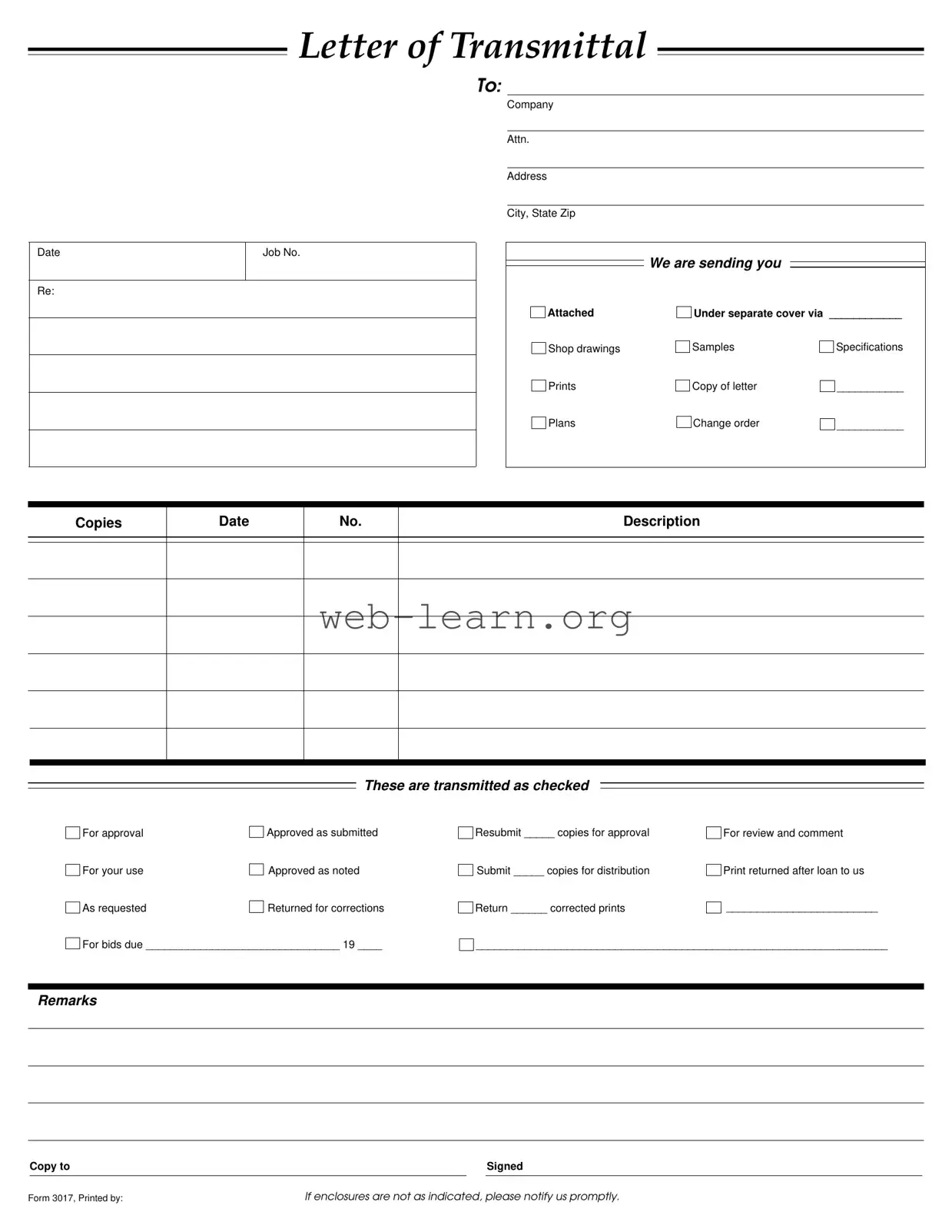
In the world of project management and construction, communication is key, and the Transmittal form serves as a vital tool in this process. This form is typically used to accompany various documents, ensuring that all parties are on the same page regarding what is being sent and its intended purpose. It includes essential details such as the date, job number, and recipient information, making it easy to track correspondence. Additionally, the form outlines the specific items being transmitted, whether they are shop drawings, samples, specifications, or plans. Each item is checked off to indicate its status—whether it’s for approval, for use, or requires corrections. The clarity provided by this form helps prevent misunderstandings and ensures that all necessary documents are accounted for. Furthermore, it includes sections for remarks and follow-up actions, which can streamline the review process and enhance collaboration among team members. By utilizing the Transmittal form effectively, companies can maintain organized communication and foster a more efficient workflow.
LETTER OF TRANSMITTAL
TO:
Date
Re:
Job No.
Company
Attn.
Address
City, State Zip
We are sending you
Attached |
Under separate cover via ____________ |
|
Shop drawings |
Samples |
Specifications |
Prints |
Copy of letter |
___________ |
Plans |
Change order |
___________ |
Copies
Date
No.
Description
These are transmitted as checked
For approval |
|
Approved as submitted |
For your use |
|
Approved as noted |
|
||
As requested |
|
Returned for corrections |
|
For bids due ________________________________ 19 ____
Resubmit _____ copies for approval |
For review and comment |
Submit _____ copies for distribution |
Print returned after loan to us |
Return ______ corrected prints |
_________________________ |
____________________________________________________________________
Remarks
|
Copy to |
|
|
Signed |
|
|
|
|
|
Form 3017, Printed by: |
If enclosures are not as indicated, please notify us promptly. |
|||
| Fact Name | Description |
|---|---|
| Purpose | The Transmittal Form is used to communicate the sending of documents or materials to another party. |
| Components | It includes sections for the date, job number, company details, and a list of attached documents. |
| Document Types | Common items sent include shop drawings, samples, specifications, and plans. |
| Approval Status | The form allows for various approval statuses such as "For approval," "Approved as submitted," and "Returned for corrections." |
| Resubmission | If corrections are needed, the form indicates how many copies should be resubmitted for approval. |
| State-Specific Forms | Some states may have specific requirements for Transmittal Forms governed by local construction laws. |
| Record Keeping | It serves as a record of what was sent and the status of each document, helping track communication. |
| Notification Requirement | The sender must notify the recipient if the enclosures are not as indicated on the form. |
| Signature | A signature is typically required at the bottom of the form to confirm the transmission of documents. |
| Legal Implications | Using the Transmittal Form can help clarify responsibilities and expectations, potentially reducing disputes. |
Filling out the Transmittal form is an important step in ensuring that all necessary documents are sent to the right person or company. Once the form is completed, it should be submitted along with any accompanying materials. Following the steps below will help ensure that you fill out the form correctly.
If any enclosures are missing or incorrect, it is important to notify the sender promptly. This ensures that everyone is on the same page and that all necessary documents are accounted for.
What is a Transmittal Form?
A Transmittal Form is a document used to accompany materials being sent from one party to another. It provides essential information about the contents being transmitted, such as shop drawings, specifications, and other relevant documents. The form ensures that all parties are aware of what is included in the shipment and helps facilitate communication regarding the materials.
What information is typically included on a Transmittal Form?
The Transmittal Form usually contains the following information:
This information helps ensure clarity and accountability in the transmission process.
Why is it important to use a Transmittal Form?
Using a Transmittal Form is important for several reasons. It serves as a record of what was sent and when it was sent. This can be crucial for tracking progress and maintaining accountability. Additionally, it helps to prevent misunderstandings by clearly outlining what is included in the transmission and any actions required by the recipient.
What should I do if the enclosures listed on the Transmittal Form are incorrect?
If you notice that the enclosures are not as indicated on the Transmittal Form, it is essential to notify the sender promptly. This can help resolve any issues quickly and ensure that the correct documents are sent. Communication is key to maintaining a smooth workflow.
How should I handle a Transmittal Form that requires approval?
When a Transmittal Form indicates that materials are submitted for approval, it is important to review the documents thoroughly. You should provide feedback or approval as indicated on the form. If changes are necessary, note them clearly and return the form with your comments. Ensure that you keep a copy for your records.
Can I modify a Transmittal Form for my specific needs?
Yes, you can modify a Transmittal Form to better suit your specific needs. While it is important to include the essential information, you may add or remove sections as necessary. Just ensure that all relevant details are clearly communicated to avoid any confusion.
Completing the Transmittal form can seem straightforward, yet many individuals encounter pitfalls that can lead to confusion or delays. One common mistake is neglecting to fill in the date at the top of the form. This information is crucial, as it establishes a timeline for the documents being transmitted. Without a date, recipients may struggle to track correspondence and deadlines effectively.
Another frequent error involves failing to specify the job number. The job number serves as a unique identifier for the project and helps ensure that all parties are on the same page. Omitting this detail can result in miscommunication and misplaced documents.
People often overlook the importance of including the recipient's information accurately. This includes the company name, attention line, address, city, state, and zip code. Any inaccuracies can lead to delays in receiving the documents or, worse, the documents being sent to the wrong location.
Additionally, many individuals do not check off the appropriate boxes indicating the purpose of the transmission. Whether the documents are for approval, use, or corrections, failing to specify this can lead to confusion about the intended action required from the recipient.
Another mistake is not providing sufficient detail in the description section. This area is meant to clarify what is being sent, such as shop drawings or specifications. A vague description can hinder the recipient's understanding and delay the review process.
It is also common for people to forget to indicate the number of copies being sent. This detail is essential for the recipient to know how many documents to expect. If this information is missing, it could lead to disputes or misunderstandings about what was actually sent.
Moreover, some individuals fail to include remarks or notes that could provide additional context for the documents being transmitted. These remarks can clarify specific points or highlight important aspects that the recipient should pay attention to. Without this information, the recipient may overlook critical details.
Another oversight is neglecting to include a copy to section. This section is useful for keeping other relevant parties informed about the transmission. Failing to include this can result in key stakeholders being left out of the loop.
Lastly, many people do not sign the form before sending it. A signature is a vital part of the document, as it signifies that the sender has verified the information provided. Without a signature, the form may lack authenticity and could be questioned by the recipient.
The Transmittal form is a key document used to communicate the delivery of materials and information between parties involved in a project. Alongside this form, several other documents often accompany it to ensure clarity and completeness. Below are five common forms and documents that are frequently used with the Transmittal form.
These documents work together to facilitate smooth communication and ensure that all parties are aligned on project requirements. Properly utilizing these forms helps prevent misunderstandings and keeps projects on track.
The Transmittal form serves as a key document in project management and communication. Several other documents share similar functions and purposes. Here’s a list of nine documents that are comparable to the Transmittal form:
When filling out the Transmittal form, it is important to follow specific guidelines to ensure clarity and accuracy. Here are seven things you should and shouldn't do:
By adhering to these guidelines, you can ensure a smooth transmission process and avoid unnecessary delays.
Misconceptions about the Transmittal form can lead to confusion and miscommunication. Here are eight common misunderstandings:
Understanding these misconceptions can help ensure that the Transmittal form is used effectively, fostering better communication and project management.
When using the Transmittal form, it is important to follow specific guidelines to ensure clarity and accuracy. Here are some key takeaways: