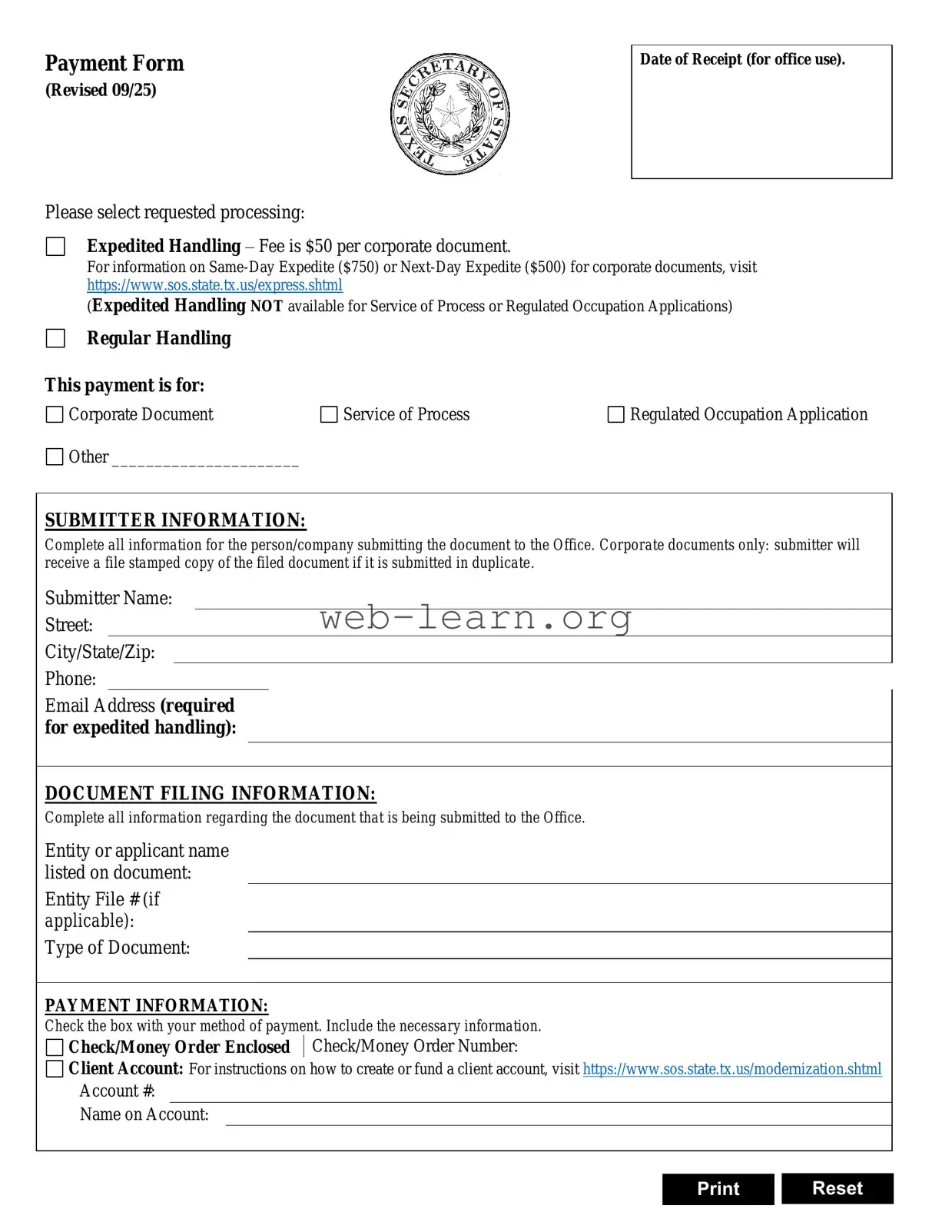
The Texas SOS Payment 807 form is an essential document for anyone looking to submit filings to the Texas Secretary of State. This form facilitates the payment process for various services, including document filing, expedited handling, and obtaining copies of corporate documents. Users can choose between expedited and regular handling, with specific fees associated with each option. For expedited requests, a valid email address must be provided to ensure prompt communication. The form requires detailed submitter information, including the name, address, and contact details of the individual or company making the submission. Additionally, it captures necessary document filing information, such as the type of document and the associated file number. Payment options include major credit cards like Visa, Mastercard, Discover, and American Express, with a convenience fee applied to credit card transactions. Users must also provide a return address for the documents, ensuring that all submissions are processed efficiently and accurately. Completing this form correctly is crucial for a smooth filing experience with the Texas Secretary of State.
Payment Form
(Revised 09/25)
Please select requested processing:
Expedited Handling – Fee is $50 per corporate document.
Date of Receipt (for office use).
For information on
(Expedited Handling NOT available for Service of Process or Regulated Occupation Applications)
Regular Handling
This payment is for:
Corporate Document |
Service of Process |
Regulated Occupation Application |
Other ______________________ |
|
|
SUBMITTER INFORMATION:
Complete all information for the person/company submitting the document to the Office. Corporate documents only: submitter will receive a file stamped copy of the filed document if it is submitted in duplicate.
Submitter Name:
Street:
City/State/Zip:
Phone:
Email Address (required for expedited handling):
DOCUMENT FILING INFORMATION:
Complete all information regarding the document that is being submitted to the Office.
Entity or applicant name listed on document:
Entity File # (if applicable):
Type of Document:
PAYMENT INFORMATION:
Check the box with your method of payment. Include the necessary information.
Check/Money Order Enclosed Check/Money Order Number:
Client Account: For instructions on how to create or fund a client account, visit https://www.sos.state.tx.us/modernization.shtml
Account #:
Name on Account:
Print Reset
| Fact Name | Description |
|---|---|
| Form Purpose | The Texas SOS Payment 807 form is used for submitting payments related to document filings with the Secretary of State. |
| Processing Options | Submitters can choose between expedited and regular handling. Expedited handling is not available for Authentication Services or Trademark Applications. |
| Payment Methods | Accepted payment methods include credit cards (Visa, Mastercard, Discover, American Express) and checks or money orders. |
| Convenience Fee | A convenience fee of 2.7% applies to payments made by credit card, as authorized by state law. |
| Governing Law | This form is governed by Texas Business Organizations Code and Texas Government Code. |
Filling out the Texas SOS Payment 807 form is a straightforward process. Once you have completed the form, you will be ready to submit it along with any required documents and payment. Make sure all information is accurate to avoid delays in processing.
What is the Texas SOS Payment 807 form?
The Texas SOS Payment 807 form is used to submit payment for various document filings with the Texas Secretary of State. This form allows individuals and companies to request expedited or regular handling of their documents and provides necessary payment information.
What types of handling requests can I select?
You can choose between expedited handling and regular handling. Expedited handling is available for most corporate documents, copies, and UCC filings, but not for Authentication Services or Trademark Applications. The fees for expedited handling are $25 for corporate documents, $10 for copies, and $15 for UCC filings.
What information do I need to provide on the form?
It is essential to fill out both the submitter information and document filing information sections completely. This includes your name, address, phone number, email, and details about the document being submitted, such as the name on the document, file number, type of document, and number of pages.
How do I make a payment?
You can make a payment using a credit card or by enclosing a check or money order. If you choose to pay by credit card, provide the card number, expiration date, security code, and billing address. Be aware that credit card payments incur a convenience fee of 2.7% of the total fees.
What should I include as a return address?
Include a return address where you want the documents to be sent back. If the return address is the same as the submitter's address, you can simply check the designated box on the form.
Can I use an electronic check for payment?
No, electronic checks are not accepted. Payments must be made via credit card or by enclosing a physical check or money order with the form.
What if I have additional questions?
If you have further questions regarding the Texas SOS Payment 807 form or the filing process, it is advisable to contact the Texas Secretary of State's office directly for assistance.
Filling out the Texas SOS Payment 807 form can be straightforward, but many individuals make common mistakes that can lead to delays or complications. One frequent error is neglecting to provide complete submitter information. This section is crucial, as it identifies the person or company responsible for submitting the documents. Missing details such as a phone number or email address can hinder communication and delay processing.
Another mistake often encountered involves the payment information section. Submitting incorrect payment details, such as an invalid credit card number or an expired card, can result in the rejection of the application. Additionally, failing to check the appropriate box for the method of payment can lead to confusion. It is essential to ensure that all payment information is accurate and complete to avoid any processing issues.
Many people also overlook the importance of specifying the type of document being filed. This information is vital for the processing of the request. If the type of document is not clearly indicated, it can cause significant delays as the office may need to reach out for clarification. Always double-check this section to ensure that the correct document type is listed.
Lastly, individuals sometimes forget to provide a return address for the documents. If the return address is the same as the submitter's, it is important to check the corresponding box. However, if it differs, failing to include the correct return address can result in lost documents or delays in receiving them. Taking the time to verify this information can save a lot of trouble down the line.
The Texas SOS Payment 807 form is essential for submitting various documents to the Texas Secretary of State. However, several other forms and documents often accompany it to ensure proper processing and compliance. Here are some commonly used documents:
Understanding these additional documents can help streamline the submission process and ensure that all necessary information is provided. Proper preparation can save time and reduce the risk of delays in processing your filings with the Texas Secretary of State.
The Texas SOS Payment 807 form serves as a crucial document for processing payments related to various filings. Several other forms share similar functions and structures. Here are seven documents that are comparable to the Texas SOS Payment 807 form:
When filling out the Texas SOS Payment 807 form, follow these guidelines to ensure a smooth process.
This form actually offers both expedited and regular handling options. While expedited handling is available for a fee, regular processing can also be selected without any additional charges.
Not all documents require the same fees. The costs vary based on the type of document being filed. For example, corporate documents have different fees compared to UCC filings or copies.
While credit card payments are an option, individuals can also submit a check or money order. However, electronic checks are not accepted.
Providing a return address is essential. This ensures that the submitted documents are sent back to the correct location after processing. If the return address is the same as the submitter's, there is a box to check for convenience.
The Texas SOS Payment 807 form can be used by individuals as well as businesses. Whether you are submitting documents for a personal matter or a corporate issue, this form is applicable.
When filling out the Texas SOS Payment 807 form, there are several important points to keep in mind: