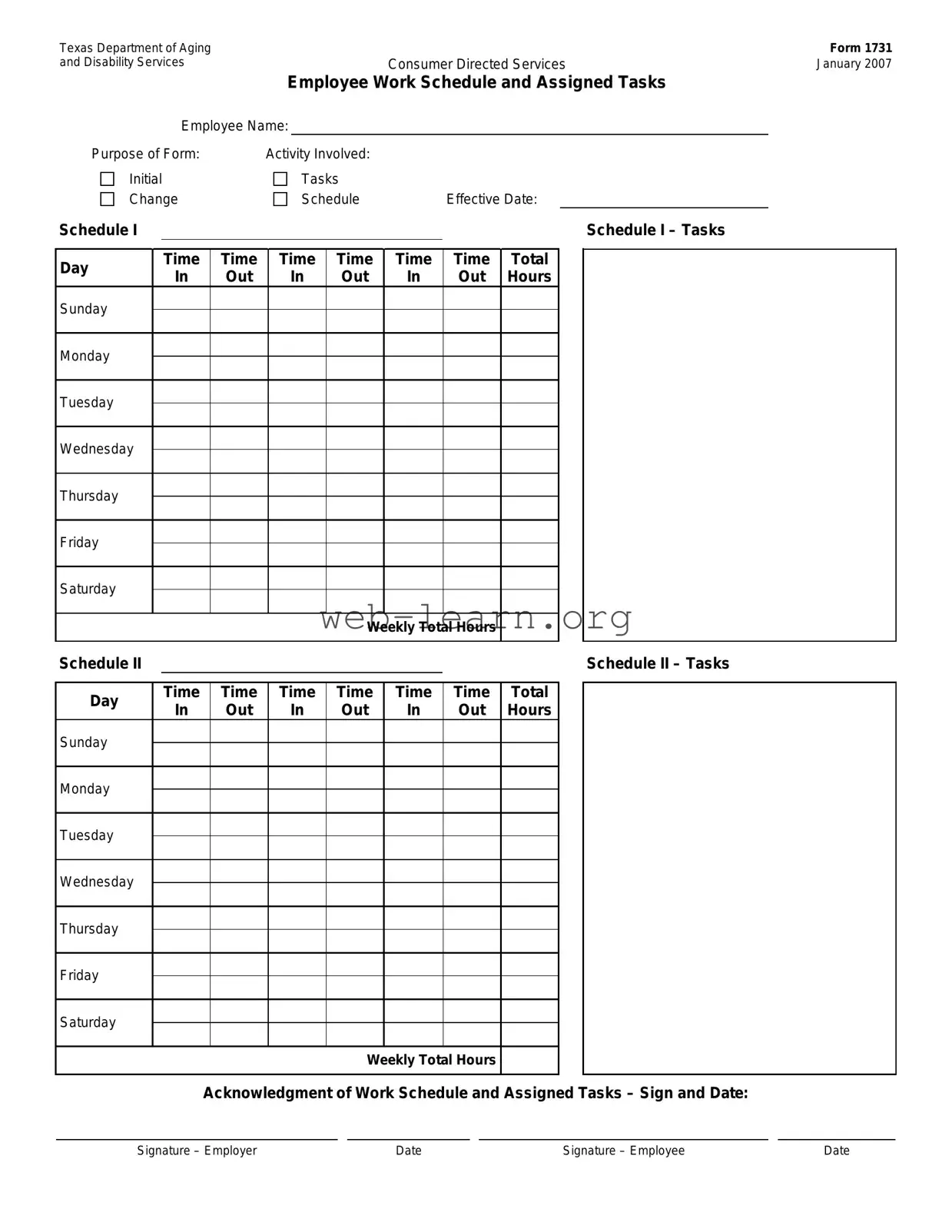
The Texas Department of Aging and Disability Services form, specifically Form 1731, is an essential document for managing Consumer Directed Services. This form serves multiple purposes, primarily focusing on the organization of employee work schedules and the assignment of specific tasks. It captures crucial information, such as the employee's name, the effective date of the schedule, and the various tasks assigned to them throughout the week. The form is divided into two main sections, Schedule I and Schedule II, allowing for a clear breakdown of daily hours and responsibilities for each day of the week. Each section requires detailed entries for the time an employee starts and finishes their tasks, ensuring that both employers and employees have a mutual understanding of expectations. At the end of the form, there is an acknowledgment section where both the employer and employee sign and date, confirming their agreement to the outlined schedule and tasks. This structured approach not only facilitates effective communication but also helps in maintaining compliance with the regulations governing consumer-directed services in Texas.

Texas Department of Aging |
|
|
|
|
|
|
|
|
|
|
|
|
|
Form 1731 |
|||||
and Disability Services |
|
|
|
|
|
|
|
Consumer Directed Services |
|
January 2007 |
|||||||||
|
|
|
|
|
|
Employee Work Schedule and Assigned Tasks |
|
|
|||||||||||
|
|
|
Employee Name: |
|
|
|
|
|
|
|
|
|
|
|
|
|
|||
Purpose of Form: |
|
|
Activity Involved: |
|
|
|
|
|
|
|
|
|
|||||||
Initial |
|
|
|
|
Tasks |
|
|
|
|
|
|
|
|
|
|||||
Change |
|
|
|
Schedule |
|
Effective Date: |
|
|
|||||||||||
Schedule I |
|
|
|
|
|
|
|
|
|
|
|
|
|
|
Schedule I – Tasks |
|
|
||
|
|
|
|
|
|
|
|
|
|
|
|
|
|
|
|
|
|
|
|
Day |
|
|
Time |
|
Time |
Time |
Time |
Time |
Time |
Total |
|
|
|
|
|||||
|
In |
|
Out |
In |
|
Out |
In |
Out |
Hours |
|
|
|
|
||||||
|
|
|
|
|
|
|
|
|
|||||||||||
Sunday |
|
|
|
|
|
|
|
|
|
|
|
|
|
|
|
|
|
|
|
|
|
|
|
|
|
|
|
|
|
|
|
|
|
|
|
|
|
||
|
|
|
|
|
|
|
|
|
|
|
|
|
|
|
|
|
|
|
|
Monday |
|
|
|
|
|
|
|
|
|
|
|
|
|
|
|
|
|
|
|
|
|
|
|
|
|
|
|
|
|
|
|
|
|
|
|
|
|
||
|
|
|
|
|
|
|
|
|
|
|
|
|
|
|
|
|
|
|
|
Tuesday |
|
|
|
|
|
|
|
|
|
|
|
|
|
|
|
|
|
|
|
|
|
|
|
|
|
|
|
|
|
|
|
|
|
|
|
|
|
||
|
|
|
|
|
|
|
|
|
|
|
|
|
|
|
|
|
|
|
|
Wednesday |
|
|
|
|
|
|
|
|
|
|
|
|
|
|
|
|
|
|
|
|
|
|
|
|
|
|
|
|
|
|
|
|
|
|
|
|
|
||
|
|
|
|
|
|
|
|
|
|
|
|
|
|
|
|
|
|
|
|
Thursday |
|
|
|
|
|
|
|
|
|
|
|
|
|
|
|
|
|
|
|
|
|
|
|
|
|
|
|
|
|
|
|
|
|
|
|
|
|
||
|
|
|
|
|
|
|
|
|
|
|
|
|
|
|
|
|
|
|
|
Friday |
|
|
|
|
|
|
|
|
|
|
|
|
|
|
|
|
|
|
|
|
|
|
|
|
|
|
|
|
|
|
|
|
|
|
|
|
|
||
|
|
|
|
|
|
|
|
|
|
|
|
|
|
|
|
|
|
|
|
Saturday |
|
|
|
|
|
|
|
|
|
|
|
|
|
|
|
|
|
|
|
|
|
|
|
|
|
|
|
|
|
|
|
|
|
|
|
|
|
||
|
|
|
|
|
|
|
|
|
|
|
|
|
|
|
|
|
|
|
|
|
|
|
|
|
|
|
|
|
|
Weekly Total Hours |
|
|
|
|
|
||||
Schedule II |
|
|
|
|
|
|
|
|
|
|
|
|
|
|
Schedule II – Tasks |
|
|
||
|
|
|
|
|
|
|
|
|
|
|
|
|
|
|
|
|
|||
Day |
|
|
Time |
|
Time |
Time |
Time |
Time |
Time |
Total |
|
|
|
|
|||||
|
In |
|
Out |
In |
|
Out |
In |
Out |
Hours |
|
|
|
|
||||||
|
|
|
|
|
|
|
|
|
|||||||||||
Sunday |
|
|
|
|
|
|
|
|
|
|
|
|
|
|
|
|
|
|
|
|
|
|
|
|
|
|
|
|
|
|
|
|
|
|
|
|
|
||
|
|
|
|
|
|
|
|
|
|
|
|
|
|
|
|
|
|
|
|
Monday |
|
|
|
|
|
|
|
|
|
|
|
|
|
|
|
|
|
|
|
|
|
|
|
|
|
|
|
|
|
|
|
|
|
|
|
|
|
||
|
|
|
|
|
|
|
|
|
|
|
|
|
|
|
|
|
|
|
|
Tuesday |
|
|
|
|
|
|
|
|
|
|
|
|
|
|
|
|
|
|
|
|
|
|
|
|
|
|
|
|
|
|
|
|
|
|
|
|
|
||
|
|
|
|
|
|
|
|
|
|
|
|
|
|
|
|
|
|
|
|
Wednesday |
|
|
|
|
|
|
|
|
|
|
|
|
|
|
|
|
|
|
|
|
|
|
|
|
|
|
|
|
|
|
|
|
|
|
|
|
|
||
|
|
|
|
|
|
|
|
|
|
|
|
|
|
|
|
|
|
|
|
Thursday |
|
|
|
|
|
|
|
|
|
|
|
|
|
|
|
|
|
|
|
|
|
|
|
|
|
|
|
|
|
|
|
|
|
|
|
|
|
||
|
|
|
|
|
|
|
|
|
|
|
|
|
|
|
|
|
|
|
|
Friday |
|
|
|
|
|
|
|
|
|
|
|
|
|
|
|
|
|
|
|
|
|
|
|
|
|
|
|
|
|
|
|
|
|
|
|
|
|
||
|
|
|
|
|
|
|
|
|
|
|
|
|
|
|
|
|
|
|
|
Saturday |
|
|
|
|
|
|
|
|
|
|
|
|
|
|
|
|
|
|
|
|
|
|
|
|
|
|
|
|
|
|
|
|
|
|
|
|
|
||
|
|
|
|
|
|
|
|
|
|
|
|
|
|
|
|
|
|
|
|
|
|
|
|
|
|
|
|
|
|
Weekly Total Hours |
|
|
|
|
|
||||
|
|
|
|
Acknowledgment of Work Schedule and Assigned Tasks – Sign and Date: |
|
|
|||||||||||||
|
|
|
|
|
|
|
|
|
|
|
|
|
|
||||||
Signature – Employer |
|
|
|
|
|
Date |
|
|
|
|
Signature – Employee |
|
Date |
||||||
| Fact Name | Description |
|---|---|
| Form Title | This form is titled "Texas Department of Aging Form 1731 and Disability Services Consumer Directed Services." |
| Purpose of the Form | The form is designed to document the employee's work schedule and assigned tasks within the Consumer Directed Services program. |
| Employee Information | It requires the employee's name, ensuring that the tasks and schedules are clearly linked to the correct individual. |
| Initial Tasks | The form includes sections for initial tasks, allowing for a clear outline of the employee's responsibilities from the start. |
| Change Schedule | There is a provision for changing the schedule, which is crucial for accommodating employee availability or service needs. |
| Effective Date | An effective date must be provided, ensuring that all parties are aware of when the schedule and tasks begin. |
| Weekly Total Hours | The form calculates total hours worked weekly, which is essential for payroll and compliance with labor regulations. |
| Acknowledgment Section | Both the employer and employee must sign and date the acknowledgment section, confirming agreement on the work schedule and tasks. |
| Governing Law | This form is governed by the Texas Health and Safety Code, Chapter 142, which outlines regulations for consumer-directed services. |
Completing the Texas Department of Aging and Disability Services form requires attention to detail and accuracy. This form is essential for documenting employee work schedules and assigned tasks within the Consumer Directed Services program. Follow the steps outlined below to ensure the form is filled out correctly.
What is the purpose of the Texas Department of Aging and Disability Services Form 1731?
The Texas Department of Aging and Disability Services Form 1731 is designed to outline the work schedule and assigned tasks for employees in the Consumer Directed Services program. This form helps ensure that both the employer and employee have a clear understanding of the expected duties and hours of work. It provides a structured way to communicate and document the specifics of the job, which is essential for effective service delivery.
How do I fill out the Employee Work Schedule and Assigned Tasks section?
To fill out the Employee Work Schedule and Assigned Tasks section, begin by entering the employee's name at the top of the form. Next, you will need to specify the tasks assigned to the employee for each day of the week. For each day, indicate the start and end times of work, as well as the total hours worked. Ensure that you complete both Schedule I and Schedule II if applicable, detailing any changes to the work schedule or tasks as needed.
What should I do if there are changes to the work schedule or assigned tasks?
If there are changes to the work schedule or assigned tasks, you must update the form accordingly. Make sure to clearly indicate the effective date of the changes. Both the employer and employee should sign and date the acknowledgment section to confirm that they agree to the new schedule and tasks. This keeps everyone informed and maintains a record of the changes made.
What if the employee does not agree with the assigned tasks or schedule?
If an employee disagrees with the assigned tasks or schedule, it is important to have an open discussion to address their concerns. Both parties should aim to reach a mutual understanding. If necessary, adjustments can be made to the schedule or tasks, and these changes should be documented on the form. Clear communication can help prevent misunderstandings and ensure a positive working relationship.
What happens if the form is not filled out correctly?
Filling out the form incorrectly can lead to confusion regarding the employee's duties and hours. It is crucial to review the form for accuracy before finalizing it. If errors are discovered after submission, they should be corrected as soon as possible, and both the employer and employee should sign the revised form. Proper documentation helps maintain compliance with regulations and supports effective service delivery.
Filling out the Texas Department of Aging and Disability Services form can be straightforward, but there are common mistakes that people often make. One frequent error is not providing complete information in the Employee Name section. Leaving this blank or filling it out incorrectly can lead to delays in processing the form.
Another mistake is failing to accurately record the Schedule I and Schedule II tasks. It's crucial to list all tasks clearly, along with the corresponding times. Omitting tasks or mixing up times can cause confusion and impact the care provided.
People sometimes overlook the importance of the Effective Date. This date indicates when the schedule begins, and not specifying it can lead to misunderstandings about when services are expected to start.
Additionally, signatures are essential. Many forget to sign the form or neglect to include both the employer's and employee's signatures. This oversight can render the form invalid and delay necessary services.
Another common issue is miscalculating the Total Hours. Double-checking the hours worked each day is vital. An incorrect total can affect payment and scheduling.
Lastly, individuals often forget to date the form. A missing date can create confusion about when the schedule was agreed upon, which can complicate matters later on.
The Texas Department of Aging and Disability Services (DADS) form is essential for managing employee work schedules and tasks in consumer-directed services. Along with this form, several other documents are commonly used to ensure compliance and facilitate effective communication between employers and employees. Below is a list of these documents, each serving a specific purpose.
These documents, when used alongside the Texas DADS form, help create a structured approach to managing care services. Each plays a vital role in ensuring that both employees and consumers are well-informed and that services are delivered effectively and safely.
Employee Handbook: Similar to the Texas Department of Aging and Disability Services form, an employee handbook outlines work schedules, job responsibilities, and expectations for employees. It serves as a guide for both employers and employees regarding workplace policies.
Time Sheets: Time sheets track the hours worked by employees. Like the Texas form, they record in and out times, helping both employees and employers monitor work hours and ensure accurate payroll processing.
Work Contracts: Work contracts detail the terms of employment, including assigned tasks and schedules. This document, similar to the Texas form, formalizes the expectations between employer and employee.
Performance Reviews: Performance reviews assess an employee's work performance and may reference their assigned tasks and schedules. This document, like the Texas form, helps in setting future goals and expectations.
Job Descriptions: Job descriptions provide an overview of an employee's responsibilities and tasks. They align closely with the Texas form by defining what is expected of the employee in their role.
Attendance Records: Attendance records keep track of when employees are present or absent. This document complements the Texas form by providing a comprehensive view of an employee's availability.
Payroll Records: Payroll records document the hours worked and payment information for employees. They are similar to the Texas form in that they rely on accurate tracking of work hours and tasks.
Onboarding Documents: Onboarding documents introduce new employees to company policies and procedures, including schedules and tasks. They share similarities with the Texas form by establishing initial expectations for new hires.
Shift Schedules: Shift schedules outline the specific times employees are expected to work. This document is akin to the Texas form, as both provide clarity on work hours and responsibilities.
Task Lists: Task lists specify the duties assigned to employees for a given period. Similar to the Texas form, they help ensure that employees understand their responsibilities and can prioritize their work effectively.
When filling out the Texas Department of Aging and Disability Services form, it’s essential to approach the task with care. Here are six key points to keep in mind:
By following these guidelines, you can help ensure that the form is filled out correctly and efficiently, minimizing potential delays in processing.
Understanding the Texas Department of Aging and Disability Services (DADS) form can be challenging, especially with the various misconceptions surrounding it. Here are seven common misunderstandings clarified:
By addressing these misconceptions, individuals can better navigate the requirements of the Texas Department of Aging and Disability Services form, ensuring compliance and fostering effective communication between employers and employees.
When dealing with the Texas Department of Aging and Disability Services Form 1731, understanding its structure and purpose is crucial. Here are some key takeaways to help you navigate the process smoothly: