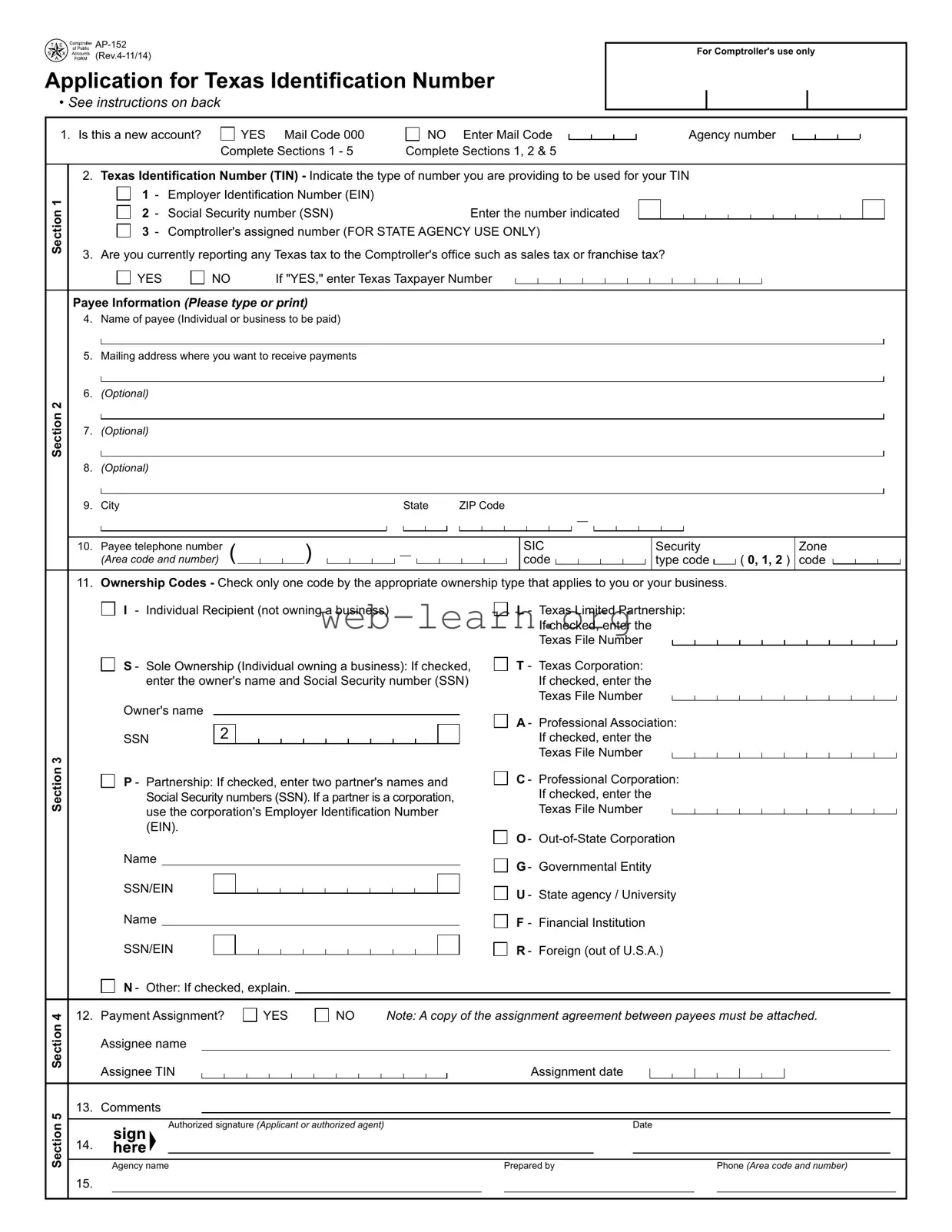
The Texas AP-152 form plays a crucial role in establishing a Texas Identification Number (TIN), which is essential for individuals and businesses looking to engage in financial transactions with state agencies. This application is necessary for anyone intending to bill the state for goods, services, or public assistance, ensuring that payments are processed efficiently. The form requires applicants to indicate whether they are establishing a new account or updating an existing one, and it collects vital information such as the type of identification number being submitted—be it an Employer Identification Number (EIN) or a Social Security Number (SSN). Additionally, the AP-152 includes sections for providing payee information, ownership codes, and payment assignment details. Each section is designed to streamline the application process, allowing for a clear and organized submission. The form also emphasizes the importance of accurate information, as it will be used to facilitate billing and payment processes with state agencies. Understanding the nuances of this form can significantly impact the efficiency of financial dealings with the state of Texas.
Application for Texas Identiication Number
• See instructions on back
For Comptroller's use only
1. Is this a new account? |
|
YES Mail Code 000 |
|
Complete Sections 1 - 5 |
|
NO Enter Mail Code Complete Sections 1, 2 & 5
Agency number
Section 1
Section 2
2. Texas Identiication Number (TIN) - Indicate the type of number you are providing to be used for your TIN
|
1 |
- Employer Identiication Number (EIN) |
|
|
|
- |
Social Security number (SSN) |
Enter the number indicated |
|
|
2 |
|||
|
- |
Comptroller's assigned number (FOR STATE AGENCY USE ONLY) |
||
|
3 |
|||
3. Are you currently reporting any Texas tax to the Comptroller's ofice such as sales tax or franchise tax?
|
YES |
|
NO |
If "YES," enter Texas Taxpayer Number |
Payee Information (Please type or print)
4.Name of payee (Individual or business to be paid)
5.Mailing address where you want to receive payments
6.(Optional)
7.(Optional)
8.(Optional)
9. |
City |
|
|
|
|
|
|
|
|
|
|
|
|
|
|
|
|
|
State |
|
ZIP Code |
|
|
|
|
|
|
|
|
|
|
|
|
|
|
|
|
|
|
|
|
|
|
|
|
|
|
|
|
||||||||||||||||
|
|
|
|
|
|
|
|
|
|
|
|
|
|
|
|
|
|
|
|
|
|
|
|
|
|
|
|
|
|
|
|
|
|
|
|
|
|
|
|
|
|
|
|
|
|
|
|
|
|
|
|
|
|
|
|
|
|
|
|
|
|
|
|
|
|
|
|
|
|
|
|
|
|
|
|
|
|
|
|
|
|
|
|
|
|
|
|
|
|
|
|
|
|
|
|
|
|
|
|
|
|
|
|
|
|
|
|
|
|
|
|
|
|
|
|
|
|
|
|
|
|
|
|
|
|
|
|
|
|
|
|
|
|
|
|
|
|
|
|
|
|
|
|
|
|
|
|
|
|
|
|
|
|
|
|
|
|
|
|
|
|
|
|
|
|
|
|
|
|
|
|
|
|
|
|
|
|
|
|
|
|
|
|
|
|
|
|
|
|
|
|
|
|
|
|
|
|
|
|
|
|
|
|
|
|
|
|
|
|
|
|
|
|
|
|
|
|
|
|
|
|
|
|
|
|
|
|
|
|
|
|
|
|
|
|
|
|
|
|
|
|
|
|
|
|
|
|
|
|
|
|
|
|
|
|
|
|
|
|
|
|
|
|
10. |
Payee telephone number |
( |
|
|
|
|
|
) |
|
|
|
|
|
|
|
|
|
|
|
|
|
|
|
|
|
|
|
|
|
|
|
|
SIC |
|
|
|
|
|
|
|
|
|
|
|
|
|
Security |
|
|
|
Zone |
||||||||||||||
|
|
|
|
|
|
|
|
|
|
|
|
|
|
|
|
|
|
|
|
|
|
|
|
|
|
|
|
|
|
|
|
|
|||||||||||||||||||||||||||||||||
|
(Area code and number) |
|
|
|
|
|
|
|
|
|
|
|
|
|
|
|
|
|
|
|
|
|
|
|
|
|
|
|
|
|
code |
|
|
|
|
|
|
|
|
|
|
|
|
|
|
|
type code |
|
|
( 0, 1, 2 ) |
code |
|
|
|
|
|
|
|
|
||||||
|
|
|
|
|
|
|
|
|
|
|
|
|
|
|
|
|
|
|
|
|
|
|
|
|
|
|
|
|
|
|
|
|
|
||||||||||||||||||||||||||||||||
|
|
|
|
|
|
|
|
|
|
|
|
|
|
|
|
|
|
|
|
|
|
|
|
|
|
|
|
|
|
|
|
|
|
|
|
|
|
|
|
|
|
|
|
|
|
|
|
|
|
|
|
|
|
|
|
|
|
|
|
|
|
|
|
|
|
11. Ownership Codes - Check only one code by the appropriate ownership type that applies to you or your business.
Section 3
I - Individual Recipient (not owning a business)
S - Sole Ownership (Individual owning a business): If checked, enter the owner's name and Social Security number (SSN)
Owner's name |
|
SSN |
2 |
P - Partnership: If checked, enter two partner's names and Social Security numbers (SSN). If a partner is a corporation, use the corporation's Employer Identiication Number (EIN).
Name
SSN/EIN Name
SSN/EIN
N - Other: If checked, explain.
L- Texas Limited Partnership: If checked, enter the Texas File Number
T- Texas Corporation: If checked, enter the Texas File Number
A- Professional Association: If checked, enter the Texas File Number
C- Professional Corporation: If checked, enter the Texas File Number
O-
G- Governmental Entity
U- State agency / University
F- Financial Institution
R - Foreign (out of U.S.A.)
Section 5 Section 4
12. |
Payment Assignment? |
|
|
YES |
|
|
NO |
Note: A copy of the assignment agreement between payees must be attached. |
||||||||||||||||||||||||
|
Assignee name |
|
|
|
|
|
|
|
|
|
|
|
|
|
|
|
|
|
|
|
|
|
|
|
|
|
|
|
|
|
||
|
|
|
|
|
|
|
|
|
|
|
|
|
|
|
|
|
|
|
|
|
|
|
|
|
|
|
|
|
|
|||
|
|
|
|
|
|
|
|
|
|
|
|
|
|
|
|
|
|
|
|
|
|
|
|
|
|
|
|
|
|
|||
|
Assignee TIN |
|
|
|
|
|
|
|
|
|
|
|
|
|
|
|
|
|
Assignment date |
|
|
|
|
|
|
|
|
|
|
|||
|
|
|
|
|
|
|
|
|
|
|
|
|
|
|
|
|
|
|
|
|
|
|
|
|
|
|
|
|||||
|
|
|
|
|
|
|
|
|
|
|
|
|
|
|
|
|
|
|
|
|
|
|
|
|
|
|
|
|||||
13. |
Comments |
|
|
|
|
|
|
|
|
|
|
|
|
|
|
|
|
|
|
|
|
|
|
|
|
|
|
|
|
|
||
|
|
|
|
|
|
|
|
|
|
|
|
|
|
|
|
|
|
|
|
|
|
|
|
|
|
|
|
|
||||
|
|
|
|
|
|
|
|
|
|
|
|
|
|
|
|
|
|
|
|
|
|
|
|
|
|
|
|
|
|
|
|
|
|
|
|
|
|
|
|
|
|
|
|
|
|
|
|
|
|
|
|
|
|
|
|
|
|
|
|
|
|
|
|
|
|
|
|
|
Authorized signature (Applicant or authorized agent) |
|
|
|
|
|
|
|
Date |
|||||||||||||||||||||
14. |
|
|
|
|
|
|
|
|
|
|
|
|
|
|
|
|
|
|
|
|
|
|
|
|
|
|
|
|
|
|
|
|
|
|
|
|
|
|
|
|
|
|
|
|
|
|
|
|
|
|
|
|
|
|
|
|
|
|
|
|
|
|
|
|
|
|
|
|
|
|
|
|
|
|
|
|
|
|
|
|
|
|
|
|
|
|
|
|
|
|
|
|
|
|
|
|
|
|
|
|
Agency name |
|
|
|
|
|
|
|
|
|
|
|
|
|
|
Prepared by |
|
|
|
|
Phone (Area code and number) |
||||||||||
15. |
|
|
|
|
|
|
|
|
|
|
|
|
|
|
|
|
|
|
|
|
|
|
|
|
|
|
|
|
|
|
|
|

Application for Texas Identiication Number
F i s c a l M a n a g e m e n t
Austin, TX 78774 - 0100
Who Must Submit This Application -
This application must be submitted by every person (sole owner, individual recipient, partnership, corporation or other organization) who intends to bill agencies of the state government for goods, services provided, refunds, public assistance, etc. The Texas
Identiication Number (TIN) will be required on all maintenance submitted by state agencies. The use of this number on all billings will reduce the time required to process billings to the State of Texas.
Note: To expedite processing of this application, please return the completed application to the state agency with which you are conducting business. It is not necessary for the payee to sign or complete this form. The state agency representative may complete the form for the payee.
For Assistance -
For assistance in completing this application, please call the Texas Comptroller's ofice at (800)
Notice to State Agnecies -
When this form is used to set up additional mail codes, Sections 1, 2 and 5 must be completed. State agencies may refer to the Texas Identiication Number System (TINS) Guide at https://fmx.cpa.state.tx.us/fmx/pubs/tins/tinsguide for additional information.
General Instructions -
•Do not use dashes when entering Social Security, Employer Identiication or Comptroller's assigned numbers.
•Disclosure of your Social Security number is required. This disclosure requirement has been adopted under the Federal Privacy Act of 1974 (5 U.S.C.A. sec. 552a(note)(West 1977), the Tax Reform Act of 1976 (42 U.S.C.A. sec. 405(c)(2)(C) (West 1992), TEX. GOV'T. CODE ANN. sec. 403.055 (Vernon 2005) and TEX. GOV'T. CODE ANN. sec. 403.056 (Vernon 2005). Your Social Security number will be used to help the Texas Comptroller of Public Accounts administer the state's tax laws and for other purposes.
See Op Tex. Att'y Gen. No.
Speciic Instructions -
Section 1 - Texas Identiication Number
EIN: For all ownership codes other than Individual Recipient listed in Section 3, enter a
SSN: For Individual Recipient or Sole Owner without an EIN, enter your
Comptroller Assigned Number: FOR STATE AGENCY USE ONLY. A Comptroller Assigned Number is an ID number that is given to a state agency that needs to pay either a foreign entity or a foreign individual who does not have an EIN or SSN.
Are you currently reporting any Texas tax to the Comptroller's ofice such as sales tax or franchise tax? If "YES," enter Texas Taxpayer Number.
Section 2 - Payee Information
Items 4 through 8 - Enter the complete name and mailing address where you want payments to be received. Names of individuals must be entered irst name irst. Each line cannot exceed 50 characters including spaces. If the name is more than 50 characters, continue the name in Item 5 and begin the address in Item 6.
Item 9 - Enter the city, state and ZIP Code. Item 10 - Enter payee telephone number.
SIC code, Security type code and Zone code: FOR STATE AGENCY USE ONLY.
Section 3 - Ownership Codes
Item 11 - Check the box next to the appropriate ownership code and enter additional information as requested. Please check only one box in this section. The Secretary of State's ofice may be contacted at (512)
Section 4 - Payment Assignment
Item 12 - Use when one payee is assigning payment to another payee. When setting up an assignment payment, ill out this section
completely and include a copy of the assignment agreement between the assignee and the assignor.
Section 5 - Comments and Identiication
Item 13 - Enter any additional information that may be helpful in processing this applicatiion. Items 14 and 15 are for identiication purposes. Always complete the identiication section, including comments and authorized signature.
Under Ch. 559, Government Code, you are entitled to review, request and correct information we have on ile about you, with limited exceptions in accordance with Ch. 552, Government Code. To request information for review or to request error correction, contact us at the address
or phone numbers listed on this form.
Form
| Fact Name | Details |
|---|---|
| Form Purpose | The Texas AP-152 form is used to apply for a Texas Identification Number (TIN). |
| Who Must Submit | Individuals, partnerships, corporations, and organizations billing state agencies must submit this application. |
| Sections Required | New accounts must complete Sections 1-5; existing accounts must complete Sections 1, 2, and 5. |
| Ownership Codes | Applicants must select one ownership code from a list that includes individual, sole ownership, partnership, and various business types. |
| Tax Reporting | Applicants must indicate if they are currently reporting any Texas tax, such as sales or franchise tax. |
| Payment Assignment | If applicable, the form allows for payment assignments, requiring additional information and an assignment agreement. |
| Contact Information | For assistance, applicants can contact the Texas Comptroller's office at (800) 531-5441 or (512) 936-8138. |
| Governing Laws | This form is governed by Texas Government Code, specifically sections 403.055 and 403.056. |
Completing the Texas AP-152 form is an essential step for individuals and businesses seeking to obtain a Texas Identification Number (TIN). This number is necessary for billing state agencies for various services. The following steps will guide you through the process of filling out the form accurately and efficiently.
After completing the form, it is advisable to review all entries for accuracy before submission. To expedite processing, return the application to the relevant state agency with which you are conducting business. If you have questions or need assistance, the Texas Comptroller's office is available to help.
The Texas AP-152 form is an application for a Texas Identification Number (TIN). This number is necessary for individuals or businesses that intend to bill state agencies for goods or services. Having a TIN streamlines the billing process, ensuring that payments are processed more efficiently. The form must be submitted by any person or entity planning to conduct business with state agencies.
Every individual or organization that wishes to bill Texas state agencies is required to submit this application. This includes sole owners, partnerships, corporations, and other types of organizations. The form helps establish a record with the Texas Comptroller's office, facilitating future transactions and payments.
The AP-152 form requires several key pieces of information:
It is important to fill out all sections accurately to avoid delays in processing.
If you need help filling out the AP-152 form, you can contact the Texas Comptroller's office. They provide assistance through their helpline at (800) 531-5441, extension 6-8138. Alternatively, you can reach the Austin office at (512) 936-8138. They can guide you through the process and clarify any questions you may have regarding the application.
Filling out the Texas AP-152 form can be straightforward, but many people make common mistakes that can delay processing. One frequent error is not indicating whether it is a new account. If you select "NO" without entering the Mail Code, it can create confusion and lead to rejection of the application.
Another common mistake involves the Texas Identification Number (TIN). Some applicants fail to choose the correct type of number they are providing. It is essential to specify whether you are using an Employer Identification Number (EIN) or a Social Security Number (SSN). Omitting this detail can result in significant processing delays.
In Section 2, many individuals overlook the requirement to provide a complete mailing address. If the name exceeds 50 characters, it must continue on the next line. Failing to follow this guideline may cause issues in payment processing, as the address needs to be clear and concise.
Ownership codes often trip people up as well. Applicants sometimes check more than one box or select an incorrect ownership type. Only one ownership code should be checked, and it must accurately reflect the applicant's status. Incorrect selections can lead to complications in the application review process.
Section 4, which pertains to payment assignments, is frequently misunderstood. Some applicants forget to attach the necessary assignment agreement when indicating that one payee is assigning payment to another. This omission can halt the application process until the required documentation is provided.
Lastly, many people neglect to complete the identification section in Section 5. This includes providing comments and an authorized signature. Failure to complete this section can result in a delay or rejection of the application. Always ensure that every part of the form is filled out accurately to avoid unnecessary setbacks.
The Texas AP-152 form is essential for individuals and businesses seeking to obtain a Texas Identification Number (TIN) for billing state agencies. However, it is often accompanied by other important documents that help streamline the process and ensure compliance with state regulations. Below is a list of additional forms and documents that may be required alongside the AP-152.
When submitting the AP-152 form, it is crucial to include any necessary supporting documents to avoid delays in processing. Ensuring all required forms are completed accurately can facilitate a smoother experience when working with Texas state agencies.
The Texas AP-152 form, which is the Application for Texas Identification Number, serves a specific purpose in the state’s administrative processes. Several other documents share similarities with the AP-152, primarily in their function of identifying entities for tax and administrative purposes. Below are seven documents that are comparable to the Texas AP-152 form:
Each of these forms plays a crucial role in the identification and registration of entities within Texas and at the federal level, ensuring compliance with tax laws and facilitating business operations.
When filling out the Texas AP-152 form, there are several important dos and don’ts to keep in mind. This will help ensure your application is processed smoothly.
This form is actually for anyone who plans to bill state agencies for goods or services, including individuals. Whether you're a sole proprietor or a larger organization, you need to complete this form to get a Texas Identification Number (TIN).
Many people think they have to fill out the AP-152 on their own. However, a representative from the state agency you're working with can complete the form on your behalf. This can make the process smoother and less stressful.
Some believe that the AP-152 is only required if they owe taxes. In reality, this form is necessary for anyone who wants to receive payments from state agencies, regardless of tax obligations. It helps streamline the billing process.
Many think that obtaining a TIN is optional. This is not the case. The TIN is crucial for processing payments and is required on all invoices submitted to state agencies. Without it, you may face delays in receiving payments.
Filling out the Texas AP-152 form is essential for anyone looking to conduct business with state agencies. Here are some key takeaways to help you navigate the process:
Understanding these key points will make the process smoother and ensure that your application is completed correctly. For any questions, reaching out to the Texas Comptroller’s office can provide additional guidance.