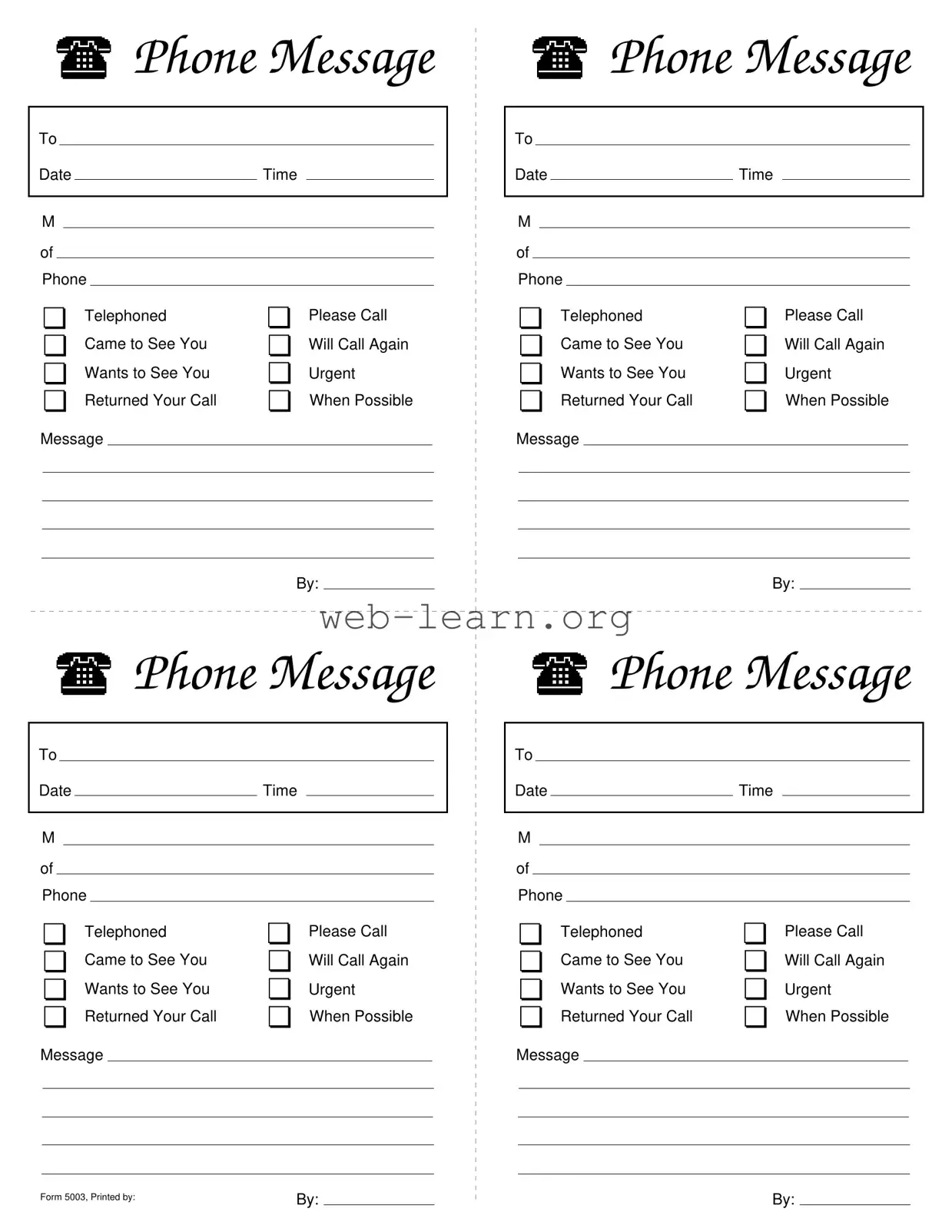
The Phone Message Slips form serves as an essential tool for effective communication in various settings, from professional offices to personal use. It allows individuals to record and relay important messages efficiently. Each slip includes fields for the recipient's name, the date, and the time of the call, ensuring that all pertinent details are captured. Users can check off specific categories such as "Telephoned," "Please Call," or "Urgent," which helps prioritize responses and actions. The structured format also accommodates notes about the nature of the call or visit, enhancing clarity. This form not only aids in organization but also ensures that no important communication slips through the cracks. By utilizing this straightforward tool, individuals can foster better communication practices, ultimately leading to improved responsiveness and accountability.
|
|
|
|
|
Phone Message |
||||
|
|
|
|
|
|
|
|
|
|
To |
|
|
|
|
|
||||
Date |
|
|
Time |
|
|
|
|||
|
|
|
|
|
|
|
|
|
|
M |
|
|
|
|
|
||||
of |
|
|
|
|
|
||||
Phone |
|
|
|
|
|
||||
❏ Telephoned |
❏ Please Call |
||||||||
❏ Came to See You |
❏ Will Call Again |
||||||||
❏ Wants to See You |
❏ Urgent |
||||||||
❏ Returned Your Call |
❏ When Possible |
||||||||
Message
|
|
|
|
|
|
By: |
|
|
|
|
|
|
|
|
|
Phone Message |
|
||||
|
|
|
|
|
|
|
|
|
|
|
To |
|
|
|
|
|
|
||||
Date |
|
|
Time |
|
|
|
||||
|
|
|
|
|
|
|
|
|
|
|
M |
|
|
|
|
|
|
||||
of |
|
|
|
|
|
|
||||
Phone |
|
|
|
|
|
|
||||
❏ Telephoned |
❏ Please Call |
|
||||||||
❏ Came to See You |
❏ Will Call Again |
|
||||||||
❏ Wants to See You |
❏ Urgent |
|
||||||||
❏ Returned Your Call |
❏ When Possible |
|
||||||||
Message
|
|
|
|
|
Phone Message |
||||
|
|
|
|
|
|
|
|
|
|
To |
|
|
|
|
|
||||
Date |
|
|
Time |
|
|
|
|||
|
|
|
|
|
|
|
|
|
|
M |
|
|
|
|
|
||||
of |
|
|
|
|
|
|
|||
Phone |
|
|
|
|
|
||||
❏ Telephoned |
❏ Please Call |
||||||||
❏ Came to See You |
❏ Will Call Again |
||||||||
❏ Wants to See You |
❏ Urgent |
||||||||
❏ Returned Your Call |
❏ When Possible |
||||||||
Message
|
|
|
|
|
|
By: |
|
|
|
|
|
|
|
|
|
Phone Message |
|
||||
|
|
|
|
|
|
|
|
|
|
|
To |
|
|
|
|
|
|
||||
Date |
|
|
Time |
|
|
|
||||
|
|
|
|
|
|
|
|
|
|
|
M |
|
|
|
|
|
|
||||
of |
|
|
|
|
|
|
||||
Phone |
|
|
|
|
|
|
||||
❏ Telephoned |
❏ Please Call |
|
||||||||
❏ Came to See You |
❏ Will Call Again |
|
||||||||
❏ Wants to See You |
❏ Urgent |
|
||||||||
❏ Returned Your Call |
❏ When Possible |
|
||||||||
Message
Form 5003, Printed by: |
By: |
|
By: |
|
|
|
| Fact Name | Description |
|---|---|
| Purpose | The Phone Message Slips form is designed to record and communicate important messages received via phone. |
| Key Components | Each slip includes fields for the date, time, and method of the phone call, as well as options for the nature of the message. |
| Message Options | Common options include "Telephoned," "Please Call," "Came to See You," and "Urgent," allowing for clear categorization of the message. |
| Usage Frequency | This form is frequently used in various professional settings, including law offices, medical practices, and corporate environments. |
| State-Specific Forms | Some states may have specific requirements or variations of the form, so it is essential to check local regulations. |
| Governing Laws | In states like California, the use of phone message slips may fall under the California Business and Professions Code regarding record-keeping. |
| Form Number | This particular form is identified as Form 5003, which helps in tracking and organizing documentation. |
| Printed By | The form is printed by authorized personnel, ensuring that it meets the necessary standards for use. |
| Accessibility | Phone Message Slips are often available in both physical and digital formats, making them easy to access and utilize. |
Filling out the Phone Message Slips form is straightforward. This form will help you document important messages for future reference. Follow these steps to ensure all necessary information is captured accurately.
What is a Phone Message Slip?
A Phone Message Slip is a form used to record important information about phone calls or visits. It helps ensure that messages are communicated clearly and efficiently. This form typically includes details such as the date, time, and nature of the call or visit, along with any specific messages that need to be conveyed.
What information is included on the Phone Message Slip?
The Phone Message Slip includes several key fields:
How do I fill out a Phone Message Slip?
To fill out a Phone Message Slip, start by entering the date and time of the call or visit. Next, select the appropriate method of contact by checking the corresponding box. If the message is urgent, be sure to mark that option. Finally, write down the message and the name of the person who delivered it. Ensure all information is clear and legible.
Why is it important to use a Phone Message Slip?
Using a Phone Message Slip is important for several reasons. It helps maintain a record of communications, reduces the risk of miscommunication, and ensures that important messages are not forgotten. This is especially useful in busy environments where multiple calls and visits occur daily.
Can I customize the Phone Message Slip?
Yes, while the standard format is effective, you can customize the Phone Message Slip to better suit your needs. This might include adding additional fields or modifying existing ones to capture specific information relevant to your organization or personal use.
Who should use the Phone Message Slip?
The Phone Message Slip can be used by anyone who needs to communicate messages effectively. This includes office staff, receptionists, and even individuals managing personal communications. It is a versatile tool that can be adapted for various contexts.
Is there a specific format for the Phone Message Slip?
While there is no strict format that must be followed, the Phone Message Slip generally includes the sections outlined earlier. Consistency in format can aid in clarity and ensure that all necessary information is captured each time a message is recorded.
How can I ensure that messages are delivered promptly?
To ensure that messages are delivered promptly, it is essential to keep the Phone Message Slip in a visible and accessible location. Regularly check and communicate the messages to the intended recipients. Establishing a routine for reviewing and acting on these messages can also enhance efficiency.
What should I do if I make a mistake on the Phone Message Slip?
If a mistake is made, it is best to cross out the incorrect information neatly and write the correct information next to it. Alternatively, if the error is significant, consider starting a new slip to avoid confusion. Clarity is key in ensuring that the intended message is conveyed accurately.
Filling out the Phone Message Slips form may seem straightforward, but many people make common mistakes that can lead to confusion. One frequent error is not including the date and time of the call. This information is crucial for tracking when the message was received. Without it, the recipient might struggle to recall the context of the conversation, which can lead to misunderstandings.
Another mistake is failing to clearly indicate the type of message being conveyed. The form provides several options, such as "Telephoned," "Please Call," and "Urgent." Selecting the appropriate checkbox helps prioritize the response. If this step is overlooked, the urgency of the message may be lost, causing delays in communication.
Some individuals also neglect to provide a clear message in the designated area. A vague note can lead to confusion about what the caller wanted. It’s important to be specific, as this ensures that the recipient understands the reason for the call and can respond appropriately.
Additionally, people sometimes forget to include their name or contact information. This omission can hinder follow-up efforts. If the recipient doesn’t know who to reach out to, they may not respond at all. Including this information fosters effective communication and helps maintain professional relationships.
Finally, many overlook the importance of legibility. Whether filling out the form by hand or digitally, clear writing is essential. Illegible handwriting can lead to misinterpretations of the message. Taking the time to ensure that everything is readable will save time and prevent potential errors in communication.
The Phone Message Slips form is an essential tool for capturing important communication details. Several other forms and documents often accompany it to ensure effective communication and documentation within an office setting. Below is a list of these related documents, each described briefly.
These forms and documents work together to enhance communication and organization in the workplace. By utilizing them alongside the Phone Message Slips form, teams can ensure that all interactions are documented and managed effectively.
When filling out the Phone Message Slips form, attention to detail is crucial. Below are some guidelines to ensure that the form is completed accurately and effectively.
Following these simple do's and don'ts can greatly enhance the clarity and usefulness of the Phone Message Slips form.
Many people have misunderstandings about the Phone Message Slips form. Here are nine common misconceptions and clarifications to help you better understand its purpose and use.
While the form does include an option for urgent messages, it is designed to accommodate a variety of communication types, including routine calls.
Not every section is mandatory. Only complete the sections that are relevant to the message you are conveying.
This form can be beneficial in both personal and professional contexts. It helps ensure important messages are communicated effectively regardless of the environment.
Despite advances in technology, the Phone Message Slips form remains a practical tool for capturing important information quickly, especially in environments where digital communication may not be feasible.
While it is primarily designed for phone communications, the form can also be used to document in-person visits and other forms of contact.
No special training is required. The form is straightforward and can be used by anyone who needs to document a message.
The Phone Message Slips form can be used for both internal and external communications, making it versatile for various interactions.
Different organizations may customize the Phone Message Slips form to fit their specific needs, so variations may exist.
In reality, the form is designed for quick completion. It allows users to efficiently record messages without taking up too much time.
Understanding these misconceptions can help ensure that the Phone Message Slips form is used effectively and appropriately in various situations.
When using the Phone Message Slips form, it’s important to ensure clear communication. Here are some key takeaways to keep in mind:
By following these guidelines, you can ensure that your communication is effective and professional.