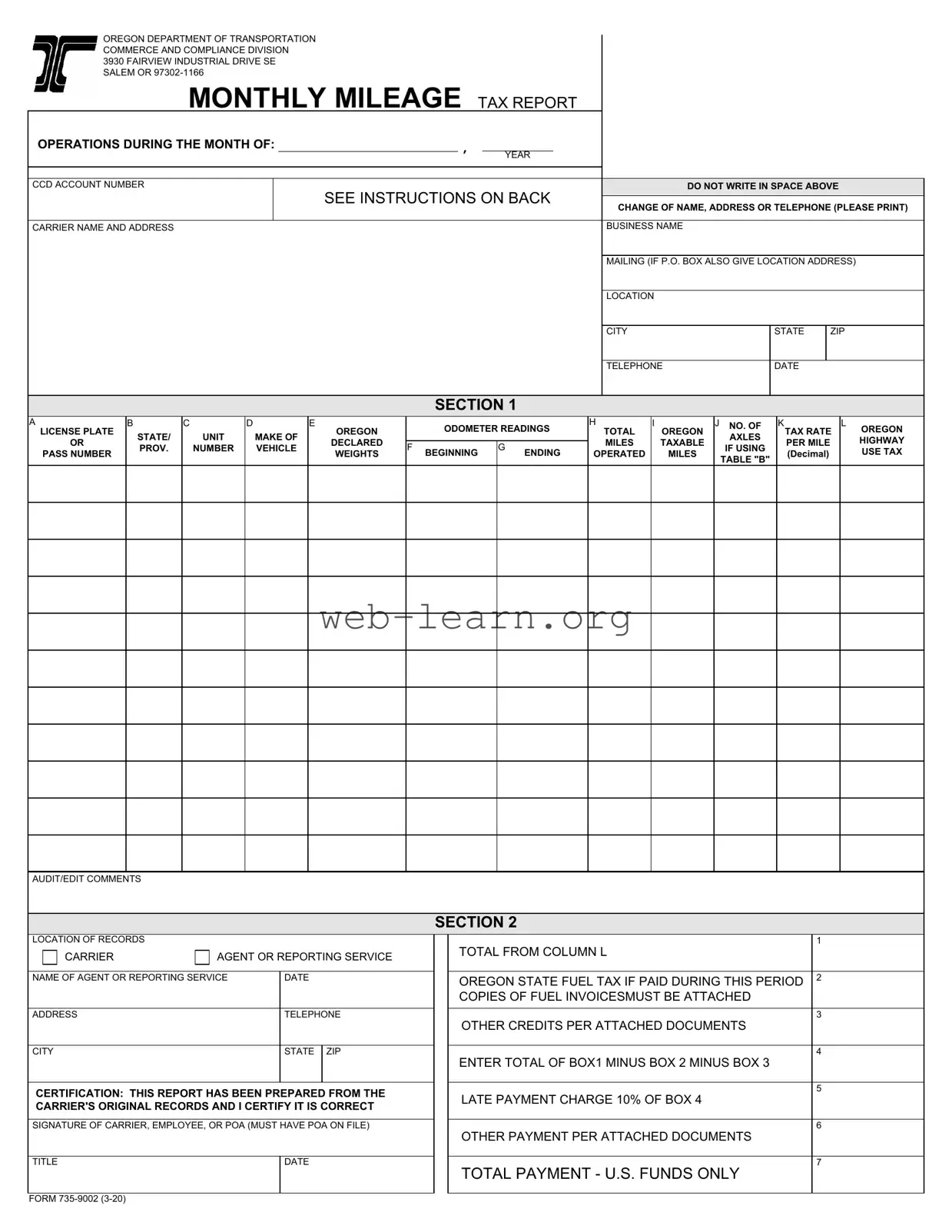
The Oregon Monthly Mileage Tax form is an essential document for carriers operating within the state, designed to facilitate the reporting and payment of highway use taxes based on mileage. Each month, carriers must report their mileage, including both total miles operated and the specific miles traveled on Oregon public roads. The form requires detailed information about each vehicle, such as license plate numbers, state of registration, make, and declared weights. In addition, odometer readings at the beginning and end of the reporting period must be accurately recorded. Carriers must also calculate the appropriate tax rate based on their vehicle's weight and the miles driven, as outlined in the instructions. Payment instructions are clearly delineated, ensuring that any applicable credits, such as Oregon state fuel tax, are properly accounted for. Timeliness is crucial; reports and payments are due by the last day of the month following the reporting period, with late submissions incurring a penalty. The form emphasizes the importance of maintaining accurate records for a minimum of three years to substantiate the reported information. For convenience, carriers can also utilize online resources for filing and payment, ensuring compliance with state regulations.
OREGON DEPARTMENT OF TRANSPORTATION COMMERCE AND COMPLIANCE DIVISION 3930 FAIRVIEW INDUSTRIAL DRIVE SE SALEM OR
MONTHLY MILEAGE TAX REPORT
OPERATIONS DURING THE MONTH OF: |
|
, |
|
|
|
|
|
|
|
||
|
|
|
YEAR |
||
|
|
|
|
|
|
|
|
|
|
|
|
CCD ACCOUNT NUMBER |
|
|
|
|
DO NOT WRITE IN SPACE ABOVE |
SEE INSTRUCTIONS ON BACK
CHANGE OF NAME, ADDRESS OR TELEPHONE (PLEASE PRINT)
CARRIER NAME AND ADDRESS |
BUSINESS NAME |
MAILING (IF P.O. BOX ALSO GIVE LOCATION ADDRESS)
LOCATION
CITY
TELEPHONE
SECTION 1
A
LICENSE PLATE
OR
PASS NUMBER
B
STATE/
PROV.
C
UNIT
NUMBER
D
MAKE OF VEHICLE
E
OREGON
DECLARED
WEIGHTS
ODOMETER READINGS
F BEGINNING G ENDING
HI
TOTAL OREGON
MILES TAXABLE OPERATED MILES
JNO. OF AXLES
IF USING
TABLE "B"
AUDIT/EDIT COMMENTS
SECTION 2
LOCATION OF RECORDS |
|
|
|
||
|
|
CARRIER |
AGENT OR REPORTING SERVICE |
||
|
|
||||
|
|
|
|
|
|
|
|
|
|||
NAME OF AGENT OR REPORTING SERVICE |
DATE |
||||
|
|
|
|
||
ADDRESS |
|
TELEPHONE |
|||
|
|
|
|
||
CITY |
|
STATE |
ZIP |
||
|
|
|
|
|
|
CERTIFICATION: THIS REPORT HAS BEEN PREPARED FROM THE CARRIER'S ORIGINAL RECORDS AND I CERTIFY IT IS CORRECT
SIGNATURE OF CARRIER, EMPLOYEE, OR POA (MUST HAVE POA ON FILE)
TITLE |
DATE |
|
|
TOTAL FROM COLUMN L
OREGON STATE FUEL TAX IF PAID DURING THIS PERIOD COPIES OF FUEL INVOICESMUST BE ATTACHED
OTHER CREDITS PER ATTACHED DOCUMENTS
ENTER TOTAL OF BOX1 MINUS BOX 2 MINUS BOX 3
LATE PAYMENT CHARGE 10% OF BOX 4
OTHER PAYMENT PER ATTACHED DOCUMENTS
TOTAL PAYMENT - U.S. FUNDS ONLY
FORM
MONTHLY MILEAGE TAX REPORT
GENERAL REPORTING INFORMATION
DO NOT PAY ROAD USE ASSESSMENT FEES OR INVOICES FROM THE
DUE DATE: Your report and payment must be postmarked by the Postal Service by the last day of the month following the end of the calendar month. An illegible or unreadable report will be returned and considered unfiled in accordance with OAR
ODOT requires you to file reports and pay for all operations within the reporting period, as long as you have ODOT plates and/or vehicle(s) enrolled in the Oregon
Enter the ACCOUNT NUMBER. Enter the NAME AND ADDRESS OF THE BUSINESS as filed with Oregon Department of Transportation, Commerce and Compliance Division (CCD).
COLUMN A |
= Enter the plate or pass number of the power unit for which you are reporting. |
|
COLUMN B |
= Enter the state or province that issued the license plate. |
|
COLUMN C |
= Enter the company's unit number for the power unit for which you are reporting. |
|
COLUMN D |
= Enter the make of the vehicle. |
|
COLUMN E |
= You must declare and report operations at the heaviest weight operated per configuration. This should be one of the weights you declared with |
|
|
|
ODOT. If returning empty, use the same declared weight and tax rate as when loaded. |
COLUMN F |
= Enter the beginning odometer reading from the first day of the month for which you are reporting. This should be the same as the ending |
|
|
|
odometer reading from the preceding month. |
COLUMN G |
= Enter the ending odometer reading from the last day of the month for which you are reporting. |
|
COLUMN H |
= Enter the total miles operated for each vehicle (Column G minus Column F). |
|
COLUMN I |
= Enter the Oregon taxable miles (miles operated on Oregon public roads). |
|
COLUMN J |
= Enter the number of axles for any declared weight greater than 80,000 pounds. |
|
COLUMN K |
= Enter the appropriate rate as indicated on Form |
|
|
|
Table A rates. If returning empty, use the same declared weight and tax rate as when loaded. Empty operations associated with Special |
|
|
Transportation Permits (STP) are to be reported at 80,000 pounds. If you are operating between 80,001 and 105,000 pounds under an extended |
|
|
weight permit complete all columns. Use Table B Tax Rates. Raising a lift axle is not a change in configuration and does not constitute a change |
|
|
in rate. Do not use Table B rates for heavy haul operations conducted under STP when in excess of 98,000 pounds. |
COLUMN L |
= Compute and enter the Oregon Highway Use Tax (Column I times Column K). |
|
PAYMENT INSTRUCTIONS (SECTION 2) |
||
BOX 1 |
= |
Enter the total fees from Column L. |
BOX 2 |
= |
Enter Oregon state fuel tax paid during this month. You may claim a credit if you pay Oregon state fuel tax on fuel purchases. Fuel must have been |
purchased in the same report month credit is claimed. Attach copies of fuel invoices to the report. The invoice must contain:
Date of purchase |
Type of fuel |
ODOT plate or Pass No |
Name & Location of supplier |
Number of gallons |
Amount of Oregon state fuel tax paid |
BOX 3
BOX 4
BOX 5
BOX 6
BOX 7
If you buy fuel in bulk, you can only claim credit for fuel pumped into a qualified vehicle during the reporting period. In addition to the invoice, you must attach records to show the amount of fuel pumped into each qualified vehicle.
=Enter the amount of other credits as indicated on monthly Statement of Account and attach a copy. Do not use credits that have not yet appeared on the monthly Statement of Account.
=Enter the total of the amounts in Box 1 minus Box 2 minus Box 3.
=If you file your report late, enter 10% of Box 4.
=Add other payments and attach the supporting documents. Payments received without supporting documentation may not be correctly applied to your account.
=Enter the total of the amounts in Box 4 plus Box 5 plus Box 6.
An authorized company representative or agent must sign the Report. An agent must have Power of Attorney on file with CCD before they are an authorized representative.
Be sure to enclose the payment. Make a copy for your records and mail the original to: ODOT Commerce and Compliance Division, 3930 Fairview Industrial Drive SE, Salem, Oregon
Trucking Online is available for your convenience in filing and paying reports online. You may also amend your vehicle information using Trucking Online. Visit our Website at www.oregontruckingonline.com. For additional record keeping requirements and tax reporting information, please see Instructions for Filing Highway- Use Tax Reports available on our website at https://www.oregon.gov/ODOT/MCT/Pages/FormsandTables.aspx or call
| Fact Name | Details |
|---|---|
| Governing Law | The Oregon Monthly Mileage Tax is governed by the Oregon Administrative Rules (OAR) 740-055-0010. |
| Filing Deadline | Reports must be postmarked by the last day of the month following the reporting month. |
| Tax Calculation | The tax is calculated by multiplying the Oregon taxable miles by the applicable tax rate from Form 735-9928. |
| Late Payment Penalty | A 10% late payment charge applies if the report is filed after the due date. |
| Record Keeping | Carriers must maintain records for three years to support the information reported. |
Completing the Oregon Monthly Mileage Tax form is an essential process for reporting your vehicle's mileage and ensuring compliance with state regulations. Following these steps will guide you through filling out the form accurately and efficiently.
Once you have completed these steps, ensure that your report is postmarked by the last day of the month following the reporting period. Maintaining accurate records for three years is also essential for compliance. If you need assistance, consider reaching out to the Oregon Department of Transportation for further guidance.
The Oregon Monthly Mileage Tax form is a report that trucking companies and vehicle operators must file to report the miles driven on Oregon public roads. This form is essential for calculating the Oregon Highway Use Tax based on the taxable miles operated during a specific month. It is required for all vehicles that have ODOT plates or are enrolled in the Oregon Weight-Mile Tax Program.
The report and payment must be postmarked by the last day of the month following the end of the calendar month being reported. For example, if you are reporting for the month of January, your report is due by February 28th. If you file your report late, you will need to add a 10% late payment charge to your total amount due.
If you did not operate any vehicles, you are still required to file a report. In this case, enter a zero (0) in both columns I and L of the form. This ensures that your compliance is maintained even if no taxable miles were accrued during that month.
The Oregon Highway Use Tax is calculated by multiplying the taxable miles operated in Oregon (Column I) by the applicable tax rate (Column K). The result is then entered in Column L of the form. It is important to ensure that you are using the correct tax rate based on the weight of your vehicle and its configuration, as specified in the tax rate tables provided by ODOT.
Filling out the Oregon Monthly Mileage Tax form can be a straightforward process, but many individuals make common mistakes that can lead to complications. One frequent error is failing to provide an accurate odometer reading. The beginning and ending readings must be precise, as they are essential for calculating the total miles operated. If these figures are incorrect, the tax owed may be miscalculated, leading to potential penalties.
Another common mistake is neglecting to report Oregon taxable miles. Taxpayers often confuse total miles with taxable miles, which can result in an inaccurate tax liability. It is crucial to differentiate between miles driven on public roads in Oregon and those driven elsewhere. This distinction is necessary for compliance with state tax regulations.
Some individuals also overlook the requirement to enter the correct tax rate in Column K. The tax rate varies based on the weight of the vehicle. Using the wrong rate can lead to an incorrect calculation of the Oregon Highway Use Tax, resulting in either overpayment or underpayment. It is advisable to refer to the appropriate tables to ensure the correct rate is applied.
In addition, people sometimes fail to include supporting documentation when claiming credits for Oregon state fuel tax paid. The form requires attachments such as fuel invoices, which must clearly show the necessary details, including the date of purchase and the amount of tax paid. Without this documentation, the credits may not be accepted, leading to a higher tax liability.
Another mistake involves not filing a report when no tax is due. Many individuals believe that if they did not operate a vehicle during the reporting period, they do not need to file. However, the state requires that a report still be submitted, even if it indicates zero taxable miles. Failing to do so can result in penalties.
Moreover, some filers forget to sign the certification section of the form. An unsigned report is considered unfiled, which can lead to delays and additional complications. It is important to ensure that the report is signed by an authorized representative or agent who has the necessary Power of Attorney on file.
Lastly, individuals often miscalculate the total payment amount. This can occur when errors are made in Boxes 1 through 6. Each box must be carefully reviewed to ensure that all amounts are correctly calculated and that any late fees are included if applicable. Miscalculations can lead to further issues with the Oregon Department of Transportation.
By being aware of these common mistakes and taking the necessary steps to avoid them, individuals can ensure a smoother filing process and maintain compliance with Oregon tax regulations.
The Oregon Monthly Mileage Tax form is an essential document for trucking companies operating within the state. However, it is often accompanied by several other forms and documents that help ensure compliance with state regulations. Understanding these additional documents can streamline the reporting process and prevent potential issues.
By ensuring all these documents are prepared and submitted correctly, businesses can navigate the requirements of the Oregon Monthly Mileage Tax more efficiently. Keeping accurate records and understanding the accompanying forms will help maintain compliance and avoid potential penalties.
The Oregon Monthly Mileage Tax form shares similarities with several other documents that pertain to vehicle operation, mileage reporting, and tax compliance. Here’s a list of documents that are comparable:
When filling out the Oregon Monthly Mileage Tax form, it is crucial to follow specific guidelines to ensure accuracy and compliance. Here’s a list of things you should and shouldn't do:
Understanding the Oregon Monthly Mileage Tax form is essential for compliance and accurate reporting. However, several misconceptions can lead to confusion. Here are five common misunderstandings:
Many believe that filing is only necessary when taxes are due. In reality, you must file a report every month, even if there is no tax owed. A simple zero in the relevant columns suffices if no vehicle was operated.
Some think that late filings result in a fixed penalty. Instead, a 10% late payment charge applies to the total tax due. This can add up, so timely submissions are crucial.
It's a common belief that you can claim fuel tax credits freely. However, you must attach copies of fuel invoices to substantiate your claims. These invoices must detail specific information, including the date of purchase and the amount of tax paid.
Some individuals think they can report mileage from any vehicle they operate. In fact, only mileage from vehicles registered under the Oregon Weight-Mile Tax Program should be reported. Ensure your vehicles are properly enrolled.
It's a mistake to assume that if no operations occurred, you don't need to file. If you hold ODOT plates, you must still submit a report, indicating zero activity. This keeps your records up to date and avoids potential issues.
Filling out the Oregon Monthly Mileage Tax form requires attention to detail and adherence to specific guidelines. Here are some key takeaways to consider:
By following these takeaways, individuals can ensure compliance with Oregon's mileage tax requirements and avoid potential penalties.