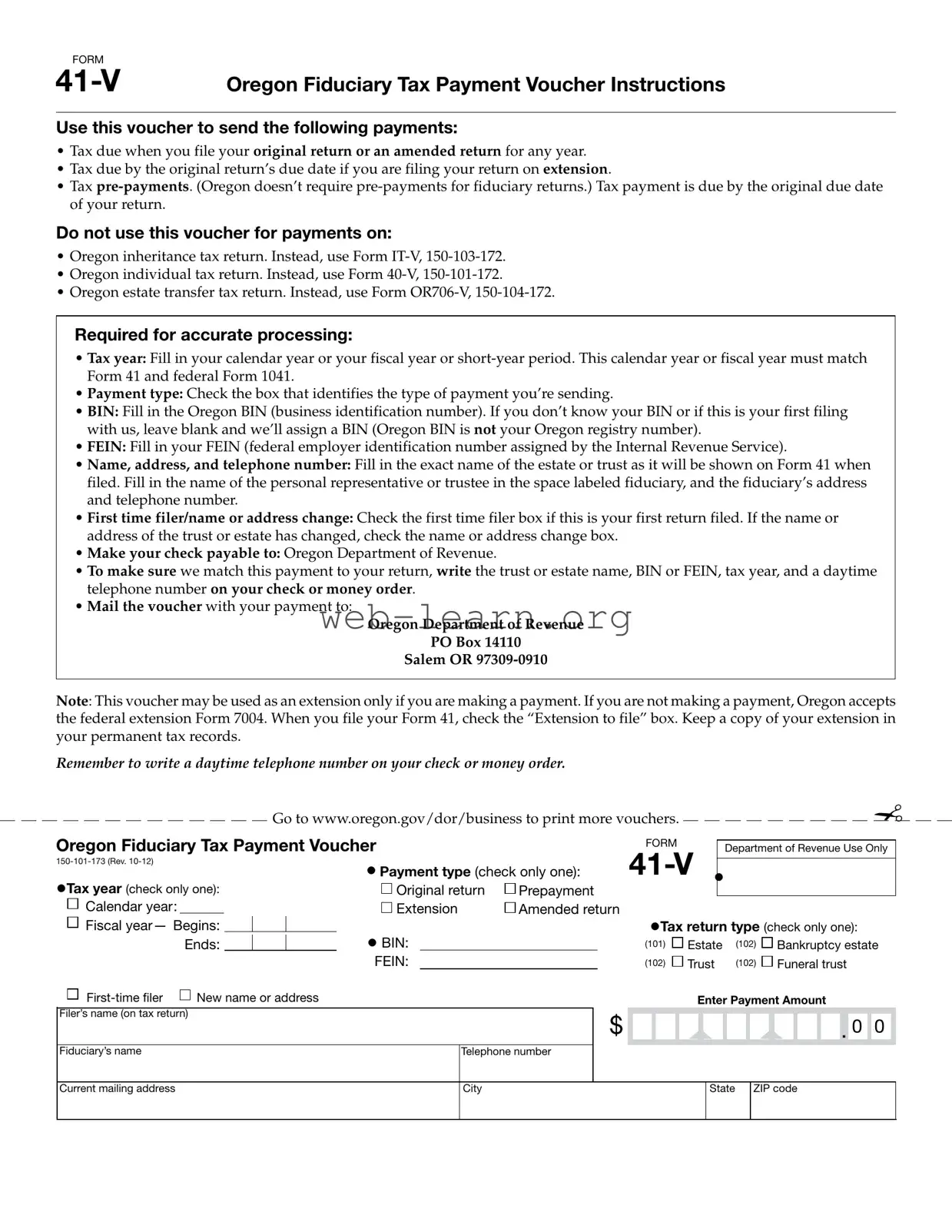
The Oregon 41 V form serves as an essential tool for individuals managing fiduciary tax obligations in the state of Oregon. This payment voucher is specifically designed for use when submitting payments related to fiduciary tax returns, including taxes due upon filing an original or amended return. It is also applicable for tax payments that are due by the original return's deadline when an extension has been filed. While the form facilitates tax pre-payments, it is important to note that Oregon does not require pre-payments for fiduciary returns. To ensure accurate processing, specific information must be provided, such as the tax year, payment type, and the Oregon Business Identification Number (BIN). Additionally, the form requires the federal Employer Identification Number (FEIN), as well as the name, address, and contact information of the fiduciary or personal representative overseeing the estate or trust. Individuals filing for the first time or those who have experienced changes in their name or address should indicate this on the form. Payments must be made payable to the Oregon Department of Revenue and should include pertinent details to facilitate matching the payment to the corresponding return. This form is not intended for use with other tax returns, such as the Oregon inheritance tax return or individual tax return, which require different forms. Overall, the Oregon 41 V form is a critical component in the timely and accurate management of fiduciary tax responsibilities, ensuring compliance with state regulations.

FORM |
|
Oregon Fiduciary Tax Payment Voucher Instructions |
Use this voucher to send the following payments:
•Tax due when you file your original return or an amended return for any year.
•Tax due by the original return’s due date if you are filing your return on extension.
•Tax
Do not use this voucher for payments on:
•Oregon inheritance tax return. Instead, use Form
•Oregon individual tax return. Instead, use Form
•Oregon estate transfer tax return. Instead, use Form
Required for accurate processing:
•Tax year: Fill in your calendar year or your fiscal year or
•Payment type: Check the box that identifies the type of payment you’re sending.
•BIN: Fill in the Oregon BIN (business identification number). If you don’t know your BIN or if this is your first filing with us, leave blank and we’ll assign a BIN (Oregon BIN is not your Oregon registry number).
•FEIN: Fill in your FEIN (federal employer identification number assigned by the Internal Revenue Service).
•Name, address, and telephone number: Fill in the exact name of the estate or trust as it will be shown on Form 41 when filed. Fill in the name of the personal representative or trustee in the space labeled fiduciary, and the fiduciary’s address and telephone number.
•First time filer/name or address change: Check the first time filer box if this is your first return filed. If the name or address of the trust or estate has changed, check the name or address change box.
•Make your check payable to: Oregon Department of Revenue.
•To make sure we match this payment to your return, write the trust or estate name, BIN or FEIN, tax year, and a daytime telephone number on your check or money order.
•Mail the voucher with your payment to:
Oregon Department of Revenue
PO Box 14110
Salem OR
Note: This voucher may be used as an extension only if you are making a payment. If you are not making a payment, Oregon accepts the federal extension Form 7004. When you file your Form 41, check the “Extension to file” box. Keep a copy of your extension in your permanent tax records.
Remember to write a daytime telephone number on your check or money order.
Go to www.oregon.gov/dor/business to print more vouchers.
Oregon Fiduciary Tax Payment Voucher |
|
FORM |
||
|
||||
• Payment type (check only one): |
||||
•Tax year (check only one): |
||||
Original return |
Prepayment |
|
||
✁
Department of Revenue Use Only
•
Calendar year: |
|
|
|
|
Extension |
Amended return |
|
|
|
|
|
|
|
|
|
|
|
|
|
||||||
|
|
|
|
|
|
|
|
|
|
|
|
|
|
|
|
|
|||||||||
Fiscal year— Begins: |
|
|
|
• BIN: |
|
|
|
|
|
•Tax return type (check only one): |
|||||||||||||||
|
Ends: |
|
|
|
|
(101) |
Estate |
(102) |
|
Bankruptcy estate |
|||||||||||||||
|
|
|
|
|
|||||||||||||||||||||
|
|
|
|
|
|
|
|
|
|
|
|
|
|
||||||||||||
|
|
|
|
|
FEIN: |
(102) |
Trust |
(102) |
|
Funeral trust |
|||||||||||||||
New name or address |
|
|
|
|
|
|
|
|
Enter Payment Amount |
||||||||||||||||
Filer’s name (on tax return) |
|
|
|
$ |
|
|
|
|
|
|
|
|
|
|
|
|
|
|
|
|
|||||
|
|
|
|
|
|
|
|
|
|
|
|
|
|
|
. |
0 |
0 |
|
|||||||
|
|
|
|
|
|
|
|
|
|
|
|
|
|
|
|
|
|
|
|
|
|||||
Fiduciary’s name |
|
|
|
|
|
|
Telephone number |
|
|
|
|
|
|
|
|
|
|
|
|
|
|
||||
|
|
|
|
|
|
|
|
|
|
|
|
|
|
|
|
|
|
|
|
|
|
|
|
|
|
Current mailing address
City
State ZIP code
| Fact Name | Details |
|---|---|
| Form Title | Oregon Fiduciary Tax Payment Voucher (FORM 41-V) |
| Governing Law | Oregon Revised Statutes, Chapter 316 |
| Payment Types | Original return, amended return, or extension payment |
| Pre-Payment Requirement | Oregon does not require pre-payments for fiduciary returns |
| BIN Requirement | Oregon Business Identification Number is required for processing |
| FEIN Requirement | Federal Employer Identification Number is needed for identification |
| Mailing Address | Payments should be mailed to Oregon Department of Revenue, PO Box 14110, Salem, OR 97309-0910 |
| Check Payable To | Make checks payable to Oregon Department of Revenue |
| First-Time Filer | Check the box if this is the first return filed for the estate or trust |
Filling out the Oregon 41 V form is a straightforward process that requires attention to detail. This form is used for making tax payments related to fiduciary returns. After completing the form, you will need to mail it along with your payment to the Oregon Department of Revenue. Below are the steps to guide you through filling out the form correctly.
What is the purpose of the Oregon 41 V form?
The Oregon 41 V form is a Fiduciary Tax Payment Voucher. It is used to send payments for taxes due when filing an original or amended return for any tax year. Additionally, it can be used for tax payments that are due by the original return's due date if you are filing on extension.
When is the payment due?
Payment is due by the original due date of your return. If you are filing an extension, the payment must still be made by the original due date to avoid penalties.
What payments should not be made using this form?
This form should not be used for the following payments:
What information is required to complete the form?
To ensure accurate processing, you need to provide:
How should I make my payment?
Make your check payable to the Oregon Department of Revenue. To help ensure that your payment is matched to your return, write the trust or estate name, BIN or FEIN, tax year, and a daytime telephone number on your check or money order.
Where do I send the completed form and payment?
Mail the voucher along with your payment to:
Oregon Department of Revenue
PO Box 14110
Salem, OR 97309-0910
What if this is my first time filing?
If this is your first return, check the first-time filer box on the form. If you have changed the name or address of the trust or estate, check the appropriate box to indicate this change.
Filling out the Oregon 41 V form can be a straightforward process, but several common mistakes can lead to complications. Understanding these pitfalls can help ensure that your submission is accurate and timely.
One frequent error occurs when individuals fail to match the tax year on the form with the tax year indicated on Form 41 and federal Form 1041. It is crucial that these dates align to avoid processing delays. Additionally, some filers neglect to check the correct payment type box. This oversight can result in confusion regarding the nature of the payment being made.
Another common mistake is leaving the Business Identification Number (BIN) blank. If you are unsure of your BIN or are filing for the first time, it is essential to leave this section blank so that the Oregon Department of Revenue can assign one for you. Conversely, some individuals mistakenly enter their Oregon registry number instead of the BIN, which can also lead to processing errors.
Filing errors can also stem from incorrect entries in the Federal Employer Identification Number (FEIN) section. This number must be accurate and match the one assigned by the IRS. Any discrepancies can delay the processing of your payment.
It is vital to provide the exact name of the estate or trust as it will appear on Form 41. Some filers may use informal names or abbreviations, which can create confusion. Furthermore, the fiduciary’s name and contact information must be filled out correctly. Omitting or misspelling these details can hinder communication and processing.
Checking the first-time filer box is another area where mistakes occur. Some individuals forget to indicate this if it is their first return, while others mistakenly check it when it is not applicable. Similarly, if there has been a name or address change, it is important to check the appropriate box; failing to do so can lead to miscommunication.
Another common error is related to the payment itself. Filers sometimes forget to write the trust or estate name, BIN or FEIN, tax year, and a daytime telephone number on their check or money order. This information is vital for matching the payment to the correct return.
Lastly, when mailing the voucher, some individuals may not send it to the correct address. Ensuring that the payment is sent to the Oregon Department of Revenue at the specified PO Box is crucial to avoid delays. Additionally, if a payment is not being made, it is important to remember that the Oregon 41 V form should not be used for extension requests.
By being aware of these common mistakes, you can take proactive steps to ensure that your Oregon 41 V form is filled out correctly, facilitating a smoother filing process and reducing the likelihood of complications.
The Oregon 41 V form serves as a payment voucher for fiduciary tax obligations. When dealing with fiduciary returns, it's essential to understand other related documents that may come into play. Here’s a list of forms commonly used alongside the Oregon 41 V form, each serving a specific purpose in the tax process.
Understanding these forms can simplify the process of managing fiduciary tax obligations in Oregon. Each document plays a vital role in ensuring that all tax responsibilities are met accurately and on time.
The Oregon 41 V form is a tax payment voucher for fiduciary returns. It shares similarities with several other tax forms used in Oregon. Below are five documents that are comparable to the Oregon 41 V form:
When filling out the Oregon 41 V form, consider the following do's and don'ts:
Understanding the Oregon 41 V form is essential for anyone dealing with fiduciary tax payments. However, several misconceptions can lead to confusion. Here are six common misunderstandings:
By clarifying these misconceptions, individuals can better navigate the requirements and ensure compliance with Oregon's fiduciary tax obligations.
Filling out the Oregon 41 V form correctly is crucial for ensuring your tax payments are processed without issues. Here are some key takeaways to keep in mind:
By following these guidelines, you can help ensure that your tax payment is processed smoothly and efficiently. Keep copies of your forms and payments for your records.