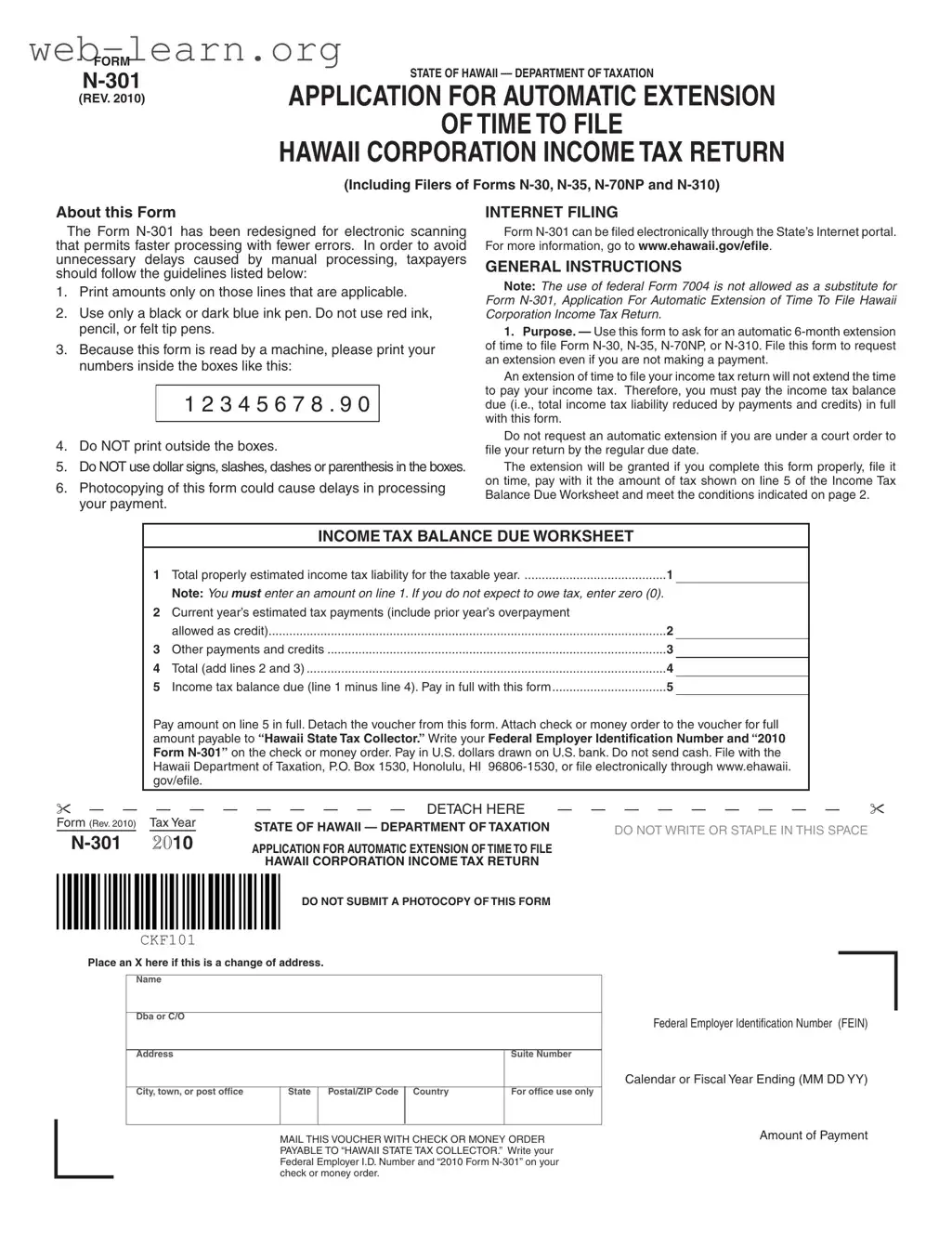
The N-301 form, issued by the State of Hawaii's Department of Taxation, serves as an essential tool for corporations seeking an automatic six-month extension to file their income tax returns. This form is applicable to various types of corporate filings, including Forms N-30, N-35, N-70NP, and N-310. A significant aspect of the N-301 is its redesign for electronic scanning, which enhances processing speed and accuracy. Taxpayers must adhere to specific guidelines when completing the form to prevent delays; for instance, it is crucial to print amounts only in designated areas using a black or dark blue ink pen, while avoiding the use of dollar signs or any other symbols. Importantly, the N-301 does not extend the time to pay taxes owed, necessitating that any balance due be submitted along with the application. This form can be filed electronically through the State’s Internet portal, making it accessible for a wider range of users. Moreover, it is vital for corporations to understand that the automatic extension is contingent upon timely submission and proper payment of estimated tax liabilities. Failure to comply with these requirements may result in penalties, underscoring the importance of careful adherence to the instructions provided with the form.
FORM |
|
|
STATE OF HAWAII |
||
APPLICATION FOR AUTOMATIC EXTENSION |
||
(REV. 2010) |
OF TIME TO FILE
HAWAII CORPORATION INCOME TAX RETURN
(Including Filers of Forms
About this Form
The Form
1.Print amounts only on those lines that are applicable.
2.Use only a black or dark blue ink pen. Do not use red ink, pencil, or felt tip pens.
3.Because this form is read by a machine, please print your numbers inside the boxes like this:
1 2 3 4 5 6 7 8 . 9 0
4.Do NOT print outside the boxes.
5.Do NOT use dollar signs, slashes, dashes or parenthesis in the boxes.
6.Photocopying of this form could cause delays in processing your payment.
INTERNET FILING
Form
GENERAL INSTRUCTIONS
Note: The use of federal Form 7004 is not allowed as a substitute for Form
1.Purpose. — Use this form to ask for an automatic
An extension of time to file your income tax return will not extend the time to pay your income tax. Therefore, you must pay the income tax balance due (i.e., total income tax liability reduced by payments and credits) in full with this form.
Do not request an automatic extension if you are under a court order to file your return by the regular due date.
The extension will be granted if you complete this form properly, file it on time, pay with it the amount of tax shown on line 5 of the Income Tax Balance Due Worksheet and meet the conditions indicated on page 2.
|
|
|
INCOME TAX BALANCE DUE WORKSHEET |
|
|
|
|
|
|
1 |
Total properly estimated income tax liability for the taxable year |
1 |
|
|
|
||
|
|
Note: You MUST enter an amount on line 1. If you do not expect to owe tax, enter zero (0). |
|
|
||||
|
2 |
Current year’s estimated tax payments (include prior year’s overpayment |
|
|
|
|
||
|
|
allowed as credit) |
2 |
|
|
|
||
|
3 |
Other payments and credits |
3 |
|
|
|
||
|
4 |
Total (add lines 2 and 3) |
4 |
|
|
|
||
|
5 |
Income tax balance due (line 1 minus line 4). Pay in full with this form |
5 |
|
|
|
||
|
Pay amount on line 5 in full. Detach the voucher from this form. Attach check or money order to the voucher for full |
|
|
|||||
|
amount payable to “Hawaii State Tax Collector.” Write your Federal Employer Identification Number and “2010 |
|
|
|||||
|
Form |
|
|
|||||
|
Hawaii Department of Taxation, P.O. Box 1530, Honolulu, HI |
|
|
|||||
|
gov/efile. |
|
|
|
|
|
|
|
— — |
|
|
|
|
|
|
|
|
— |
— |
— — — — — — DETACH HERE |
— — — |
— — — — — — |
||||
Form (Rev. 2010) |
Tax Year |
STATE OF HAWAII — DEPARTMENT OF TAXATION |
DO NOT WRITE OR STAPLE IN THIS SPACE |
|
||||
|
|
|
|
|||||
2010 |
|
|
||||||
APPLICATION FOR AUTOMATIC EXTENSION OF TIME TO FILE |
|
|
|
|
|
|||
HAWAII CORPORATION INCOME TAX RETURN
DO NOT SUBMIT A PHOTOCOPY OF THIS FORM
CKF101
Place an X here if this is a change of address.
Name
Dba or C/O
Address |
|
|
|
Suite Number |
|
|
|
|
|
City, town, or post office |
State |
Postal/ZIP Code |
Country |
For office use only |
|
|
|
|
|
MAIL THIS VOUCHER WITH CHECK OR MONEY ORDER PAYABLE TO “HAWAII STATE TAX COLLECTOR.” Write your Federal Employer I.D. Number and “2010 Form
Federal Employer Identification Number (FEIN)
Calendar or Fiscal Year Ending (MM DD YY)
Amount of Payment

FORM |
|
(REV. 2010) |
PAGE 2 |
In no case shall the extension be granted for a period of more than 6 months beyond the prescribed due date of the return.
For extension requirement purposes, Hawaii does not conform to Treasury Regs. section
An automatic extension of time for filing a return shall be allowed upon the following two conditions:
• You complete this form properly, file it, and pay any or properly estimated balance due on line 5 of the Income Tax Balance Due Worksheet by the prescribed due date for the return for which the extension applies.
• Within the time specified by the automatic extension, the return shall be filed, accompanied by payment of the tax to the extent not already paid.
One hundred percent of the properly estimated tax liability must be paid on or before the prescribed due date of your return. Properly estimated tax liability means the taxpayer made a bonafide and reasonable attempt at the time the extension was submitted to locate and gather all of the necessary information to make a proper estimate of tax liability for the taxable year. Payment of properly estimated tax liability will be presumed if the tax still owing after the prescribed due date of the return is 10 percent or less of the total tax shown as due on the return.
The Director of Taxation may terminate the automatic extension at any time by mailing a notice of termination to the entity or to the person who requested the extension for the entity. The notice will be mailed at least 10 days prior to the termination date designated in the notice.
Note: Only those taxpayers whose automatic extension has been rejected will be notified by the Department of Taxation.
2.How To Obtain Tax Forms. — To request tax forms and publications by mail, you may call
Tax forms are also available on the Internet. The Department of Taxation’s site on the Internet is: www.hawaii.gov/tax.
3.When to File. — File one copy of this application on or before the prescribed due date of the entity’s income tax return. If the prescribed due date falls on a Saturday, Sunday, or legal holiday file by the next regular workday.
You may file the applicable income tax return any time before the
4.Where to File. — File Form
5.Consolidated Returns. — If a consolidated return is to be filed, a parent corporation may request automatic extensions for itself and its
subsidiaries by filing one Form
6. How to Fill Out This Form.
• Enter the corporation’s name and address on the appropriate lines. • Using black or blue ink, enter the corporation’s FEIN, the date of
the end of the tax year, and the amount of the payment in the space provided.
• If no payment is being made with this form, enter “0.00” in amount of payment space.
• It is suggested that you make a photocopy of this form for your records before you detach the voucher. Do not, however, submit a photocopy of this form.
• Detach the voucher where indicated. Submit only the voucher portion of this form with your payment.
• Attach your check or money order payable to “Hawaii State Tax Collector” to the front of the voucher. Write your FEIN and “2010 Form
7.Making a Payment. — If a payment is being made with this form, make your check or money order payable to “Hawaii State Tax Collector.” Write your FEIN and “2010 Form
8.How to Claim Credit for Payment Made With This Form. — Show the amount paid (line 5) with this form on the applicable income tax return.
9.Penalties
Late Filing of Return. — The penalty for failure to file a return on time is assessed on the tax due at a rate of 5% per month, or part of a month, up to a maximum of 25%.
Failure to Pay After Filing Timely Return. — The penalty for failure to pay the tax after filing a timely return is 20% of the tax unpaid within 60 days of the prescribed due date. The
These penalties are in addition to any interest charged on underpayment or nonpayment of tax.
10.Interest. — Interest at the rate of 2/3 of 1% per month or part of a month shall be assessed on unpaid taxes and penalties beginning with the first calendar day after the date prescribed for payment, whether or not that first calendar day falls on a Saturday, Sunday, or legal holiday. Form
REASONS FOR REJECTION OF EXTENSION
1. The request was not in this office or mailed on or before the date prescribed by law for filing this return.
2. Separate requests are required for each type of tax and for each taxpayer involved.
3. The income tax return was not filed within the time specified by the automatic extension.
| Fact Name | Details |
|---|---|
| Form Title | Application for Automatic Extension of Time to File Hawaii Corporation Income Tax Return |
| Governing Law | Hawaii Revised Statutes, Section 235-108 |
| Filing Deadline | File Form N-301 by the original due date of the income tax return. |
| Extension Duration | Grants an automatic extension of 6 months to file the return. |
| Payment Requirement | Tax balance due must be paid in full with this form. |
| Electronic Filing | Form N-301 can be filed electronically at www.ehawaii.gov/efile. |
| Penalties | Late filing incurs a 5% penalty per month, up to 25% maximum. |
| Interest Rate | Interest on unpaid taxes is charged at 2/3 of 1% per month. |
| Rejection Reasons | Requests may be rejected for late submission or incorrect filing. |
Completing the N-301 form for an automatic extension of time to file your Hawaii corporation income tax return requires careful attention to detail. Following the steps outlined below will help ensure that the form is filled out correctly and submitted on time.
After submitting the N-301 form, you will have an automatic six-month extension to file your corporation income tax return. However, remember that this extension does not apply to the payment of taxes owed, which must be submitted with the form. Keep track of any deadlines to ensure compliance with Hawaii tax regulations.
What is Form N-301?
Form N-301 is an application for an automatic extension of time to file Hawaii corporation income tax returns. This form is applicable for entities filing Forms N-30, N-35, N-70NP, or N-310. The form allows taxpayers to request a six-month extension, but it does not extend the time to pay any taxes owed.
How should I fill out Form N-301?
To fill out Form N-301, follow these guidelines:
When is Form N-301 due?
Form N-301 must be filed by the prescribed due date of the entity’s income tax return. If the due date falls on a weekend or legal holiday, the form should be submitted by the next regular workday. Timely filing is essential to secure the extension.
Where do I file Form N-301?
Form N-301 can be filed either by mail or electronically. To file by mail, send the completed form to the Hawaii Department of Taxation at P.O. Box 1530, Honolulu, Hawaii 96806-1530. For electronic filing, taxpayers can visit the State’s Internet portal at www.ehawaii.gov/efile.
What happens if I do not file Form N-301 on time?
If Form N-301 is not filed by the deadline, the request for an extension will be rejected. Additionally, late filing of the income tax return may incur penalties. The penalty for failure to file on time is 5% of the tax due for each month or part of a month, up to a maximum of 25%.
Can I file Form N-301 for multiple corporations?
A parent corporation can request automatic extensions for itself and its subsidiaries by filing one Form N-301. However, it must include an attachment listing the name, address, and FEIN of each subsidiary for which the extension is requested. This process does not affect the privilege of filing a consolidated return.
Filling out the N-301 form for a Hawaii corporation's income tax extension can be straightforward, but many people make common mistakes that can lead to delays or rejections. Understanding these pitfalls can help ensure a smoother process.
One frequent error is failing to provide information on all applicable lines. Taxpayers often overlook certain sections, which can result in incomplete submissions. It’s essential to read the instructions carefully and fill out every required field. If a particular line does not apply, it’s important to indicate that appropriately, rather than leaving it blank.
Another mistake involves the choice of writing instruments. Many individuals use colored ink or pencil, which is not acceptable. The form specifically states to use only a black or dark blue ink pen. Using the correct ink ensures that the form is machine-readable, minimizing the risk of processing errors.
People often misinterpret how to enter numerical values. The instructions specify that numbers should be printed inside the designated boxes, resembling this format: 1 2 3 4 5 6 7 8 . 9 0. Writing outside these boxes or using dollar signs, slashes, or other symbols can lead to confusion and potential rejection of the form.
Another common issue arises from submitting a photocopy of the N-301 form. This can cause significant delays in processing. Only the original form should be submitted, and it’s advisable to keep a copy for personal records before detaching any vouchers.
Many taxpayers also neglect to make the required payment when filing the N-301 form. It’s crucial to remember that an extension to file does not extend the time to pay any taxes owed. If the income tax balance due is not paid in full with the form, the extension request may be denied.
Lastly, some individuals forget to file the form by the prescribed due date. It’s important to submit the N-301 on or before the deadline to avoid penalties. If the due date falls on a weekend or holiday, the form should be filed by the next business day.
By being aware of these common mistakes, taxpayers can improve their chances of a successful and timely filing of the N-301 form. Taking the time to carefully follow the guidelines will help avoid unnecessary complications.
The N-301 form is an essential document for corporations in Hawaii seeking an automatic extension for filing their income tax returns. Along with this form, several other documents may be required or helpful in ensuring compliance with tax regulations. Below is a list of commonly used forms and documents that often accompany the N-301.
Understanding the various forms associated with the N-301 is crucial for ensuring compliance with Hawaii's tax regulations. Each form serves a specific purpose and plays a vital role in the overall tax filing process for corporations and partnerships. Proper preparation and timely submission can help avoid penalties and ensure a smooth filing experience.
The N-301 form from Hawaii is designed for corporations seeking an automatic extension to file their income tax returns. It shares similarities with several other forms used for tax extensions and related purposes. Here are four documents that are comparable to the N-301 form:
Understanding these forms helps clarify the tax filing landscape in Hawaii and the options available for managing deadlines effectively.
When filling out the N-301 Hawaii form, it is essential to follow specific guidelines to ensure proper processing. Below is a list of things you should and shouldn't do:
Following these guidelines will help avoid unnecessary delays in processing your application for an automatic extension of time to file your Hawaii corporation income tax return.
Understanding the N-301 Hawaii form is essential for corporations seeking an extension for filing their income tax returns. However, several misconceptions can lead to confusion. Here are six common misunderstandings:
This is incorrect. The N-301 only extends the time to file the return, not the time to pay any taxes owed. Corporations must still pay their tax balance by the original due date.
Many believe that photocopies are acceptable. However, submitting a photocopy can cause delays in processing. Always use the original form.
Corporations must file the N-301 by the original due date of their tax return. Filing after this date may result in rejection of the extension.
In fact, it is crucial to provide a properly estimated tax liability on the form. Failing to do so can jeopardize the extension.
This is not allowed. The N-301 is specifically required for Hawaii corporation income tax extensions.
Contrary to this belief, the N-301 can be filed electronically through the State’s Internet portal, making the process quicker and more efficient.
Here are key takeaways about filling out and using the N-301 Hawaii form: