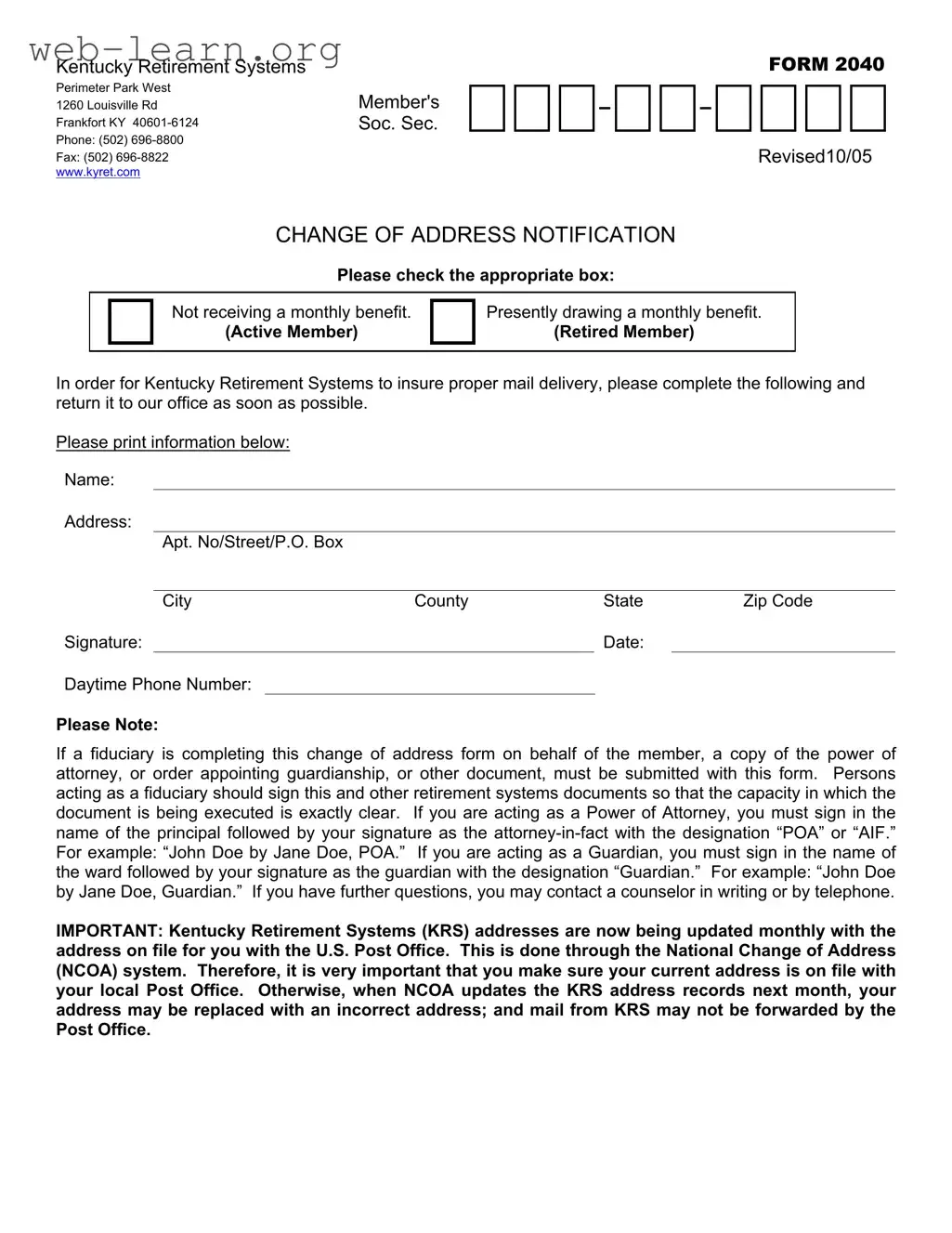
For members of the Kentucky Retirement Systems, staying connected is crucial, especially when it comes to receiving important information about your retirement benefits. The Kentucky Retirement Systems FORM 2040 serves as a vital tool for notifying the organization of any changes to your address. Whether you are an active member not yet receiving benefits or a retired member currently drawing a monthly benefit, completing this form accurately ensures that you continue to receive timely communications. The form requires essential details such as your name, current address, and contact information, along with a signature to validate the request. If someone is completing this form on your behalf, specific documentation, such as a power of attorney or guardianship order, must accompany the submission. This requirement safeguards your information and clarifies the authority of the person acting on your behalf. Additionally, it’s important to remember that the Kentucky Retirement Systems regularly updates its address records through the National Change of Address system. Therefore, maintaining an accurate address with your local Post Office is imperative to prevent any disruption in mail delivery. Failure to do so could result in KRS sending correspondence to an outdated or incorrect address, jeopardizing your access to critical retirement information.

Kentucky Retirement Systems |
FORM 2040 |
Perimeter Park West
1260 Louisville Rd Frankfort KY
Fax: (502)
Member's
Soc. Sec.
Revised10/05
CHANGE OF ADDRESS NOTIFICATION
Please check the appropriate box:
Not receiving a monthly benefit.
(Active Member)
Presently drawing a monthly benefit.
(Retired Member)
In order for Kentucky Retirement Systems to insure proper mail delivery, please complete the following and return it to our office as soon as possible.
Please print information below:
Name:
Address:
Apt. No/Street/P.O. Box
City |
County |
State |
Zip Code |
Signature:Date:
Daytime Phone Number:
Please Note:
If a fiduciary is completing this change of address form on behalf of the member, a copy of the power of attorney, or order appointing guardianship, or other document, must be submitted with this form. Persons acting as a fiduciary should sign this and other retirement systems documents so that the capacity in which the document is being executed is exactly clear. If you are acting as a Power of Attorney, you must sign in the name of the principal followed by your signature as the
IMPORTANT: Kentucky Retirement Systems (KRS) addresses are now being updated monthly with the address on file for you with the U.S. Post Office. This is done through the National Change of Address (NCOA) system. Therefore, it is very important that you make sure your current address is on file with your local Post Office. Otherwise, when NCOA updates the KRS address records next month, your address may be replaced with an incorrect address; and mail from KRS may not be forwarded by the Post Office.
| Fact Name | Description |
|---|---|
| Form Purpose | This form is used to notify the Kentucky Retirement Systems of a change of address for both active and retired members. |
| Contact Information | The form provides contact details for the Kentucky Retirement Systems, including a phone number and fax number for inquiries. |
| Fiduciary Requirements | If a fiduciary completes the form, they must submit a power of attorney or guardianship document along with it. |
| Signature Guidelines | Signatures must clearly indicate the capacity in which the fiduciary is acting, whether as Power of Attorney or Guardian. |
| Governing Law | This form is governed by Kentucky Revised Statutes (KRS) related to retirement systems and fiduciary duties. |
Filling out the Kentucky Retirement Systems Change of Address Notification form is a straightforward process. Ensuring that your address is updated is crucial for receiving important communications. Follow the steps below to complete the form accurately.
What is the purpose of the Kentucky Retirement Systems Form 2040?
The Kentucky Retirement Systems Form 2040 is designed to notify the Kentucky Retirement Systems (KRS) of any changes to a member's address. This ensures that important communications and benefits are sent to the correct location.
Who should complete this form?
Both active members who are not yet receiving monthly benefits and retired members currently drawing benefits should complete this form if they have changed their address. It is essential for both groups to keep their contact information up to date.
What information is required on the form?
Members must provide their name, new address, including apartment number or P.O. Box, city, county, state, and zip code. Additionally, a signature and date are required, along with a daytime phone number for any follow-up questions.
What if a fiduciary is completing the form?
If a fiduciary, such as a Power of Attorney or Guardian, is filling out the form on behalf of the member, they must include a copy of the relevant legal document. The fiduciary should also sign the form in a way that clearly indicates their capacity, such as “John Doe by Jane Doe, POA” for a Power of Attorney.
How will KRS ensure my address is correct?
Kentucky Retirement Systems updates addresses monthly using the National Change of Address (NCOA) system, which is linked to the U.S. Post Office. Therefore, it is crucial for members to ensure that their current address is also updated with their local Post Office to avoid any discrepancies.
What happens if I do not update my address?
If a member does not update their address with KRS and their local Post Office, there is a risk that the NCOA system may replace the KRS address records with an incorrect address. This could lead to important mail from KRS not being forwarded, potentially resulting in missed communications or benefits.
How can I contact KRS if I have further questions?
Members can reach out to KRS by writing or calling. The contact information is provided on the form, including a phone number and fax number for convenience.
What is the significance of the signature on the form?
The signature is important as it verifies that the information provided is accurate and that the member or fiduciary is formally requesting the change of address. It serves as a legal affirmation of the request.
Is there a deadline for submitting this form?
While the form does not specify a strict deadline, it is advisable to submit it as soon as possible to ensure that the member’s address is updated before the next mailing cycle. Prompt action helps to prevent any delays in receiving benefits or important information.
Filling out the Kentucky Retirement Systems FORM 2040 can seem straightforward, but many people make common mistakes that can delay processing. One frequent error is neglecting to check the appropriate box indicating whether the member is an active or retired member. This simple step is crucial for ensuring that the form is directed to the right department.
Another mistake is failing to provide a complete address. Members often forget to include their apartment number or P.O. Box, which can lead to mail delivery issues. Every detail matters, so double-check that all fields are filled in accurately.
Many individuals overlook the signature requirement. Without a signature, the form is incomplete and cannot be processed. It's essential to sign and date the form before submission. Remember, the date is just as important as the signature.
People also tend to forget to include their daytime phone number. This information is vital for the Kentucky Retirement Systems to contact you if there are any questions or issues regarding your form. Providing a reliable phone number can help expedite the process.
Another common error involves fiduciaries. If someone is completing the form on behalf of a member, they must submit the appropriate documentation, such as a power of attorney. Failing to include these documents can result in delays or rejection of the form.
Improper signing by fiduciaries is another mistake. If you are acting as a Power of Attorney, it’s important to sign correctly, indicating your role. For example, the signature should read, “John Doe by Jane Doe, POA.” Missteps in this area can create confusion and complicate the process.
Some individuals do not verify their address with the local Post Office before submitting the form. Since KRS updates records through the National Change of Address system, an outdated address can lead to mail not being forwarded. This can result in missed communications regarding benefits.
Another oversight is not reviewing the entire form before submission. Skimming through the form can lead to overlooked errors. Taking a moment to review all entries ensures that everything is correct and complete.
Finally, many forget to keep a copy of the completed form for their records. This can be helpful in case any issues arise later. Having a copy allows you to reference what was submitted and provides peace of mind.
By avoiding these common mistakes, you can ensure a smoother process when submitting the Kentucky Retirement Systems FORM 2040. Attention to detail is key, and taking the time to complete the form accurately will help avoid unnecessary delays.
When dealing with retirement benefits in Kentucky, several forms and documents may accompany the Kentucky Retirement Systems FORM 2040. Each of these documents plays a vital role in ensuring accurate and timely processing of your requests. Below is a list of commonly used forms and documents that you may need to consider.
Understanding these documents can streamline your interactions with the Kentucky Retirement Systems. It is advisable to keep copies of all forms submitted and maintain clear communication with the retirement office to ensure that your benefits are managed efficiently.
When filling out the Kentucky Retirement Systems form, it's essential to approach the task with care. Here’s a list of things you should and shouldn’t do to ensure your form is completed correctly.
By following these guidelines, you can help ensure that your change of address is processed smoothly and without delay.
Misconceptions about the Kentucky Retirement Systems Form 2040 can lead to confusion and delays. Here are eight common misunderstandings:
Understanding these misconceptions can help ensure that members effectively manage their retirement benefits and communications with the Kentucky Retirement Systems.
Filling out the Kentucky Retirement Systems Form 2040 is a straightforward process, but attention to detail is crucial. Here are some key takeaways to help ensure a smooth experience:
By following these guidelines, you can ensure that your change of address is processed efficiently, allowing for seamless communication with the Kentucky Retirement Systems.