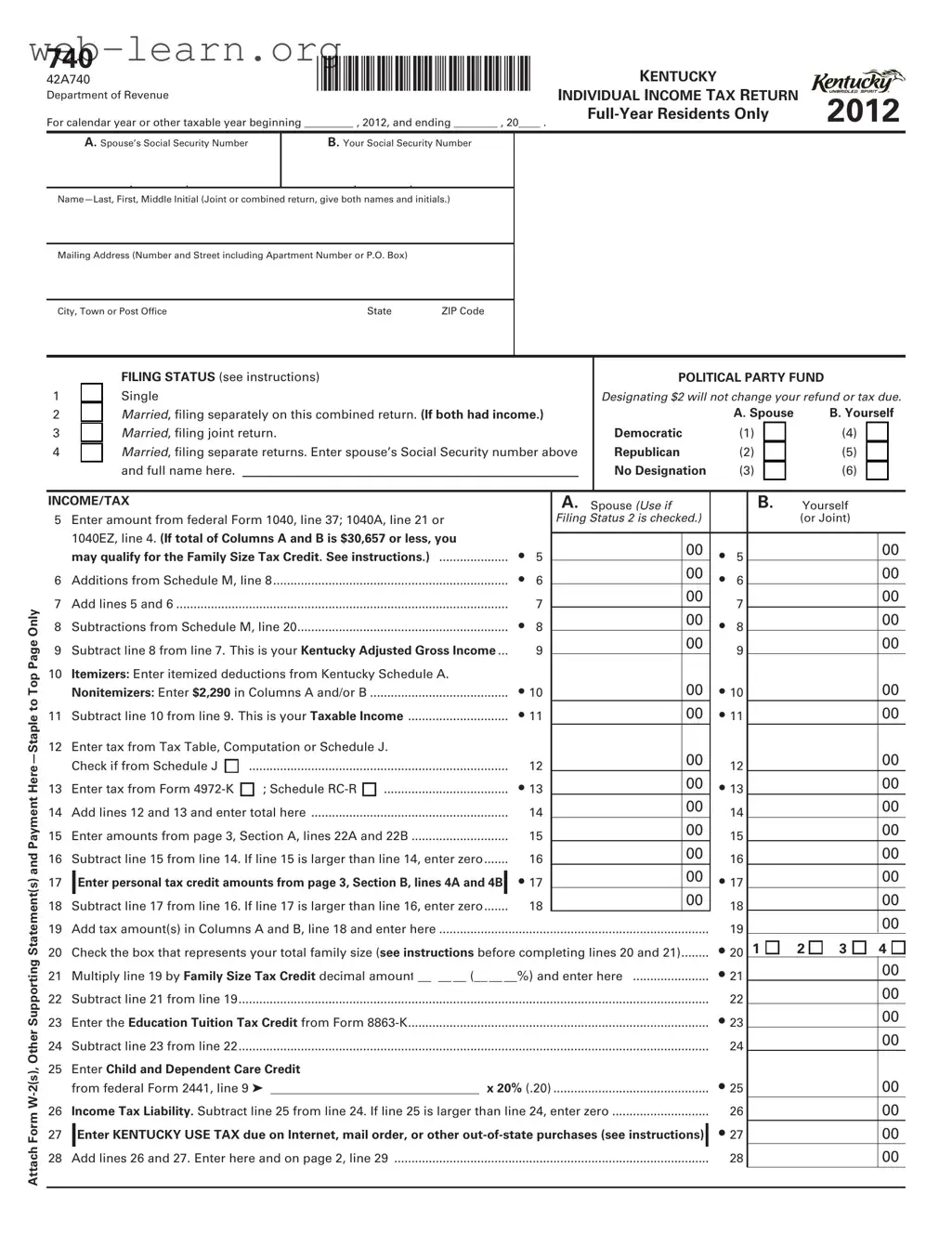
The Kentucky 740 form is an essential document for residents filing their individual income tax returns in the state. Designed specifically for full-year residents, it captures various details necessary for accurately reporting income and calculating tax liabilities. When filling out this form, individuals will provide personal information, including names, Social Security numbers, and mailing addresses. The form also requires taxpayers to select their filing status, which can significantly impact the amount of tax owed or refunded. Throughout the form, there are sections dedicated to income, deductions, and credits, allowing filers to account for various income sources and potential tax benefits. Taxpayers must also include any applicable supporting documents, such as W-2 forms, to substantiate their claims. Furthermore, the Kentucky 740 form includes areas for contributions to political party funds and other charitable causes, highlighting the state's encouragement of civic engagement. Understanding the nuances of this form is crucial for ensuring compliance with state tax regulations and maximizing potential refunds.

740 |
|
*1200030001* |
INDIVIDUAL INCOME TAX RETURN |
|
|||||
Department of Revenue |
|
||||||||
42A740 |
|
|
|
|
|
KENTUCKY |
|
||
For calendar year or other taxable year beginning _________ , 2012, and ending ________ , 20____ . |
2012 |
||||||||
|
|
|
|
|
|
|
|
|
|
|
A. Spouse’s Social Security Number |
|
B. Your Social Security Number |
|
|
|
|||
|
|
|
|
|
|
|
|
|
|
|
|
|
|
|
|
|
|
|
|
|
|
|
|||||||
|
|
|
|
|
|
|
|
|
|
Mailing Address (Number and Street including Apartment Number or P.O. Box) |
|
|
|
|
|
||||
|
|
|
|
|
|
|
|
|
|
City, Town or Post Office |
|
State |
ZIP Code |
|
|
|
|||
|
|
|
|
|
|
|
|
|
|
Attach Form
|
|
|
|
FILING STATUS (see instructions) |
|
|
|
|
POLITICAL PARTY FUND |
|
|
|
|
||||||||
1 |
|
|
|
Single |
|
|
|
|
|
Designating $2 will not change your refund or tax due. |
|||||||||||
2 |
|
|
|
Married, filing separately on this combined return. (If both had income.) |
|
|
|
A. Spouse |
|
B. Yourself |
|||||||||||
3 |
|
|
|
Married, filing joint return. |
|
|
|
|
Democratic |
|
(1) |
|
|
|
(4) |
|
|
|
|||
4 |
|
|
|
Married, filing separate returns. Enter spouse’s Social Security number above |
Republican |
|
(2) |
|
|
|
(5) |
|
|
|
|||||||
|
|
|
|
and full name here. |
|
|
|
|
|
No Designation |
|
(3) |
|
|
|
(6) |
|
|
|
||
|
|
|
|
|
|
|
|
|
|
|
|
|
|
|
|
|
|
|
|||
|
|
|
|
|
|
|
|
|
|
|
|
|
|
|
|
|
|
|
|
|
|
INCOME/TAX |
|
|
|
|
A. Spouse (Use if |
|
|
B. |
Yourself |
|
|
||||||||||
5 |
Enter amount from federal Form 1040, line 37; 1040A, line 21 or |
|
|
|
Filing Status 2 is checked.) |
|
|
|
|
|
(or Joint) |
|
|
||||||||
|
1040EZ, line 4. (If total of Columns A and B is $30,657 or less, you |
|
|
|
|
|
|
|
|
|
|
|
|
|
|
|
|
||||
|
• |
5 |
|
|
00 |
• |
5 |
|
|
|
|
|
|
00 |
|||||||
|
may qualify for the Family Size Tax Credit. See instructions.) |
|
|
|
|
|
|
|
|
|
|||||||||||
|
|
|
00 |
|
|
|
|
|
|
00 |
|||||||||||
6 |
Additions from Schedule M, line 8 |
• |
6 |
|
|
• |
6 |
|
|
|
|
|
|
||||||||
|
|
00 |
|
|
|
|
|
|
00 |
||||||||||||
7 |
Add lines 5 and 6 |
|
|
|
7 |
|
|
|
7 |
|
|
|
|
|
|
||||||
|
|
|
|
|
|
|
|
|
|
|
|
|
|
||||||||
............................................................. |
• |
|
|
00 |
• |
|
|
|
|
|
|
00 |
|||||||||
8 |
Subtractions from Schedule M, line 20 |
|
8 |
|
|
8 |
|
|
|
|
|
|
|||||||||
|
|
00 |
|
|
|
|
|
|
00 |
||||||||||||
9 |
Subtract line 8 from line 7. This is your Kentucky Adjusted Gross Income |
|
|
9 |
|
|
|
9 |
|
|
|
|
|
|
|||||||
|
|
|
|
|
|
|
|
|
|
|
|
|
|||||||||
|
|
|
|
|
|
|
|
|
|
|
|
|
|
||||||||
10 |
Itemizers: Enter itemized deductions from Kentucky Schedule A. |
|
|
|
|
|
|
|
|
|
|
|
|
|
|
|
|
||||
|
Nonitemizers: Enter $2,290 in Columns A and/or B |
• 10 |
|
|
00 |
• 10 |
|
|
|
|
00 |
||||||||||
11 |
Subtract line 10 from line 9. This is your Taxable Income |
• 11 |
|
|
00 |
• 11 |
|
|
|
00 |
|||||||||||
12 |
Enter tax from Tax Table, Computation or Schedule J. |
|
|
|
|
|
00 |
|
|
|
|
|
|
|
|
00 |
|||||
|
Check if from Schedule J |
|
|
|
12 |
|
|
|
12 |
|
|
|
|
|
|
||||||
|
........................................................................... |
|
|
|
|
|
|
|
|
|
|
|
|
|
|||||||
13 |
Enter tax from Form |
; Schedule |
• 13 |
|
|
00 |
• 13 |
|
|
|
00 |
||||||||||
14 |
Add lines 12 and 13 and enter total here |
|
|
14 |
|
|
00 |
|
14 |
|
|
|
|
|
|
00 |
|||||
|
|
|
|
|
|
|
|
|
|
|
|
|
|||||||||
15 |
Enter amounts from page 3, Section A, lines 22A and 22B |
|
|
15 |
|
|
00 |
|
15 |
|
|
|
|
|
|
00 |
|||||
|
|
|
|
|
|
|
|
|
|
|
|
|
|||||||||
16 |
Subtract line 15 from line 14. If line 15 is larger than line 14, enter zero |
|
|
16 |
|
|
00 |
|
16 |
|
|
|
|
|
|
00 |
|||||
|
|
|
|
|
|
|
|
|
|
|
|
|
|||||||||
17 |
|
Enter personal tax credit amounts from page 3, Section B, lines 4A and 4B |
|
• 17 |
|
|
00 |
• 17 |
|
|
|
00 |
|||||||||
|
|
|
|
|
|
|
|||||||||||||||
|
|
|
|
|
|
|
|
|
|
|
00 |
|
|
|
|
|
|
|
|
00 |
|
18 |
Subtract line 17 from line 16. If line 17 is larger than line 16, enter zero |
|
|
18 |
|
|
|
18 |
|
|
|
|
|
|
|||||||
|
|
|
|
|
|
|
|
|
|
|
|
|
|||||||||
19 |
..............................................................................Add tax amount(s) in Columns A and B, line 18 and enter here |
|
|
|
|
|
|
|
19 |
|
|
|
|
|
|
00 |
|||||
20 |
Check the box that represents your total family size (see instructions before completing lines 20 and 21) |
• 20 |
1 |
|
|
2 |
3 |
|
4 |
|
|||||||||||
21 |
Multiply line 19 by Family Size Tax Credit decimal amount __ . __ __ (__ __ __%) and enter here |
• 21 |
|
|
|
|
|
|
00 |
||||||||||||
22 |
Subtract line 21 from line 19 |
|
|
|
|
|
|
|
|
22 |
|
|
|
|
|
|
00 |
||||
23 |
Enter the Education Tuition Tax Credit from Form |
|
|
|
|
|
• 23 |
|
|
|
|
|
|
00 |
|||||||
24 |
Subtract line 23 from line 22 |
|
|
|
|
|
|
|
|
24 |
|
|
|
|
|
|
00 |
||||
25Enter Child and Dependent Care Credit
|
from federal Form 2441, line 9 ➤ |
|
x 20% (.20) |
• 25 |
00 |
||
|
|
|
|
|
|
||
26 |
Income Tax Liability. Subtract line 25 from line 24. If line 25 is larger than line 24, enter zero |
26 |
00 |
||||
27 |
|
Enter KENTUCKY USE TAX due on Internet, mail order, or other |
|
• 27 |
00 |
||
|
|
||||||
28 |
Add lines 26 and 27. Enter here and on page 2, line 29 |
28 |
00 |
||||
|
|
|
|
|
|
|
|
FORM 740 (2012) |
*1200030002* |
|
Page 2 of 3 |
|
|
|
|
|
|
|
|
|
|
|
REFUND/TAX PAYMENT SUMMARY |
|
|
|
|
29 Enter amount from page 1, line 28. This is your Total Tax Liability |
• 29 |
|
00 |
|
30(a) Enter Kentucky income tax withheld as shown on attached
|
|
2012 Form |
....................................... |
|
• |
30(a) |
|
|
|
|
|
|
|
|
|
|
|
00 |
|
|
|
|
|
|||||
|
(b) |
Enter 2012 Kentucky estimated tax payments |
|
|
• |
30(b) |
|
|
|
|
|
|
|
|
|
|
|
00 |
|
|
|
|
|
|||||
|
(c) |
Enter 2012 refundable certified rehabilitation credit |
(KRS 141.382(1)(b)) |
• |
30(c) |
|
|
|
|
|
|
|
|
|
|
|
00 |
|
|
|
|
|
||||||
|
(d) |
Enter 2012 film industry tax credit (KRS 141.383) |
|
|
• |
30(d) |
|
|
|
|
|
|
|
|
|
|
|
00 |
|
|
|
|
|
|||||
31 |
Add lines 30(a) through 30(d) |
|
|
|
|
|
|
|
|
|
|
|
|
|
|
|
|
|
|
• |
31 |
|
|
|
|
00 |
||
32 |
If line 31 is larger than line 29, enter AMOUNT OVERPAID (see instructions) |
|
|
|
|
|
|
|
|
|
|
|
|
|
|
|
|
32 |
|
|
|
|
00 |
|||||
Fund Contributions; See instructions. |
|
|
|
|
|
➤ (ENTER AMOUNT(S) CHECKED) |
|
|
|
|
|
|||||||||||||||||
33 |
Nature and Wildlife Fund |
$10 |
$25 |
$50 |
Other |
|
|
|
|
|
• |
33 |
|
|
|
|
|
00 |
|
|
|
|
|
|||||
34 |
Child Victims’ Trust Fund |
$10 |
$25 |
$50 |
Other |
|
|
|
|
|
• |
34 |
|
|
|
|
|
00 |
|
|
|
|
|
|||||
35 |
Veterans’ Program Trust Fund |
$10 |
$25 |
$50 |
Other |
|
|
|
|
|
• |
35 |
|
|
|
|
|
00 |
|
|
|
|
|
|||||
36 |
Breast Cancer Research/Education Trust Fund |
$10 |
$25 |
$50 |
Other |
|
|
|
|
|
• |
36 |
|
|
|
|
|
00 |
|
|
|
|
|
|||||
37 |
Add lines 33 through 36 |
|
|
|
|
|
|
|
|
|
|
|
|
|
|
|
|
|
|
|
37 |
|
|
|
|
00 |
||
38 |
Amount of line 32 to be CREDITED TO YOUR 2013 ESTIMATED TAX |
|
|
|
|
|
|
|
|
|
|
|
|
|
|
|
• 38 |
|
|
|
00 |
|||||||
39 |
Subtract lines 37 and 38 from line 32. Amount to be REFUNDED TO YOU |
................................. |
|
|
|
|
|
|
|
|
|
REFUND |
|
|
• 39 |
|
|
|
00 |
|||||||||
40 |
If line 29 is larger than line 31, enter ADDITIONAL TAX DUE |
|
|
|
|
|
|
|
|
|
|
|
|
|
|
|
|
• 40 |
|
|
00 |
|||||||
41 |
(a) |
Estimated tax penalty and/or interest. |
...CHECK IF FORM |
|
41(a) |
|
|
|
|
|
|
|
|
|
|
|
|
00 |
|
|
|
|
|
|||||
|
(b) |
Interest |
|
|
|
|
41(b) |
|
|
|
|
|
|
|
|
|
|
|
|
00 |
|
|
|
|
|
|||
|
(c) |
Late payment penalty |
|
|
|
|
41(c) |
|
|
|
|
|
|
|
|
|
|
|
|
00 |
|
|
|
|
|
|||
|
(d) |
Late filing penalty |
|
|
|
|
41(d) |
|
|
|
|
|
|
|
|
|
|
|
|
00 |
|
|
|
|
|
|||
42 |
Add lines 41(a) through 41(d). Enter here |
|
|
|
|
|
|
|
|
|
|
|
|
|
|
|
|
|
|
• 42 |
|
|
00 |
|||||
43 |
Add lines 40 and 42 and enter here. This is the AMOUNT YOU OWE |
|
|
|
|
|
|
|
|
|
|
OWE |
|
|
|
43 |
|
|
|
|
00 |
|||||||
|
|
|
|
|
|
|
|
|
|
|
|
|
|
|
|
|
|
|
|
|
|
|
|
|
|
|
|
|
|
|
|
|
|
|
|
|
|
|
|
|
|
|
|
|
|
|
|
|
|
|
|
|
|
|
|
||
|
l Make check payable to Kentucky State Treasurer or visit www.revenue.ky.gov for more options. |
|
|
|
|
|
|
OFFICIAL USE ONLY |
||||||||||||||||||||
|
|
|
|
|
|
|
|
|
|
|||||||||||||||||||
|
l Write your Social Security number and “KY Income |
|
|
|
|
|
|
|
|
|
|
|
|
|
|
|
|
|
|
|
PWR |
|||||||
|
|
|
|
|
|
|
|
|
|
|
|
|
|
|
|
|
|
|
|
|
|
|||||||
|
|
|
|
|
|
|
|
|
|
|
|
|
|
|
|
|||||||||||||
|
|
|
|
|
|
|
|
|
|
|
|
|
|
|
|
|
|
|
|
|
|
|
|
|
|
|
|
|
SECTION |
|
|
|
|
A. |
Spouse |
|
|
|
|
|
B. |
Yourself |
|||||||||||||||
|
|
|
|
|
|
|
|
|
|
|
|
|
|
|
|
|
|
|
|
|
|
|
|
|
||||
1 |
Enter nonrefundable limited liability entity credit (KRS 141.0401(2)) |
|
1 |
|
|
|
|
|
|
|
|
|
|
|
00 |
|
1 |
|
|
|
|
00 |
||||||
2 |
Enter Kentucky small business investment credit |
|
|
|
2 |
|
|
|
|
|
|
|
|
|
|
|
00 |
|
2 |
|
|
|
|
00 |
||||
3 |
Enter skills training investment credit (attach copy(ies) of certification) |
|
3 |
|
|
|
|
|
|
|
|
|
|
|
00 |
|
3 |
|
|
|
|
00 |
||||||
4 |
Enter nonrefundable certified rehabilitation credit (KRS 171.397(1)(a)) |
|
4 |
|
|
|
|
|
|
|
|
|
|
|
00 |
|
4 |
|
|
|
|
00 |
||||||
5 |
Enter credit for tax paid to another state (attach copy of other state’s return(s)) |
|
5 |
|
|
|
|
|
|
|
|
|
|
|
00 |
|
5 |
|
|
|
|
00 |
||||||
6 |
Enter unemployment credit (attach Schedule UTC) |
|
|
|
6 |
|
|
|
|
|
|
|
|
|
|
|
00 |
|
6 |
|
|
|
|
00 |
||||
7 |
Enter recycling and/or composting equipment credit (attach Schedule RC) |
|
7 |
|
|
|
|
|
|
|
|
|
|
|
00 |
|
7 |
|
|
|
|
00 |
||||||
8 |
Enter Kentucky investment fund credit (attach copy(ies) of certification) |
|
8 |
|
|
|
|
|
|
|
|
|
|
|
00 |
|
8 |
|
|
|
|
00 |
||||||
9 |
Enter coal incentive credit |
|
|
|
|
9 |
|
|
|
|
|
|
|
|
|
|
|
00 |
|
9 |
|
|
|
|
00 |
|||
10 |
Enter qualified research facility credit (attach Schedule QR) |
|
10 |
|
|
|
|
|
|
|
|
|
|
|
00 |
|
10 |
|
|
|
|
00 |
||||||
11 |
Enter GED incentive credit (attach Form |
|
|
11 |
|
|
|
|
|
|
|
|
|
|
|
00 |
|
11 |
|
|
|
|
00 |
|||||
12 |
Enter voluntary environmental remediation credit (attach Schedule VERB) |
12 |
|
|
|
|
|
|
|
|
|
|
|
00 |
|
12 |
|
|
|
|
00 |
|||||||
13 |
Enter biodiesel and renewable diesel credit |
|
|
|
13 |
|
|
|
|
|
|
|
|
|
|
|
00 |
|
13 |
|
|
|
|
00 |
||||
14 |
Enter environmental stewardship credit |
|
|
|
14 |
|
|
|
|
|
|
|
|
|
|
|
00 |
|
14 |
|
|
|
|
00 |
||||
15 |
Enter clean coal incentive credit |
|
|
|
15 |
|
|
|
|
|
|
|
|
|
|
|
00 |
|
15 |
|
|
|
|
00 |
||||
16 |
Enter ethanol credit (attach Schedule ETH) |
|
|
|
16 |
|
|
|
|
|
|
|
|
|
|
|
00 |
|
16 |
|
|
|
|
00 |
||||
17 |
Enter cellulosic ethanol credit (attach Schedule CELL) |
|
|
17 |
|
|
|
|
|
|
|
|
|
|
|
00 |
|
17 |
|
|
|
|
00 |
|||||
18 |
Enter energy efficiency products credit (attach Form |
|
18 |
|
|
|
|
|
|
|
|
|
|
|
00 |
|
18 |
|
|
|
|
00 |
||||||
Continue to page 3 to complete Section A
FORM 740 (2012) |
*1200030040* |
|
|
|
|
|
|
Page 3 of 3 |
|||
|
|
|
|
|
|
|
|
||||
|
|
|
|
|
|
|
|
|
|||
SECTION |
|
A. Spouse |
|
B. |
Yourself |
||||||
|
|
|
|
|
|
|
|
|
|
||
19 |
Enter railroad maintenance and improvement credit (attach Schedule |
|
19 |
|
00 |
19 |
|
|
00 |
||
20 |
Enter Endow Kentucky credit (attach Schedule ENDOW) |
..................................... |
|
20 |
|
00 |
20 |
|
|
00 |
|
21 |
Enter New Markets Development Program credit |
|
21 |
|
00 |
21 |
|
|
00 |
||
22 |
Add lines 1 through 21, Columns A and B. Enter here and on page 1, line 15 . |
|
22 |
|
00 |
22 |
|
|
00 |
||
|
|
|
|
|
|
|
|
|
|||
SECTION |
Check Regular |
Check both if 65 or over |
|
Check both if blind |
|
|
|
|
|||
1 (a) Credits for yourself:
(b) Credits for spouse:
2 Dependents:
First name |
Last name |
Dependent’s
Social Security number
Dependent’s relationship to you
Check if qualifying
child for family size tax credit
3Add total number of credits claimed on lines 1 and 2.
If married filing separately on a combined return (Filing Status 2), each taxpayer must claim his or her own credits from line 1, divide the credits on line 2, and enter the totals in Boxes 3A and 3B. All other
filers enter the amount from line 3 in Box 3B |
➤ |
4Multiply credits on line 3A by $20 and enter on line 4A. Multiply credits on line 3B by $20 and
enter on line 4B. Enter here and on page 1, line 17, Columns A and B ..................................................................
Spouse |
Yourself |
|
|
• 3A |
• 3B |
x $20 |
x $20 |
4A |
4B |
SECTION
First name |
Last name |
Social Security number
First name |
Last name |
Social Security number
Attach a complete copy of federal Form 1040 if you received farm, business, or rental income or loss. If not required, check here.
I, the undersigned, declare under penalties of perjury that I have examined this return, including all accompanying schedules and statements, and to the best of my knowledge and belief, it is true, correct and complete. I also understand and agree that our election to file a combined return under the provisions of Regulation 103 KAR 17:020 will result in refunds being made payable to us jointly and in each of us being jointly and severally liable for all taxes accruing under this return.
|
|
( |
) |
||
|
|
|
|
|
|
Your Signature (If joint or combined return, both must sign.) |
Spouse’s Signature |
Date Signed |
Telephone Number (daytime) |
||
|
|
|
|
|
|
Typed or Printed Name of Preparer Other than Taxpayer |
I.D. Number of Preparer |
Date |
|
||
|
|
|
|
|
|
Firm Name |
EIN |
Date |
|
||
Mail to:
REFUNDS
PAYMENTS
Kentucky Department of Revenue, Frankfort, KY
Kentucky Department of Revenue, Frankfort, KY
| Fact Name | Description |
|---|---|
| Purpose | The Kentucky 740 form is used for filing individual income tax returns for full-year residents in Kentucky. |
| Filing Period | This form is applicable for the calendar year or other taxable year beginning in 2012 and ending in the specified year. |
| Governing Laws | The form is governed by Kentucky Revised Statutes (KRS) 141.010 and related tax regulations. |
| Attachments Required | Taxpayers must attach Form W-2(s) and other supporting statements when submitting the 740 form. |
Completing the Kentucky 740 form is a necessary step for full-year residents filing their individual income tax returns. After filling out the form, it should be submitted to the Kentucky Department of Revenue along with any required documentation, such as W-2 forms. Ensure that all information is accurate to avoid delays in processing.
The Kentucky 740 form is the Individual Income Tax Return used by residents of Kentucky to report their income and calculate their state tax liability. It is primarily designed for full-year residents and must be completed for the tax year indicated on the form.
Full-year residents of Kentucky who have earned income during the tax year must file the Kentucky 740 form. This includes individuals who are married and may choose to file jointly or separately. If you do not meet the income threshold, you may not be required to file.
To complete the Kentucky 740 form, you will need:
Your filing status is determined by your marital status and how you choose to file. The options include:
Choose the option that best reflects your situation for the tax year.
The Kentucky 740 form allows for various tax credits, including:
Each credit has specific eligibility requirements, so review the instructions carefully.
You can submit the Kentucky 740 form by mailing it to the Kentucky Department of Revenue at the address specified on the form. Ensure you attach any required documents, such as W-2 forms, and check that all information is complete before sending.
If you owe taxes, the amount will be indicated on the form. You can make a payment by check or online. If you are due a refund, the form will detail the amount and how it will be processed. Refunds typically take several weeks to process.
For additional assistance, you can visit the Kentucky Department of Revenue's website or contact their office directly. They provide resources, including instructions for the form and FAQs, to help you navigate the filing process.
Filling out the Kentucky 740 form can be challenging. Many people make common mistakes that can lead to delays or issues with their tax returns. Here are nine frequent errors to avoid.
First, some individuals forget to include their Social Security numbers. This information is crucial for processing the return. Without it, the tax return may be rejected. Ensure that both your Social Security number and your spouse’s (if applicable) are clearly written in the designated spaces.
Second, failing to check the correct filing status is another common mistake. The form offers multiple options, such as single or married filing jointly. Selecting the wrong status can affect your tax liability and eligibility for credits. Carefully review the instructions to determine your correct filing status.
Another mistake involves not attaching necessary documents. Form W-2s and other supporting statements should be stapled to the top of the form. Omitting these documents can delay processing and lead to questions from the tax department.
Some people also miscalculate their income or deductions. Ensure that you enter the correct figures from your federal tax return. Double-check your math, especially when adding or subtracting amounts. Errors in these calculations can significantly impact your final tax liability.
Additionally, individuals often overlook tax credits they may qualify for. The Kentucky 740 form includes various credits, such as the Family Size Tax Credit. Not claiming these credits means potentially paying more tax than necessary. Review the eligibility requirements and claim all applicable credits.
Another common error is neglecting to sign the form. Both spouses must sign if filing jointly. An unsigned return will not be processed, which can lead to penalties or delays in receiving a refund.
People sometimes enter incorrect amounts for their tax payments or withholdings. Ensure that the amounts listed match your W-2s and any other tax documents. Discrepancies can raise red flags and cause complications with your return.
Failing to include the correct family size can also lead to issues. The form requires you to check the box that represents your total family size. This information affects your eligibility for certain credits, so be sure to fill it out accurately.
Finally, many filers do not keep a copy of their submitted form. Retaining a copy is essential for your records and can be helpful if questions arise later. Always make a copy of your completed form before mailing it.
By avoiding these mistakes, you can ensure a smoother filing process for your Kentucky 740 form. Take your time, review your entries, and consult the instructions as needed.
The Kentucky 740 form is essential for individuals filing their income tax returns in Kentucky. However, several other documents often accompany this form to ensure accurate reporting and compliance with state tax regulations. Below is a list of commonly used forms and documents that may be necessary when completing the Kentucky 740.
Understanding these accompanying forms can help ensure a smooth tax filing process. Each document serves a specific purpose, contributing to the overall accuracy of your tax return. When preparing your Kentucky 740 form, be sure to gather all necessary documents to support your claims and deductions.
When filling out the Kentucky 740 form, there are important dos and don'ts to keep in mind to ensure accuracy and compliance.
This is incorrect. The Kentucky 740 form is designed for all full-year residents, regardless of income level. Even individuals with lower incomes must file if they meet certain criteria.
In reality, your filing status can significantly impact your tax liability. Options include single, married filing jointly, married filing separately, and head of household, each with different tax implications.
This is misleading. It is essential to attach Form W-2 and any other supporting statements to ensure accurate processing of your return.
If you are married and filing jointly, you must include your spouse's information. This includes their Social Security number and income details.
While the form is primarily for full-year residents, part-year residents may also need to file if they earned income during their time in Kentucky.
This is false. The Kentucky 740 form can change annually based on new tax laws and regulations. Taxpayers should always use the most current version of the form for accurate filing.
Here are some important points to remember when filling out and using the Kentucky 740 form:
Following these key points will help ensure that your tax return is accurate and complete.