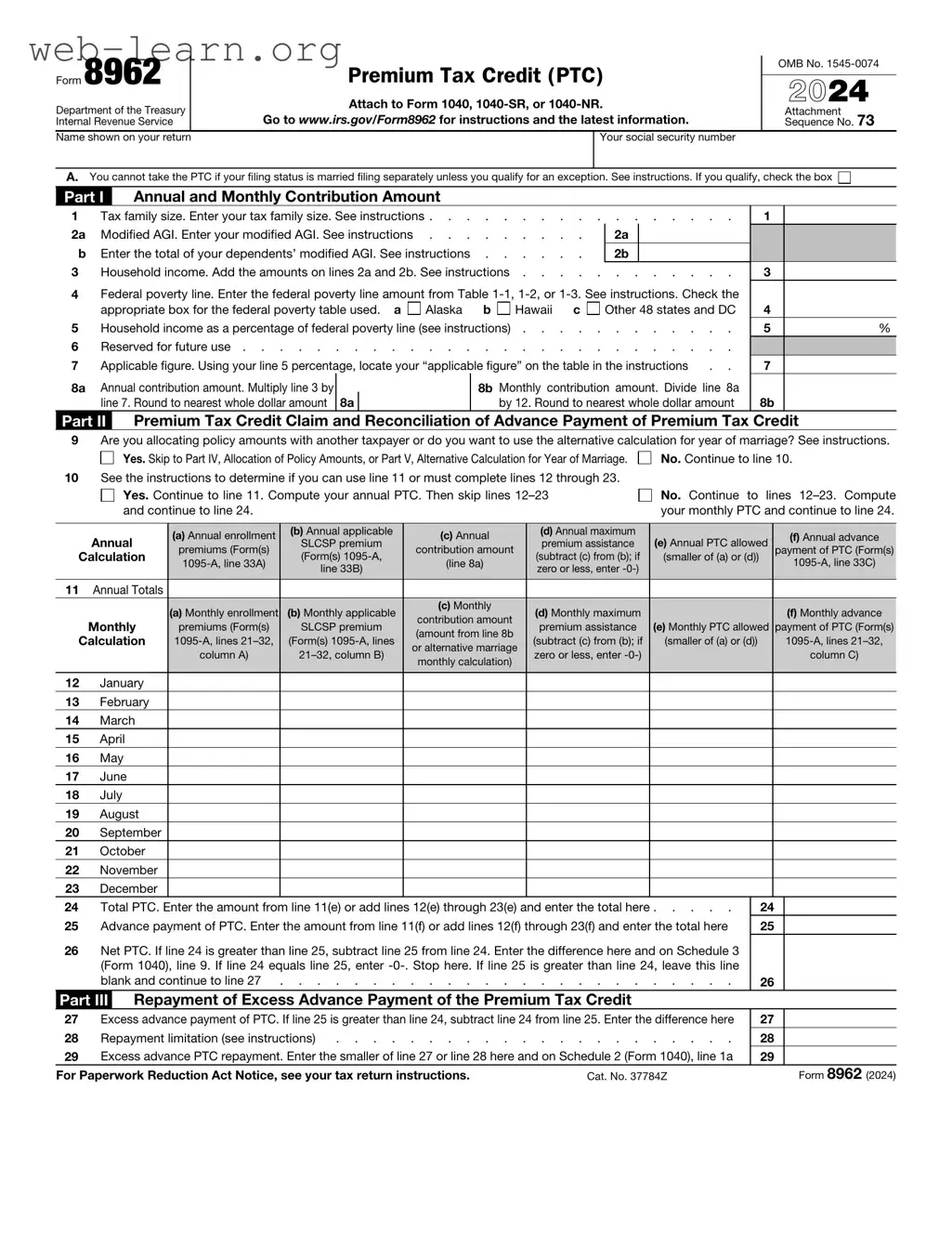
The IRS Form 8962 plays a crucial role in the Affordable Care Act (ACA) framework, specifically concerning premium tax credits. This form is essential for individuals and families who have purchased health insurance through the Health Insurance Marketplace and have received advance payments of the premium tax credit. By completing Form 8962, taxpayers can reconcile the amount of premium tax credit they received throughout the year with what they were actually eligible for based on their final income. The form requires detailed information, including household size and income, to ensure that taxpayers receive the correct amount of financial assistance. Failure to accurately fill out this form can result in the loss of premium tax credits, which can significantly impact an individual’s tax return. Understanding the nuances of Form 8962 is vital for anyone navigating the complexities of health insurance subsidies and tax implications under the ACA.
Form 8962
Department of the Treasury Internal Revenue Service
Name shown on your return
Premium Tax Credit (PTC)
Attach to Form 1040,
Go to www.irs.gov/Form8962 for instructions and the latest information.
Your social security number
OMB No.
2024
Attachment Sequence No. 73
A.You cannot take the PTC if your filing status is married filing separately unless you qualify for an exception. See instructions. If you qualify, check the box
Part I Annual and Monthly Contribution Amount
1 |
Tax family size. Enter your tax family size. See instructions |
. . . . . . . . |
|
1 |
|
||
2a |
Modified AGI. Enter your modified AGI. See instructions |
|
2a |
|
|
|
|
b |
Enter the total of your dependents’ modified AGI. See instructions |
|
2b |
|
|
|
|
3 |
Household income. Add the amounts on lines 2a and 2b. See instructions . . . . |
. . . . . . . . |
|
3 |
|
||
4Federal poverty line. Enter the federal poverty line amount from Table
|
appropriate box for the federal poverty table used. a |
Alaska |
b |
Hawaii |
c |
Other 48 states and DC |
4 |
|
|
5 |
Household income as a percentage of federal poverty line (see instructions) |
5 |
% |
||||||
6 |
Reserved for future use |
|
|
||||||
7 |
Applicable figure. Using your line 5 percentage, locate your “applicable figure” on the table in the instructions |
. . |
7 |
|
|||||
8a |
Annual contribution amount. Multiply line 3 by |
|
8b Monthly contribution amount. Divide line 8a |
|
|
||||
|
line 7. Round to nearest whole dollar amount 8a |
|
|
by 12. Round to nearest whole dollar amount |
8b |
|
|||
Part II Premium Tax Credit Claim and Reconciliation of Advance Payment of Premium Tax Credit
9Are you allocating policy amounts with another taxpayer or do you want to use the alternative calculation for year of marriage? See instructions.
Yes. Skip to Part IV, Allocation of Policy Amounts, or Part V, Alternative Calculation for Year of Marriage. |
No. Continue to line 10. |
10See the instructions to determine if you can use line 11 or must complete lines 12 through 23.
Yes. Continue to line 11. Compute your annual PTC. Then skip lines
No. Continue to lines
Annual |
(a) Annual enrollment |
(b) Annual applicable |
(c) Annual |
(d) Annual maximum |
(e) Annual PTC allowed |
(f) Annual advance |
|
SLCSP premium |
premium assistance |
||||||
premiums (Form(s) |
contribution amount |
payment of PTC (Form(s) |
|||||
Calculation |
(Form(s) |
(line 8a) |
(subtract (c) from (b); if |
(smaller of (a) or (d)) |
|||
|
line 33B) |
zero or less, enter |
|
||||
|
|
|
|
|
|||
|
|
|
|
|
|
|
11Annual Totals
|
(a) Monthly enrollment |
(b) Monthly applicable |
(c) Monthly |
(d) Monthly maximum |
|
(f) Monthly advance |
|
|
contribution amount |
|
|||||
Monthly |
premiums (Form(s) |
SLCSP premium |
premium assistance |
(e) Monthly PTC allowed |
payment of PTC (Form(s) |
||
(amount from line 8b |
|||||||
Calculation |
(Form(s) |
(subtract (c) from (b); if |
(smaller of (a) or (d)) |
||||
or alternative marriage |
|||||||
|
column A) |
zero or less, enter |
|
column C) |
|||
|
monthly calculation) |
|
|||||
|
|
|
|
|
|
||
|
|
|
|
|
|
|
12January
13February
14March
15April
16May
17June
18July
19August
20September
21October
22November
23December
24 |
Total PTC. Enter the amount from line 11(e) or add lines 12(e) through 23(e) and enter the total here |
24 |
25 |
Advance payment of PTC. Enter the amount from line 11(f) or add lines 12(f) through 23(f) and enter the total here |
25 |
26Net PTC. If line 24 is greater than line 25, subtract line 25 from line 24. Enter the difference here and on Schedule 3 (Form 1040), line 9. If line 24 equals line 25, enter
|
blank and continue to line 27 |
26 |
|
||
Part III |
Repayment of Excess Advance Payment of the Premium Tax Credit |
|
|
||
27 |
Excess advance payment of PTC. If line 25 is greater than line 24, subtract line 24 from line 25. Enter the difference here |
27 |
|
||
28 |
Repayment limitation (see instructions) |
28 |
|
||
29 |
Excess advance PTC repayment. Enter the smaller of line 27 or line 28 here and on Schedule 2 (Form 1040), line 1a |
29 |
|
||
For Paperwork Reduction Act Notice, see your tax return instructions. |
Cat. No. 37784Z |
|
Form 8962 (2024) |
||
Form 8962 (2024) |
Page 2 |
|
Part IV |
Allocation of Policy Amounts |
|
Complete the following information for up to four policy amount allocations. See instructions for allocation details.
Allocation 1
30(a) Policy Number (Form
(b)SSN of other taxpayer
(c)Allocation start month
(d)Allocation stop month
Allocation percentage applied to monthly amounts
(e)Premium Percentage
(f)SLCSP Percentage
(g)Advance Payment of the PTC Percentage
Allocation 2
31(a) Policy Number (Form
(b)SSN of other taxpayer
(c)Allocation start month
(d)Allocation stop month
Allocation percentage applied to monthly amounts
(e)Premium Percentage
(f)SLCSP Percentage
(g)Advance Payment of the PTC Percentage
Allocation 3
32(a) Policy Number (Form
(b)SSN of other taxpayer
(c)Allocation start month
(d)Allocation stop month
Allocation percentage applied to monthly amounts
(e)Premium Percentage
(f)SLCSP Percentage
(g)Advance Payment of the PTC Percentage
Allocation 4
33(a) Policy Number (Form
(b)SSN of other taxpayer
(c)Allocation start month
(d)Allocation stop month
Allocation percentage applied to monthly amounts
(e)Premium Percentage
(f)SLCSP Percentage
(g)Advance Payment of the PTC Percentage
34Have you completed all policy amount allocations?
Yes. Multiply the amounts on Form
No. See the instructions to report additional policy amount allocations.
Part V Alternative Calculation for Year of Marriage
Complete line(s) 35 and/or 36 to elect the alternative calculation for year of marriage. For eligibility to make the election, see the instructions for line 9. To complete line(s) 35 and/or 36 and compute the amounts for lines
35 |
Alternative entries |
(a) |
Alternative family size |
(b) Alternative monthly |
(c) |
Alternative start month |
(d) |
Alternative stop month |
|
|
contribution amount |
|
|
|
|
||
|
for your SSN |
|
|
|
|
|
|
|
|
|
|
|
|
|
|
|
|
|
|
|
|
|
|
|
|
|
36 |
Alternative entries |
(a) |
Alternative family size |
(b) Alternative monthly |
(c) |
Alternative start month |
(d) |
Alternative stop month |
|
|
contribution amount |
|
|
|
|
||
|
for your spouse’s |
|
|
|
|
|
|
|
|
|
|
|
|
|
|
|
|
|
SSN |
|
|
|
|
|
|
|
|
|
|
|
|
|
|
|
Form 8962 (2024) |
| Fact Name | Description |
|---|---|
| Purpose | The IRS Form 8962 is used to calculate the premium tax credit for individuals and families who purchased health insurance through the Health Insurance Marketplace. |
| Eligibility | To qualify for the premium tax credit, individuals must meet specific income requirements and must not be eligible for other types of health coverage. |
| Filing Requirement | Taxpayers must file Form 8962 with their federal tax return if they received premium tax credits during the tax year. |
| State-Specific Forms | Some states have their own forms similar to Form 8962. For example, California uses Form 3849, governed by California Health and Safety Code Section 14000. |
| Information Needed | Form 8962 requires information from Form 1095-A, which provides details about the health insurance coverage obtained through the Marketplace. |
| Impact on Refunds | Filing Form 8962 accurately can impact tax refunds. If the premium tax credit is calculated incorrectly, it may lead to a tax liability or reduced refund. |
| Deadline | Form 8962 must be submitted by the tax filing deadline, which is typically April 15, unless an extension is filed. |
Completing the IRS Form 8962 is an important step in ensuring your tax return is accurate. Follow these steps carefully to fill out the form correctly.
Once you have completed the form, you can attach it to your tax return when you file. Ensure you keep a copy for your records.
IRS Form 8962, also known as the Premium Tax Credit (PTC) form, is used to determine your eligibility for the premium tax credit. This credit helps individuals and families afford health insurance purchased through the Health Insurance Marketplace. If you received advance payments of the premium tax credit, you must file this form to reconcile the amounts you received with your actual income for the year.
Not everyone needs to file Form 8962. You are required to complete this form if you or a member of your household enrolled in a health plan through the Marketplace and received premium tax credits. Additionally, if you are claiming the premium tax credit for the first time, you will need to file this form. If you did not receive any advance payments or do not qualify for the credit, you do not need to submit this form.
Completing Form 8962 involves several steps:
It is essential to ensure that all information is accurate, as errors can lead to delays in processing your tax return or even penalties.
If you fail to file Form 8962 when required, you may face several consequences. The IRS may deny your premium tax credit, which could result in owing money when you file your taxes. Additionally, if you received advance payments of the premium tax credit, not filing the form may lead to a tax bill for the amount you received. It is important to file the form accurately and on time to avoid these issues.
Filling out the IRS Form 8962 can be a daunting task, especially for those who are not familiar with tax forms. One common mistake is failing to accurately report the premium tax credit. This credit is designed to help individuals and families afford health insurance purchased through the Health Insurance Marketplace. When taxpayers do not correctly calculate their premium tax credit, they may end up receiving too much or too little assistance, leading to potential penalties or unexpected tax bills.
Another frequent error involves incorrect personal information. It’s essential to ensure that names, Social Security numbers, and other identifying details are entered correctly. Mistakes in this area can cause significant delays in processing the form and may even result in the IRS rejecting the entire submission. Always double-check this information before submitting.
Many people also overlook the importance of matching Form 8962 with Form 1095-A. The 1095-A form provides information about the health insurance coverage obtained through the Marketplace. If the figures on these two forms do not align, it can create confusion and lead to mistakes in calculating the premium tax credit. Always compare the numbers carefully to ensure consistency.
Additionally, some filers forget to include all members of their household when determining eligibility for the premium tax credit. The IRS requires that all individuals in the household be accounted for, even if they are not covered under the same health plan. Omitting someone can affect the overall calculation and result in an inaccurate tax credit.
Finally, many taxpayers neglect to keep proper documentation. Supporting documents, such as proof of income and health insurance enrollment, are crucial if the IRS requests verification of the information provided. Without this documentation, it can be challenging to resolve any discrepancies that may arise after filing.
The IRS Form 8962, also known as the Premium Tax Credit (PTC) form, is essential for individuals who have received advance payments of the premium tax credit for health insurance coverage. However, this form often accompanies several other important documents that help ensure accurate reporting and compliance with tax regulations. Below is a list of forms and documents that are frequently used alongside Form 8962.
Understanding these forms and their purposes can significantly ease the process of filing your taxes, especially when it comes to reconciling your premium tax credits. Always ensure that you have all the necessary documentation on hand to support your claims and to avoid any potential issues with the IRS.
The IRS Form 8962 is used to calculate the Premium Tax Credit and reconcile it with advance payments of the credit. Several other documents share similar purposes or processes. Here’s a list of seven such forms:
Understanding these forms can help taxpayers navigate their financial responsibilities more effectively. Each document plays a role in ensuring that individuals receive the correct benefits and credits available to them.
When filling out the IRS Form 8962, which is used to claim the Premium Tax Credit, there are several important dos and don'ts to keep in mind. Following these guidelines can help ensure that your application is accurate and complete.
By adhering to these guidelines, you can navigate the process of completing Form 8962 more smoothly and increase your chances of receiving the tax credit you deserve.
The IRS Form 8962, also known as the Premium Tax Credit form, is essential for many taxpayers who receive health coverage through the Health Insurance Marketplace. However, several misconceptions surround this form that can lead to confusion. Here are eight common misconceptions explained.
While the form is primarily used to reconcile premium tax credits, it is also necessary for those who need to report health coverage status, even if they did not receive credits.
If you had health coverage through the Marketplace, you will need the 1095-A to complete Form 8962. Without it, you cannot accurately report your premium tax credits.
For those who received premium tax credits, filing Form 8962 is mandatory. Failing to file can lead to penalties or the loss of future credits.
This form must be submitted with your tax return. If you realize you need to file it after your return has been submitted, you may need to amend your return.
While many low-income individuals benefit from premium tax credits, anyone who qualifies for coverage through the Marketplace may need to file Form 8962, regardless of income level.
If you had Marketplace coverage at any point during the year, you still need to file Form 8962, even if you later switched to employer-sponsored insurance.
In reality, you will need various documents, such as your 1095-A, income information, and details about your household size to accurately complete the form.
Errors can complicate your tax situation. It’s crucial to double-check your entries before submitting to avoid delays or issues with your tax refund.
Understanding these misconceptions can help you navigate the tax process more effectively. Taking the time to learn about Form 8962 can save you from potential pitfalls and ensure you receive any benefits to which you are entitled.
When filling out and using the IRS Form 8962, there are several important points to keep in mind:
Understanding these key points can help ensure that you accurately complete Form 8962 and maximize your tax benefits.