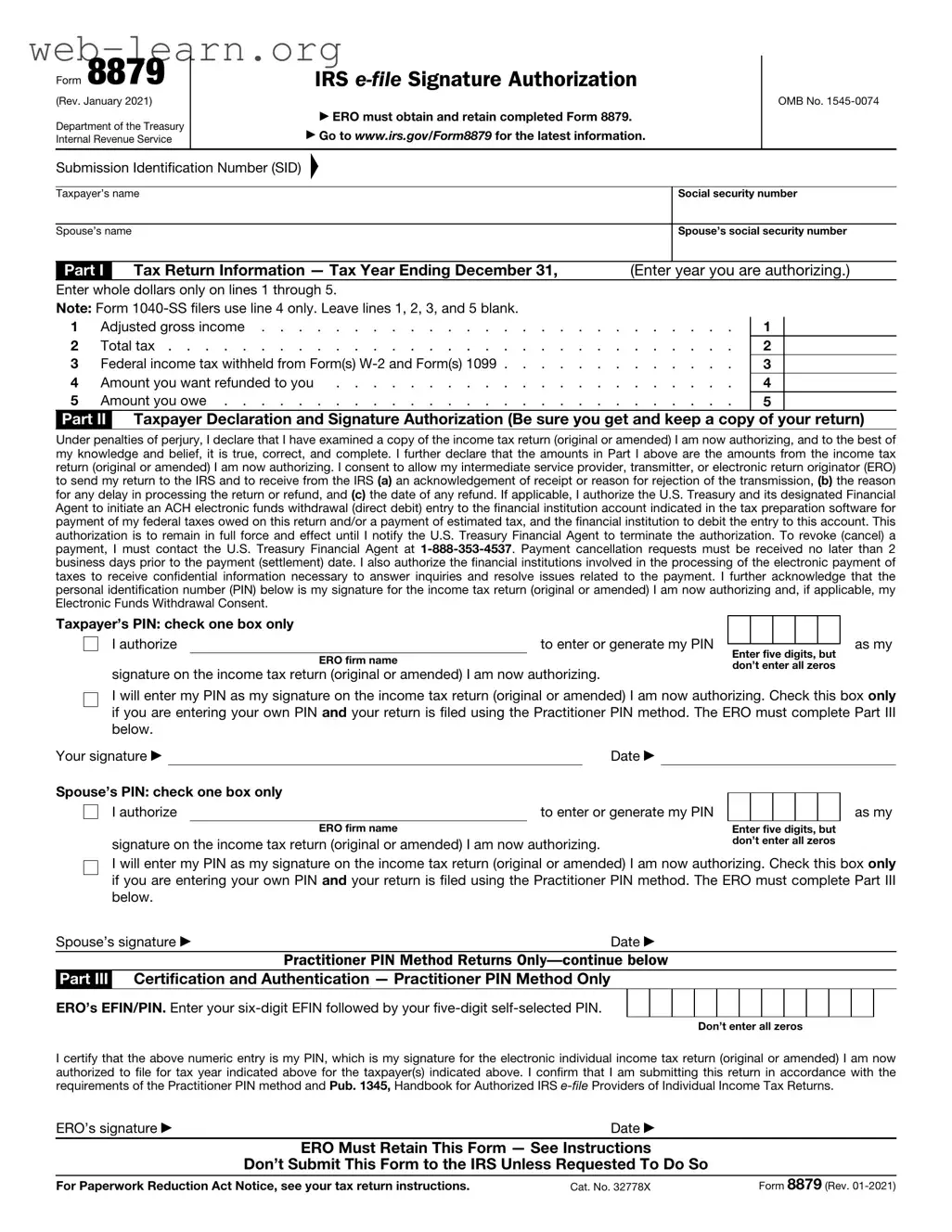
The IRS 8879 form plays a crucial role in the tax filing process for many individuals and businesses. This form serves as an e-signature document, allowing taxpayers to authorize their tax preparers to electronically file their returns on their behalf. By using Form 8879, taxpayers can ensure that their returns are submitted accurately and on time, while also providing a layer of security and verification. The form requires essential information, including the taxpayer’s name, Social Security number, and details about the tax return being filed. Importantly, it also includes a section for the tax preparer to sign, confirming that they have completed the return in accordance with IRS guidelines. Understanding the significance of this form can help taxpayers navigate the complexities of electronic filing, ensuring compliance with federal regulations while streamlining the overall tax preparation process.
Form 8879
(Rev. January 2021)
Department of the Treasury Internal Revenue Service
IRS
▶ ERO must obtain and retain completed Form 8879.
▶Go to www.irs.gov/Form8879 for the latest information.
OMB No.
Submission Identification Number (SID)
▲
Taxpayer’s name |
|
|
|
Social security number |
||||
|
|
|
|
|
|
|
||
Spouse’s name |
|
|
|
|
Spouse’s social security number |
|||
|
|
|
|
|
|
|||
Part I |
|
Tax Return Information — Tax Year Ending December 31, |
|
(Enter |
year you are authorizing.) |
|||
Enter whole dollars only on lines 1 through 5. |
|
|
|
|
|
|||
Note: Form |
|
|
|
|
|
|||
1 |
Adjusted gross income |
. |
. . |
. |
. . . |
1 |
||
2 |
Total tax |
. |
. . |
. |
. . . |
2 |
||
3 |
Federal income tax withheld from Form(s) |
. |
. . |
. |
. . . |
3 |
||
4 |
Amount you want refunded to you |
. |
. . |
. |
. . . |
4 |
||
5 |
Amount you owe |
. |
. . |
. |
. . . |
5 |
||
Part II Taxpayer Declaration and Signature Authorization (Be sure you get and keep a copy of your return)
Under penalties of perjury, I declare that I have examined a copy of the income tax return (original or amended) I am now authorizing, and to the best of my knowledge and belief, it is true, correct, and complete. I further declare that the amounts in Part I above are the amounts from the income tax return (original or amended) I am now authorizing. I consent to allow my intermediate service provider, transmitter, or electronic return originator (ERO) to send my return to the IRS and to receive from the IRS (a) an acknowledgement of receipt or reason for rejection of the transmission, (b) the reason for any delay in processing the return or refund, and (c) the date of any refund. If applicable, I authorize the U.S. Treasury and its designated Financial Agent to initiate an ACH electronic funds withdrawal (direct debit) entry to the financial institution account indicated in the tax preparation software for payment of my federal taxes owed on this return and/or a payment of estimated tax, and the financial institution to debit the entry to this account. This authorization is to remain in full force and effect until I notify the U.S. Treasury Financial Agent to terminate the authorization. To revoke (cancel) a payment, I must contact the U.S. Treasury Financial Agent at
Taxpayer’s PIN: check one box only |
|
|
|
|
|
|
|
||
I authorize |
|
|
to enter or generate my PIN |
|
|
|
|
|
|
|
Enter five digits, but |
||||||||
|
|
ERO firm name |
|||||||
|
|
don’t enter all zeros |
|||||||
signature on the income tax return (original or amended) I am now authorizing. |
|||||||||
|
|
|
|
|
|||||
as my
I will enter my PIN as my signature on the income tax return (original or amended) I am now authorizing. Check this box only if you are entering your own PIN and your return is filed using the Practitioner PIN method. The ERO must complete Part III below.
Your signature ▶ |
|
|
Date ▶ |
|
|
|
|
|
|
Spouse’s PIN: check one box only |
|
|
|
|
|
|
|
||
|
|
|
|
|
|
|
|||
I authorize |
to enter or generate my PIN |
|
|
|
|
|
|||
|
|
ERO firm name |
|
|
Enter five digits, but |
||||
signature on the income tax return (original or amended) I am now authorizing. |
don’t enter all zeros |
||||||||
as my
I will enter my PIN as my signature on the income tax return (original or amended) I am now authorizing. Check this box only if you are entering your own PIN and your return is filed using the Practitioner PIN method. The ERO must complete Part III below.
Spouse’s signature ▶ |
Date ▶ |
|
Practitioner PIN Method Returns |
Part III Certification and Authentication — Practitioner PIN Method Only
ERO’s EFIN/PIN. Enter your
Don’t enter all zeros
I certify that the above numeric entry is my PIN, which is my signature for the electronic individual income tax return (original or amended) I am now authorized to file for tax year indicated above for the taxpayer(s) indicated above. I confirm that I am submitting this return in accordance with the requirements of the Practitioner PIN method and Pub. 1345, Handbook for Authorized IRS
ERO’s signature ▶ |
Date ▶ |
|
ERO Must Retain This Form — See Instructions |
|
|
Don’t Submit This Form to the IRS Unless Requested To Do So |
|
|
For Paperwork Reduction Act Notice, see your tax return instructions. |
Cat. No. 32778X |
Form 8879 (Rev. |
Form 8879 (Rev. |
Page 2 |
General Instructions
Section references are to the Internal Revenue Code unless otherwise noted.
Future developments. For the latest information about developments related to Form 8879 and its instructions, such as legislation enacted after they were published, go to www.irs.gov/Form8879.
What's New. Form 8879 is used to authorize the electronic filing
Purpose of Form
Form 8879 is the declaration document and signature authorization for an
|
|
▲ |
|
! |
Don’t send this form to the IRS. |
The ERO must retain Form 8879. |
|
CAUTION |
|
When and How To Complete
Use this chart to determine when and how to complete Form 8879.
IF the ERO is . . . |
THEN . . . |
|
|
|
|
Not using the Practitioner |
Don’t complete |
|
PIN method and the |
Form 8879. |
|
taxpayer enters his or her |
|
|
own PIN |
|
|
|
|
|
Not using the Practitioner |
Complete Form |
|
PIN method and is |
8879, Parts I and II. |
|
authorized to enter or |
|
|
generate the taxpayer’s |
|
|
PIN |
|
|
|
|
|
Using the Practitioner PIN |
Complete Form 8879, |
|
method and is authorized |
Parts I, II, and III. |
|
to enter or generate the |
|
|
taxpayer’s PIN |
|
|
|
|
|
Using the Practitioner PIN |
Complete Form 8879, |
|
Parts I, II, and III. |
||
method and the taxpayer |
||
|
||
enters his or her own PIN |
|
|
|
|
ERO Responsibilities
The ERO must:
1.Enter the name(s) and social security number(s) of the taxpayer(s) at the top of the form.
2.Complete Part I using the amounts (zeros may be entered when appropriate) from the taxpayer’s tax return. Form
3.Enter or generate, if authorized by the taxpayer, the taxpayer’s PIN and enter it in the boxes provided in Part II.
4.Enter on the authorization line in Part II the ERO firm name (not the name of the individual preparing the return) if the ERO is authorized to enter the taxpayer’s PIN.
5.Provide the taxpayer(s) Form 8879 by hand delivery, U.S. mail, private delivery service, email, Internet website, or fax.
6.Enter the
You must receive the completed ▲! and signed Form 8879 from the
taxpayer before the electronic CAUTION return is transmitted (or released
for transmission).
For additional information, see Pub. 1345.
Taxpayer Responsibilities
Taxpayers must:
1.Verify the accuracy of the prepared income tax return, including direct deposit information.
2.Check the appropriate box in Part II to authorize the ERO to enter or generate your PIN or to do it yourself.
3.Indicate or verify your PIN when authorizing the ERO to enter or generate it (the PIN must be five digits other than all zeros).
4.Sign and date Form 8879. Taxpayers must sign Form 8879 by handwritten signature, or electronic signature if supported by computer software.
5.Return the completed Form 8879 to the ERO by hand delivery, U.S. mail, private delivery service, email, Internet website, or fax.
Your return won’t be transmitted to the IRS until the ERO receives your signed Form 8879.
Refund information. You can check on the status of your refund if it has been at least 72 hours since the IRS acknowledged receipt of your
•Go to www.irs.gov/Refunds.
•Call
•Call
Important Notes for EROs
•Don’t send Form 8879 to the IRS unless requested to do so. Retain the completed Form 8879 for 3 years from the return due date or IRS received date, whichever is later. Form 8879 may be retained electronically in accordance with the recordkeeping guidelines in Rev. Proc.
•Confirm the identity of the taxpayer(s).
•Complete Part III only if you are filing the return using the Practitioner PIN method. You aren’t required to enter the taxpayer’s date of birth, prior year adjusted gross income, or PIN in the Authentication Record of the electronically filed return.
•If you aren’t using the Practitioner PIN method, enter the taxpayer(s) date of birth and either the adjusted gross income or the PIN, or both, from the taxpayer’s prior year originally filed return in the Authentication Record of the taxpayer’s electronically filed return. Don’t use an amount from an amended return or a math error correction made by the IRS.
•Enter the taxpayer’s PIN(s) on the input screen only if the taxpayer has authorized you to do so. If married filing jointly, it is acceptable for one spouse to authorize you to enter his or her PIN, and for the other spouse to enter his or her own PIN. It isn’t acceptable for a taxpayer to select or enter the PIN of an absent spouse.
•Taxpayers must use a PIN to sign their
•Provide the taxpayer with a copy of the signed Form 8879 for his or her records upon request.
•Provide the taxpayer with a corrected copy of Form 8879 if changes are made to the return (for example, based on taxpayer review).
•EROs can sign the form using a rubber stamp, mechanical device (such as a signature pen), or computer software program. See Notice
•Go to www.irs.gov/Efile for the latest information.
| Fact Name | Description |
|---|---|
| Purpose | The IRS Form 8879 is used to authorize an electronic return originator (ERO) to file your tax return electronically. |
| Signature | This form serves as your electronic signature, confirming that you approve the return being filed. |
| Eligibility | Individuals filing Form 1040 can use Form 8879, but it is not required for all taxpayers. |
| Filing Deadline | The form must be signed and dated before the electronic return is submitted to the IRS. |
| Record Keeping | Taxpayers should keep a copy of Form 8879 for their records for at least three years. |
| State-Specific Forms | Some states have their own versions of Form 8879; check state laws for specific requirements. |
| Governing Law | For example, California requires Form 8879 for e-filing, governed by California Revenue and Taxation Code Section 18621. |
| Signature Requirements | Both the taxpayer and the ERO must sign the form, either electronically or in writing. |
| Form Updates | The IRS may update Form 8879 annually; always use the latest version available. |
| Submission Method | Form 8879 must be submitted to the ERO, not the IRS, as part of the e-filing process. |
After gathering all necessary information, the next step involves completing the IRS Form 8879. This form is essential for electronically filing your tax return. It requires accurate information to ensure a smooth submission process.
Once completed, the form should be submitted to your tax preparer or e-filed as directed. Ensure that all information is accurate to avoid delays in processing your tax return.
What is the IRS 8879 form?
The IRS 8879 form, also known as the IRS e-file Signature Authorization, allows taxpayers to authorize their tax preparers to electronically file their federal income tax returns on their behalf. This form serves as a signature for the taxpayer, confirming that they have reviewed their tax return and agree with its contents.
Who needs to complete the IRS 8879 form?
Any taxpayer who chooses to have their tax return filed electronically by a tax preparer must complete the IRS 8879 form. This includes individuals, families, and business owners who utilize professional tax services. It is essential for those who want to ensure their return is filed accurately and timely.
How do I fill out the IRS 8879 form?
To complete the IRS 8879 form, follow these steps:
It is crucial to ensure that all information is accurate before signing the form.
Is the IRS 8879 form required for all tax returns?
No, the IRS 8879 form is not required for all tax returns. It is specifically needed when a tax preparer is filing your return electronically. If you are filing your taxes by mail or preparing your return yourself without a preparer, you do not need to complete this form.
What should I do if I make a mistake on the IRS 8879 form?
If you notice an error on the IRS 8879 form after you have signed it, contact your tax preparer immediately. They can assist you in correcting the information and may need to file an amended return if the mistake affects your tax filing. Prompt communication can help resolve any issues quickly.
Filling out the IRS Form 8879, which is the "IRS e-file Signature Authorization," is a crucial step in the electronic filing process. However, many individuals encounter pitfalls that can delay their tax returns or lead to complications. One common mistake is failing to provide accurate personal information. Taxpayers must ensure that their name, Social Security number, and address are entered correctly. Even a small typographical error can result in significant issues, including the rejection of the e-filed return.
Another frequent error involves not signing the form properly. The IRS requires a signature from both the taxpayer and the tax preparer, if applicable. Sometimes, individuals overlook this requirement, thinking that electronic submission negates the need for a signature. However, the IRS mandates that the form must be signed to validate the e-filing process. Without the necessary signatures, the return may be considered incomplete.
Some taxpayers also neglect to review the information on the form thoroughly. It’s essential to double-check all entries before submission. Mistakes in the income figures, deductions, or credits can lead to discrepancies that may trigger audits or delays in processing. Taking the time to review the form can prevent these issues and ensure a smoother filing experience.
Another mistake is not keeping a copy of the signed Form 8879 for personal records. This form serves as proof that the taxpayer authorized the e-filing of their return. If questions arise later, having a copy can be invaluable. Individuals should always retain a copy of their tax documents, including Form 8879, for at least three years.
Additionally, some people fail to understand the implications of the form regarding their tax preparer's responsibilities. Taxpayers should be aware that by signing the 8879, they are also affirming that they have reviewed their return and that it is accurate to the best of their knowledge. This means that if any discrepancies arise, the taxpayer may bear some responsibility, even if a preparer filed the return on their behalf.
Lastly, individuals sometimes overlook the submission deadlines associated with Form 8879. The IRS has specific timelines for e-filing, and failing to submit the form on time can lead to penalties or complications with the tax return. Being mindful of these deadlines is crucial to avoid unnecessary stress and ensure compliance with IRS regulations.
The IRS 8879 form, also known as the "IRS e-file Signature Authorization," is commonly used in conjunction with several other forms and documents during the tax filing process. Below is a list of related documents that taxpayers and tax professionals often utilize alongside the IRS 8879. Each document serves a specific purpose in ensuring compliance and accuracy in tax reporting.
Understanding these forms and documents is essential for a smooth tax filing experience. Each one plays a vital role in accurately reporting income, claiming deductions, and ensuring compliance with IRS regulations. Proper documentation not only facilitates the e-filing process but also helps in addressing any potential inquiries from the IRS.
The IRS Form 8879, known as the IRS e-file Signature Authorization, is an important document for taxpayers who e-file their tax returns. It serves as a way for taxpayers to authorize their tax preparers to submit their returns electronically. There are several other documents that share similarities with Form 8879 in terms of purpose and function. Below is a list of nine such documents:
Each of these forms plays a crucial role in the tax process, ensuring that necessary authorizations and validations are in place for compliance and accuracy.
The IRS Form 8879, also known as the e-file Signature Authorization, is an important document for taxpayers who want to electronically file their tax returns. Here are some essential dos and don'ts to keep in mind when filling out this form:
Following these guidelines will help ensure a smooth and efficient e-filing process with the IRS.
The IRS 8879 form, also known as the "IRS e-file Signature Authorization," is essential for taxpayers who choose to file their returns electronically. However, several misconceptions surround this form. Below are six common misunderstandings:
This is not true. The IRS 8879 can be used by any taxpayer who files electronically, regardless of their employment status.
Actually, signing the IRS 8879 simply authorizes the e-filing of your return. The return itself must still be submitted separately by your tax preparer.
This is incorrect. The IRS requires the 8879 form to be completed for electronic filing, as it serves as your signature and consent.
This misconception is misleading. The form is required regardless of whether you owe taxes or are expecting a refund.
This is false. The IRS 8879 must be signed and submitted before your tax return is filed electronically. It is part of the e-filing process.
This is not accurate. The IRS 1040 form is the actual tax return, while the 8879 form is an authorization for e-filing that accompanies it.
When it comes to the IRS 8879 form, understanding its purpose and how to use it effectively is crucial for taxpayers. Here are some key takeaways: