Homepage Blank Employee Form
Outline

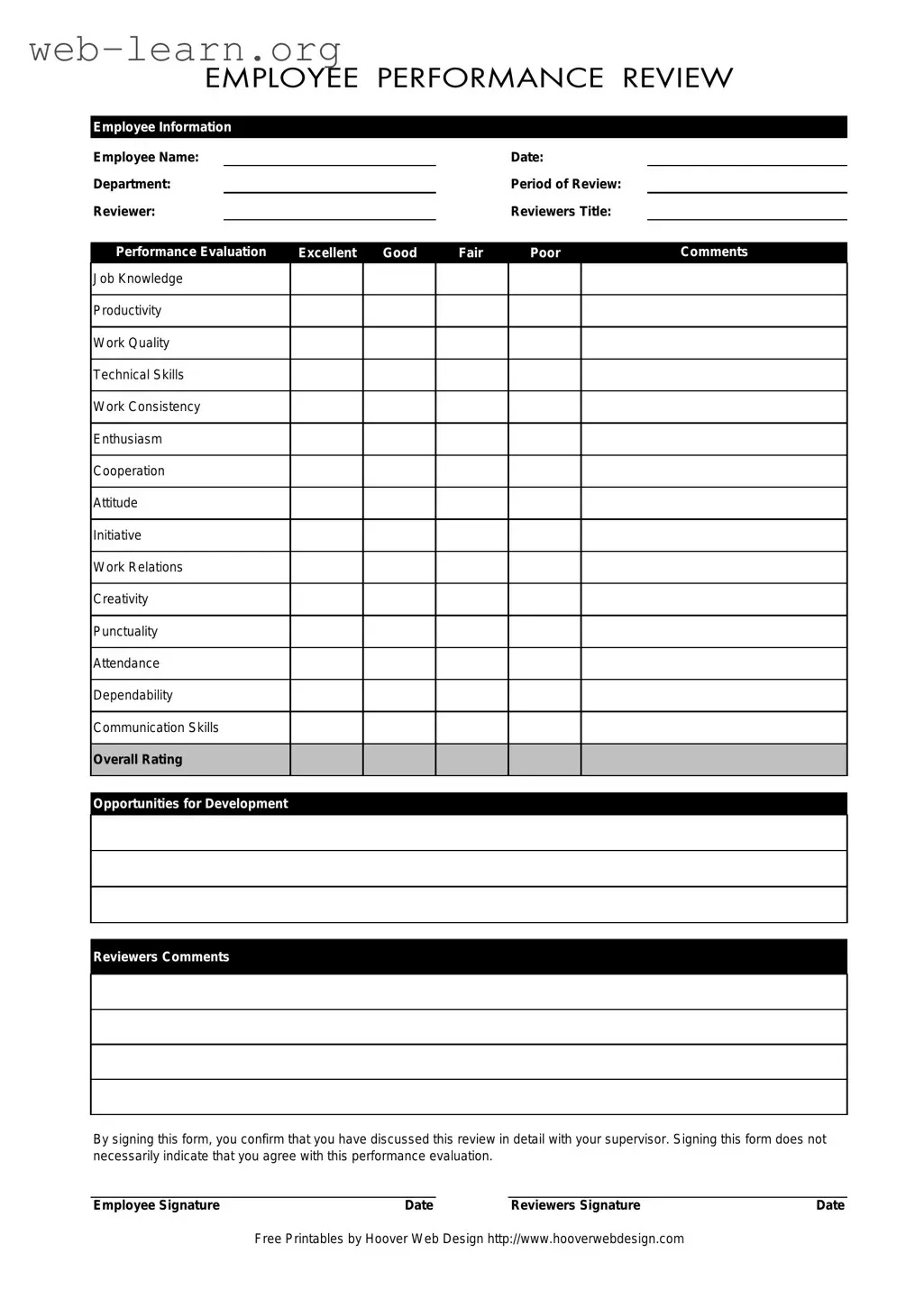
The Employee form serves as a crucial tool in the performance evaluation process, providing a structured framework for assessing an employee's contributions and areas for improvement. It begins with essential employee information, including the employee's name, department, and the period of review, ensuring that all evaluations are properly documented and attributed. The form is completed by a reviewer, who notes their title and provides a comprehensive assessment of the employee's performance across various categories such as job knowledge, productivity, and work quality. Each category is rated on a scale from excellent to poor, allowing for a nuanced understanding of the employee's strengths and weaknesses. Additionally, the form encourages qualitative feedback through comments on technical skills, enthusiasm, cooperation, and communication skills, among others. The overall rating summarizes the reviewer's assessment, while sections for opportunities for development and reviewers' comments guide future growth. Finally, both the employee and reviewer are required to sign the form, indicating that the evaluation has been discussed, though the signature does not imply agreement with the assessment. This multifaceted approach not only fosters clear communication but also supports the employee's professional development.
Sample - Employee Form

Employee Information
Employee Name: Date:
Department: Period of Review:
Reviewer: Reviewers Title:
Excellent Good Fair Poor
Job Knowledge
Productivity
Work Quality
Technical Skills
Work Consistency
Enthusiasm
Cooperation
Attitude
Initiative
Work Relations
Creativity
Punctuality
Attendance
Dependability
Communication Skills
Overall Rating
Opportunities for Development
Reviewers Comments
By signing this form, you confirm that you have discussed this review in detail with your supervisor. Signing this form does not
necessarily indicate that you agree with this performance evaluation.
Employee Signature Date Reviewers Signature Date
CommentsPerformance Evaluation

Free Printables by Hoover Web Design http://www.hooverwebdesign.com

Form Information

Fact Name Description
Employee Information This section collects essential details about the employee, including name, date, department, and review period.
Performance Evaluation Criteria The form includes various categories for evaluating performance such as job knowledge, productivity, and work quality.
Rating Scale Performance is assessed using a scale of excellent, good, fair, and poor, allowing for a clear evaluation of the employee's performance.
Reviewer's Information Details about the reviewer, including their title, are required to ensure accountability and clarity in the evaluation process.
Opportunities for Development This section encourages constructive feedback, highlighting areas where the employee can improve and grow.
Signatures Both the employee and the reviewer must sign the form, confirming that the evaluation has been discussed in detail.
Governing Laws State-specific employment laws govern the use of performance evaluation forms, ensuring compliance with regulations.

Detailed Guide for Filling Out Employee

Completing the Employee form is an important step in the performance evaluation process. After filling out this form, it will be reviewed by your supervisor, and both parties will discuss the evaluation in detail. Follow the steps below to ensure accurate and complete submission.

  1. Enter your Employee Name at the top of the form.
  2. Fill in the Date of completion.
  3. Specify your Department.
  4. Indicate the Period of Review.
  5. Provide the Reviewer's name.
  6. Input the Reviewer's Title.
  7. Evaluate your performance in the following areas by selecting one of the options: Excellent, Good, Fair, or Poor for each category:
    • Job Knowledge
    • Productivity
    • Work Quality
    • Technical Skills
    • Work Consistency
    • Enthusiasm
    • Cooperation
    • Attitude
    • Initiative
    • Work Relations
    • Creativity
    • Punctuality
    • Attendance
    • Dependability
    • Communication Skills
  8. Provide an Overall Rating based on your self-assessment.
  9. Identify any Opportunities for Development that you see fit.
  10. Include any Reviewer's Comments if applicable.
  11. Sign the form in the Employee Signature section and date it.
  12. Ensure the Reviewer also signs and dates the form.

Obtain Answers on Employee

  1. What information is required on the Employee form?

    The Employee form requires several key pieces of information. You will need to provide:

    • Employee Name
    • Date
    • Department
    • Period of Review
    • Reviewer Name
    • Reviewer's Title

    This information helps ensure that the performance evaluation is properly documented and attributed to the right individuals.

  2. How is the performance evaluation scored?

    The performance evaluation is scored using four categories: Excellent, Good, Fair, and Poor. Each category reflects the employee's performance in various areas, including:

    • Job Knowledge
    • Productivity
    • Work Quality
    • Technical Skills
    • Work Consistency
    • Enthusiasm
    • Cooperation
    • Attitude
    • Initiative
    • Work Relations
    • Creativity
    • Punctuality
    • Attendance
    • Dependability
    • Communication Skills

    Each category allows for a comprehensive assessment of the employee's overall performance.

  3. What should I include in the comments section?

    The comments section is an opportunity to provide specific feedback. Consider including:

    • Examples of strong performance
    • Areas needing improvement
    • Suggestions for professional development

    Specific feedback helps the employee understand their strengths and areas for growth.

  4. What does the overall rating signify?

    The overall rating summarizes the employee's performance across all evaluated areas. It reflects the reviewer’s assessment of the employee’s contributions and effectiveness in their role. This rating can be crucial for future opportunities, such as promotions or raises.

  5. What does signing the form mean?

    By signing the Employee form, the employee confirms that they have discussed the review in detail with their supervisor. However, it’s important to note that signing does not necessarily indicate agreement with the performance evaluation. It simply acknowledges that the discussion took place.

  6. What happens if an employee disagrees with their evaluation?

    If an employee disagrees with their evaluation, they should discuss their concerns with their supervisor. Open communication can lead to a better understanding of the evaluation process and may provide an opportunity for the employee to express their perspective.

  7. How can I ensure a fair evaluation process?

    To ensure a fair evaluation process, both the reviewer and the employee should engage in honest dialogue. Setting clear performance expectations at the beginning of the review period can also help. Regular check-ins throughout the period allow for ongoing feedback, making the evaluation process more transparent and constructive.

Common mistakes

Completing the Employee form can be a straightforward task, but several common mistakes can lead to complications. One frequent error is leaving sections blank. When employees skip filling out required fields such as Employee Name or Date, it creates confusion and may delay the review process. Each piece of information is essential for proper documentation and tracking.

Another mistake involves providing inaccurate information. Employees sometimes misstate their Department or the Period of Review. This can lead to mismatched records and complicate future evaluations. Accuracy is key to maintaining a clear performance history.

Additionally, some individuals may overlook the importance of comments. The Comments section under each evaluation criterion is an opportunity to provide context and specifics. Failing to include thoughtful comments can result in a lack of clarity about performance strengths and areas needing improvement.

Many also neglect to review their signatures. The Employee Signature and Reviewers Signature sections must be completed correctly. If signatures are missing or incorrectly dated, it can invalidate the evaluation. This step is crucial for confirming that discussions took place.

Finally, some employees do not engage in the review process adequately. Signing the form without having a detailed discussion with the supervisor can lead to misunderstandings about performance. It is important to ensure that all aspects of the review are understood before signing. Taking the time to clarify any uncertainties can lead to a more productive evaluation experience.

Documents used along the form

When managing employee performance and development, several forms and documents complement the Employee form. Each document serves a specific purpose and contributes to a comprehensive evaluation process. Below is a list of commonly used forms that support the Employee form.

  • Job Description: This document outlines the specific responsibilities, duties, and expectations associated with a particular position. It serves as a reference point for performance evaluations.
  • Performance Improvement Plan (PIP): A PIP is used when an employee's performance does not meet expectations. It details specific goals and a timeline for improvement.
  • Self-Assessment Form: Employees complete this form to reflect on their own performance, achievements, and areas for growth. It encourages self-reflection and personal accountability.
  • Peer Review Form: This document allows colleagues to provide feedback on an employee’s performance. Peer insights can offer a different perspective on teamwork and collaboration.
  • Training and Development Plan: This plan outlines opportunities for employee growth, including training sessions, workshops, and other resources to enhance skills and knowledge.
  • Goals and Objectives Document: This form sets specific, measurable goals for employees to achieve within a designated timeframe. It aligns individual performance with organizational objectives.
  • Exit Interview Form: Used when an employee leaves the organization, this form gathers feedback on their experience and reasons for departure. It can provide valuable insights for improvement.
  • Attendance Record: This document tracks employee attendance, including absences and tardiness. It is essential for evaluating reliability and commitment.
  • Compensation Review Form: This form assesses an employee's salary and benefits in relation to their performance and market standards. It is often part of the annual review process.

Each of these documents plays a vital role in the employee evaluation process. Together, they provide a well-rounded view of performance, helping both employees and supervisors to engage in meaningful discussions about development and growth.

Similar forms

  • Performance Appraisal Form: Similar to the Employee form, this document assesses an employee’s performance over a specific period, focusing on various skills and competencies.
  • Employee Evaluation Form: This form evaluates an employee’s work performance, providing a structured way to give feedback on strengths and areas for improvement.
  • Self-Assessment Form: Employees fill out this form to evaluate their own performance, often reflecting on the same criteria as the Employee form.
  • Probationary Review Form: Used for new employees, this document reviews their performance during the probation period, similar in structure to the Employee form.
  • 360-Degree Feedback Form: This comprehensive evaluation gathers feedback from peers, supervisors, and subordinates, covering similar performance metrics.
  • Training Needs Assessment: This document identifies areas where an employee may need further development, paralleling the opportunities for development section in the Employee form.
  • Goal Setting Form: This form outlines specific objectives for employees, often referencing the same performance areas highlighted in the Employee form.
  • Employee Recognition Form: Used to acknowledge outstanding performance, this document shares some evaluative criteria with the Employee form.
  • Exit Interview Form: This form gathers feedback from departing employees about their experiences, often reflecting on performance and workplace relations.
  • Promotion Review Form: Similar to the Employee form, this document assesses an employee’s readiness for promotion based on their performance and skills.

Dos and Don'ts

When filling out the Employee form, it’s important to be thorough and accurate. Here are some guidelines to help ensure the process goes smoothly.

Things You Should Do:

  • Read the entire form carefully before starting.
  • Fill in all required fields, including names and dates.
  • Provide specific comments for each performance category.
  • Be honest and objective in your evaluations.
  • Discuss the review with your supervisor if needed.
  • Sign and date the form to confirm your participation.
  • Keep a copy for your records after submission.

Things You Shouldn't Do:

  • Skip any sections of the form.
  • Use vague language in your comments.
  • Make personal attacks or unprofessional remarks.
  • Forget to double-check your spelling and grammar.
  • Submit the form without discussing it with your supervisor.
  • Assume that signing means you agree with everything.
  • Neglect to follow any specific instructions provided.

Misconceptions

Misconceptions about the Employee form can lead to confusion and misinterpretation. Here are four common misunderstandings:

  • Signing the form means you agree with the evaluation. Many people believe that signing the Employee form indicates agreement with the performance review. In reality, the signature simply confirms that the discussion took place, not that the employee agrees with the evaluation.
  • All evaluations are purely subjective. Some assume that performance evaluations are entirely based on personal opinions. While personal observations play a role, the form includes specific criteria like job knowledge and productivity to guide the review process.
  • The form is only for negative feedback. A common myth is that the Employee form is used solely to highlight areas of improvement. In fact, it also recognizes strengths and accomplishments, providing a balanced view of an employee's performance.
  • Only supervisors can fill out the form. Some believe that only the reviewer can complete the form. However, employees have the opportunity to provide comments and feedback, making it a collaborative process.

Key takeaways

When filling out the Employee form, it is essential to approach the process with care and attention to detail. Here are some key takeaways to keep in mind:

  • Accurate Information: Ensure that all personal and departmental information is filled out correctly. Mistakes can lead to confusion during the review process.
  • Performance Ratings: Carefully assess each performance category, such as Job Knowledge and Work Quality. Your ratings should reflect the employee's actual performance over the review period.
  • Constructive Comments: Provide specific comments for each performance category. This feedback can help the employee understand their strengths and areas for improvement.
  • Opportunities for Development: Clearly outline any opportunities for growth. This can guide the employee in their professional development and future performance.
  • Signatures Required: Both the employee and the reviewer must sign the form. This confirms that the review has been discussed, but it does not necessarily imply agreement with the evaluation.
  • Documentation: Keep a copy of the completed form for your records. This documentation can be valuable for future reference and performance discussions.

By following these guidelines, the Employee form can serve as a valuable tool for performance evaluation and development. It is designed to facilitate constructive conversations about an employee's contributions and growth within the organization.