Homepage Blank Dr8453 Colorado Form
Outline

The DR 8453 form is an essential document for Colorado taxpayers who are filing their income tax returns electronically. This form serves as a declaration that the information provided in the tax return is accurate and complete. At its core, the DR 8453 captures critical data, including the taxpayer's total income, taxable income, and any applicable withholding or refund amounts as reported on the federal Form 1040 and Colorado Form 104. In addition, it requires signatures from both the taxpayer and, if applicable, their spouse, affirming the validity of the information submitted. For those utilizing an Electronic Return Originator (ERO) or tax preparer, the form also mandates the ERO's signature and identification number, ensuring accountability in the filing process. It’s important to note that the DR 8453 must be retained for the taxpayer's records and is not submitted to the IRS or the Colorado Department of Revenue. This document plays a pivotal role in maintaining compliance with state regulations, and understanding its requirements is vital for a smooth filing experience.

Sample - Dr8453 Colorado Form

For help, visit Tax.Colorado.gov
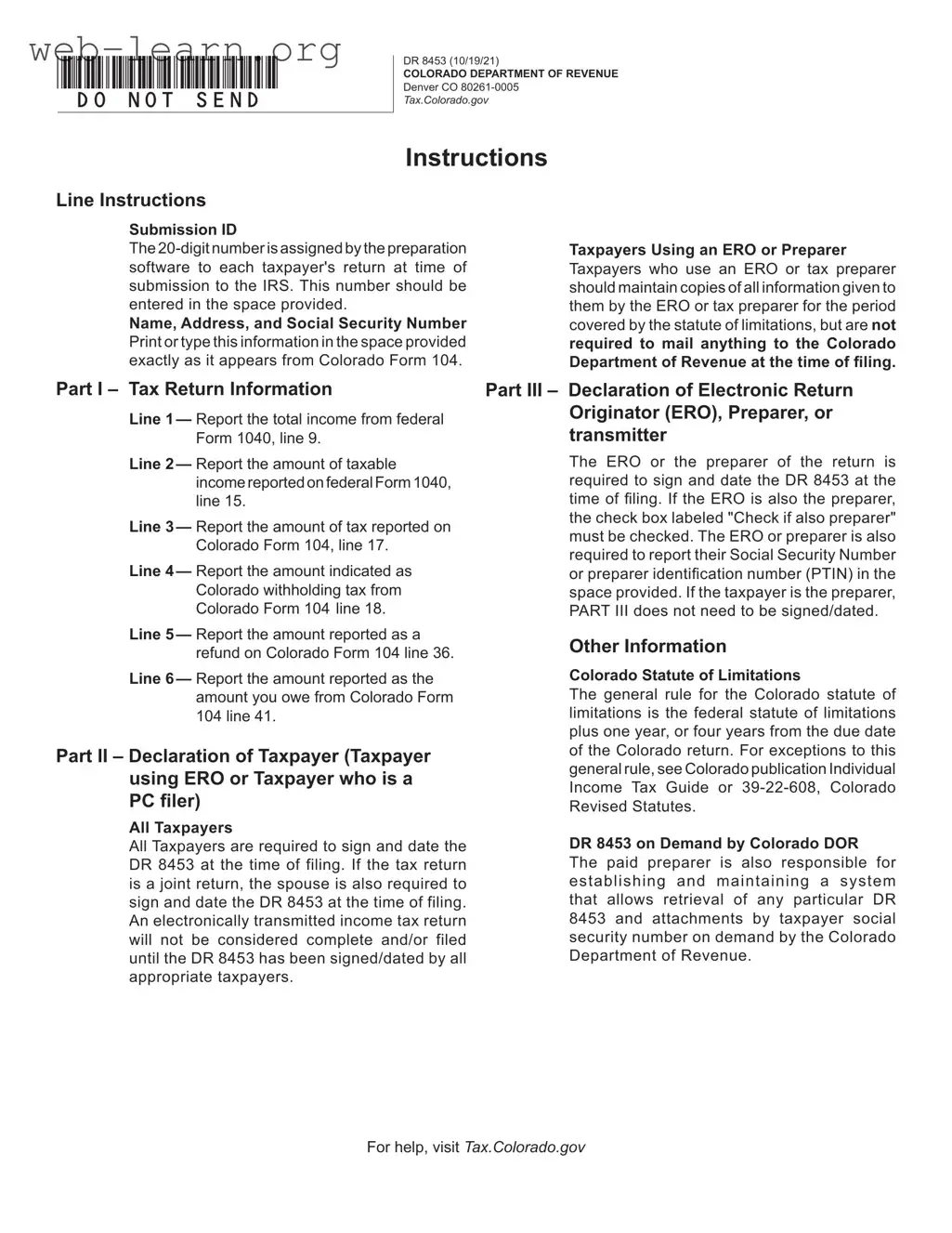
Instructions
Line Instructions
Submission ID
The 20-digit number is assigned by the preparation
software to each taxpayer's return at time of
submission to the IRS. This number should be
entered in the space provided.
Name, Address, and Social Security Number
Print or type this information in the space provided
exactly as it appears from Colorado Form 104.
Part I – Tax Return Information
Line 1 — Report the total income from federal
Form 1040, line 9.
Line 2 — Report the amount of taxable
income reported on federal Form 1040,
line 15.
Line 3 — Report the amount of tax reported on
Colorado Form 104, line 17.
Line 4 — Report the amount indicated as
Colorado withholding tax from
Colorado Form 104 line 18.
Line 5 — Report the amount reported as a
refund on Colorado Form 104 line 36.
Line 6 — Report the amount reported as the
amount you owe from Colorado Form
104 line 41.
Part II – Declaration of Taxpayer (Taxpayer
using ERO or Taxpayer who is a
PC ler)
All Taxpayers
All Taxpayers are required to sign and date the
DR 8453 at the time of filing. If the tax return
is a joint return, the spouse is also required to
sign and date the DR 8453 at the time of filing.
An electronically transmitted income tax return
will not be considered complete and/or filed
until the DR 8453 has been signed/dated by all
appropriate taxpayers.
Taxpayers Using an ERO or Preparer
Taxpayers who use an ERO or tax preparer
should maintain copies of all information given to
them by the ERO or tax preparer for the period
covered by the statute of limitations, but are not
required to mail anything to the Colorado
Department of Revenue at the time of ling.
Part III – Declaration of Electronic Return
Originator (ERO), Preparer, or
transmitter
The ERO or the preparer of the return is
required to sign and date the DR 8453 at the
time of ling. If the ERO is also the preparer,
the check box labeled "Check if also preparer"
must be checked. The ERO or preparer is also
required to report their Social Security Number
or preparer identication number (PTIN) in the
space provided. If the taxpayer is the preparer,
PART III does not need to be signed/dated.
Other Information
Colorado Statute of Limitations
The general rule for the Colorado statute of
limitations is the federal statute of limitations
plus one year, or four years from the due date
of the Colorado return. For exceptions to this
general rule, see Colorado publication Individual
Income Tax Guide or 39-22-608, Colorado
Revised Statutes.
DR 8453 on Demand by Colorado DOR
The paid preparer is also responsible for
establishing and maintaining a system
that allows retrieval of any particular DR
8453 and attachments by taxpayer social
security number on demand by the Colorado
Department of Revenue.
*DO=NOT=SEND*
DR 8453 (10/19/21)
COLORADO DEPARTMENT OF REVENUE
Denver CO 80261-0005
Tax.Colorado.gov
*218453==19999*
DR 8453 (10/19/21)
COLORADO DEPARTMENT OF REVENUE
Denver CO 80261-0005
Tax.Colorado.gov
Page 1 of 1
State of Colorado Individual Income Tax Declaration for Electronic Filing
Do not mail this form to the IRS or the Colorado Department of Revenue. Retain with your records.
Taxpayer SSN or ITIN Spouse SSN or ITIN (If Joint Return) Submission ID
Taxpayer Last Name Taxpayer First Name Middle Initial
Spouse Last Name (If Joint Return) Spouse First Name (If Joint Return)
Street Address Phone Number
City State ZIP
Part I — Tax Return Information
1. Total Income, line 9 from your federal Form 1040 1 $
2. Taxable Income, line 15 on federal Form 1040 2 $
3. Colorado Tax, line 17 on Colorado Form 104 3 $
4. Colorado Tax Withheld, line 18 on Colorado Form 104 4 $
5. Refund, line 36 Colorado Form 104 5 $
6. Amount You Owe, line 41 on Colorado Form 104 6 $
Part II — Declaration of Tax Payer
Under penalties of perjury, I declare that the information I have provided for electronic ling and the amounts shown in Part I above agree with
the amounts shown on my 2021 Federal/Colorado income tax returns, and that said tax returns, statements, schedules and attachments are
true, correct, and complete to the best of my knowledge and belief. I understand that I (or my Electronic Return Originator (ERO) if applicable)
may be required to provide paper copies of this declaration, my returns, withholding statements, schedules, and attachments upon request
by the Colorado Department of Revenue at any time during the period covered by the Colorado statute of limitations.
Signature Date Spouse's Signature (If Joint Return, Both Must Sign) Date
Part III — Declaration of ERO/Preparer/Transmitter
If the transmitter did not prepare the tax return, check here
If I am not the preparer, I declare only that the amounts shown in Part I above agree with the amounts shown on the taxpayer's 2021 Federal/
Colorado income tax returns. If I am the preparer, under penalties of perjury I declare that I have reviewed the above taxpayer's 2021 Federal/
Colorado income tax returns and that the information provided to me by the taxpayer and the amounts shown in Part I above agree with the
amounts shown on said tax returns, and that said tax returns, statements, schedules, and attachments are true, correct, and complete to the
best of my knowledge and belief. As preparer, I further declare that I have obtained the taxpayer's signature on this form at the time of ling and
have provided the taxpayer with copies of all forms and information led. I also agree to maintain this signed Form (DR 8453) for the period
covered by the Colorado statute of limitations, and to provide paper copies of this declaration, said returns, withholding statements, schedules
and attachments upon request by the Colorado Department of Revenue at any time during this period.
ERO's Signature Preparer Identication Number or Your SSN
Check if also Preparer
Date (MM/DD/YY)

Form Information

Fact Name Details
Form Purpose The DR 8453 is used as a declaration for electronic filing of individual income tax returns in Colorado.
Submission ID A unique 20-digit number assigned by the preparation software must be included when filing.
Filing Requirement All taxpayers must sign and date the DR 8453 at the time of filing, including spouses for joint returns.
Retention of Records Taxpayers using an Electronic Return Originator (ERO) should keep copies of all documents provided to the ERO for the statute of limitations period.
Statute of Limitations The general rule is four years from the due date of the Colorado return, as per Colorado Revised Statutes 39-22-608.
Electronic Filing Returns are not considered filed until the DR 8453 is signed and dated by all necessary parties.
Preparer Responsibilities The ERO or tax preparer must maintain a system to retrieve the DR 8453 and its attachments upon request by the Colorado Department of Revenue.

Detailed Guide for Filling Out Dr8453 Colorado

Completing the DR 8453 form for Colorado is an essential step in the electronic filing process for your state income tax return. This form must be signed and submitted alongside your electronic return to ensure it is considered complete. Below are the steps to accurately fill out the DR 8453 form.

  1. Locate the Submission ID section and enter the 20-digit number provided by your tax preparation software.
  2. In the Name, Address, and Social Security Number section, print or type your information exactly as it appears on your Colorado Form 104.
  3. Proceed to Part I – Tax Return Information and fill in the following lines:
    • Line 1: Enter the total income from your federal Form 1040, line 9.
    • Line 2: Enter the taxable income from your federal Form 1040, line 15.
    • Line 3: Enter the amount of tax reported on Colorado Form 104, line 19.
    • Line 4: Enter the Colorado withholding tax from Colorado Form 104, line 20.
    • Line 5: Enter the refund amount reported on Colorado Form 104, line 32.
    • Line 6: Enter the amount you owe from Colorado Form 104, line 37.
  4. In Part II – Declaration of Taxpayer, sign and date the form. If filing jointly, your spouse must also sign and date the form.
  5. If you used an Electronic Return Originator (ERO) or tax preparer, ensure they sign and date Part III – Declaration of ERO/Preparer/Transmitter. If applicable, check the box indicating they are also the preparer.
  6. For the ERO or preparer, provide the Social Security Number or Preparer Identification Number (PTIN) in the designated space.

Once the form is completed, keep it with your records. It is important to remember that you do not mail this form to the IRS or the Colorado Department of Revenue. Instead, ensure that it is signed and retained for your records as it may be requested later.

Obtain Answers on Dr8453 Colorado

  1. What is the purpose of the DR 8453 form?

    The DR 8453 form is used as a declaration for electronic filing of individual income tax returns in Colorado. It confirms that the information provided in the electronic return matches the information on the taxpayer's federal and Colorado tax returns. This form must be signed by the taxpayer and, if applicable, their spouse.

  2. Who needs to sign the DR 8453 form?

    All taxpayers must sign the DR 8453 at the time of filing. If the tax return is filed jointly, both spouses are required to sign and date the form. This is crucial because an electronically transmitted tax return is not considered complete until the DR 8453 has been signed by all necessary parties.

  3. What information is required on the DR 8453?

    Several key pieces of information must be included:

    • Total income from federal Form 1040, line 9
    • Taxable income from federal Form 1040, line 15
    • Colorado tax from Colorado Form 104, line 19
    • Colorado withholding tax from Colorado Form 104, line 20
    • Refund amount from Colorado Form 104, line 32
    • Amount owed from Colorado Form 104, line 37

    This information ensures that the electronic return aligns with the taxpayer's official records.

  4. Do I need to send the DR 8453 to the Colorado Department of Revenue?

    No, you should not send the DR 8453 form to the Colorado Department of Revenue or the IRS. Instead, keep it with your personal records. However, you may need to provide it upon request during the statute of limitations period.

  5. What happens if I use a tax preparer or Electronic Return Originator (ERO)?

    If you use a tax preparer or ERO, they will also need to sign the DR 8453. It’s important to keep copies of all documents provided to them, as you may need to refer back to them later. You are not required to mail any documents to the Colorado Department of Revenue when filing electronically.

  6. What is the statute of limitations for Colorado tax returns?

    The general statute of limitations for Colorado tax returns is four years from the due date of the return, plus one additional year. This means you should retain your records and any associated documents for at least this period, as the Colorado Department of Revenue may request them during this time.

Common mistakes

Filling out the DR8453 Colorado form can be tricky, and many people make common mistakes. One frequent error is failing to enter the correct Submission ID. This 20-digit number is crucial as it links the taxpayer's return to the preparation software. If this number is missing or incorrect, it could delay the processing of the tax return.

Another common mistake involves the personal information section. Taxpayers often do not print or type their names, addresses, and Social Security numbers exactly as they appear on Colorado Form 104. This inconsistency can lead to confusion and may result in the form being rejected. It is important to double-check this information before submission.

Many people overlook the requirement for signatures. All taxpayers must sign and date the DR8453 at the time of filing. If it is a joint return, both spouses need to sign. Without the necessary signatures, the form will not be considered complete, which could lead to complications in processing the return.

Some taxpayers also make errors in reporting income and tax amounts. Each line on the form corresponds to specific lines on federal or Colorado tax forms. Misreporting these figures, whether by entering the wrong amounts or misplacing decimal points, can result in incorrect tax calculations. Always verify these numbers against the original tax forms.

Lastly, many individuals forget to keep a copy of the DR8453 for their records. Although the form does not need to be mailed to the IRS or the Colorado Department of Revenue, it is essential to retain it. This document serves as proof of the taxpayer's declaration and may be needed if questions arise in the future.

Documents used along the form

The DR 8453 form is an important document used in the electronic filing of Colorado individual income tax returns. When submitting this form, there are several other documents that may also be required or beneficial to have on hand. Below is a list of these forms and documents, along with a brief description of each.

  • Colorado Form 104: This is the main individual income tax return form for Colorado residents. It details income, deductions, and credits, and is essential for calculating the overall tax liability.
  • Federal Form 1040: This is the federal income tax return form used by individuals to report their income, claim deductions, and calculate their tax obligations at the federal level.
  • W-2 Forms: Employers provide W-2 forms to employees, summarizing their earnings and the taxes withheld during the year. These forms are crucial for accurately reporting income on both federal and state tax returns.
  • 1099 Forms: Various 1099 forms report income received from sources other than employment, such as freelance work or interest income. They help ensure all income is accurately reported on tax returns.
  • Schedule A: This form is used to itemize deductions for federal income tax purposes. Taxpayers may choose to use this instead of the standard deduction to potentially lower their taxable income.
  • Tax Payment Records: Documentation of any estimated tax payments made during the year is important. These records help ensure that all payments are accounted for when filing tax returns.
  • Tax Credits Documentation: Supporting documents for any tax credits claimed, such as education credits or energy-efficient home improvements, should be retained to substantiate claims on tax returns.

Having these documents ready can streamline the tax filing process and help ensure accuracy. Proper documentation not only aids in completing the DR 8453 form but also supports compliance with tax laws and regulations. Retaining these records is essential for future reference, especially in the event of an audit or inquiry from the Colorado Department of Revenue.

Similar forms

The DR 8453 Colorado form serves a specific purpose in the electronic filing of state income tax returns. Several other documents share similarities with this form, each playing a crucial role in the tax filing process. Below are four documents that are comparable to the DR 8453, along with an explanation of how they are similar:

  • Form 1040: This is the standard federal income tax return form used by individuals. Like the DR 8453, it requires taxpayers to report their income, deductions, and tax liability. Both forms are essential for ensuring accurate reporting and compliance with tax laws.
  • Form 8879: Known as the IRS e-file Signature Authorization, this form allows taxpayers to authorize an Electronic Return Originator (ERO) to file their tax return electronically. Similar to the DR 8453, it requires signatures from the taxpayer and spouse (if applicable), confirming the accuracy of the information provided.
  • Form 8453: This is the federal counterpart to the DR 8453. It serves as an electronic signature for federal tax returns filed electronically. Like the DR 8453, it must be signed by all taxpayers involved in the return and is necessary for the return to be considered complete.
  • Form W-2: This document reports an employee's annual wages and the taxes withheld from their paycheck. While it serves a different function, it is similar in that it provides essential information for completing tax returns. Taxpayers must reference this form when filling out both the DR 8453 and their income tax returns to ensure accurate reporting of income and withholdings.

Dos and Don'ts

When filling out the DR 8453 Colorado form, it's essential to follow specific guidelines to ensure accuracy and compliance. Here’s a list of things you should and shouldn't do:

  • Do: Print or type your name, address, and Social Security Number exactly as they appear on your Colorado Form 104.
  • Do: Sign and date the form at the time of filing. If filing jointly, ensure both spouses sign.
  • Do: Keep a copy of the DR 8453 and all related documents for your records.
  • Do: Enter the Submission ID correctly, as assigned by your tax preparation software.
  • Do: Report all income and tax amounts accurately from your federal Form 1040 and Colorado Form 104.
  • Do: Check the box if the Electronic Return Originator (ERO) is also the preparer.
  • Don't: Mail the DR 8453 to the IRS or the Colorado Department of Revenue.
  • Don't: Forget to provide your Social Security Number or Preparer Tax Identification Number (PTIN) if you are the ERO or preparer.
  • Don't: Leave any required fields blank; all information must be filled out completely.
  • Don't: Assume that your electronic tax return is complete without the signed DR 8453.
  • Don't: Use outdated versions of the form; always ensure you have the most current version.
  • Don't: Ignore the Colorado statute of limitations; keep records for the required period.

Misconceptions

Understanding the DR 8453 form is crucial for taxpayers in Colorado who are filing their returns electronically. However, several misconceptions can lead to confusion. Here are nine common misunderstandings about this important document:

  • Misconception 1: The DR 8453 must be mailed to the Colorado Department of Revenue.
  • This form is not to be sent to the state. Instead, it should be kept with your records after signing.

  • Misconception 2: Only the taxpayer needs to sign the form.
  • If the return is joint, both spouses must sign and date the DR 8453 at the time of filing.

  • Misconception 3: The Submission ID is optional.
  • The 20-digit Submission ID is essential and must be entered as it is assigned by the preparation software.

  • Misconception 4: The DR 8453 is only for taxpayers using a tax preparer.
  • All taxpayers filing electronically, regardless of whether they use a preparer or not, are required to submit this form.

  • Misconception 5: The DR 8453 can be signed at any time after filing.
  • It must be signed and dated at the time of filing for the return to be considered complete.

  • Misconception 6: Taxpayers do not need to keep copies of the DR 8453.
  • Taxpayers should maintain copies of the DR 8453 and any related documents for the duration of the statute of limitations.

  • Misconception 7: The ERO or preparer does not need to keep the signed form.
  • The ERO or preparer is responsible for maintaining the signed form for the required period.

  • Misconception 8: The form is only relevant for federal tax returns.
  • The DR 8453 is specifically for Colorado state tax returns and must reflect information from the Colorado Form 104.

  • Misconception 9: You can fill out the form after your tax return has been submitted.
  • The DR 8453 must be completed and signed at the time of electronic submission for it to be valid.

By clarifying these misconceptions, taxpayers can ensure they are properly completing their electronic filings and complying with state requirements.

Key takeaways

Filling out and using the DR 8453 Colorado form involves several important steps and considerations. Here are key takeaways to keep in mind:

  • Do not send the form to the IRS or Colorado Department of Revenue. This form is meant to be retained with your records after electronic filing.
  • Ensure all information is accurate. Report total income, taxable income, and tax amounts as indicated on the federal and Colorado tax forms.
  • All taxpayers must sign and date the DR 8453. If filing jointly, both spouses need to sign.
  • Taxpayers using an Electronic Return Originator (ERO) or tax preparer should keep copies of all documents provided by them for the duration of the statute of limitations.
  • The ERO or preparer must also sign and date the form. If the ERO is the preparer, they should check the appropriate box on the form.
  • Understand the Colorado statute of limitations, which generally extends one year beyond the federal statute, or four years from the due date of the return.