Homepage Blank Ct 1040 Connecticut Form
Outline

The CT-1040 form is a crucial document for Connecticut residents, serving as the primary income tax return for individuals. This form is specifically designed for those filing their state taxes, allowing taxpayers to report their income, calculate tax liabilities, and claim various credits and deductions. It covers essential information such as filing status, personal identification details, and income sources. Taxpayers must provide their federal adjusted gross income and make necessary adjustments, which include additions and subtractions, to determine their Connecticut adjusted gross income. The form also includes sections for tax credits, such as those for property taxes paid and taxes owed to qualifying jurisdictions. Additionally, it allows for the reporting of any overpayments, the calculation of refunds, and the declaration of any tax due. Proper completion of the CT-1040 is vital, as it ensures compliance with state tax regulations while maximizing potential refunds and minimizing liabilities.

Sample - Ct 1040 Connecticut Form

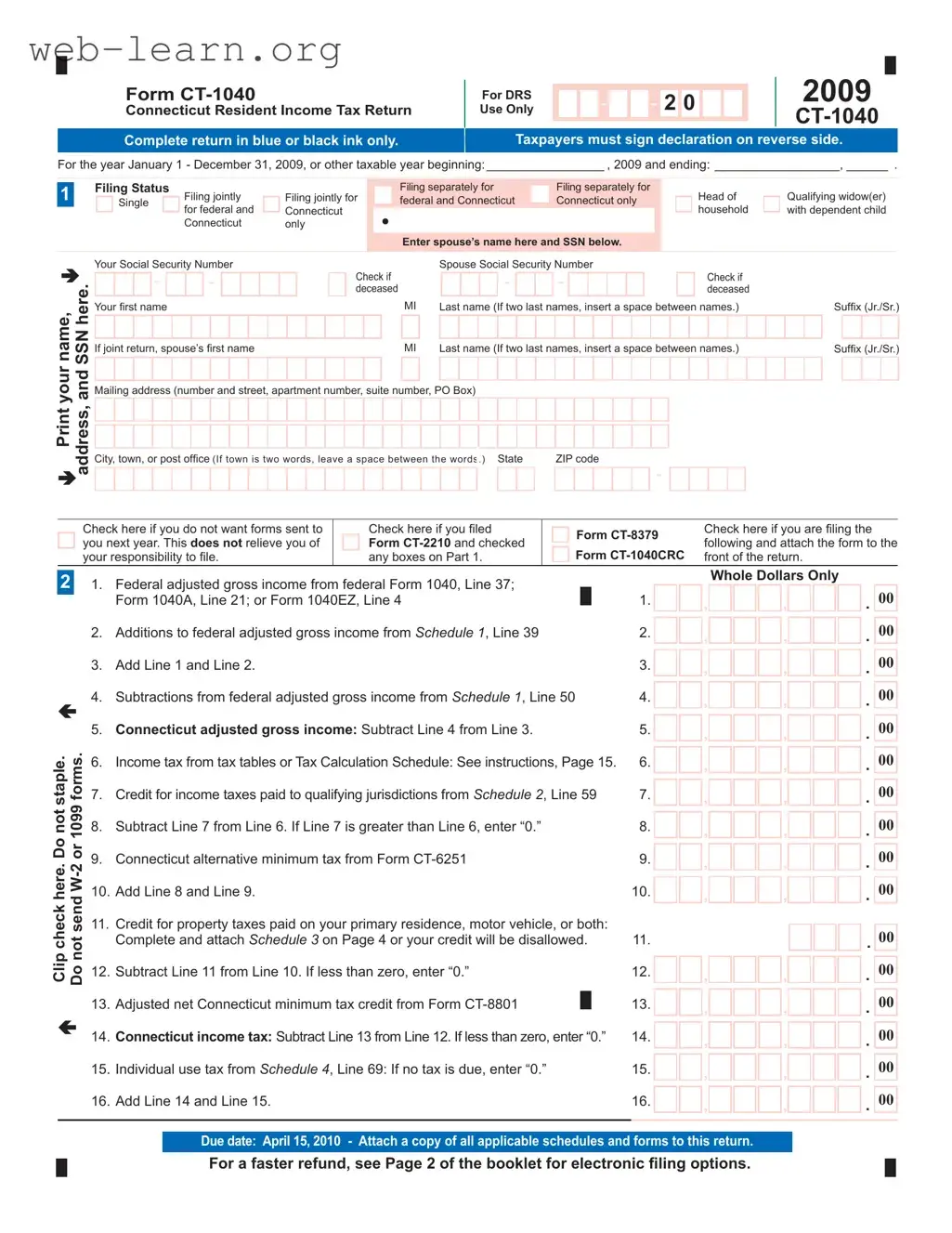
For a faster refund, see Page 2 of the booklet for electronic fi ling options.
Due date: April 15, 2010 - Attach a copy of all applicable schedules and forms to this return.
1. Federal adjusted gross income from federal Form 1040, Line 37;
Form 1040A, Line 21; or Form 1040EZ, Line 4 1.
2. Additions to federal adjusted gross income from Schedule 1, Line 39 2.
3. Add Line 1 and Line 2. 3.
4. Subtractions from federal adjusted gross income from Schedule 1, Line 50 4.
5. Connecticut adjusted gross income: Subtract Line 4 from Line 3. 5.
6. Income tax from tax tables or Tax Calculation Schedule: See instructions, Page 15. 6.
7. Credit for income taxes paid to qualifying jurisdictions from Schedule 2, Line 59 7.
8. Subtract Line 7 from Line 6. If Line 7 is greater than Line 6, enter “0.” 8.
9. Connecticut alternative minimum tax from Form CT-6251 9.
10. Add Line 8 and Line 9. 10.
11. Credit for property taxes paid on your primary residence, motor vehicle, or both:
Complete and attach Schedule 3 on Page 4 or your credit will be disallowed. 11.
12. Subtract Line 11 from Line 10. If less than zero, enter “0.” 12.
13. Adjusted net Connecticut minimum tax credit from Form CT-8801 13.
14. Connecticut income tax: Subtract Line 13 from Line 12. If less than zero, enter “0.” 14.
15. Individual use tax from Schedule 4, Line 69: If no tax is due, enter “0.” 15.
16. Add Line 14 and Line 15. 16.
Whole Dollars Only
, ,
.
00
, ,
.
00
, ,
.
00
, ,
.
00
, ,
.
00
, ,
.
00
, ,
.
00
, ,
.
00
, ,
.
00
.
00
, ,
.
00
, ,
.
00
, ,
.
00
, ,
.
00
, ,
.
00
Form CT-1040
Connecticut Resident Income Tax Return
2009
CT-1040
For DRS
Use Only
20
2
, ,
.
00
Form CT-8379
Form CT-1040CRC
Check here if you are fi ling the
following and attach the form to the
front of the return.
Check here if you fi led
Form CT-2210 and checked
any boxes on Part 1.
Check here if you do not want forms sent to
you next year. This does not relieve you of
your responsibility to fi le.
For the year January 1 - December 31, 2009, or other taxable year beginning: _________________ , 2009 and ending: __________________, ______ .
Complete return in blue or black ink only.
Taxpayers must sign declaration on reverse side.
Clip check here. Do not staple.
Do not send W-2 or 1099 forms.

Filing separately for
federal and Connecticut
Filing separately for
Connecticut only
Filing Status
Single
Filing jointly
for federal and
Connecticut
Filing jointly for
Connecticut
only
Head of
household
Qualifying widow(er)
with dependent child
Enter spouse’s name here and SSN below.
MI
Last name (If two last names, insert a space between names.)
Suffi x (Jr./Sr.)
Suffi x (Jr./Sr.)
Your fi rst name
Mailing address (number and street, apartment number, suite number, PO Box)
MI
If joint return, spouse’s fi rst name
City, town, or post offi ce (If town is two words, leave a space between the words.)
State ZIP code
-
Your Social Security Number
-
-
Check if
deceased
--
Check if
deceased
Spouse Social Security Number
Print your name,
address, and SSN here.
1
1
Your Social
Security Number
Form CT-1040 - Page 2 of 4
Column C
Connecticut income tax withheld
W-2 and 1099
Information
Only enter
information
from your W-2
and 1099 forms
if Connecticut
income tax
was withheld.
18a.
18b.
18c.
18d.
18e.
18f.
18g.
18h. Enter amount from Supplemental Schedule CT-1040WH, Line 3. 18h.
18. Total Connecticut income tax withheld: Add amounts in Column C and enter here.
You must complete Columns A, B, and C or your withholding will be disallowed. 18.
19. All 2009 estimated tax payments and any overpayments applied from a prior year 19.
20. Payments made with Form CT-1040 EXT (Request for extension of time to fi le) 20.
21. Total payments: Add Lines 18, 19, and 20. 21.
22. Overpayment: If Line 21 is more than Line 17, subtract Line 17 from Line 21. 22.
23. Amount of Line 22 you want applied to your 2010 estimated tax 23.
24. Total contributions of refund to designated charities from Schedule 5, Line 70 24.
25. Refund: Subtract Lines 23 and 24 from Line 22.
For faster refund, use Direct Deposit by completing Lines 25a, 25b, and 25c. 25.
17. Enter amount from Line 16. 17.
18a.
18b.
18c.
18d.
18e.
18f.
18g.
3
4
--
, ,
.
00
00
00
00
00
00
00
00
Column A
Employer’s federal ID No. from Box b of W-2,
or payer’s federal ID No. from Form 1099
Column B
Connecticut wages, tips, etc.
, ,
.
00
.
, ,
.
00
, ,
.
00
, ,
.
00
, ,
.
00
, ,
.
00
, ,
.
00
, ,
.
00
, ,
.
00
, ,
.
00
, ,
.
00
, ,
.
00
, ,
.
00
, ,
.
00
, ,
.
00
Complete applicable schedules on Pages 3 and 4 and send all four pages of the return to DRS.
Declaration: I declare under penalty of law that I have examined this return (including any accompanying
schedules and statements) and, to the best of my knowledge and belief, it is true, complete, and correct. I
understand the penalty for willfully delivering a false return or document to DRS is a fi ne of not more than
$5,000, or imprisonment for not more than fi ve years, or both. The declaration of a paid preparer other than
the taxpayer is based on all information of which the preparer has any knowledge.
Sign Here
Keep a copy for your records.
Designee’s name Telephone number Personal identi cation number (PIN)
Third Party Designee - Complete the following to authorize DRS to contact another person about this return.
6
Your signature Date Daytime telephone number
( )
Spouse’s signature (if joint return) Date Daytime telephone number
( )
Paid preparer’s signature Date Telephone number Preparer’s SSN or PTIN
( )
Firm’s name, address, and ZIP code FEIN
, ,
.
00
.
.
.
.
.
.
26. Tax due: If Line 17 is more than Line 21, subtract Line 21 from Line 17. 26.
27. If late: Enter penalty. Multiply Line 26 by 10% (.10). 27.
28. If late: Enter interest. Multiply Line 26 by number of months or fraction of a month
late, then by 1% (.01). 28.
29. Interest on underpayment of estimated tax from Form CT-2210: 29.
See instructions, Page 17.
30. Total amount due: Add Lines 26 through 29.
30.
, ,
.
00
, ,
.
00
, ,
.
00
, ,
.
00
, ,
.
00
5
25a.
Checking
25b. Routing 25c. Account
Savings
number number
25d. Will this refund go to a bank account outside the U.S.? Yes
51. Modi ed Connecticut adjusted gross income 51.
See instructions, Page 24.
52. Enter qualifying jurisdiction’s name and two-letter
code: See instructions, Page 24. 52.
53. Non-Connecticut income included on Line 51 and
reported on a qualifying jurisdiction’s income tax
return: Complete Schedule 2 Worksheet, Page 24. 53.
54. Divide Line 53 by Line 51. May not exceed 1.0000 54.
55. Income tax liability: Subtract Line 11 from Line 6. 55.
56. Multiply Line 54 by Line 55. 56.
57. Income tax paid to a qualifying jurisdiction
See instructions, Page 25. 57.
58. Enter the lesser of Line 56 or Line 57. 58.
59. Total credit: Add Line 58, all columns. Enter here and on Line 7. 59.
Schedule 2 - Credit for Income Taxes Paid to Qualifying Jurisdictions
You must attach a copy of your return fi led with the qualifying jurisdiction(s) or your credit will be disallowed.
Complete applicable schedules on Page 4 and send all four pages of the return to DRS.
Schedule 1 - Modifi cations to Federal Adjusted Gross Income Enter all items as positive numbers.
See instructions, Page 18.
Form CT-1040 - Page 3 of 4
Your Social
Security Number
--
, ,
.
00
, ,
.
00
, ,
.
00
, ,
.
00
31. Interest on state and local government obligations other than Connecticut 31.
32. Mutual fund exempt-interest dividends from non-Connecticut state or municipal
government obligations 32.
33. Cancellation of debt income: See instructions. 33.
34. Taxable amount of lump-sum distributions from qualifi ed plans not included in federal
adjusted gross income 34.
35. Bene ciary’s share of Connecticut fi duciary adjustment: Enter only if greater than zero. 35.
36. Loss on sale of Connecticut state and local government bonds 36.
37. Domestic production activity deduction from federal Form 1040, Line 35 37.
38. Other - specify ________________________________________________________ 38.
39. Total additions: Add Lines 31 through 38. Enter here and on Line 2. 39.
40. Interest on U.S. government obligations 40.
41. Exempt dividends from certain qualifying mutual funds derived from U.S. government obligations 41.
42. Social Security bene t adjustment: See Social Security Bene t Adjustment Worksheet, Page 20. 42.
43. Refunds of state and local income taxes 43.
44. Tier 1 and Tier 2 railroad retirement benefi ts and supplemental annuities 44.
45. 50% of military retirement pay 45.
46. Bene ciary’s share of Connecticut fi duciary adjustment: Enter only if less than zero. 46.
47. Gain on sale of Connecticut state and local government bonds 47.
48. Connecticut Higher Education Trust (CHET) contributions 48.
Enter CHET account number:
(can be up to 14 digits)
49. Other - specify: Do not include out of state income. ___________________________ 49.
50. Total subtractions: Add Lines 40 through 49. Enter here and on Line 4. 50.
, ,
.
00
, ,
.
00
, ,
.
00
, ,
.
00
, ,
.
00
, ,
.
00
, ,
.
00
, ,
.
00
, ,
.
00
, ,
.
00
, ,
.
00
, ,
.
00
, ,
.
00
, ,
.
00
Column B
Name Code
Column A
Name Code
, , .
00
, ,
.
00
, ,
.
00
, ,
.
00
, ,
.
00
, ,
.
00
, ,
.
00
, ,
.
00
, ,
.
00
, ,
.
00
, ,
.
00
. .
, ,
.
00
, ,
.
00
, ,
.
00
Qualifying Property
Name of Connecticut Tax
Town or District
Description of Property
If primary residence, enter
street address.
If motor vehicle, enter year,
make, and model.
Date(s) Paid
Primary Residence Auto 1
Auto 2
(joint returns or qualifying widow(er) only)
Schedule 3 - Property Tax Credit See instructions, Page 25.
_ _
/
_ _
/ 2009
_ _
/
_ _
/ 2009
_ _
/
_ _
/ 2009
_ _
/
_ _
/ 2009
_ _
/
_ _
/ 2009
_ _
/
_ _
/ 2009
Amount Paid 60. 61. 62.
63. Total property tax paid: Add Lines 60, 61, and 62. 63.
64. Maximum property tax credit allowed 64.
65. Enter the lesser of Line 63 or Line 64. 65.
66. Enter the decimal amount for your fi ling status and Connecticut AGI from the Property Tax
Credit Table exactly as it appears on Page 27. If zero, enter the amount from Line 65 on Line 68. 66.
67. Multiply Line 65 by Line 66. 67.
68. Subtract Line 67 from Line 65. Enter here and on Line 11.
Attach Schedule 3 to your return or your credit will be disallowed. 68.
Form CT-1040 - Page 4 of 4
For refunds and all other tax forms without payment:
Department of Revenue Services
PO Box 2976
Hartford CT 06104-2976
Use envelope provided, with correct mailing label, or mail to:
Make your check payable to: Commissioner of Revenue Services
To ensure proper posting, write your SSN(s) (optional) and “2009 Form CT-1040” on your check.
For all tax forms with payment:
Department of Revenue Services
PO Box 2977
Hartford CT 06104-2977
70a. AIDS Research 70a.
70b. Organ Transplant 70b.
70c. Endangered Species/Wildlife 70c.
70d. Breast Cancer Research 70d.
70e. Safety Net Services 70e.
70f. Military Family Relief Fund 70f.
70. Total Contributions: Add Lines 70a through 70f. Enter amount here and on Line 24. 70.
, ,
.
00
, ,
.
00
, ,
.
00
, ,
.
00
, ,
.
00
, ,
.
00
Schedule 5 - Contributions to Designated Charities
Your Social
Security Number
--
,
.
00
,
.
00
,
.
00
,
.
00
.
00
.
.
00
.
00
500
. 00
, ,
.
00
Schedule 4 - Individual Use Tax - Do you owe use tax? See instructions, Page 28.
Complete this worksheet to calculate your Connecticut individual use tax liability and attach Page 4 to your return.
Column EColumn A Column B Column DColumn C Column F Column G
CT tax due
(.06 X Column D)
Date of
purchase
Description of
goods or services
Purchase
price
Retailer or
service provider
Tax, if any,
paid to
another
jurisdiction
Balance due
(Column E minus
Column F but not
less than zero)
Total of individual purchases under $300 not listed above
69. Individual use tax: Add all amounts for Column G. Enter here and on Line 15. 69.
,
.
00

Form Information

Fact Name Details
Form Purpose The CT-1040 is used by Connecticut residents to file their state income tax returns.
Filing Requirements Taxpayers must complete the form using blue or black ink and sign the declaration on the reverse side.
Due Date The due date for filing the CT-1040 for the tax year 2009 is April 15, 2010.
Governing Law This form is governed by the Connecticut General Statutes, specifically Title 12, Chapter 219.

Detailed Guide for Filling Out Ct 1040 Connecticut

Completing the CT-1040 form is an important step in fulfilling your tax obligations for the year. Follow the steps below to ensure accurate completion of the form.

  1. Use blue or black ink to fill out the form.
  2. Indicate your filing status by checking the appropriate box: Single, Married Filing Jointly, Married Filing Separately, Head of Household, or Qualifying Widow(er).
  3. Provide your name and Social Security Number (SSN) in the designated fields. If filing jointly, include your spouse's information as well.
  4. Enter your mailing address, including city, state, and ZIP code.
  5. Complete Line 1 by entering your Federal Adjusted Gross Income from the appropriate federal form.
  6. Fill out Line 2 by adding any additions to your federal adjusted gross income, as indicated in Schedule 1.
  7. Calculate Line 3 by adding Line 1 and Line 2.
  8. Complete Line 4 with any subtractions from your federal adjusted gross income from Schedule 1.
  9. Determine your Connecticut adjusted gross income by subtracting Line 4 from Line 3 and enter the result on Line 5.
  10. Calculate your income tax using the tax tables or Tax Calculation Schedule and enter the amount on Line 6.
  11. Complete Line 7 with any credits for income taxes paid to qualifying jurisdictions from Schedule 2.
  12. Subtract Line 7 from Line 6 and enter the result on Line 8. If Line 7 is greater than Line 6, enter “0.”
  13. Complete Line 9 with any Connecticut alternative minimum tax from Form CT-6251.
  14. Add Lines 8 and 9 and enter the total on Line 10.
  15. Complete Line 11 with any credit for property taxes paid on your primary residence or motor vehicle.
  16. Subtract Line 11 from Line 10 and enter the result on Line 12. If less than zero, enter “0.”
  17. Complete Line 13 with any adjusted net Connecticut minimum tax credit from Form CT-8801.
  18. Subtract Line 13 from Line 12 and enter the result on Line 14. If less than zero, enter “0.”
  19. Complete Line 15 with any individual use tax from Schedule 4.
  20. Add Lines 14 and 15 and enter the total on Line 16.
  21. Enter the amount from Line 16 on Line 17.
  22. Complete Lines 18 through 21 with information regarding Connecticut income tax withheld, estimated tax payments, and any payments made with Form CT-1040 EXT.
  23. Calculate any overpayment or amount due on Lines 22 through 30.
  24. Sign and date the form, and include your daytime telephone number.
  25. If applicable, have your spouse sign as well if filing jointly.
  26. Attach any necessary schedules and forms to the return.
  27. Mail the completed form to the appropriate address based on whether you are expecting a refund or making a payment.

Obtain Answers on Ct 1040 Connecticut

  1. What is Form CT-1040?

    Form CT-1040 is the Connecticut Resident Income Tax Return. It is used by residents of Connecticut to report their income and calculate their state tax liability for the year. The form must be completed accurately and submitted to the Connecticut Department of Revenue Services (DRS).

  2. Who needs to file Form CT-1040?

    All residents of Connecticut who earn income must file Form CT-1040 if their income exceeds the filing threshold set by the state. This includes individuals, married couples filing jointly, and heads of household. Even if you do not owe any tax, you may still need to file.

  3. What is the due date for filing Form CT-1040?

    The due date for filing Form CT-1040 is typically April 15 of the following year. For example, for the 2009 tax year, the due date was April 15, 2010. If this date falls on a weekend or holiday, the due date may be extended to the next business day.

  4. How do I determine my filing status?

    Your filing status is determined by your marital status and family situation on the last day of the tax year. The options include:

    • Single
    • Married filing jointly
    • Married filing separately
    • Head of household
    • Qualifying widow(er) with dependent child

    Choose the status that best describes your situation to ensure accurate tax calculations.

  5. What information do I need to complete Form CT-1040?

    To complete Form CT-1040, you will need:

    • Your Social Security Number
    • Income information from your federal tax return (Form 1040)
    • Details of any deductions or credits you are claiming
    • Information on property taxes paid, if applicable
    • Any other relevant financial documents

    Gathering this information ahead of time will help streamline the filing process.

  6. What are common deductions and credits available on Form CT-1040?

    Common deductions and credits include:

    • Property tax credit for primary residence and motor vehicles
    • Credit for income taxes paid to qualifying jurisdictions
    • Adjustments for certain types of income, such as Social Security benefits
    • Individual use tax for out-of-state purchases

    Review the instructions carefully to ensure you claim all eligible deductions and credits.

  7. How can I file Form CT-1040?

    You can file Form CT-1040 either by mail or electronically. For electronic filing, consider using the DRS e-file system for faster processing and refunds. If you choose to file by mail, ensure you send all required schedules and forms to the appropriate DRS address.

  8. What should I do if I owe taxes?

    If you owe taxes, you can make your payment by check or electronic transfer. Be sure to include your Social Security Number and “Form CT-1040” on your payment to ensure proper credit. If you cannot pay the full amount, contact DRS to discuss payment options.

  9. What happens if I miss the filing deadline?

    If you miss the filing deadline, you may incur penalties and interest on any unpaid taxes. It is important to file your return as soon as possible, even if you cannot pay the full amount owed. Consider filing for an extension if you need more time.

Common mistakes

Filling out the CT-1040 form can seem straightforward, but many people make common mistakes that can lead to delays or issues with their tax returns. One frequent error is neglecting to sign the declaration on the reverse side of the form. Taxpayers must remember that a signature is not just a formality; it confirms that the information provided is accurate and complete. Without a signature, the return may be considered incomplete, resulting in processing delays.

Another common mistake is failing to use blue or black ink when filling out the form. While this might seem like a minor detail, using the wrong ink color can lead to issues with scanning and processing the document. It’s essential to adhere to this requirement to ensure that the form is legible and can be accurately processed by the Department of Revenue Services.

Many taxpayers also overlook the importance of correctly entering their Social Security Number (SSN). Errors in this critical piece of information can lead to significant complications. For instance, if the SSN is incorrect, it may cause the return to be misfiled or even rejected. It’s crucial to double-check that the SSN matches the one issued by the Social Security Administration.

Additionally, some individuals forget to attach necessary schedules or forms that support their claims. For example, if you are claiming a credit for property taxes paid, you must complete and attach Schedule 3. Failing to do so can result in disallowance of the credit, meaning you won’t receive the refund you expected. Always ensure that all applicable schedules are included with your return.

Lastly, many people neglect to review their calculations. Simple arithmetic errors can lead to incorrect tax liabilities. Whether it's adding up income or calculating credits, a small mistake can change the outcome significantly. Taking the time to double-check calculations can save a lot of headaches down the road.

Documents used along the form

The CT-1040 form is a crucial document for Connecticut residents filing their state income tax returns. However, several other forms and documents are often used alongside it to ensure accurate reporting and compliance. Below is a list of these commonly associated forms, each serving a specific purpose in the tax filing process.

  • Form CT-2210: This form is used to calculate any penalties for underpayment of estimated tax. Taxpayers who did not pay enough tax throughout the year may need to file this form to determine if they owe any penalties.
  • Form CT-6251: This document is utilized to calculate the Connecticut alternative minimum tax (AMT). Taxpayers may need to complete this form if their income exceeds certain thresholds, ensuring they pay a minimum level of tax.
  • Schedule 1: This schedule lists modifications to federal adjusted gross income. It includes additions and subtractions that affect the calculation of Connecticut adjusted gross income.
  • Schedule 2: This schedule allows taxpayers to claim credits for income taxes paid to qualifying jurisdictions. It requires documentation of taxes paid to other states to avoid double taxation.
  • Schedule 3: This form is for claiming a property tax credit. Taxpayers must complete this schedule to receive credits for property taxes paid on their primary residence or motor vehicle.

Using these forms in conjunction with the CT-1040 can help ensure that taxpayers accurately report their income and claim any eligible credits or deductions. Being thorough with documentation can lead to a smoother filing experience and potentially a larger refund.

Similar forms

  • Form 1040 (U.S. Individual Income Tax Return): The CT-1040 is similar to the federal Form 1040 as both are used to report individual income, claim deductions, and determine tax liability. Taxpayers fill out personal information, income details, and tax calculations on both forms.

  • Form 1040A: This simplified version of the federal tax return is similar to the CT-1040 in that it allows taxpayers to report income and claim credits without itemizing deductions. Both forms cater to individuals with straightforward tax situations.

  • Form 1040EZ: Like the CT-1040, the 1040EZ is designed for simple tax situations. It is shorter and easier to complete, appealing to those with basic income and no dependents.

  • Form CT-2210 (Underpayment of Estimated Tax): This form is similar to the CT-1040 as it addresses tax liabilities for individuals who may not have paid enough tax throughout the year. Both forms require calculations based on income and tax rates.

  • Form CT-8379 (Injured Spouse Claim): This form is used in conjunction with the CT-1040 to protect a spouse's share of a tax refund from being applied to the other spouse's tax debts. Both forms require detailed personal information and income reporting.

  • Form CT-6251 (Connecticut Alternative Minimum Tax): Similar to the CT-1040, this form calculates the alternative minimum tax for Connecticut residents, requiring additional income adjustments and calculations.

  • Schedule A (Itemized Deductions): This schedule is similar to the CT-1040 as it allows taxpayers to list deductions rather than taking the standard deduction. Both forms require detailed documentation of expenses.

  • Schedule C (Profit or Loss from Business): This schedule is used by self-employed individuals to report income and expenses, paralleling the CT-1040 in its need for accurate income reporting and tax calculation.

  • Form CT-8801 (Connecticut Income Tax Credit): This form is similar to the CT-1040 as it allows taxpayers to claim credits against their tax liability, requiring detailed income and tax information.

  • Schedule 1 (Additional Income and Adjustments to Income): This schedule accompanies the CT-1040 to report additional income and adjustments, reflecting the same need for comprehensive income reporting as the main form.

Dos and Don'ts

When filling out the CT-1040 Connecticut form, there are several important dos and don'ts to keep in mind. Following these guidelines can help ensure a smooth filing process.

  • Do complete the form using blue or black ink only.
  • Do sign the declaration on the reverse side of the form.
  • Do attach all applicable schedules and forms to your return.
  • Do check your Social Security Number for accuracy.
  • Don't leave any required fields blank; ensure all information is filled in.
  • Don't forget to calculate and include any tax credits or deductions you may qualify for.
  • Don't mail your return without using the correct envelope and mailing label.

Misconceptions

Understanding the CT-1040 form can be challenging, especially with the many misconceptions that surround it. Here are eight common misunderstandings, along with clarifications to help you navigate your Connecticut income tax return.

  • Misconception 1: You can file the CT-1040 form in any color ink.
  • In reality, you must complete the form using only blue or black ink. This requirement helps ensure that the information is clear and easily readable.

  • Misconception 2: You don’t need to sign the CT-1040 if you are filing electronically.
  • Even if you file electronically, you still need to sign the declaration on the reverse side of the form. This signature confirms the accuracy of your return.

  • Misconception 3: All income is taxable in Connecticut.
  • Not all income is subject to taxation. Certain types of income, such as Social Security benefits and some pensions, may be exempt from state taxes.

  • Misconception 4: You can ignore the due date if you file for an extension.
  • Filing for an extension does not extend the payment deadline. You are still responsible for any taxes owed by the original due date to avoid penalties and interest.

  • Misconception 5: You can claim deductions without any documentation.
  • Documentation is crucial. You must keep records of any deductions you claim, as the state may require proof to substantiate your claims.

  • Misconception 6: If you owe taxes, you can pay them later without consequences.
  • Failing to pay taxes on time can lead to penalties and interest. It's always best to pay any owed taxes by the due date to avoid additional charges.

  • Misconception 7: The CT-1040 form is the same as the federal 1040 form.
  • While both forms are used for income tax purposes, they are different. The CT-1040 is specific to Connecticut residents and includes state-specific tax regulations and calculations.

  • Misconception 8: You can file the CT-1040 without considering your federal return.
  • Your federal return plays a significant role in determining your state tax liability. The CT-1040 requires information from your federal return, so it's essential to complete it first.

By understanding these misconceptions, you can approach your CT-1040 filing with greater confidence and clarity. Remember, accurate and timely filing is key to avoiding issues with the state.

Key takeaways

Filling out the CT-1040 form is an important step for Connecticut residents. Here are key points to remember:

  • Use blue or black ink: Always fill out the form using blue or black ink to ensure clarity.
  • Sign the declaration: Don’t forget to sign the declaration on the back of the form. This is necessary for your return to be valid.
  • Filing status matters: Choose the correct filing status, such as single, married filing jointly, or head of household.
  • Provide accurate information: Make sure to enter your name, Social Security Number, and mailing address correctly.
  • Attach necessary forms: Include any required schedules and forms. Missing documents can delay processing.
  • Check for credits: Look for credits that you may qualify for, such as property tax credits or credits for taxes paid to other jurisdictions.
  • Be aware of due dates: The form is typically due by April 15 of the following year. Plan ahead to avoid penalties.
  • Keep a copy: Always keep a copy of your completed form for your records. This is important for future reference.
  • Consider electronic filing: For a faster refund, consider e-filing your return.
  • Double-check calculations: Review all calculations carefully. Errors can lead to delays or issues with your return.

Following these guidelines can help ensure a smoother filing experience. Take your time, and don’t hesitate to seek assistance if needed.