Homepage Blank Colorado Uitr 6A Form
Outline

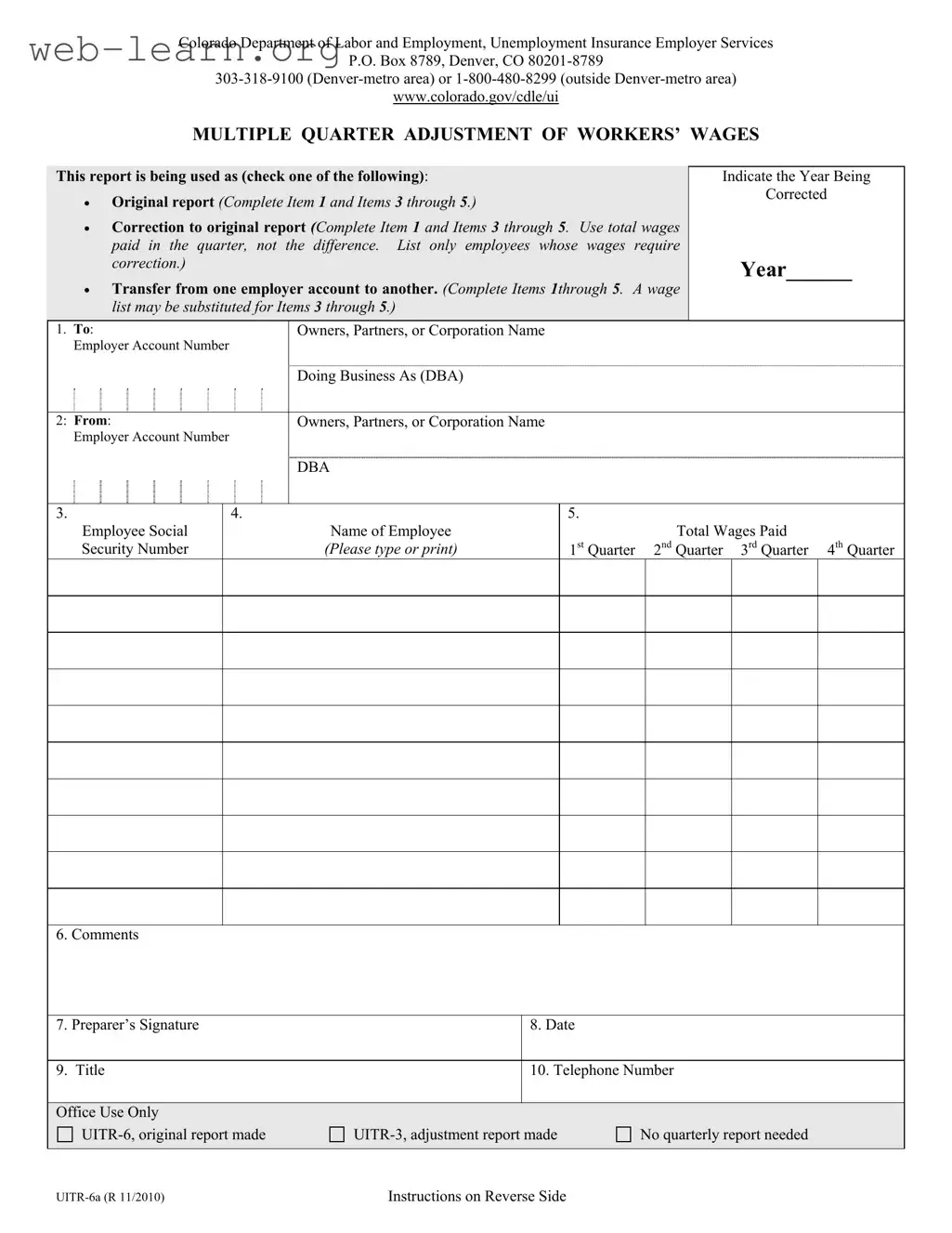
The Colorado UITR 6A form serves as a vital tool for employers in the state, enabling them to accurately report and adjust workers' wages across multiple quarters. This form is particularly important for situations where wages have not been previously reported, need correction, or require transfer between different employer accounts. Employers must indicate the specific purpose of the report—whether it is an original submission, a correction, or a transfer—by checking the appropriate box at the beginning of the form. Additionally, it is essential to specify the year for which the adjustments are being made. The form requires detailed information, including the employer's account number, the names of owners or partners, and the doing business as (DBA) name. For each employee listed, their Social Security number and total wages paid for the relevant quarters must be accurately reported. Employers are encouraged to provide comments for any additional context that may clarify the adjustments being made. Completing this form not only ensures compliance with state regulations but also supports the integrity of the unemployment insurance system, ultimately benefiting both employers and employees.

Sample - Colorado Uitr 6A Form

UITR-6a (R 11/2010) Instructions on Reverse Side
Colorado Department of Labor and Employment, Unemployment Insurance Employer Services
P.O. Box 8789, Denver, CO 80201-8789
303-318-9100 (Denver-metro area) or 1-800-480-8299 (outside Denver-metro area)
www.colorado.gov/cdle/ui
MULTIPLE QUARTER ADJUSTMENT OF WORKERS’ WAGES
This report is being used as (check one of the following):
Original report (Complete Item 1 and Items 3 through 5.)
Correction to original report (Complete Item 1 and Items 3 through 5. Use total wages
paid in the quarter, not the difference. List only employees whose wages require
correction.)
Transfer from one employer account to another. (Complete Items 1through 5. A wage
list may be substituted for Items 3 through 5.)
Indicate the Year Being
Corrected
Year______
Owners, Partners, or Corporation Name
1. To:
Employer Account Number
Doing Business As (DBA)
Owners, Partners, or Corporation Name
2: From:
Employer Account Number
DBA
5.
Total Wages Paid
3.
Employee Social
Security Number
4.
Name of Employee
(Please type or print)
1
st
Quarter 2
nd
Quarter 3
rd
Quarter 4
th
Quarter
6. Comments
7. Preparer’s Signature 8. Date
9. Title 10. Telephone Number
Office Use Only
UITR-6, original report made UITR-3, adjustment report made No quarterly report needed
UITR-6a Page 2 (R 11/2010)
INSTRUCTIONS
MULTIPLE QUARTER ADJUSTMENT OF WORKERS’ WAGES
This form should be used to report worker wages never reported before, to correct previously reported wages, or to transfer earnings
from one employer unemployment insurance account to another. Please use an additional form for each additional year to be adjusted.
1. ALL EMPLOYERS MUST COMPLETE THIS
SECTION
Employer Account Number—the current 9-digit
unemployment insurance account number under
which wages are to be reported.
List the name(s) of the owner, partners, or
corporation.
Report the DBA or the trade name of the
business, if applicable.
2. THIS SECTION SHOULD ONLY BE
COMPLETED IF WAGES WERE
INCORRECTLY REPORTED UNDER
ANOTHER ACCOUNT NUMBER
Employer Account Number—the incorrect 9-
digit unemployment insurance account number
from which wages should be deleted.
List the name of the owner, partners, or
corporation.
Report the DBA or the trade name of the
business, if applicable.
3. EMPLOYEE SOCIAL SECURITY NUMBER
List the social security number (SSN) of the worker.
You must provide the SSN to report new wages or
for correcting previously reported wages.
4. NAME OF EMPLOYEE
Please type or print the worker’s name. Confirm that
the correct SSN has been listed for the worker listed.
5. TOTAL WAGES PAID
Report the total wages paid in the calendar quarter.
If correcting wages, do not report the difference.
List only those employees whose wages require
correction.
6. COMMENTS
Note any additional information that might be needed
to clarify the reason for submitting this wage-
adjustment report.
7 through 10. PREPARER’S INFORMATION
This section is to be completed by the person actually
completing and submitting this document. Please
include a telephone number.

Form Information

Fact Name Fact Details
Form Purpose The UITR 6A form is used for reporting multiple quarter adjustments of workers' wages.
Governing Law This form is governed by Colorado's unemployment insurance laws.
Who Should Use It Employers needing to report unreported wages, correct previous reports, or transfer wages between accounts must use this form.
Sections to Complete Employers must fill out Items 1 through 5, depending on the type of adjustment being made.
Employee Information Each employee's name and Social Security Number (SSN) must be accurately reported.
Wages Reporting Report the total wages paid during the quarter, not the difference if correcting wages.
Preparer's Information The person completing the form must provide their title and telephone number.
Submission Instructions Employers must submit a separate form for each additional year requiring adjustments.

Detailed Guide for Filling Out Colorado Uitr 6A

Filling out the Colorado UITR 6A form requires careful attention to detail. This form is essential for reporting worker wages that have not been reported before, correcting previously reported wages, or transferring earnings between employer accounts. After completing the form, it should be submitted to the Colorado Department of Labor and Employment for processing.

  1. Identify the purpose of the report: Check one of the options: Original report, Correction to original report, or Transfer from one employer account to another.
  2. Complete the "To" section: Enter the name of the owner, partners, or corporation, along with the Employer Account Number and Doing Business As (DBA) name.
  3. Complete the "From" section: If applicable, fill in the name of the owner, partners, or corporation from which the wages are being transferred, along with the incorrect Employer Account Number and DBA name.
  4. List employee details: For each employee, provide their Social Security Number and name. Ensure that the correct SSN is listed for each worker.
  5. Report total wages: Indicate the total wages paid for each quarter (1st, 2nd, 3rd, and 4th) for the employees listed. If correcting wages, report the total wages paid, not the difference.
  6. Add comments: Include any additional information that may clarify the reason for the wage adjustment report.
  7. Complete preparer's information: The person filling out the form should provide their signature, date, title, and telephone number.

Obtain Answers on Colorado Uitr 6A

  1. What is the Colorado Uitr 6A form?

    The Colorado Uitr 6A form is used by employers to report adjustments related to workers' wages. This includes reporting wages that were never reported before, correcting previously reported wages, or transferring earnings between employer accounts. It's an essential tool for maintaining accurate records with the Colorado Department of Labor and Employment.

  2. When should I use this form?

    You should use the Uitr 6A form if:

    • You need to report wages that were not previously reported.
    • You are correcting wages that were reported incorrectly.
    • You are transferring wages from one employer account to another.
  3. How do I complete the form?

    To complete the Uitr 6A form, you need to provide the following information:

    • Employer account number.
    • Name of the owner, partners, or corporation.
    • Doing Business As (DBA) name, if applicable.
    • Social Security Number (SSN) of the employee.
    • Name of the employee.
    • Total wages paid for the relevant quarter.
    • Any comments to clarify your submission.
    • Your contact information, including your title and phone number.
  4. What if I am correcting wages?

    If you are correcting wages, report the total wages paid for the quarter, not just the difference. It’s important to list only the employees whose wages need correction.

  5. Is there a specific format for the information I need to provide?

    Yes, make sure to type or print the information clearly. This includes the employee’s name and Social Security Number. Accuracy is crucial to avoid any issues with your submission.

  6. Do I need to submit a separate form for each year?

    Yes, if you are making adjustments for multiple years, you will need to complete a separate Uitr 6A form for each year that requires adjustments.

  7. What should I do if I have additional comments or information?

    There is a section on the form for comments. Use this space to provide any additional information that may help clarify your reason for submitting the wage adjustment report.

  8. Who should sign the form?

    The form should be signed by the person who is completing and submitting it. This ensures accountability and provides a point of contact for any follow-up questions.

  9. Where do I send the completed Uitr 6A form?

    Send the completed form to the Colorado Department of Labor and Employment, Unemployment Insurance Employer Services, P.O. Box 8789, Denver, CO 80201-8789. You can also contact them at 303-318-9100 if you are in the Denver-metro area or 1-800-480-8299 if you are outside that area.

  10. What if I have more questions about the form?

    If you have further questions, it’s best to reach out directly to the Colorado Department of Labor and Employment. They can provide specific guidance and assistance tailored to your situation.

Common mistakes

Filling out the Colorado UITR 6A form can be straightforward, but mistakes often occur. One common error is failing to check the appropriate box at the top of the form. This box indicates whether the report is original, a correction, or a transfer. Not selecting the correct option can lead to confusion and delays in processing the report.

Another frequent mistake involves the reporting of wages. Some individuals mistakenly report only the difference in wages when correcting a previous report. The instructions clearly state that the total wages paid for the quarter should be reported instead. This error can complicate the review process and may result in further adjustments being required.

Additionally, people often overlook the importance of accurately entering the employee's Social Security Number (SSN). It is crucial to confirm that the SSN provided matches the worker's name. Errors in this section can lead to significant issues with wage reporting and can affect the employee's benefits.

Lastly, preparers sometimes forget to fill out their contact information completely. Sections 7 through 10 require the preparer's signature, date, title, and telephone number. Omitting any of this information can delay the processing of the form, as the department may need to reach out for clarification. Ensuring all sections are completed accurately can help streamline the process and prevent unnecessary complications.

Documents used along the form

The Colorado UITR 6A form is essential for reporting adjustments to workers' wages. Several other forms and documents are often used in conjunction with this form to ensure compliance with unemployment insurance regulations. Below is a list of these documents, each described briefly for clarity.

  • UITR-6: This is the original report form used to report wages for employees for the first time. It includes all necessary information about the employer and the employees.
  • UITR-3: This form is an adjustment report. Employers use it to correct previously reported wages without submitting a new original report.
  • Employer Account Number Request Form: Employers submit this form to obtain or update their unemployment insurance account number with the Colorado Department of Labor and Employment.
  • Wage Verification Form: This document is used to verify the wages of employees for various purposes, such as loan applications or government assistance programs.
  • Employee Termination Notice: Employers must complete this form when an employee is terminated. It provides essential information for unemployment claims processing.
  • Quarterly Wage Report: This report summarizes all wages paid to employees during a specific quarter and is submitted regularly to the state.
  • Unemployment Insurance Claim Form: Employees fill out this form to apply for unemployment benefits. It requires information about their employment history and reasons for unemployment.
  • Record of Employment (ROE): This document is issued by employers to employees upon termination and details their employment history, which can affect their eligibility for unemployment benefits.
  • IRS Form 941: This is the Employer's Quarterly Federal Tax Return, used to report income taxes, Social Security tax, and Medicare tax withheld from employee paychecks.
  • State Tax Withholding Form: Employers use this form to report state income tax withheld from employee wages. It ensures compliance with state tax laws.

Using these forms in conjunction with the Colorado UITR 6A helps maintain accurate records and ensures compliance with employment laws. Proper documentation is crucial for both employers and employees in navigating unemployment insurance processes effectively.

Similar forms

  • UITR-6 Form: This is the original report for unemployment insurance wage reporting. It serves a similar purpose by capturing the total wages paid by an employer during a specific quarter.
  • UITR-3 Form: This form is used for adjustments to previously reported wages. Like the UITR 6A, it allows employers to correct wage information for accuracy.
  • Wage Adjustment Request Form: Employers use this form to request changes to reported wages. It is similar in that it addresses inaccuracies and ensures correct reporting of employee wages.
  • Quarterly Wage Report: This report provides a summary of all wages paid during a quarter. It shares the goal of accurate wage reporting, similar to the UITR 6A.
  • Employee Wage Verification Form: This document is used to verify the wages reported for employees. It aligns with the UITR 6A in confirming wage details for accuracy.
  • Transfer of Wages Form: This form facilitates the transfer of wages between employer accounts. It has a similar function in adjusting wage records as seen in the UITR 6A.
  • Employer Account Change Form: This form is for updating employer account details. It relates to the UITR 6A in that both documents require accurate account information for reporting purposes.
  • Annual Wage Summary Report: This report summarizes total wages for the year. It is similar in that it provides a comprehensive overview of employee wages, akin to the adjustments made on the UITR 6A.

Dos and Don'ts

When filling out the Colorado UITR 6A form, it's essential to follow specific guidelines to ensure accuracy and compliance. Here are four key dos and don'ts:

  • Do provide the correct Employer Account Number. This is crucial for proper reporting.
  • Do list the total wages paid for each employee in the correct quarter. Ensure this figure reflects all wages paid, not just adjustments.
  • Don't submit the form without checking that all employee names and Social Security Numbers are accurate. Errors can lead to delays.
  • Don't report differences in wages when correcting. Always report the total wages paid for the quarter.

Misconceptions

Understanding the Colorado UITR 6A form is essential for employers navigating wage adjustments. However, several misconceptions can lead to confusion. Below are six common misunderstandings about this form:

  • The UITR 6A form is only for correcting errors. Many believe this form serves solely to correct previously reported wages. In reality, it can also be used to report wages that were never reported before or to transfer wages between employer accounts.
  • All employers need to submit a UITR 6A form every quarter. This is not true. Employers only need to file this form when they have wage adjustments to report. If no adjustments are necessary, there is no requirement to submit the form.
  • Wages must be reported as differences when correcting errors. Some employers think they should report only the difference in wages when correcting an error. Instead, the form requires the total wages paid during the quarter, not just the corrected amount.
  • Only one UITR 6A form is needed for multiple adjustments. It is a misconception that one form can cover multiple years of adjustments. Employers must submit a separate UITR 6A form for each year that requires adjustments.
  • Employee Social Security Numbers (SSNs) are optional on the form. This is incorrect. Providing the correct SSN for each employee is mandatory when reporting new wages or correcting previously reported wages. Failure to include this information can delay processing.
  • The comments section is not important. Some may overlook the comments section, thinking it is unnecessary. However, including additional information can clarify the reasons for submitting the wage adjustment, aiding in the processing of the form.

By addressing these misconceptions, employers can ensure compliance and facilitate smoother wage adjustments. Understanding the proper use of the UITR 6A form is vital for maintaining accurate records and fulfilling reporting obligations.

Key takeaways

Filling out the Colorado UITR 6A form can seem daunting, but understanding a few key points can make the process smoother. Here are some essential takeaways:

  • Purpose of the Form: This form is used for multiple reasons, including reporting wages that were never reported, correcting previously reported wages, or transferring earnings between employer accounts.
  • Complete Required Sections: Ensure you fill out all necessary sections based on your situation, whether it’s an original report, a correction, or a transfer. Each option requires specific information.
  • Accurate Employee Information: Carefully list the employee's name and Social Security Number. Double-check this information to avoid delays or issues with processing.
  • Total Wages: When reporting total wages, always include the full amount paid in the quarter. If you are correcting wages, report the total, not the difference.
  • Preparer’s Information: The person completing the form must provide their contact information, including a phone number. This ensures that any follow-up questions can be addressed promptly.

By keeping these points in mind, you can navigate the UITR 6A form with greater confidence and accuracy.