Homepage Blank Colorado Tax Form
Outline

The Colorado Tax form encompasses a range of essential documents designed for individuals filing their state income tax returns. Central to this process is the DR 0104 form, which serves as the primary vehicle for reporting income and calculating tax liability for full-year residents, part-year residents, and nonresidents. Accompanying this form are various related schedules, including the DR 0104CH for voluntary contributions, the DR 0900 for individual income tax payments, and the DR 0104AD for subtractions from income. Taxpayers may also need to utilize the DR 0104PN for part-year residents and nonresidents to accurately calculate their tax obligations based on income earned within Colorado. Additionally, the DR 0104CR allows for the reporting of individual tax credits, while the DR 0104US is designated for consumer use tax reporting. The instructions booklet provides detailed guidance on completing these forms, including information about filing deadlines, residency requirements, and the necessary documentation for various credits and deductions. Understanding these components is crucial for ensuring compliance and optimizing potential tax benefits in the state of Colorado.


Sample - Colorado Tax Form

(11/04/19)
Full-Year, Part-Year and Nonresident Individuals
104
Colorado Individual Income Tax Filing Guide
PAYMENT
WITHOUT
Mail To
COLORADO DEPARTMENT OF REVENUE
Denver, CO 80261-000
5
PAYMENT
WITH
Mail To
COLORADO DEPARTMENT OF REVENUE
Denver, CO 80261-000
6
MAILING ADDRESS FOR FORM DR 0104
These addresses and zip codes are exclusive to the Colorado Department of Revenue, so a street address is not required.
Disclosure of Average Taxes Paid
Colorado Income Tax Table
Description of Voluntary Contribution organizations
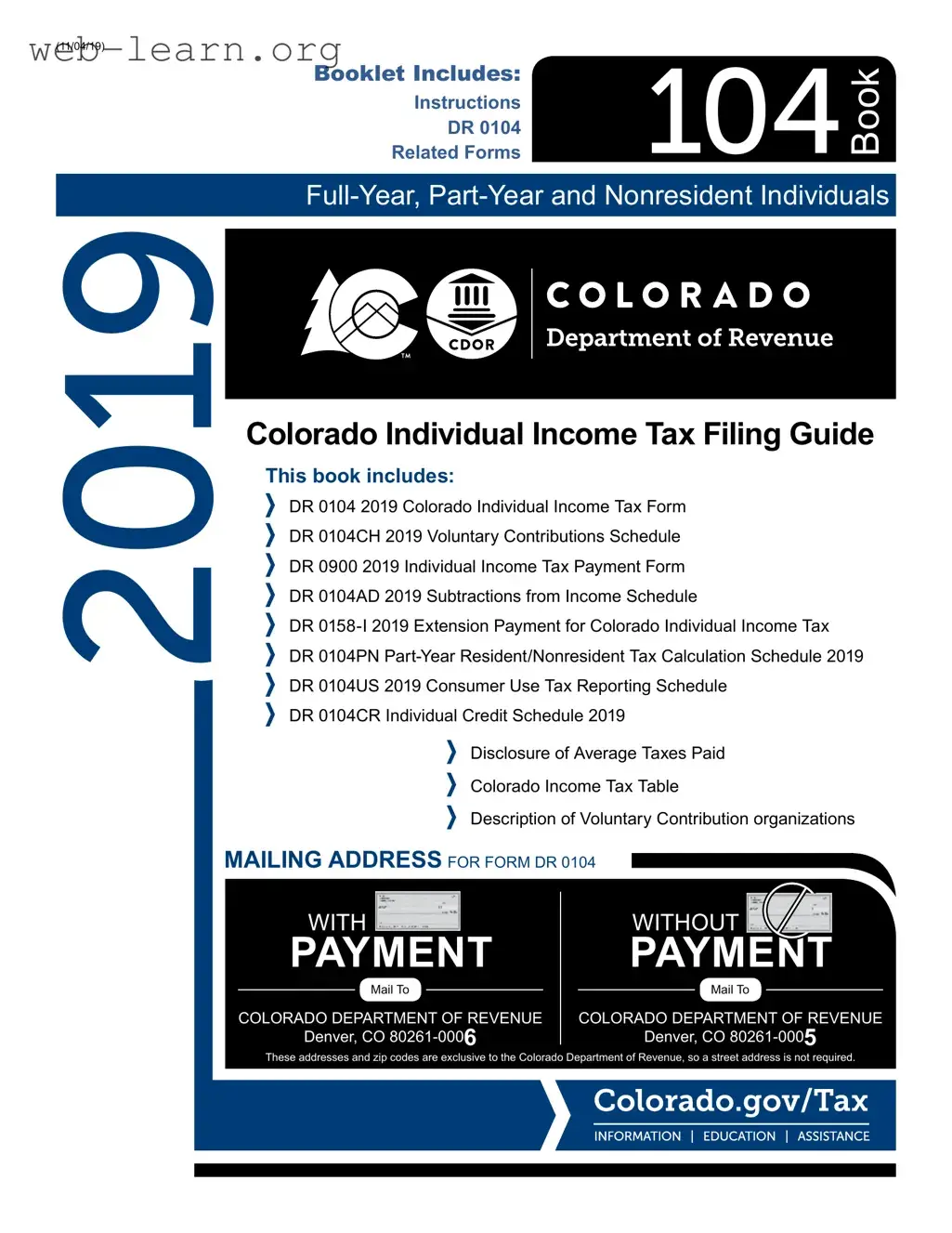
This book includes:
DR 0104 2019 Colorado Individual Income Tax Form
DR 0104CH 2019 Voluntary Contributions Schedule
DR 0900 2019 Individual Income Tax Payment Form
DR 0104AD 2019 Subtractions from Income Schedule
DR 0158-I 2019 Extension Payment for Colorado Individual Income Tax
DR 0104PN Part-Year Resident/Nonresident Tax Calculation Schedule 2019
DR 0104US 2019 Consumer Use Tax Reporting Schedule
DR 0104CR Individual Credit Schedule 2019
Book
Booklet Includes:
Instructions
DR 0104
Related Forms
2019
Page 2
Disclosure of Average Taxes Paid
Calendar Year 2016 Average Family Money Income
1
$0
to
$15,000
2
$15,000
to
$29,999
$30,000
to
$39,999
$40,000
to
$49,999
$50,000
to
$69,999
$70,000
to
$99,999
$100,000
to
$149,999
$150,000
to
$199,999
$200,000
and
more
Weighted
Average
3
State Taxes and Fees
Individual Income
4
$83 $319 $719 $1,063 $1,567 $2,428 $3,850 $5,696 $16,241 $2,544
Sales
5
$285 $347 $468 $487 $582 $712 $923 $1,204 $2,480 $690
Gasoline and Gasohol
6
$92 $117 $156 $178 $202 $240 $274 $288 $437 $198
Licenses
7
and Registrations
8
$91 $126 $162 $171 $188 $224 $250 $250 $259 $179
Alcoholic Beverages
6
$4 $3 $4 $6 $6 $9 $14 $18 $42 $9
Cigarettes and Tobacco
6
$44 $42 $48 $49 $49 $52 $50 $34 $42 $46
Total State Taxes and Fees $598 $955 $1,557 $1,955 $2,595 $3,665 $5,361 $7,491 $19,501 $3,667
Local Taxes and Fees
Residential Property
5
$666 $1,024 $1,363 $1,316 $1,652 $2,128 $2,998 $4,259 $9,964 $2,240
Sales and Use
5
$446 $544 $733 $763 $912 $1,115 $1,444 $1,886 $3,882 $1,081
Specic Ownership
8
$94 $136 $177 $188 $209 $250 $282 $282 $292 $198
Occupation
9
$2 $6 $9 $11 $15 $22 $31 $44 $136 $23
Total Local Taxes and Fees $1,208 $1,709 $2,282 $2,278 $2,788 $3,515 $4,755 $6,470 $14,273 $3,542
Federal Taxes
Individual Income
4
$609 $1,166 $2,273 $3,377 $5,318 $8,716 $14,652 $24,598 $100,649 $12,224
Medicare
10
$106 $303 $483 $630 $843 $1,198 $1,746 $2,478 $12,382 $1,595
Social Security
10
$455 $1,294 $2,067 $2,693 $3,607 $5,121 $7,347 $7,347 $7,347 $3,536
Total Federal Taxes $1,170 $2,762 $4,824 $6,699 $9,768 $15,035 $23,745 $34,422 $120,377 $17,356
Total Taxes and Fees Paid
Households $2,977 $5,426 $8,663 $10,932 $15,150 $22,214 $33,861 $48,384 $154,152 $24,565
Taxes Paid by Employers
11
$561 $1,597 $2,551 $3,323 $4,450 $6,319 $9,093 $9,825 $19,729 $5,131
Federal data and other data sources are used to estimate average taxes paid when actual data are unavailable for most tax types.
The methodology for some estimates and income class categories changed from 2014 due to changes in the Bureau of Labor Statistics Consumer
Expenditure Survey (CES), therefore estimates from prior years may not be comparable.
1
Estimate of income uses the CES denition of “money income” which includes all sources of income, taxable and nontaxable, as well as transfer payments (such as public
assistance, supplemental security income, food stamps, and other benets or contributions).
2
Some taxpayers family money income estimate was negative. Negative income is associated with self-employment and investment losses. These taxpayers were excluded
because we cannot reliably assign them to the income categories used in this table.
3
The weighted averages were calculated for each row using the average tax paid for each income class multiplied by the total number of lers in that income class. This
report’s weighted average values are not comparable to prior reports’ average values.
4
Estimate is based on values from state and Federal income tax returns.
5
Estimate is calculated using the CES proportion of income for the tax on that item for each class, multiplied by the Colorado average income value for each class.
6
Industry data (e.g., average prices) was used to estimate the tax paid based on the CES value for that item. Then, the estimate was calculated using the CES proportion of
income for the tax on that item for each class, multiplied by the Colorado average income value for each class.
7
The total state collections for drivers licenses was divided by the total number of lers, yielding a at fee across all income classes.
8
The registrations and specic ownership fees/taxes paid were estimated using the total state collections and the CES average number of vehicles for each income class.
9
Total local occupation fees collected were distributed by income class.
10
Medicare and Social Security taxes were estimated based on income subject to these taxes.
11
Employers pay taxes to Medicare and Social Security on the employees’ behalf.
Disclosure of Colorado Expenditures and Revenues
Expenditures by FunctionRevenues by Source
Other
8.9%
Education
39.9%
Justice
6.4%
Transportation
4.5%
Business, Community
& Consumer Affairs
5.2%
Social Assistance
35.2%
Other
3.2%
Taxes
41.1%
Interest & Rents
2.6%
Charges for
Goods & Services
20.5%
Federal Grants
& Contracts
29.7%
License, Permits
& Fines
2.9%
** Due to rounding, the values in each chart may not sum to 100%
Disclosure of Average Taxes Paid ............................. 2
Using this Guide: Filing Instructions .......................... 3
Taxpayer Service and Assistance .............................. 8
Tax Table ................................................................. 15
DR 0104: Colorado Return for All Resident Types ...... 17
DR 0104CH: Voluntary Contributions Schedule ...... 21
DR 0104AD: Subtractions from Income Schedule .. 23
DR 0900: Individual Payment Form......................... 25
DR 0158-I: Extension Information and Form ........... 27
DR 0104PN: Part–Year Resident/Nonresident
Tax Calculation Schedule ........................................ 29
DR 0104US: Consumer Use Tax Reporting Schedule .. 33
DR 0104CR: Individual Credit Schedule ................. 35
Voluntary Contribution Information .......................... 39
Table of Contents
Page 3
How To Use This Filing Guide
This ling guide will assist you with completing your Colorado
Income Tax Return. Please read through this guide before
starting your return. Once you nish the form, le it with a
computer, smartphone or tablet using our free and secure
Revenue Online service at Colorado.gov/RevenueOnline. You
may also le using private e-File software or with a paid tax
preparer. You signicantly reduce the chance of errors by ling
your return electronically. If you cannot le electronically for any
reason, mail the enclosed forms as instructed. All Colorado
forms and publications referenced in this guide are available
for download at Colorado.gov/Tax, the ofcial Taxation website.
The following symbols appear throughout this guide and
point out important information, reminders and changes to
tax rules.
This points out a topic that is the source of common
filing errors. Filing your return on Revenue Online
will reduce the risk of errors; however, it is important
to understand the information on your return. Errors
cause processing delays and erroneous bills.
Several subtractions and tax credits require you
to provide supporting documentation. This symbol
points out those requirements. If the additional
documentation is not provided, it will cause
processing delays or denial of the credits/
subtractions. These documents can be scanned
and attached to your electronic filing through
Revenue Online or most tax software, mailed with
the DR 1778 or attached to your paper return.
In-depth tax information is available in our easy to
understand FYI Publications, which include examples
and worksheets. This symbol lets you know when
such a publication is available for a subject. All FYI
publications are available in the Education and Legal
Research section at Colorado.gov/Tax.
Filing Information
Who Must File This Tax Return
Each year you must evaluate if you should le a Colorado
income tax return. Generally, you must le this return if you
are required to le a federal income tax return with the IRS
for this year or will have a Colorado income tax liability for
this year and you are:
A full-year resident of Colorado, or
A part-year Colorado resident who received
taxable income while residing here or
Not a resident of Colorado, but received income
from sources within Colorado.
Colorado residents must file this return if they are
required to file an income tax return with the IRS,
even if they do not have a Colorado tax liability.
Otherwise, the Department may file a return on your
behalf and our return might not consider your unique
tax situation. Also, the only way to determine if you
are entitled to a refund is to file a return.
Due Date
The DR 0104 and any tax payment owed are due
April 15, 2020. Revenue Online will accept returns as
timely led until midnight. Returns that are mailed must be
postmarked by April 15. An automatic extension to le is
granted until October 15, but there is no extension to pay.
See page 27 for more information.
Deceased Persons
Legal representatives and surviving spouses may le a return
on behalf of a deceased person whose date of death was
during the tax year. Surviving spouses may complete the
return as usual and indicate the deceased status on the
return. They can le the return and submit a copy of the
death certicate through Revenue Online. Legal represen-
tatives may le the return and submit a copy of the death
certicate through Revenue Online, but they must complete
the Third Party Designee portion of the return. Either a
surviving spouse or legal representative can avoid problems
when ling on paper by marking the box next to the name of
the deceased person, writing “DECEASED” in large letters
in the white space above the tax year of the return, writing
“FILING AS SURVIVING SPOUSE” or “FILING AS LEGAL
REPRESENTATIVE” after their signature, and attaching the
DR 0102 and a copy of the death certicate to the return.
To claim a refund on behalf of a deceased person:
you must submit a copy of the death certificate with
the DR 0102 when filing the return.
Filing Status
You must file using the same filing status on both your
federal and Colorado income tax returns. Any two
individuals who legally file a joint federal income tax
return must also file their Colorado income tax return
jointly. Individuals filing a joint return must list the
taxpayer names and Social Security numbers (SSN)
in the same order on both the federal and Colorado
returns. For married filing separate, do not list your
spouse’s name or SSN on the return.
Claiming Credits from a Pass-through Entity
Individuals claiming tax credits as a partner or
shareholder must obtain from the partnership or S
corporation a federal Schedule K-1 or other statement
reporting the name and employer identification number
(EIN) of the partnership or S corporation and the type
and amount of the credit. The Colorado Department
of Revenue verifies the credit claims of partners
and shareholders by reviewing the partnership or S
corporation’s return. The Schedule K-1s or statements
may be submitted through Revenue Online, through
tax software or may be attached to a paper return.
Lineby–Line Instructions for
the DR 0104
First, complete the federal income tax return you will le with
the IRS because you will use information from that return
on your Colorado income tax return. Colorado income tax
is based on your federal taxable income, which has already
considered your deductions.
Residency Status
Mark the appropriate box to designate your residency status.
If you are ling a joint return, and one person is a full-year
Colorado resident and the other is either a part-year resident or
a nonresident, mark the Part-Year Resident/Nonresident box.
Page 4
Part-Year Colorado Residents and
Nonresidents
Tax is prorated so that it is calculated only on income received
in Colorado or from sources within Colorado. We recommend
you review publication FYI Income 6 if this applies to you. You
will calculate your prorated tax by completing the DR 0104PN.
You must submit the DR 0104PN with your return.
Persons Traveling or Residing Abroad
If you are traveling or residing outside the United States
on April 15, the deadline for ling your return is June 15,
2020. If you need additional time to le your return, you will
automatically have until October 15, 2020, to le. Interest is
due on any tax paid after April 15, 2020. To avoid any late
payment penalties, you must pay 90% of your tax liability
by June 15, 2020, le your return by October 15, 2020 and
pay any remaining tax due at the time of ling. When ling
your return, mark the Abroad on Due Date” box on Revenue
Online or the paper return.
Active Duty Military
Under federal law, a military servicemembers state of legal
residence does not change solely as the result of the service-
members assignment for service in another state. Consequently,
a Colorado resident who enters into military service will remain
a Colorado resident unless they ofcially change their state of
legal residence as described in DD Form 2058.
In general, military servicemembers who are Colorado residents
are subject to the same income tax ling requirements as other
Colorado residents, even if they are serving in another state.
These requirements are described on the preceding page,
under the heading Who Must File This Tax Return.
However, any military servicemember who spends at least 305
days of the tax year stationed outside of the United States on
active military duty may elect to be treated as a nonresident.
The servicemember may make this election by ling a return
and checking the applicable box on Form 104PN.
Military servicemembers who are stationed in Colorado, but
are not Colorado residents, are not required to pay Colorado
tax on their military income. However, any other Colorado
source income of a nonresident servicemember is subject to
Colorado taxation.
Please see Military Service Members Special Filing
Information” webpage on our website for additional information.
The residency rules described above for military
servicemembers also apply generally to a
servicemember’s spouse if the spouse is residing
with the servicemember either inside or outside of
Colorado in compliance with the servicemember’s
military orders. If a servicemember and their spouse
are nonresidents stationed in Colorado, any wages
earned by the spouse for work performed in Colorado
are not subject to Colorado taxation. The military
spouse must complete a DR 1059, provide a copy
to their employer when hired for employment, and
submit a copy to the Department, along with a copy
of their military ID card, when they file their Colorado
return each year. The DR 1059 may be filed with the
Department through Revenue Online, with DR 1778,
or as an attachment to a DR 0104 filed by paper.
Name and Address
Provide your name, mailing address, date of birth, Social
Security number, as well as the state of issue, last four digits,
and the date of issuance of your state issued ID card in the
provided spaces. If ling Married Filing Joint, provide the
spouse’s information where prompted. Provide the spouse’s
information ONLY if ling a joint return. Otherwise leave
blank. All Departmental correspondence will be mailed to
the mailing address provided. We recommend you read
publication FYI General 2 for the Privacy Act Notice.
Line 1 Federal Taxable Income
Refer to your federal income tax return to complete this line:
Form 1040 line 11b
If your federal taxable income is a negative amount, be
sure to enter the amount as such on your Colorado return.
If submitting a paper return, put the negative amount in
parentheses, for example ($1,234).
Do not enter your total income or wages on this
line because it will make your tax too high. The
Department will compare the amount you list here
to the return you file with the IRS, so be very careful
to complete this correctly.
Additions
Line 2
State Addback
Refer to your federal income tax return to complete this line.
Enter $0 if you led Form 1040 or 1040SR but did not itemize
your deductions on Schedule A.
Taxpayers who deduct general sales taxes on Schedule A
line 5a, Form 1040 or 1040SR, are not required to calculate
this addback. If you deducted state income tax on Schedule
A line 5a, complete the worksheet below to calculate the
Income Tax Deduction.
We recommend that you read publication FYI
Income 4 for special instructions before completing
the worksheet below.
Complete the following worksheet to determine your state
income tax deduction addback.
a) Is the amount on federal Form 1040 or
1040SR Schedule A line 5d greater than
the amount on federal Form 1040 or
1040SR Schedule A line 5e?
$
No.
Enter the state income tax
deduction from federal Form 1040
or 1040SR Schedule A line 5a.
Yes.
Subtract the amounts on federal
Form 1040 or 1040SR Schedule
A lines 5b and 5c from the
amount on line 5e. Enter the
result, but not less than $0.
b) Total itemized deductions from federal
Form 1040 or 1040SR Schedule A line 17
$
c) The amount of federal standard deduction
you could have claimed (See instructions
federal Form 1040 or 1040SR line 9 for
2019 federal standard deductions.)
$
d) Line (b) minus line (c), but not less than $0
$
Transfer to line 2 of the DR 0104 the smaller amount from
line (a) or (d) of the worksheet above.
Page 5
Line 3 Other Additions
Enter the sum of the following and specify which addition(s)
in text box:
Bond interestthe amount of any interest earned
from bonds issued by any state or political
subdivision, excluding any bonds issued by the
State of Colorado or its political subdivisions on
or after May 1, 1980. Calculate the appropriate
amount by subtracting the amortization of bond
premiums and expenses (required to be allocated
to interest income by Internal Revenue Code) from
the gross amount of state and local bond interest.
We recommend that you read publication FYI
Income 52 if this applies to you.
Improper distributions from a qualied state tuition
program for which tuition program contribution
subtraction was previously claimed. See FYI
Income 44 for additional information.
Dependent child incomethe amount from
IRS Form 8814 line 14 or $1,050, whichever is
smaller. Include this income only if you elected
to report your child’s income on your federal
income tax return.
Charitable gross conservation easement—the
amount of your federal charitable deduction
for a conservation easement that is also
claimed for a Colorado tax credit. Complete
the DR 1305 Part D.
Alien labor—the amount of expenses for
unauthorized alien labor services. We recommend
that you read publication FYI Income 64 if this
applies to you.
Partnership/Fiduciary—the amount of any duciary
adjustment or partnership modification that
increases your federal taxable income.
Any expenses incurred by a taxpayer with respect
to expenditures made at, or payments made to,
a club that restricts membership on the basis of
sex, sexual orientation, marital status, race, creed,
religion, color, ancestry or national origin.
Distributions from a medical savings account not
made for an eligible expense.
Charitable hunger relief credit addback—the
amount of your federal charitable deduction for a
donation for which a Credit for Food Contributed to
Hunger-Relief Charitable Organizations is claimed.
Line 4 Subtotal
Enter the sum of lines 1 through 3.
Line 5 Subtractions from the DR 0104AD
Schedule, line 20
Transfer the amount from the DR 0104AD line 20 to report
any subtractions from your Federal Taxable Income. These
subtractions will change your Colorado Taxable Income from
the amount of Federal Taxable Income. See instructions in
the income tax booklet for additional guidance on completing
this schedule. Do not enter negative amounts. To ensure
faster processing of your paper return, the amount entered
on line 5 must exactly match the amount on the DR 0104AD.
You must submit the DR 0104AD with your return.
Line 6 Colorado Taxable Income
Subtract line 5 from line 4. This is your Colorado taxable
income and is the gure used to determine how much
Colorado tax is owed, if any.
Part-Year Residents or Nonresidents Go To
the DR 0104PN. Full-Year Residents Continue
To Line 7
Line 7
Colorado Tax
The income tax rate is currently 4.5%. Full-year residents should
refer to the tax table in this booklet. Determine the tax by the
amount listed on line 6. Part-year residents and nonresidents
should transfer the apportioned tax amount from the DR 0104PN
line 36. You must submit the DR 0104PN with your return.
Line 8 Alternative Minimum Tax
Enter the amount of any Alternative Minimum Tax. Generally, if you
pay alternative minimum tax on your federal income tax return,
you will pay the same for your Colorado return. We recommend
that you read publication FYI Income 14 if this applies to you.
Line 9 Recapture of Prior Year Credits
Enter any credit claimed in prior years that is subject to
recapture under Colorado law.
Line 10 Subtotal
Sum of lines 7 through 9.
Tax Credits
Visit Colorado.gov/Tax/Income-Tax-Credits to read more
about which tax credits can be claimed on this form.
Line 11 Nonrefundable Credits
Complete the DR 0104CR to claim various nonrefundable
credits. Transfer the amount from the DR 0104CR line 41 to
this line. The nonrefundable credits used from the DR 0104CR
combined with the total Nonrefundable Enterprise Zone Credit
used cannot exceed line 10. To ensure faster processing of
your paper return, the amount entered on line 11 must exactly
match the amount on the DR 0104CR. You must submit the
DR 0104CR with your return.
Scan and submit any required documentation
through Revenue Online E-Filer Attachment, attach
to your electronic return or mail paper documentation
with the DR 1778 E-Filer Attachment.
Line 12 Nonrefundable Enterprise Zone Credits
Use your tax software, Revenue Online or the DR 1366 to
calculate the total amount of Nonrefundable Enterprise Zone
Credits being used to offset the current year tax liability.
Complete the DR 1366 and transfer line 87 to this line. The
total Nonrefundable Enterprise Zone Credit used combined
with nonrefundable credits from the DR 0104CR cannot
exceed the amount on line 10. You must submit the DR 1366
and a copy of each certicate with your return.
The Department strongly recommends electronic
filing for taxpayers with enterprise zone credits.
Failure to file electronically may result in delays
processing your return.
Page 6
Line 13 Strategic Capital Tax Credits
Use your tax software, Revenue Online or the DR 1330 to
calculate the total amount of nonrefundable Strategic Capital
Tax Credits being used to offset the current year tax liability.
Complete the DR 1330 and transfer amount on line 5b to this
line. The total nonrefundable Strategic Capital Tax Credits
used combined with nonrefundable credits from lines 11 and
12 cannot exceed the amount on line 10. You must submit the
DR 1330 and a copy of each certicate with your return. The
Department strongly recommends electronic ling for
taxpayers with Strategic Capital Tax credits. Failure to le
electronically may result in delays processing your return.
Please include a copy of each Strategic Capital Tax
Credit Certificate
Line 14 Net Income Tax
Sum of lines 11, 12, and 13. Subtract that sum from line 10.
This cannot be a negative number.
Line 15 Use Tax
Enter the amount from the DR 0104US schedule line 7. If you
did not have any purchases from retailers who do not collect
Colorado state sales tax, then leave this line blank and DO
NOT ll out the DR 0104US schedule. For more information on
your consumer use tax obligation, including how to use the new
annual customer reports from non-collecting retailers, please
visit Colorado.gov/Tax/UseTax. If you are reporting use tax on
this return, you must submit the DR 0104US with your return.
Line 16 Net Colorado Tax
Sum of lines 14 and 15.
Line 17 Colorado Income Tax Withheld
Enter the sum of all Colorado income tax withheld as reported
on W-2, W-2G and/or various 1099 statements.
Enclose your Colorado withholding forms where
indicated or, if filing electronically, scan and submit
them through Revenue Online E-Filer Attachments.
Failure to submit your withholding forms will
result in the credit being denied. Do NOT include
withholding for federal income tax, income tax from
another state, or income tax from local governments.
Be certain to exclude amounts withheld from
Colorado real estate sales by nonresidents,
nonresident beneficiary withholding, or Colorado
partnership or S Corporation income withholding
for nonresidents because these specified amounts
should be listed on line 21.
Line 18 Prior-year Estimated Tax Carryforward
Enter the amount, if any, from your 2018 Colorado
DR 0104 line 27.
Line 19 Quarterly Estimated Payments
Carefully review your payment(s) before completing this
line. Use Revenue Online (Colorado.gov/RevenueOnline) to
verify estimated taxes paid on your account. Doing so will
reduce processing delays. Most taxpayers who have made
quarterly estimated payments used the DR 0104EP to remit
these payments. Refer to FYI Income 51 for more information
about Estimated Payments.
Line 20 Extension Payment
Enter the amount, if any, you remitted with the DR 0158-I to
ensure 90% of your tax was paid by the ling due date.
Line 21 Other Prepayments
Enter the sum of payments remitted on your behalf because
you received Colorado income from:
an estate as a beneciary remitted using the
DR 0104BEP, and/or
partnership or shareholder agreement–remitted
using the DR 0108, and/or
a real estate transaction that closed during
the tax year for which you are ling this return
– remitted using the current DR 1079.
Be sure to mark corresponding box(es) as appropriate.
Line 22 Gross Conservation Easement Credit
Complete all applicable parts of the DR 1305. Enter the
amount from the DR 1305G line 33. You must submit the
DR 1305G with your return.
Line 23 Innovative Motor Vehicle and
Innovative Truck Credit
Complete one Form DR 0617 for each vehicle, truck, trailer,
or modication claimed, then enter the amount (or sum) from
each DR 0617 line 9 and/or line 18. You must submit each
DR 0617 with your return. NOTE: If you assigned the credit
to a nancing entity you will not submit a Form DR 0617. For
additional information, please refer to FYI Income 69.
For each Form DR 0617, you must also submit copies
of the title, purchase invoice, lease agreement, or
conversion receipts, along with proof of permanent
Colorado registration for each vehicle for which you
are claiming a credit. For financing entities that accept
assignment of the credit, a completed Form DR 0618
must be submitted for each vehicle claimed.
Line 24 Refundable Credits
Complete the DR 0104CR to claim various refundable credits.
Transfer the amount from the DR 0104CR line 8 to this line.
You must submit the DR 0104CR with your return.
See the DR 0104CR for the required documentation
for the credit claimed. Submit using Revenue Online,
attach to an electronically filed return as a PDF or
attach to your paper return.
Line 25 Subtotal
Sum of lines 17 through 24.
Line 26 Federal Adjusted Gross Income
Refer to your 2019 federal income tax return to complete this line:
Form 1040 line 8b
If your federal adjusted gross income is a negative amount,
be sure to enter the amount as such on your Colorado return.
If submitting a paper return, put the negative amount in
parentheses, for example ($1,234).
Compare lines 16 and 25. If line 16 is greater, skip to
line 38. If line
25 is greater, continue to line 33.
Line 33 Overpayment
Subtract line 16 from line 25.
Page 7
Line 34 Estimated Tax Carryforward
Enter the amount, if any, you would like to be available for
2020 estimated tax.
Line 37 Refund
Subtract line 34 from line 33. This is the amount of your
refund. You have the option of authorizing the Department
to directly deposit these funds to your bank or CollegeInvest
account. Otherwise, a refund check will be mailed to the
address you have designated on this return.
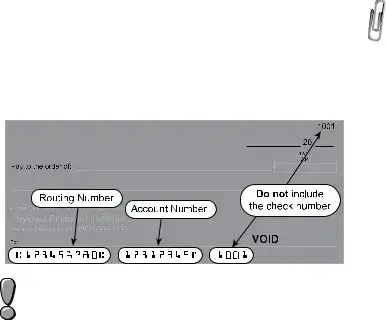
Direct Deposit—Enter the routing and account
numbers and account type. The routing number
is 9 digits. Account numbers can be up to 17
characters (numbers and/or letters). Include
hyphens, but do NOT enter spaces or special
symbols. We recommend that you contact your
nancial institution to ensure you are using the
correct information and that they will honor a direct
deposit. See the sample check below to assist you
in nding the account and routing numbers.
Did you know you can now direct deposit your tax
refund into a new or existing CollegeInvest
account? Please contact 1-800-448-2424 or visit
CollegeInvest.org for more information.
Intercepted RefundsThe Department will
intercept your refund if you owe back taxes or if you
owe a balance to another Colorado government
agency or the IRS. If you are ling a joint return and
only one party is responsible for the unpaid debt,
you may le a written claim to: Injured Spouse
Desk, 1375 Sherman Street, Room 240, Denver,
CO 80261. Claims must include a copy of your
federal income tax return, federal form 8379 and
copies of all W-2, W-2G, or any 1099 statements
received by both parties. DO NOT attach your
claim to this return. It will not be processed.
Line 38 Net Tax Due
Subtract line 25 from line 16. This is the amount you owe with
this return. If you are ling after the due date (or valid extension)
or you owe estimated tax penalty, continue to the next line. If you
are ling timely and do not owe penalty or interest, go to line 42.
Line 39 Delinquent Payment Penalty
Calculate any penalty owed for delinquent ling or payment.
The penalty is the greater of $5 or 5% of the net tax due for
the rst month after the due date and increased by 0.5%
for each additional month past the due date. The maximum
penalty is 12%. If you prefer not to calculate this penalty, the
Department will bill you.
Line 40 Delinquent Payment Interest
Calculate any interest owed for delinquent ling or payment.
The interest rate is 6% of the net tax due. If you prefer not to
calculate this interest, the Department will bill you. Interest on
any bill issued that remains unpaid after 30 days of issuance
will increase to 9%.
Line 41 Estimated Tax Penalty
To calculate this penalty, complete the form DR 0204. Enter
any estimated tax penalty owed on this line. You must submit
the DR 0204 with your return. If you over compute your
estimated tax penalty from what the Department calculates,
any amount of overpayment of penalty will be refunded to you.
Scan and submit the form DR 0204 through Revenue
Online E-Filer Attachments or submit the form to
your paper return.
Line 42 Amount You Owe
Enter the sum of lines 38 through 41. You have three
payment options. Please note: Any assessment made by the
Department will likely include delinquent payment penalty and
interest. The only way to avoid paying penalty and interest is
to pay in full by the ling due date.
Pay OnlineAfter submitting your return
on Revenue Online, you will be given the
opportunity to submit an online payment with
your credit card, e-check or by Electronic Funds
Transfer (EFT). A nominal processing fee may
apply. If you le a paper return, you may still
choose to pay electronically. Visit Colorado.gov/
RevenueOnline for details.
Pay by MailIf ling by Revenue Online or
other electronic ling method and you wish to
send a check or money order, complete the form
DR 0900 and mail with your payment. Make
payable to Colorado Department of Revenue”
and clearly write your Social Security number
and “2019 DR 0104” on the memo line. Be sure
to keep a copy of the money order or note the
check number with your tax records.
Payment PlanThe Department will issue
a bill for any unpaid balance due. When you
receive the bill, you may set up a payment plan
as instructed on the bill.
Third Party Designee
Mark the Yes” box to allow the Colorado Department of
Revenue to discuss this tax return with the paid preparer or
designee who signed it. This authorization is valid for any
period of time and can be revoked with a written statement
to the Department. Revocations must declare the return ling
period and tax type, must designate that the Third Party
Designee is being revoked and must be signed and dated
by the taxpayer and/or designee. By completing this area of
the return, the taxpayer is granting the designee the ability to:
Provide any missing information needed for the
processing of the return, and
Call the Department for information about the
return, including the status of any refund or
processing time, and
Page 8
Receive upon request copies of notices, bills or
transcripts related to the return, and
Respond to notices about math errors, intercepts
and questions about the preparation of the return.
This designation does not allow the third party to receive any
refund check, bind the taxpayer to anything (including any
additional tax liability), or otherwise represent the taxpayer
before the Colorado Department of Revenue. In order to
expand the designee’s authorization, complete the DR 0145
Power of Attorney for Department-Administered Tax Matters
and submit via Revenue Online.
W-2s and 1099s
When filing a paper return, all W-2s and/or 1099s
that show Colorado income tax withholding must be
attached to the front of the form where indicated. When
filing an electronic return, attach scanned copies of
all W-2s and/or 1099s that show Colorado income tax
withholding to the e-filed tax return. If you are unable to
attach W-2s and/or 1099s to your e-filed return, submit
through Revenue Online, Colorado.gov/RevenueOnline.
Taxpayer Service and Assistance
Revenue Online and Secure Messaging
The Department offers many services through Revenue Online.
You can le or amend a return, submit required return attachments,
monitor your account activity, pay taxes, check the status of a
refund, le a protest and send a secure message to Department
staff. Visit Colorado.gov/RevenueOnline to get started.
Taxation Website
Visit the official Colorado Department of Revenue’s
Taxation Division website, Colorado.gov/Tax, for tax
forms, FYI publications, education resources, legal
research and more.
Call Center
Representatives are available Monday through Friday,
8 a.m. to 4:30 p.m.
303-238-SERV (7378)
TTY/TDD 800-659-2656
Walk-in Assistance
Forms and information are available Monday through Friday,
8 a.m. to 4:30 p.m.
Denver—1375 Sherman Street
Colorado Springs—2447 North Union Boulevard
Fort Collins3030 South College Avenue
Grand Junction—222 South 6th Street, Room 208
Pueblo827 West 4th Street, Suite A
Common Issues
Did Not Receive W-2 Statement from
Your Employer
Contact your employer to request a copy, or
Use the year-to-date (YTD) Colorado wages and
withholding amounts from your nal paycheck
stub to complete a Substitute W-2, form
DR 0084 and submit both with your return.
Records Retention
Keep all documentation you used to prepare your return
at least 4 years after the due date, which is the statute of
limitations for the Department to make changes to your return.
However, if the Department does not receive your return, they
may le on your behalf using the best information available.
There is no statute of limitations for assessment if a return is
not led.
Correcting Errors or Changing a Return
Individual income tax returns from 2009 and forward may be
amended electronically through Revenue Online. Filing and
amending returns in Revenue Online is a free service. You may
amend online even if the original return was led on paper.
Revenue Online has all the information from your original
return. You will not need to re-enter everything.
If you cannot amend online, you may le the
DR 0104X. Make sure you use the appropriate
form version for the year you are amending.
If you are changing your Colorado return
because the IRS made changes to your federal
return, you must le the DR 0104X within 30
days of being notied by the IRS. You must
amend your Colorado return in this case, even
if there is no net change to your tax liability.
IT IS VERY IMPORTANT THAT YOU SUBMIT
ALL SCHEDULES AND SUPPORTING
DOCUMENTATION FOR ANY CHANGES
WITH YOUR AMENDED RETURN. YOU MUST
SUBMIT ALL SCHEDULES, EVEN IF YOU ARE
NOT CHANGING THOSE VALUES.
Estimated Tax Requirements
If you expect next years Colorado tax liability to be
greater than $1,000 after subtracting credits, you should
make estimated tax payments using the DR 0104EP. We
recommend that you read publication FYI Income 51 for
additional information.
Filing Errors and Incomplete Information
It is important to read all the information available for your
specic tax situation and to submit all required documentation
with your return. Failure to do so may result in delayed
processing of your return and refund, if any. We recommend
that you file using Revenue Online to avoid common
mathematical errors. You may also opt to use a commercial
tax preparation software program or a paid tax professional
to help you complete your return.
Federal Earned Income Tax Credit and
Colorado Insurance Programs
Individuals whose income does not exceed certain
thresholds and/or have qualifying children may be eligible
for a refund resulting from the federal Earned Income Tax
Credit (EITC) and/or low-cost health insurance through
Child Health Plan Plus (CHP+). You may obtain additional
information regarding the EITC online at IRS.gov or by
calling Colorado United Way at 211. Additional information
regarding CHP+ may be found at CCHP.org or by
calling 1-800-359-1991.
Page 9
Line-by-Line Instructions for the
DR 0104AD - Subtractions from
Income Schedule
If you use this schedule to claim any subtractions from
your income, you must submit it with the DR 0104.
Line 1 State Income Tax Refund
Refer to your federal income tax return to complete
this line. If you did not complete federal Schedule 1,
Form 1040 or 1040SR, enter $0. Otherwise, enter the amount
from line 10, Schedule 1, Form 1040 or 1040SR.
Line 2 U.S. Government Interest
Enter the sum of all interest earned from U.S. government
bonds, treasury bills and other obligations of the U.S. or its
territories, possessions and agencies that you reported on
your federal income tax return and is calculated as part of
your federal taxable income. We recommend that you read
publication FYI Income 20 if this applies to you.
Do not include interest earned from Federal National
Mortgage Association and Government National
Mortgage Association (Fannie Mae and Ginnie Mae).
Dividends from mutual funds may not be 100% exempt.
Line 3 Pension and Annuity
Subtraction
You might be eligible to subtract the income you earned from a
pension or annuity. We recommend that you read publication
FYI Income 25 if this applies to you. This subtraction is allowed
only for pension or annuity income that is included in your
federal taxable income. The amount of subtraction you can
claim is also limited based upon your age.
As of December 31, 2019, if you were:
Age 65 or older, then you are entitled to subtract
$24,000 or the total amount of your taxable
pension/annuity income, whichever is smaller; or
At least 55 years old, but not yet 65, then
you are entitled to subtract $20,000 or the
total amount of your taxable pension/annuity
income, whichever is smaller; or
Younger than 55 years old and you received
pension/annuity income as a secondary
beneficiary (widow, dependent child, etc.)
due to the death of the person who earned
the pension/annuity, then you are entitled to
subtract $20,000 or the total amount of your
secondary beneciary taxable pension/annuity
income, whichever is smaller. If this applies
to you, please list the Social Security number
of the deceased in the space provided.
Pension/annuity income should not be intermingled
between spouses. Each spouse must meet the
requirements for the subtraction separately and
claim the subtraction only on their pension/annuity
income. Any qualifying spouse pension/annuity
income should be reported on line 4.
Submit copies of all 1099R and SSA-1099
statements with your return. Submit using
Revenue Online or attach to your paper return.
Line 4 Spouse Pension and
Annuity Subtraction
If the secondary taxpayer listed on a jointly led return is
eligible for the pension and annuity subtraction, enter the
qualifying amount on this line. Review the instructions for
line 3 to see what amount qualies. We recommend that
you read publication FYI Income 25 if this applies to you.
Take precautions to report the subtraction on the
correct line. The first person listed on the return
shall report on line 3 and the second person listed
shall report on line 4.
Line 5 Military Retirement Subtraction
You might be eligible to subtract the income you earned
from your military retirement benefits. We recommend
that you read publication FYI Income 25 if this applies
to you. This subtraction is allowed only for military
retirement income that is included in your federal taxable
income. To qualify, you must have been 54 years of age
or younger as of December 31,2019. If you meet the
age requirement, then you are entitled to subtract $4,500
or the total amount of your taxable military retirement
benefits, whichever is smaller.
Military retirement benefits should not be intermingled
between spouses. Each spouse must meet the
requirements for the subtraction separately and
claim the subtraction only on their military retirement
benefits. Any qualifying spouse military retirement
benefits should be reported on line 6.
Submit copies of all 1099R statements with your
return. Submit as attachments when e-filing
or using Revenue online, or include with your
paper return.
Line 6 Spouse Military Retirement
Subtraction
If the secondary taxpayer listed on a jointly led return is
eligible for the military retirement subtraction, enter the
qualifying amount on this line. Review the instructions for
line 5 to see what amount qualies. We recommend that you
read publication FYI Income 25 if this applies to you.
Take precautions to report the subtraction on the
correct line. The first person listed on the return
must report on line 5 and the second person listed
must report on line 6.
Line 7 Colorado Capital Gain
Subtraction
You might be eligible to subtract some or all of the capital
gain included in your federal taxable income, if the gain is
derived from the sale of tangible personal property or from
the sale of real property located in Colorado. The amount of
this subtraction is limited to $100,000. We recommend that
you read publication FYI Income 15 if this applies to you.
You must complete and submit the DR 1316 with
your return. Take precaution to completely fill out
each item of this form. Be as detailed as possible,
especially when providing property descriptions,
ownership, and dates of acquisition and sale.
Page 10
Line 8 CollegeInvest Contribution
Contributions to CollegeInvest can be deducted from your
return. The contribution must have been included on your
federal income tax return and calculated as part of your
federal taxable income. We recommend that you read
publication FYI Income 44 if this applies to you.
The three fields on line 8 should be left blank if the
taxpayer and/or spouse are the CollegeInvest account
owners who set up the account for the student
beneficiary. If you are not the account owner (e.g.
grandparent, friend,) complete the three additional
fields. To report contributions to more than one
account, you must file electronically. Do not deduct
contributions made to a tuition savings plan for another
state or any tuition you paid while attending school.
Do NOT deduct contributions made by your employer/
business to your College Invest account on this line. To
claim pass-through credits for employer contributions
to employee 529 qualified state tuition account, please
refer to the instructions on form DR0289 and report the
credit on applicable credit schedule.
Line 9 Qualifying Charitable Contributions
Taxpayers who make charitable contributions that would be
eligible for a federal income tax deduction, but do not claim
federal itemized deductions on Schedule A of form 1040 or
1040SR, might be eligible to deduct a portion of their contribution
on this form. We recommend that you read publication FYI
Income 48 if this applies to you. Use the worksheet on the next
page to determine your qualifying contribution.
(a) Did you itemize your deductions on Schedule
A of federal form 1040 or 1040SR? Yes No
(b) Did you deduct charitable contributions on
the federal form? Yes No
If you answered Yes on either (a) or (b) above, enter $0 on line 9;
you do not qualify for this subtraction. If you answered No on both
(a) and (b) above, continue below.
(c) Enter the amount you could have deducted
as charitable contributions on lines 11 and
12 of federal Schedule A. $
(d) Colorado adjustment $500
(e) Subtract line (d) from line (c). This is the
qualifying amount. If the amount is greater
than $0, transfer to line 9.
Enter the total contributions in the space provided and the
subtraction after the $500 adjustment on line 9.
Do not enter an amount on this line if you already
deducted your charitable donation on Schedule A of
the federal 1040 or 1040SR form. Otherwise, you will
be issued an assessment that will likely include
penalty and interest.
For claims greater than $5,000, submit the receipts you
received at the time of donation. For in-kind
donations, submit an itemized list of the donated items
and their fair market value. Submit using Revenue
Online or attach to your paper return. Do not send
receipts of items that were purchased for donation.
Line 10 Qualified Reservation Income
List any amount of income that was derived wholly from
reservation sources by an enrolled tribal member who lives
on the reservation, which was included as taxable income on
the Federal income tax form.
Submit proof of tribal membership, residence, and
source of income. This must be submitted every
three years by taxpayers claiming this subtraction.
Line 11 PERA/DPSRS Subtraction
If you made contributions to PERA between July 1, 1984,
and December 31, 1986, or to Denver Public Schools
District No. 1 Retirement during 1986 and your 2019 federal
taxable income includes pension income, see FYI Income
16 to determine if you can take a subtraction for any of your
pension income.
Submit a copy of your previously taxed contribution.
PERA statements can be obtained from
Copera.org or by calling 1-800-759-7372. Submit
using Revenue Online or attach to your
paper return.
Do not list the amount of contributions you made as
an employee this past year.
Line 12 Railroad Benefit
List any railroad retirement benets that you reported on
your federal income tax return and is calculated as part of
your federal taxable income. We recommend that you read
publication FYI Income 25 if this applies to you.
Submit copies of all RRB-1099 and RRB-1099R
Statements. Submit using Revenue Online or submit
with your paper return.
Line 13 Wildfire Mitigation Measures
Enter the amount incurred in performing wildfire
mitigation on your land, up to $2,500. We recommend that
you read publication FYI Income 65 to properly calculate
this subtraction.
Submit copies of receipts for qualified costs for wildfire
mitigation for your property. Submit using Revenue
Online or submit with your paper return.
Line 14 Colorado Marijuana Business Deduction
For Colorado-licensed marijuana businesses, list any
expenditure that is eligible to be claimed as a federal income
tax deduction but is disallowed by section 280E of the Internal
Revenue Code because marijuana is a controlled substance
under federal law.
To calculate this deduction, you must create pro forma
federal schedule(s) for Business Prot or Loss as if the
federal government would have allowed the expenditures
from the marijuana business. The Colorado deduction shall
be the difference between the prot/loss as calculated on the
ACTUAL schedule(s) led with the federal return and the pro
forma schedule(s) described above.
You must submit both the pro forma federal schedule(s)
and the actual federal schedule(s) with your Colorado
return when claiming this deduction. Submit using
Revenue Online or submit with your paper return.

Form Information

Fact Name Description
Form Types The Colorado Tax form includes several components: DR 0104, DR 0104CH, DR 0900, DR 0104AD, DR 0158-I, DR 0104PN, DR 0104US, and DR 0104CR.
Filing Deadline Tax returns must be postmarked by April 15. An automatic extension to file until October 15 is available, but payment is still due by April 15.
Residency Status Taxpayers must indicate their residency status on the form, which affects how income is taxed in Colorado.
Mailing Addresses Forms must be mailed to specific addresses based on whether payment is included: one for with payment and another for without payment.
Governing Law The Colorado Individual Income Tax is governed by Colorado Revised Statutes Title 39, Article 22.
Electronic Filing Taxpayers are encouraged to file electronically via Revenue Online to reduce errors and processing delays.

Detailed Guide for Filling Out Colorado Tax

Filling out the Colorado Tax form is an important task that requires careful attention to detail. Completing this form accurately will help ensure that your tax return is processed smoothly and efficiently. Follow the steps below to fill out the form correctly.

  1. Gather necessary documents, including your federal income tax return, W-2s, and any other relevant financial records.
  2. Start with the DR 0104 form, which is the main Colorado Individual Income Tax form.
  3. Fill in your personal information, including your name, mailing address, date of birth, and Social Security number. If filing jointly, include your spouse's information.
  4. Mark your residency status by checking the appropriate box on the form.
  5. Refer to your federal income tax return to complete Line 1, which is your federal taxable income. Make sure to enter any negative amounts in parentheses.
  6. Complete Line 2 for state addbacks, using your federal return to determine the correct amount. If you did not itemize deductions, enter $0.
  7. For Line 3, list any other additions to your income as specified on the form.
  8. Calculate the subtotal for Lines 4 and 5. Line 4 is the sum of Lines 1 through 3, and Line 5 reflects any subtractions from your federal taxable income as reported on the DR 0104AD schedule.
  9. Subtract Line 5 from Line 4 to find your Colorado taxable income, which goes on Line 6.
  10. If you are a full-year resident, calculate your tax using the tax table provided. If you are a part-year resident or nonresident, complete the DR 0104PN to determine your apportioned tax.
  11. Fill in any applicable alternative minimum tax on Line 8 and any prior year credits on Line 9.
  12. Complete Lines 10 through 12 for tax credits, ensuring to use the DR 0104CR for nonrefundable credits and the DR 1366 for enterprise zone credits.
  13. Double-check all entries for accuracy and completeness.
  14. Submit your form electronically via Revenue Online or mail it to the appropriate address based on whether you are making a payment.

After completing these steps, you can file your tax return electronically or by mail. If you choose to mail it, ensure it is postmarked by the due date. Filing electronically is recommended to minimize errors and speed up processing. Be sure to keep a copy of your completed form and any supporting documents for your records.

Obtain Answers on Colorado Tax

  1. What is the purpose of the Colorado Tax Form?

    The Colorado Tax Form, specifically the DR 0104, is used for filing individual income tax returns for Colorado residents, part-year residents, and nonresidents who earn income from Colorado sources. This form allows taxpayers to report their income, claim deductions and credits, and calculate their tax liability based on their federal taxable income.

  2. Who is required to file a Colorado income tax return?

    Individuals must file a Colorado income tax return if they meet any of the following criteria:

    • They are full-year residents of Colorado.
    • They are part-year residents who received taxable income while residing in Colorado.
    • They are nonresidents who earned income from sources within Colorado.

    Even if there is no Colorado tax liability, residents must file if they are required to file a federal income tax return with the IRS.

  3. What is the due date for filing the Colorado Tax Form?

    The Colorado Tax Form is due on April 15 each year. If taxpayers need more time to file, they can request an automatic extension until October 15. However, it is important to note that this extension does not apply to the payment of taxes owed, which are still due by April 15.

  4. How can taxpayers file their Colorado income tax return?

    Taxpayers have several options for filing their Colorado income tax return:

    • Electronically using the Revenue Online service at Colorado.gov/RevenueOnline.
    • Using private e-file software.
    • Through a paid tax preparer.

    Filing electronically is recommended as it significantly reduces the chance of errors. If electronic filing is not possible, taxpayers can mail their completed forms as instructed.

  5. What should be included when filing for a deceased person?

    Legal representatives or surviving spouses can file a Colorado income tax return on behalf of a deceased individual. They must indicate the deceased status on the return and attach a copy of the death certificate. It is also necessary to mark the box next to the deceased person's name and write "DECEASED" clearly on the return. For claiming refunds, the death certificate must accompany the return.

Common mistakes

Filling out the Colorado Tax Form can be a daunting task, and many people make mistakes that can lead to processing delays or even penalties. One common error occurs when individuals do not accurately report their federal taxable income. It is crucial to refer to your federal income tax return to complete this line correctly. If you enter a total income amount instead of the taxable income, your tax liability could be overstated. This mistake can easily be avoided by double-checking the relevant line on your federal return before transferring the information.

Another frequent mistake involves the residency status selection. Taxpayers must mark the appropriate box to indicate whether they are full-year residents, part-year residents, or nonresidents. Failing to do so can lead to incorrect tax calculations, as the tax rates and obligations differ based on residency status. Always ensure that your residency status is accurately represented on the form to avoid complications.

Many people also neglect to include necessary supporting documentation when claiming certain tax credits or subtractions. For example, if you are claiming credits from a pass-through entity, you must attach the federal Schedule K-1 or another statement that details the type and amount of the credit. Without this documentation, your claim may be denied, resulting in a higher tax liability than anticipated.

Additionally, some taxpayers make the mistake of not filing electronically. While it is possible to submit a paper return, electronic filing significantly reduces the risk of errors. The Colorado Department of Revenue provides a secure online filing option that is user-friendly and helps ensure that all necessary information is accurately reported. If you are able to file electronically, it is highly recommended.

Another common pitfall is not properly calculating the Colorado taxable income. This figure is derived from your federal taxable income and requires careful attention to detail. Be sure to subtract any applicable subtractions from the DR 0104AD schedule accurately. An error in this calculation can lead to an incorrect tax amount owed, which could result in penalties or interest on unpaid taxes.

Lastly, some taxpayers overlook the importance of keeping a copy of their submitted tax return and all supporting documents. This practice is essential for future reference, especially if the Colorado Department of Revenue has questions or requires additional information. Maintaining thorough records can save you time and stress should any issues arise after filing.

Documents used along the form

When preparing to file your Colorado tax return, you may encounter several additional forms and documents that can assist you in accurately reporting your income and claiming any applicable credits or deductions. Below is a list of these forms, along with a brief description of each.

  • DR 0104CH: Voluntary Contributions Schedule - This form allows taxpayers to make voluntary contributions to various charitable organizations directly through their tax return, specifying the amount they wish to donate.
  • DR 0900: Individual Income Tax Payment Form - Use this form to make payments towards your Colorado income tax liability, whether you are filing electronically or by mail.
  • DR 0104AD: Subtractions from Income Schedule - This schedule helps taxpayers identify and report any allowable subtractions from their federal taxable income, which can lower their Colorado taxable income.
  • DR 0158-I: Extension Payment for Colorado Individual Income Tax - If you need more time to file your tax return, this form allows you to request an extension and make any necessary payments to avoid penalties.
  • DR 0104PN: Part-Year Resident/Nonresident Tax Calculation Schedule - This schedule is specifically for individuals who lived in Colorado for part of the year or who earned income from Colorado sources while residing elsewhere.
  • DR 0104US: Consumer Use Tax Reporting Schedule - Taxpayers use this form to report and pay the use tax on items purchased from out-of-state vendors that did not collect Colorado sales tax.
  • DR 0104CR: Individual Credit Schedule - This schedule is used to claim various nonrefundable tax credits available to Colorado taxpayers, helping to reduce overall tax liability.
  • DR 1778: E-Filer Attachment - This document is used to submit any additional required documentation when filing electronically, ensuring that all necessary information is included with your tax return.

Understanding these forms and how they relate to your Colorado tax return can significantly streamline the filing process. Each document serves a specific purpose and can help ensure that you are compliant with state tax regulations while maximizing your potential refunds or minimizing your tax liabilities.

Similar forms

  • IRS Form 1040: This is the standard federal income tax form used by individuals to report their income, claim deductions, and calculate their tax liability. Similar to the Colorado Tax form, it requires detailed income information and provides various schedules for specific tax situations.
  • IRS Form 1040-SR: Designed for seniors, this form is similar to the 1040 and includes a larger font for easier reading. Like the Colorado Tax form, it allows for the reporting of income and deductions, catering to a specific demographic.
  • IRS Form 1040-NR: This form is for non-resident aliens who must report their U.S. income. It shares similarities with the Colorado Tax form in that it requires income reporting and may involve state-specific considerations for non-residents.
  • IRS Schedule A: This schedule is used to itemize deductions on the federal tax return. The Colorado Tax form similarly allows for various subtractions from income, reflecting the need for detailed financial reporting.
  • IRS Schedule C: Self-employed individuals use this form to report income and expenses. The Colorado Tax form parallels this by requiring additional schedules for specific income types, such as those for business income.
  • IRS Form 8862: This form is used to claim the Earned Income Credit after it has been disallowed in a prior year. The Colorado Tax form also includes provisions for claiming credits, emphasizing the importance of accurate reporting for tax benefits.
  • State Tax Forms from Other States: Many states have their own tax forms that resemble the Colorado Tax form. They typically require similar information regarding income, deductions, and credits, reflecting the common goal of state tax compliance.

Dos and Don'ts

When filling out the Colorado Tax form, it’s important to follow certain guidelines to ensure a smooth process. Here’s a list of things you should and shouldn’t do:

  • Do read the instructions thoroughly before starting your return. Understanding the requirements can save you time and frustration.
  • Do file electronically whenever possible. Using the Revenue Online service can significantly reduce errors and processing time.
  • Do double-check your Social Security number and other personal information for accuracy. Small mistakes can lead to big delays.
  • Do include all necessary supporting documentation. Missing documents can result in processing delays or denial of credits.
  • Don't leave any sections blank. If a question does not apply to you, write "N/A" to indicate that you have considered it.
  • Don't forget to sign and date your return. An unsigned return is considered incomplete and may be rejected.
  • Don't wait until the last minute to file. Early filing can help you avoid stress and potential issues with payment deadlines.

By following these tips, you can navigate the Colorado Tax form with greater ease and confidence.

Misconceptions

  • Misconception 1: The Colorado Tax Form is only for full-time residents.
  • This is not true. The form is designed for full-year residents, part-year residents, and non-residents who earn income in Colorado. Anyone who has taxable income from Colorado sources must file.

  • Misconception 2: Filing an extension means you do not have to pay taxes until later.
  • An extension allows extra time to file your return, but it does not extend the time to pay any taxes owed. Payments are still due by the original deadline to avoid penalties and interest.

  • Misconception 3: All income is taxable in Colorado.
  • Not all income is taxable. Certain types of income, such as some retirement benefits or specific types of disability payments, may be exempt. It's essential to review the guidelines to determine what qualifies.

  • Misconception 4: You cannot claim tax credits if you file a paper return.
  • This is incorrect. Tax credits can be claimed regardless of whether you file electronically or on paper. However, electronic filing may simplify the process and reduce the risk of errors.

  • Misconception 5: You can skip the supporting documentation for deductions and credits.
  • Many deductions and credits require additional documentation to substantiate your claims. Failing to provide this can lead to processing delays or denial of those deductions and credits.

Key takeaways

When filling out the Colorado Tax form, consider the following key takeaways:

  • Filing Requirement: You must file if you are a full-year resident, part-year resident with Colorado income, or a nonresident earning income from Colorado sources.
  • Due Date: The tax return is due by April 15. If you need more time, you can file for an automatic extension until October 15, but this does not extend the payment deadline.
  • Residency Status: Clearly mark your residency status on the form. This determines how your tax is calculated.
  • Electronic Filing: Filing online significantly reduces the chance of errors. Use Revenue Online or approved tax software.
  • Documentation: Some credits and subtractions require supporting documents. Failing to provide these can delay processing or deny claims.
  • Joint Returns: If filing jointly, ensure both federal and Colorado returns use the same filing status and list names in the same order.
  • Special Considerations for Military: Military members may retain Colorado residency even when stationed elsewhere. Specific rules apply for their income.
  • Tax Credits: Familiarize yourself with available tax credits and ensure you complete the necessary forms to claim them.