Homepage Blank Colorado Dr 1102 Form
Outline

The Colorado DR 1102 form serves as a crucial tool for businesses needing to communicate changes regarding their registration with the Colorado Department of Revenue. It is primarily used to notify the department of any alterations in business name or address, as well as to inform them when a business is closing its account. This form is essential for maintaining accurate records and ensuring compliance with state tax regulations. Businesses must provide their Colorado Account Number (CAN) and, if applicable, a Branch ID to specify which location is affected. In cases of ownership changes, businesses are required to submit a new Sales Tax/Wage Withholding Account Application (CR 0100). Furthermore, the form allows for the indication of closure dates and the specific tax types involved, ensuring that the Department of Revenue can update its records efficiently. Completing the DR 1102 accurately helps prevent delays in processing and avoids incorrect billing, making it an indispensable part of managing business operations in Colorado.

Sample - Colorado Dr 1102 Form

*DO=NOT=SEND*
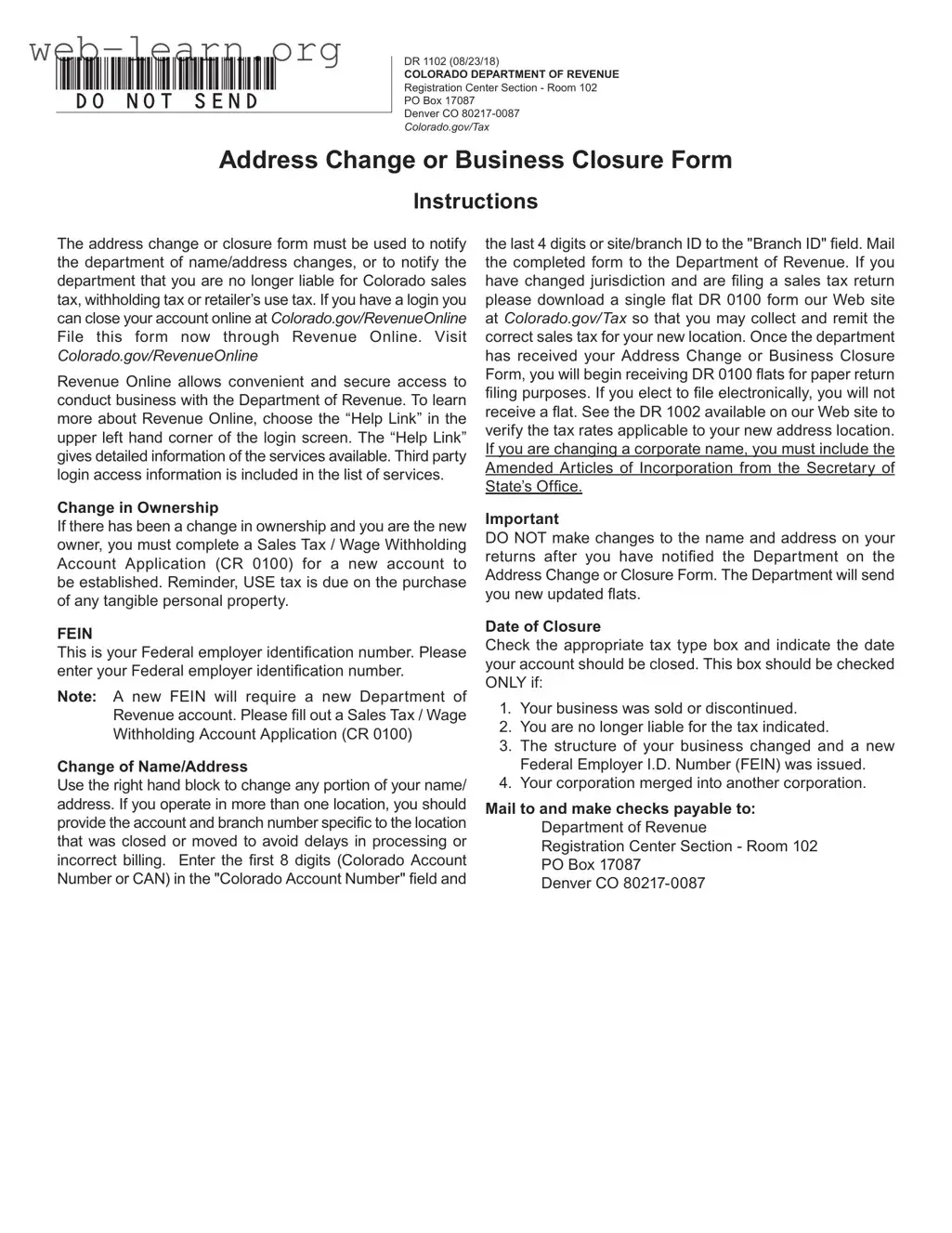
DR 1102 (08/23/18)
COLORADO DEPARTMENT OF REVENUE
Registration Center Section - Room 102
PO Box 17087
Denver CO 80217-0087
Colorado.gov/Tax
Address Change or Business Closure Form
Instructions
The address change or closure form must be used to notify
the department of name/address changes, or to notify the
department that you are no longer liable for Colorado sales
tax, withholding tax or retailer’s use tax. If you have a login you
can close your account online at Colorado.gov/RevenueOnline
File this form now through Revenue Online. Visit
Colorado.gov/RevenueOnline
Revenue Online allows convenient and secure access to
conduct business with the Department of Revenue. To learn
more about Revenue Online, choose the “Help Link” in the
upper left hand corner of the login screen. The “Help Link
gives detailed information of the services available. Third party
login access information is included in the list of services.
Change in Ownership
If there has been a change in ownership and you are the new
owner, you must complete a Sales Tax / Wage Withholding
Account Application (CR 0100) for a new account to
be established. Reminder, USE tax is due on the purchase
of any tangible personal property.
FEIN
This is your Federal employer identication number. Please
enter your Federal employer identication number.
Note: A new FEIN will require a new Department of
Revenue account. Please ll out a Sales Tax / Wage
Withholding Account Application (CR 0100)
Change of Name/Address
Use the right hand block to change any portion of your name/
address. If you operate in more than one location, you should
provide the account and branch number specic to the location
that was closed or moved to avoid delays in processing or
incorrect billing. Enter the rst 8 digits (Colorado Account
Number or CAN) in the "Colorado Account Number" eld and
the last 4 digits or site/branch ID to the "Branch ID" eld. Mail
the completed form to the Department of Revenue. If you
have changed jurisdiction and are ling a sales tax return
please download a single at DR 0100 form our Web site
at Colorado.gov/Tax so that you may collect and remit the
correct sales tax for your new location. Once the department
has received your Address Change or Business Closure
Form, you will begin receiving DR 0100 ats for paper return
ling purposes. If you elect to le electronically, you will not
receive a at. See the DR 1002 available on our Web site to
verify the tax rates applicable to your new address location.
If you are changing a corporate name, you must include the
Amended Articles of Incorporation from the Secretary of
State’s Ofce.
Important
DO NOT make changes to the name and address on your
returns after you have notied the Department on the
Address Change or Closure Form. The Department will send
you new updated ats.
Date of Closure
Check the appropriate tax type box and indicate the date
your account should be closed. This box should be checked
ON LY if:
1. Your business was sold or discontinued.
2. You are no longer liable for the tax indicated.
3. The structure of your business changed and a new
Federal Employer I.D. Number (FEIN) was issued.
4. Your corporation merged into another corporation.
Mail to and make checks payable to:
Department of Revenue
Registration Center Section - Room 102
PO Box 17087
Denver CO 80217-0087
*131102==19999*
DR 1102 (08/23/18)
COLORADO DEPARTMENT OF REVENUE
Registration Center Section - Room 102
PO Box 17087
Denver CO 80217-0087
Colorado.gov/Tax
Address Change or Business Closure Form
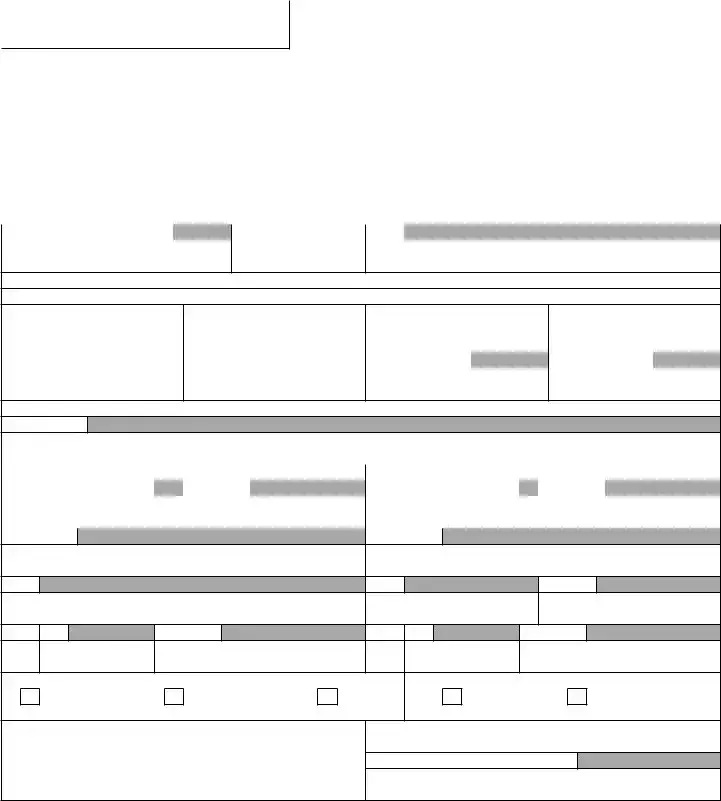
Use this form to notify the department of name and/or address changes or to notify the department that you want to close your
account. Your Colorado Account Number (or CAN) is an 8 digit account number that is assigned to you when you open your
account with the department. If you have a location based business, your sales tax license from the department should include
both an 8 digit account number, as well as a 4 digit branch ID or site ID for each location you operate. To close or update the
address of a location based businesses, please include the CAN and the branch ID specic to the location in question. Be sure
to include the appropriate effective dates for closures and relocations in order to avoid incorrect assessments of tax liability.
Colorado Account Number (CAN) Branch/Site ID (last 4 digits) FEIN
To close one or more accounts, complete this section.
Date account closed: (MM/DD/YY)
Withholding Tax Sales Tax Entire Account Other
Date (MM/DD/YY) (Last Day of Payroll) Date (MM/DD/YY) (Last Day of Sales) Date (MM/DD/YY) Date (MM/DD/YY)
To change the
address or name for one or more accounts, complete this section.
Effective Date
Previous Name and Address New Name and Address
Last Name or Business Name First Name Last Name or Business Name First Name
Old Address New Address
City City County
State Zip Telephone State Zip Telephone
Mailing Address Physical Address Both Inside City Outside City
Mail to: Colorado Department of Revenue
Registration Center Section - Room 102
PO Box 17087
Denver CO 80217-0087
Note: If your retail business location changes during a ling period you must
le a separate sales tax return for the taxes collected at each location
Must Be Signed By An Authorized Agent

Form Information

Fact Name Details
Purpose The DR 1102 form is used to notify the Colorado Department of Revenue about changes in name or address, or to inform them of business closure.
Governing Law This form is governed by Colorado state tax laws, specifically regarding sales tax and withholding tax obligations.
Account Number Each business is assigned a Colorado Account Number (CAN), which consists of 8 digits, along with a 4-digit branch ID for location-based businesses.
Submission Method The form can be submitted online through Revenue Online or mailed to the Department of Revenue at the specified address.
Change of Ownership If ownership changes, a new Sales Tax / Wage Withholding Account Application (CR 0100) must be completed for a new account.
Effective Dates It is crucial to include effective dates for closures or relocations to prevent incorrect tax assessments.

Detailed Guide for Filling Out Colorado Dr 1102

To complete the Colorado DR 1102 form, follow the steps outlined below. This process will ensure that the Department of Revenue receives accurate information regarding your address change or business closure. After submitting the form, you can expect to receive updated documentation reflecting your changes.

  1. Obtain the Colorado DR 1102 form from the Colorado Department of Revenue website or your local office.
  2. Locate your Colorado Account Number (CAN), which is an 8-digit number assigned to your account.
  3. If applicable, find your Branch/Site ID, which consists of the last 4 digits associated with your specific location.
  4. Fill in your Federal Employer Identification Number (FEIN) in the designated field.
  5. If you are closing your account, indicate the date of closure in the appropriate section. Specify the type of tax (Withholding Tax, Sales Tax, Entire Account, or Other) that applies.
  6. If you are changing your name or address, complete the section for new name and address details. Include the effective date of the change.
  7. Provide your previous name and address, as well as the new name and address, ensuring that all information is accurate and complete.
  8. Include your telephone number and verify that all details are correct.
  9. Sign the form as an authorized agent. Your signature is necessary to validate the request.
  10. Mail the completed form to the Department of Revenue at the address provided: Registration Center Section - Room 102, PO Box 17087, Denver, CO 80217-0087.

Obtain Answers on Colorado Dr 1102

  1. What is the Colorado DR 1102 form used for?

    The Colorado DR 1102 form is primarily used to inform the Department of Revenue about changes in your business address or to notify them if you are closing your business account. This includes changes to your name or address, as well as notifying the department if you are no longer responsible for collecting sales tax, withholding tax, or retailer’s use tax.

  2. How do I complete the DR 1102 form?

    To complete the DR 1102 form, you will need to provide specific information such as your Colorado Account Number (CAN), branch ID, and Federal Employer Identification Number (FEIN). Fill out the relevant sections for either changing your address/name or closing your account. Be sure to include effective dates for any changes to avoid issues with tax liability.

  3. Where should I send the completed DR 1102 form?

    Once you have filled out the DR 1102 form, mail it to the Colorado Department of Revenue at the following address:

    • Department of Revenue
    • Registration Center Section - Room 102
    • PO Box 17087
    • Denver, CO 80217-0087
  4. Can I submit the DR 1102 form online?

    Yes, you can submit the DR 1102 form online through Revenue Online. If you have a login, this option provides a convenient and secure way to manage your business with the Department of Revenue. If you need assistance, you can find help by clicking the “Help Link” on the login screen.

  5. What if my business has changed ownership?

    If your business has changed ownership, you will need to complete a new Sales Tax / Wage Withholding Account Application (CR 0100) to establish a new account. Simply using the DR 1102 form will not suffice in this case.

  6. What happens after I submit the DR 1102 form?

    After the Department of Revenue receives your DR 1102 form, they will process your request. If you have changed your address or name, you will begin receiving updated forms for tax filing. If you choose to file electronically, you will not receive paper forms. Make sure not to change your name or address on your returns until the department has processed your form.

Common mistakes

Filling out the Colorado DR 1102 form can be a straightforward process, but several common mistakes can lead to complications. One frequent error is failing to provide the correct Colorado Account Number (CAN). This eight-digit number is essential for identifying your account. Omitting or miswriting this number can delay the processing of your request.

Another common mistake involves not including the Branch ID. This four-digit identifier is crucial for businesses operating in multiple locations. Without it, the Department of Revenue may not accurately process changes related to specific sites.

Many individuals neglect to check the appropriate tax type box. It is vital to indicate whether the closure pertains to sales tax, withholding tax, or the entire account. Failing to do so can lead to confusion and potential liabilities.

Additionally, people often forget to specify the effective date for closures or changes. Providing this information is essential to ensure that the Department of Revenue updates its records accurately and promptly. An incorrect date can result in continued tax obligations or erroneous billing.

Some individuals mistakenly believe they can make changes to their name and address on tax returns after submitting the DR 1102 form. This is incorrect. Once the Department has been notified through this form, any changes should be avoided to prevent discrepancies.

Another error arises from not including necessary documentation. For example, if changing a corporate name, it is required to attach the Amended Articles of Incorporation from the Secretary of State’s Office. Omitting this documentation can lead to the rejection of the form.

Inaccurate or incomplete contact information is also a common issue. Ensure that the new address, phone number, and any other relevant details are correct. Miscommunication due to incorrect contact information can result in missed notifications from the Department of Revenue.

Some people fail to sign the form. An authorized agent must sign the DR 1102 to validate the submission. Without a signature, the form is incomplete and cannot be processed.

Finally, many individuals do not take advantage of the online filing option. The Colorado Department of Revenue provides a secure online platform for submitting the form. Utilizing this option can expedite the process and reduce the likelihood of errors associated with mailing.

By being aware of these common mistakes, individuals can improve their chances of a smooth and successful submission of the Colorado DR 1102 form.

Documents used along the form

The Colorado DR 1102 form is essential for notifying the Department of Revenue about address changes or business closures. Alongside this form, several other documents may be required to ensure compliance with tax regulations. Below is a list of forms commonly used in conjunction with the DR 1102 form.

  • Sales Tax / Wage Withholding Account Application (CR 0100): This form is necessary for establishing a new account when there is a change in ownership. If a new owner takes over a business, they must complete this application to ensure proper tax reporting and compliance.
  • Amended Articles of Incorporation: If a business undergoes a name change, this document must be submitted. It is obtained from the Secretary of State’s Office and serves as official proof of the new corporate name.
  • DR 0100 Form: This form is used for filing sales tax returns. When a business changes its jurisdiction, it is essential to download this form to collect and remit the correct sales tax for the new location.
  • DR 1002 Form: This document helps verify the applicable tax rates for a new address. It is crucial for businesses that have relocated to ensure they are charging the correct sales tax rate based on their new location.

Each of these forms plays a critical role in maintaining accurate tax records and ensuring compliance with Colorado tax laws. Properly completing and submitting these documents can help avoid delays and potential penalties.

Similar forms

  • CR 0100 - Sales Tax / Wage Withholding Account Application: This form is used to establish a new account when there is a change in ownership. Similar to the DR 1102, it requires specific identification details and notifies the Department of Revenue of significant changes.
  • DR 0100 - Sales Tax Return: This form is necessary for filing sales tax returns. Like the DR 1102, it requires accurate account information and is crucial for compliance with tax regulations when changing business locations.
  • DR 1002 - Tax Rate Verification: This document helps businesses verify the tax rates applicable to their new address. It shares the need for accurate information, similar to the DR 1102, ensuring compliance with local tax laws.
  • Amended Articles of Incorporation: Required for businesses changing their corporate name, this document must be submitted alongside the DR 1102. Both forms aim to ensure the Department of Revenue has updated and accurate information.
  • Form 941 - Employer's Quarterly Federal Tax Return: This form is used to report income taxes, Social Security tax, and Medicare tax withheld from employee's paychecks. Like the DR 1102, it requires timely submission to avoid penalties.
  • Form W-2 - Wage and Tax Statement: This form reports an employee's annual wages and the taxes withheld. Similar to the DR 1102, it is critical for ensuring proper tax reporting and compliance.

Dos and Don'ts

When filling out the Colorado DR 1102 form, it is essential to follow specific guidelines to ensure accuracy and compliance. Here is a list of things you should and shouldn't do:

  • Do ensure you provide your Colorado Account Number (CAN) and Branch ID accurately.
  • Do include your Federal Employer Identification Number (FEIN) if applicable.
  • Do check the appropriate tax type box and indicate the correct closure date.
  • Do mail the completed form to the correct address provided by the Department of Revenue.
  • Don't make changes to your name and address on previous returns after submitting the form.
  • Don't forget to include Amended Articles of Incorporation if you are changing a corporate name.
  • Don't submit the form without checking for completeness and accuracy.
  • Don't delay in filing the form if you have changed your business structure or ownership.

Misconceptions

  • Misconception 1: The DR 1102 form can be submitted online.
  • This form must be mailed to the Department of Revenue. Online submission is not permitted for this specific form.

  • Misconception 2: You can change your business name and address on tax returns after submitting the form.
  • Once you submit the DR 1102 form, do not make changes to your name and address on your returns. This could lead to confusion and incorrect billing.

  • Misconception 3: The form is only for businesses that are closing.
  • The DR 1102 form is also used for notifying the department of name or address changes, not just for business closures.

  • Misconception 4: You can use the form to update any information related to your business.
  • The form is specifically for name/address changes or to close your account. Other changes may require different forms.

  • Misconception 5: You do not need to provide your Colorado Account Number (CAN) when submitting the form.
  • It is essential to include your 8-digit Colorado Account Number and the appropriate branch ID to ensure accurate processing.

  • Misconception 6: The form can be submitted without a signature.
  • An authorized agent must sign the form. Submitting without a signature may delay processing.

  • Misconception 7: You can submit the form at any time without consequences.
  • Timely submission is crucial. Delays may result in incorrect assessments of tax liability.

  • Misconception 8: A new Federal Employer Identification Number (FEIN) does not require a new Department of Revenue account.
  • If you obtain a new FEIN, you must complete a Sales Tax/Wage Withholding Account Application (CR 0100) to establish a new account.

  • Misconception 9: The DR 1102 form is the only document needed for a business name change.
  • If changing a corporate name, you must also include the Amended Articles of Incorporation from the Secretary of State’s Office.

Key takeaways

Filling out the Colorado DR 1102 form is an essential task for businesses that need to update their information with the Department of Revenue. Here are some key takeaways to keep in mind:

  • Purpose of the Form: This form is primarily used to notify the Department of Revenue about any changes in your business name or address, or to inform them that you are no longer responsible for certain taxes.
  • Online Options: If you have an account, you can conveniently close it online through Revenue Online, which offers a secure platform for managing your tax obligations.
  • Account Information: When completing the form, be sure to include your Colorado Account Number (CAN) and the Branch ID for accurate processing, especially if you operate multiple locations.
  • Closure Requirements: Check the appropriate boxes to indicate the type of tax account being closed and provide the closure date. This is crucial if your business has changed ownership or structure.
  • Documentation for Name Changes: If you are changing the name of your corporation, include the Amended Articles of Incorporation from the Secretary of State’s Office to ensure your request is processed smoothly.

By understanding these key points, businesses can navigate the process of updating their information with the Colorado Department of Revenue more effectively.