Homepage Blank Colorado 104 Form
Outline

The Colorado 104 form, officially known as the Colorado Individual Income Tax Return, is an essential document for residents, part-year residents, and nonresidents who need to report their state income tax. This form allows taxpayers to detail their income, deductions, and credits, ultimately calculating the amount of tax owed or the refund due. It includes sections for personal information, such as names, Social Security numbers, and addresses, as well as financial data like federal taxable income and various addbacks and subtractions specific to Colorado tax law. Taxpayers must also provide information about any credits they are claiming, including nonrefundable and refundable credits, which can significantly affect their overall tax liability. Additionally, the form requires supporting documentation, such as W-2s and 1099s, to validate the income reported. Understanding the nuances of the Colorado 104 form is crucial for ensuring accurate filing and compliance with state tax regulations.

Sample - Colorado 104 Form

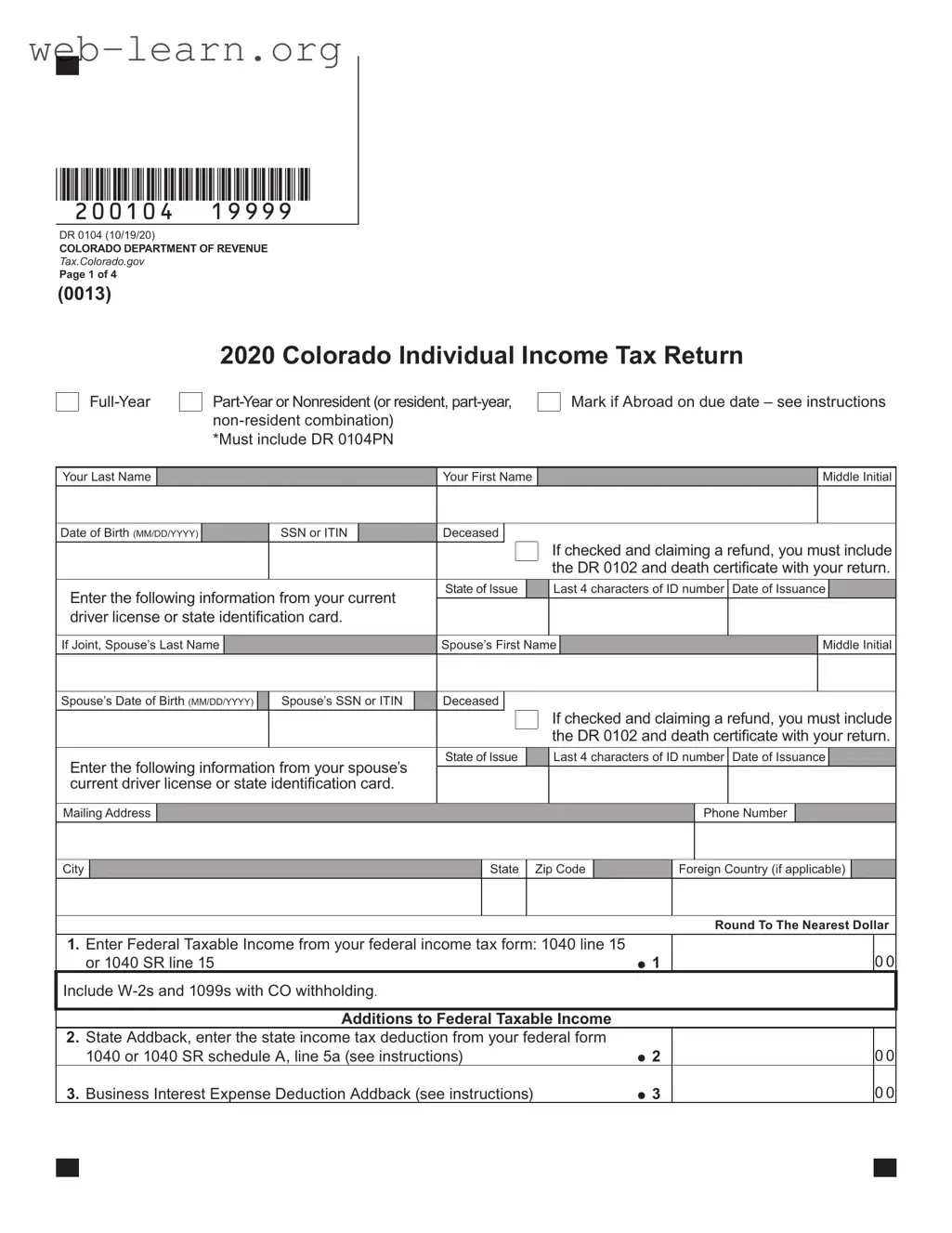
*200104==19999*
DR 0104 (10/19/20)
COLORADO DEPARTMENT OF REVENUE
Tax.Colorado.gov
Page 1 of 4
2020 Colorado Individual Income Tax Return
Full-Year
Part-Year or Nonresident (or resident, part-year,
non-resident combination)
*Must include DR 0104PN
Mark if Abroad on due date – see instructions
Your Last Name Your First Name Middle Initial
Date of Birth
(MM/DD/YYYY) SSN or ITIN Deceased
If checked and claiming a refund, you must include
the DR 0102 and death certicate with your return.
Enter the following information from your current
driver license or state identication card.
State of Issue Last 4 characters of ID number Date of Issuance
If Joint, Spouse’s Last Name Spouse’s First Name Middle Initial
Spouse’s Date of Birth
(MM/DD/YYYY) Spouse’s SSN or ITIN Deceased
If checked and claiming a refund, you must include
the DR 0102 and death certicate with your return.
Enter the following information from your spouses
current driver license or state identication card.
State of Issue Last 4 characters of ID number Date of Issuance
Mailing Address Phone Number
City State Zip Code Foreign Country (if applicable)
Round To The Nearest Dollar
1. Enter Federal Taxable Income from your federal income tax form: 1040 line 15
or 1040 SR line 15 1
0 0
Include W-2s and 1099s with CO withholding
.
Additions to Federal Taxable Income
2. State Addback, enter the state income tax deduction from your federal form
1040 or 1040 SR schedule A, line 5a (see instructions)
2
0 0
3. Business Interest Expense Deduction Addback (see instructions)
3
0 0
(0013)
4. Excess Business Loss Addback (see instructions) 4
0 0
5. Net Operating Loss Addback (see instructions)
5
0 0
6. Other Additions, explain (see instructions)
6
0 0
Explain:
7. Subtotal, sum of lines 1 through 6 7
0 0
Colorado Subtractions
8. Subtractions from the DR 0104AD Schedule, line 20, you must submit the
DR 0104AD schedule with your return. 8
0 0
9. Colorado Taxable Income, subtract line 8 from line 7
9
0 0
Tax, Prepayments and Credits: see 104 Book for full-year tax table and part-year DR 0104PN Schedule
10. Colorado Tax from tax table or the DR 0104PN line 36, you must submit
the DR 0104PN with your return if applicable. 10
0 0
11. Alternative Minimum Tax from the DR 0104AMT line 8, you must submit the
DR 0104AMT with your return.
11
0 0
12. Recapture of prior year credits
12
0 0
13. Subtotal, sum of lines 10 through 12 13
0 0
14. Nonrefundable Credits from the DR 0104CR line 43, the sum of lines 14, 15, and 16
cannot exceed line 13, you must submit the DR 0104CR with your return.
14
0 0
15. Total Nonrefundable Enterprise Zone credits used – as calculated,
or from the DR 1366 line 87, the sum of lines 14, 15, and 16 cannot exceed line 13,
you must submit the DR 1366 with your return.
15
0 0
16. Strategic Capital Tax Credit from DR 1330, the sum of lines 14, 15, and 16 cannot
exceed line 13, you must submit the DR 1330 with your return.
16
0 0
17. Net Income Tax, sum of lines 14, 15, and 16. Subtract that sum from line 13. 17
0 0
18. Use Tax reported on the DR 0104US schedule line 7, you must submit
the DR 0104US with your return.
18
0 0
19. Net Colorado Tax, sum of lines 17 and 18 19
0 0
20. CO Income Tax Withheld from W-2s and 1099s, you must submit the W-2s
and/or 1099s claiming Colorado withholding with your return.
20
0 0
21. Prior-year Estimated Tax Carryforward
21
0 0
22. Estimated Tax Payments, enter the sum of the quarterly payments
remitted for this tax year
22
0 0
23. Extension Payment remitted with the DR 0158-I
23
0 0
24. Other Prepayments:
DR 0104BEP DR 0108 DR 1079 24
0 0
Name SSN or ITIN
DR 0104 (10/19/20)
COLORADO DEPARTMENT OF REVENUE
Tax.Colorado.gov
Page 2 of 4
*200104==29999*
25. Gross Conservation Easement Credit from the DR 1305G line 33, you must
submit the DR 1305G with your return. 25
0 0
26. Innovative Motor Vehicle Credit from the DR 0617, you must submit each
DR 0617 with your return.
26
0 0
27. Refundable Credits from the DR 0104CR line 9, you must submit the
DR 0104CR with your return.
27
0 0
28. Subtotal, sum of lines 20 through 27 28
0 0
29. Federal Adjusted Gross Income from your federal income tax form: 1040 line 11,
or 1040 SR line 11
29
0 0
30. Overpayment, if line 28 is greater than line 19 then subtract line 19 from line 28 30
0 0
31. Estimated Tax Credit Carryforward to 2021 rst quarter, if any.
31
0 0
If you have an overpayment on line 32 below and would like to donate all or a portion of your overpayment to a qualied
Colorado charity, include Form DR 0104CH to contribute.
32. Refund, subtract line 31 from line 30 (see instructions)
32
0 0
Direct
Deposit
Routing Number Type: Checking Savings CollegeInvest 529
Account Number
For questions regarding CollegeInvest direct deposit or to open an account, visit CollegeInvest.org or call 800-448-2424.
33. Net Tax Due, subtract line 28 from line 19 33
0 0
34. Delinquent Payment Penalty (see instructions)
34
0 0
35. Delinquent Payment Interest (see instructions)
35
0 0
36. Estimated Tax Penalty, you must submit the DR 0204 with your return.
(see instructions)
36
0 0
37. Amount You Owe, sum of lines 33 through 36
37
The State may convert your check to a one-time electronic banking transaction. Your bank account may be debited as early as the same day received by the State. If converted, your
check will not be returned. If your check is rejected due to insufcient or uncollected funds, the Department of Revenue may collect the payment amount directly from your bank account
electronically.
DR 0104 (10/19/20)
COLORADO DEPARTMENT OF REVENUE
Tax.Colorado.gov
Page 3 of 4
*200104==39999*
Name SSN or ITIN
*200104==49999*
Third Party Designee
Do you want to allow another person to discuss this
return and any related information with the Colorado
Department of Revenue? See the instructions.
No Yes. Complete the following:
Designee’s Name Phone Number
Sign Below Under penalties of perjury, I declare that to the best of my knowledge and belief, this return is true, correct and complete.
Your Signature Date
(MM/DD/YY)
Spouse’s Signature. If joint return, BOTH must sign. Date (MM/DD/YY)
Paid Preparers Name Paid Preparers Phone
Paid Preparer’s Address City State Zip
If you are ling this return with a check or
payment, please mail the return to:
COLORADO DEPARTMENT OF REVENUE
Denver, CO 80261-0006
If you are ling this return without a check or
payment, please mail the return to:
COLORADO DEPARTMENT OF REVENUE
Denver, CO 80261-0005
These addresses and zip codes are exclusive to the Colorado Department of Revenue, so a street address is not required.
Name SSN or ITIN
DR 0104 (10/19/20)
COLORADO DEPARTMENT OF REVENUE
Tax.Colorado.gov
Page 4 of 4
File and pay at: Colorado.gov/RevenueOnline

Form Information

Fact Name Details
Form Title 2020 Colorado Individual Income Tax Return
Governing Law Colorado Revised Statutes Title 39, Article 22
Filing Status Available for full-year, part-year, and non-resident taxpayers
Required Attachments W-2s, 1099s, and any applicable schedules must be included
Refund Claims for Deceased Taxpayers Include DR 0102 and death certificate if claiming a refund
Colorado Taxable Income Calculation Subtract state subtractions from the subtotal of additions to federal taxable income
Tax Credits Nonrefundable and refundable credits must be reported using specific forms
Payment Methods Direct deposit, check, or electronic payment options are available
Signature Requirement Both spouses must sign if filing jointly
Filing Addresses Different addresses for returns with or without payment

Detailed Guide for Filling Out Colorado 104

Filling out the Colorado 104 form is an important step in reporting your state income taxes. After completing the form, you will submit it to the Colorado Department of Revenue, along with any necessary supporting documents. Ensure that all information is accurate to avoid delays or issues with your return.

  1. Begin by entering your last name, first name, and middle initial in the designated fields.
  2. Input your date of birth in the format MM/DD/YYYY.
  3. Provide your Social Security Number (SSN) or Individual Taxpayer Identification Number (ITIN).
  4. If applicable, check the box indicating you are deceased. If claiming a refund, include the DR 0102 form and a death certificate.
  5. Enter the last four characters of your driver’s license or state ID number, along with the date of issuance.
  6. If filing jointly, fill in your spouse’s last name, first name, middle initial, date of birth, and SSN or ITIN.
  7. Complete the mailing address section with your street address, city, state, and zip code.
  8. Provide your phone number and, if applicable, the foreign country information.
  9. Round your federal taxable income from your federal income tax form (1040 line 15 or 1040 SR line 15) to the nearest dollar and enter it on line 1.
  10. List any additions to your federal taxable income on lines 2 through 6, following the instructions provided.
  11. Calculate the subtotal by summing lines 1 through 6 and enter it on line 7.
  12. Complete the Colorado subtractions by entering the appropriate amounts from the DR 0104AD schedule on line 8.
  13. Subtract line 8 from line 7 to find your Colorado taxable income and enter it on line 9.
  14. Determine your Colorado tax from the tax table or DR 0104PN and enter it on line 10.
  15. Include any alternative minimum tax from the DR 0104AMT on line 11.
  16. List any recapture of prior year credits on line 12.
  17. Add lines 10 through 12 to get a subtotal on line 13.
  18. Enter any nonrefundable credits from the DR 0104CR on line 14.
  19. Fill in any total nonrefundable enterprise zone credits on line 15.
  20. Include the strategic capital tax credit from DR 1330 on line 16.
  21. Calculate the net income tax by subtracting the sum of lines 14, 15, and 16 from line 13, and enter it on line 17.
  22. Report use tax on line 18 from the DR 0104US schedule.
  23. Add lines 17 and 18 to find your net Colorado tax and enter it on line 19.
  24. Include any CO income tax withheld from W-2s and 1099s on line 20.
  25. List any prior-year estimated tax carryforward on line 21.
  26. Enter the total of your estimated tax payments for the year on line 22.
  27. Include any extension payment on line 23.
  28. Report any other prepayments on line 24.
  29. List any gross conservation easement credits from the DR 1305G on line 25.
  30. Include the innovative motor vehicle credit from the DR 0617 on line 26.
  31. Enter any refundable credits from the DR 0104CR on line 27.
  32. Add lines 20 through 27 to get a subtotal on line 28.
  33. Report your federal adjusted gross income from your federal tax form on line 29.
  34. Calculate your overpayment on line 30, if applicable.
  35. Indicate any estimated tax credit carryforward to 2021 on line 31.
  36. Calculate your refund by subtracting line 31 from line 30 and enter it on line 32.
  37. Provide your direct deposit routing number and account number if you wish to receive your refund electronically.
  38. Calculate the net tax due by subtracting line 28 from line 19 and enter it on line 33.
  39. List any delinquent payment penalties on line 34.
  40. Include any delinquent payment interest on line 35.
  41. Report the estimated tax penalty on line 36, if applicable.
  42. Add lines 33 through 36 to find the total amount you owe and enter it on line 37.
  43. Complete the third-party designee section if you want to allow someone else to discuss your return with the Department of Revenue.
  44. Sign and date the form, along with your spouse's signature if filing jointly.
  45. Include the paid preparer’s information if applicable.
  46. Submit the completed form and any required attachments either online or by mailing it to the appropriate address.

Obtain Answers on Colorado 104

  1. What is the Colorado 104 form?

    The Colorado 104 form is the state’s individual income tax return. It is used by residents, part-year residents, and non-residents to report their income and calculate their state tax liability. This form includes various sections where taxpayers can enter their federal taxable income, state-specific deductions, and credits. It is essential for ensuring compliance with Colorado tax laws.

  2. Who needs to file the Colorado 104 form?

    Any individual who earned income in Colorado during the tax year must file the Colorado 104 form. This includes:

    • Full-year residents who live in Colorado for the entire year.
    • Part-year residents who moved in or out of Colorado during the year.
    • Non-residents who earned income from Colorado sources.

    If you meet any of these criteria, you are required to file the form, even if you do not owe any taxes.

  3. What information do I need to complete the Colorado 104 form?

    To fill out the Colorado 104 form, you will need the following information:

    • Your personal details, including your name, date of birth, and Social Security Number (SSN) or Individual Taxpayer Identification Number (ITIN).
    • Your federal taxable income, which you can find on your federal tax return (Form 1040).
    • Details about any state deductions or credits you are eligible for, such as the state income tax deduction or business interest expense deductions.
    • Information on any tax withheld from your income, which can be found on your W-2s or 1099s.

    Gathering this information before starting the form can make the process smoother.

  4. How do I submit the Colorado 104 form?

    You can submit the Colorado 104 form in a couple of ways:

    • Online: If you prefer to file electronically, you can do so through the Colorado Department of Revenue's Revenue Online portal.
    • By Mail: If you choose to file a paper return, send it to the appropriate address based on whether you are including a payment or not. If you are mailing a payment, send it to:
      • COLORADO DEPARTMENT OF REVENUE
      • Denver, CO 80261-0006
    • If you are not including a payment, mail it to:
      • COLORADO DEPARTMENT OF REVENUE
      • Denver, CO 80261-0005

    Make sure to check the filing deadlines to avoid penalties.

Common mistakes

Filling out the Colorado 104 form can be a straightforward process, but many people make common mistakes that can lead to delays or complications. One frequent error is not including all required documentation. Taxpayers often forget to attach W-2s or 1099s that show Colorado withholding. Without these forms, the Colorado Department of Revenue may not process the return correctly.

Another mistake occurs when individuals overlook the requirement to submit additional schedules. For example, if you claim specific deductions or credits, you must include the DR 0104PN, DR 0104AD, or DR 0104CR schedules as applicable. Failing to submit these can result in denied claims or adjustments to your tax calculations.

People also frequently miscalculate their income. When transferring figures from federal tax forms, errors can easily happen. For instance, entering the wrong line number or miscalculating the federal taxable income can lead to significant discrepancies. Always double-check these numbers to ensure accuracy.

In addition, many filers neglect to sign the form. A signature is crucial for validating the return. Without it, the return is incomplete and may be rejected. Both spouses must sign if filing jointly, which is another common oversight.

Some taxpayers also make the mistake of not rounding their numbers correctly. The form specifies that amounts should be rounded to the nearest dollar. Ignoring this instruction can lead to confusion and potential errors in processing.

Addressing the mailing information is another area where mistakes occur. Filers sometimes send their returns to the wrong address, particularly if they are not including a payment. There are different addresses for returns with and without payments, and using the incorrect one can cause delays.

Another common error is misunderstanding the implications of claiming a refund for a deceased taxpayer. If claiming a refund for someone who has passed away, the appropriate documentation, such as the DR 0102 and a death certificate, must be included. Failing to do so can lead to complications in processing the return.

Furthermore, many individuals do not keep copies of their filed forms. Retaining a copy of the submitted return is essential for future reference, especially if questions arise from the Colorado Department of Revenue.

Lastly, procrastination can lead to rushed submissions, which often results in errors. Taking the time to review the completed form thoroughly can help catch mistakes before submission. Proper planning and attention to detail can make the process smoother and ensure compliance with state tax regulations.
Documents used along the form

The Colorado 104 form is a crucial document for individuals filing their state income taxes. Several other forms and documents are often required to accompany this form, depending on individual circumstances. Below is a list of commonly used forms that may need to be submitted along with the Colorado 104 form.

  • DR 0104PN: This form is the Colorado Part-Year Resident Income Tax Schedule. It is used by individuals who lived in Colorado for only part of the year to determine their tax obligations based on the income earned during their residency.
  • DR 0102: This form is the Claim for Refund for Deceased Taxpayers. It must be submitted if claiming a refund for a deceased individual, along with a death certificate.
  • DR 0104AD: This is the Colorado Additions and Subtractions Schedule. It details any additions to or subtractions from federal taxable income that affect state tax calculations.
  • DR 0104AMT: This form is used to report the Alternative Minimum Tax. If applicable, it must be submitted to calculate the minimum tax owed.
  • DR 0104CR: This is the Nonrefundable Credit Schedule. It lists any nonrefundable credits that can reduce the overall tax liability.
  • DR 1366: This form is for claiming Nonrefundable Enterprise Zone Credits. It must be included if applicable to the taxpayer's situation.
  • DR 1330: This form is used to claim the Strategic Capital Tax Credit. It is necessary for individuals eligible for this specific credit.
  • DR 0104US: This is the Use Tax Schedule. It is used to report any use tax owed on purchases made outside of Colorado that are subject to state tax.
  • DR 0204: This form is the Estimated Tax Penalty. It is required if there are penalties associated with underpayment of estimated taxes.
  • DR 0104CH: This is the Charitable Contribution Form. It allows taxpayers to donate part of their tax refund to a qualified Colorado charity.

Each of these forms serves a specific purpose in the tax filing process. It is essential to review individual tax situations to determine which forms are necessary to ensure compliance with Colorado tax laws.

Similar forms

The Colorado 104 form, which serves as the individual income tax return for residents, part-year residents, and non-residents, has several similar documents that also facilitate tax reporting and compliance. Each of these documents shares specific characteristics with the Colorado 104 form, such as their purpose of reporting income and calculating taxes owed or refunds due. Below is a list of six documents that are similar to the Colorado 104 form:

  • IRS Form 1040: This is the standard federal income tax return form used by U.S. taxpayers. Like the Colorado 104, it collects information about income, deductions, and credits to determine tax liability.
  • IRS Form 1040-SR: Designed for seniors, this form is similar to the standard 1040 but features larger print and a simpler layout. It also calculates tax liability based on income and deductions, akin to the Colorado 104.
  • State Income Tax Returns: Each state has its own income tax return form, similar to the Colorado 104. These forms serve the same purpose of reporting state-specific income and calculating state tax obligations.
  • IRS Form 1040-NR: This form is specifically for non-resident aliens who need to report U.S. income. It parallels the Colorado 104 in that it focuses on income reporting and tax calculations for individuals who do not qualify as residents.
  • IRS Schedule A: Used for itemizing deductions, Schedule A is often submitted alongside the 1040 form. It is similar to the Colorado 104 in that it allows taxpayers to detail deductions that can reduce taxable income.
  • DR 0104PN (Colorado Part-Year Resident/Nonresident Tax Form): This form is specifically for individuals who lived in Colorado for only part of the year. It operates similarly to the Colorado 104 by allowing taxpayers to report income earned while residing in the state and calculate the appropriate tax.

Dos and Don'ts

When filling out the Colorado 104 form, careful attention to detail is crucial. Here are five important things to consider doing and avoiding.

  • Do double-check all personal information, including names, Social Security numbers, and dates of birth. Accuracy is essential.
  • Do include all necessary documentation, such as W-2s and 1099s, to support your claims for withholding.
  • Do ensure that you sign and date the form. Both you and your spouse must sign if filing jointly.
  • Do read the instructions thoroughly. Understanding what each line requires can prevent costly mistakes.
  • Do keep a copy of the completed form and all supporting documents for your records.
  • Don't leave any fields blank. If a question does not apply, write “N/A” instead of skipping it.
  • Don't forget to include any required schedules, such as the DR 0104PN or DR 0104AD, as applicable.
  • Don't rush through the calculations. Errors in math can lead to delays or penalties.
  • Don't ignore deadlines. Submit your form on time to avoid late fees and penalties.
  • Don't assume that the state will correct any mistakes. Take responsibility for ensuring everything is accurate.

Misconceptions

  • Misconception 1: The Colorado 104 form is only for full-year residents.
  • This form is designed for full-year residents, part-year residents, and non-residents. It accommodates various tax situations, allowing individuals to report their income accurately regardless of their residency status.

  • Misconception 2: You do not need to include supporting documents with the Colorado 104 form.
  • In fact, it is essential to include supporting documents such as W-2s, 1099s, and any applicable schedules like the DR 0104PN or DR 0104AD. These documents validate the information reported on the form.

  • Misconception 3: Filing the Colorado 104 form is the same as filing your federal tax return.
  • While both forms require similar information, they are distinct. The Colorado 104 form has specific requirements, including state-specific deductions and credits that do not appear on the federal return.

  • Misconception 4: You can file the Colorado 104 form without considering your federal taxable income.
  • Your federal taxable income is a critical component of the Colorado 104 form. It serves as the starting point for calculating your state income tax and determining any necessary adjustments.

  • Misconception 5: You can ignore the deadlines for submitting the Colorado 104 form.
  • Deadlines are crucial. Failing to file on time can result in penalties and interest on any taxes owed. It is vital to be aware of the submission dates to avoid unnecessary financial consequences.

  • Misconception 6: The Colorado Department of Revenue does not offer assistance for filing the 104 form.
  • The Colorado Department of Revenue provides resources and assistance for taxpayers. They offer guidance through their website and customer service to help individuals understand the filing process and requirements.

Key takeaways

Filing your Colorado 104 form can seem daunting, but understanding the key components can simplify the process. Here are some essential takeaways:

  • Eligibility: Ensure you determine whether you are a full-year resident, part-year resident, or non-resident before filling out the form.
  • Personal Information: Accurately enter your name, Social Security Number (SSN) or Individual Taxpayer Identification Number (ITIN), and date of birth. If filing jointly, include your spouse’s information as well.
  • Income Reporting: Report your federal taxable income from your federal tax return. This is usually found on line 15 of the 1040 or 1040 SR forms.
  • Subtractions and Additions: Be aware of any state-specific additions or subtractions that may affect your taxable income. Use the DR 0104AD schedule for subtractions.
  • Credits: Take advantage of available nonrefundable and refundable credits. Ensure to submit the necessary forms to claim these credits.
  • Refunds and Payments: If you are expecting a refund, provide your bank details for direct deposit. If you owe taxes, calculate the total amount due carefully.
  • Sign and Date: Don’t forget to sign and date your return. If filing jointly, both spouses must sign.

By keeping these points in mind, you can navigate the Colorado 104 form with greater confidence and accuracy.