Homepage Blank CMS-1763 Exp Form
Outline

The CMS-1763 Exp form plays a vital role in the healthcare system, particularly for individuals seeking assistance with their Medicare coverage. This form is designed to facilitate the process of disenrollment from a Medicare Advantage plan or a Medicare Prescription Drug plan. It is essential for beneficiaries who may no longer wish to remain in their current plan, whether due to changes in personal circumstances, dissatisfaction with coverage, or a desire to switch to a different plan that better meets their needs. The form requires accurate information regarding the individual’s identification, the specific plan from which they wish to disenroll, and the reason for their decision. Understanding how to complete this form properly can help ensure a smooth transition to new coverage options, thereby minimizing potential gaps in healthcare services. Timely submission of the CMS-1763 Exp form is crucial, as it affects the effective date of disenrollment and subsequent enrollment in a new plan. Overall, this form serves as an important tool for beneficiaries navigating their Medicare choices.


Sample - CMS-1763 Exp Form

DEPARTMENT OF HEALTH AND HUMAN SERVICES
CENTERS FOR MEDICARE & MEDICAID SERVICES
Form CMS-1763 (01/2022)
Form Approved
OMB No. 0938-0025
Expires: 04/24
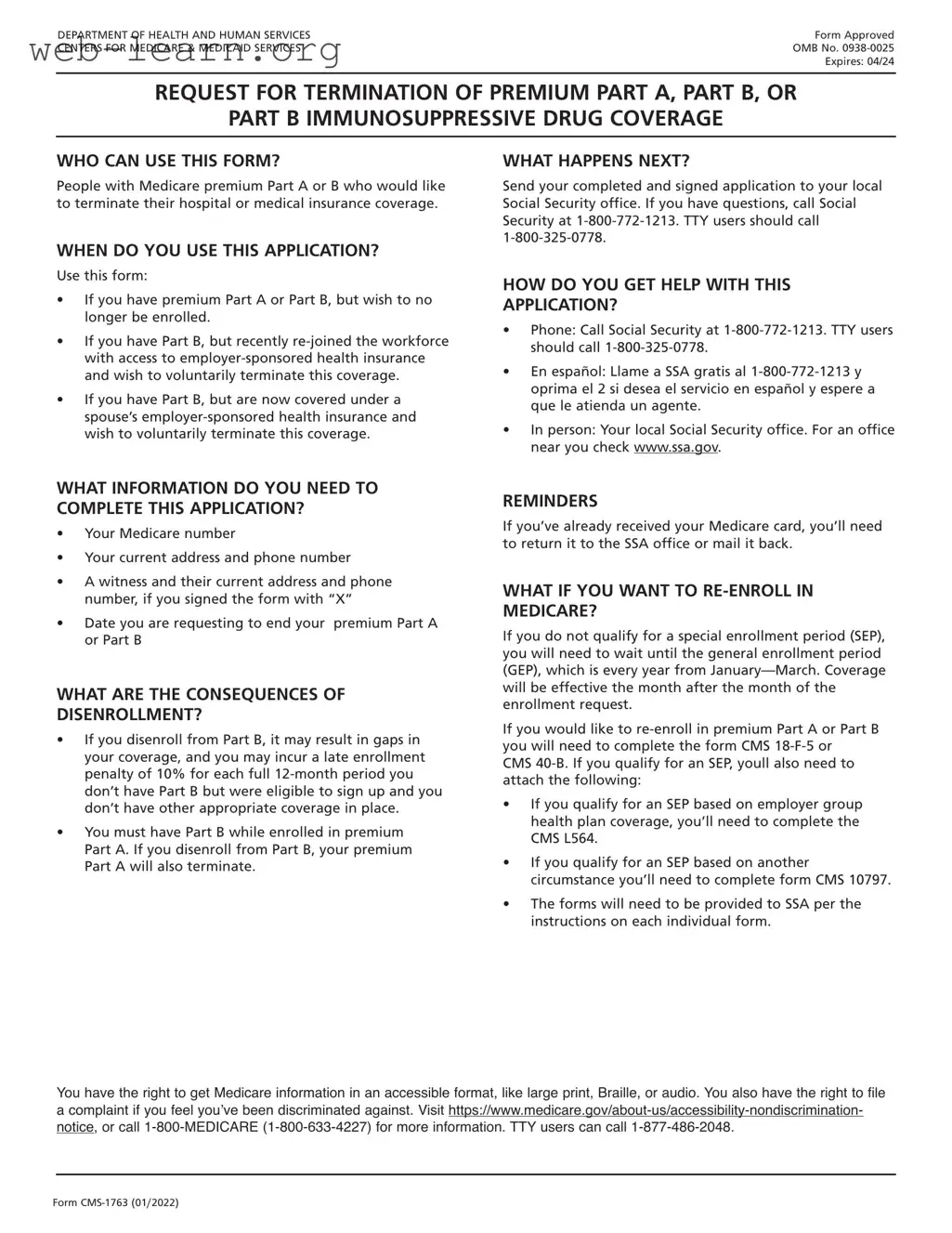
REQUEST FOR TERMINATION OF PREMIUM PART A, PART B, OR
PART B IMMUNOSUPPRESSIVE DRUG COVERAGE
WHO CAN USE THIS FORM?
People with Medicare premium Part A or B who would like
to terminate their hospital or medical insurance coverage.
WHEN DO YOU USE THIS APPLICATION?
Use this form:
If you have premium Part A or Part B, but wish to no
longer be enrolled.
If you have Part B, but recently re-joined the workforce
with access to employer-sponsored health insurance
and wish to voluntarily terminate this coverage.
If you have Part B, but are now covered under a
spouse’s employer-sponsored health insurance and
wish to voluntarily terminate this coverage.
WHAT INFORMATION DO YOU NEED TO
COMPLETE THIS APPLICATION?
Your Medicare number
Your current address and phone number
A witness and their current address and phone
number, if you signed the form with “X”
Date you are requesting to end your premium Part A
or Part B
WHAT ARE THE CONSEQUENCES OF
DISENROLLMENT?
If you disenroll from Part B, it may result in gaps in
your coverage, and you may incur a late enrollment
penalty of 10% for each full 12-month period you
don’t have Part B but were eligible to sign up and you
don’t have other appropriate coverage in place.
You must have Part B while enrolled in premium
Part A. If you disenroll from Part B, your premium
Part A will also terminate.
WHAT HAPPENS NEXT?
Send your completed and signed application to your local
Social Security office. If you have questions, call Social
Security at 1-800-772-1213. TTY users should call
1-800-325-0778.
HOW DO YOU GET HELP WITH THIS
APPLICATION?
Phone: Call Social Security at 1-800-772-1213. TTY users
should call 1-800-325-0778.
En español: Llame a SSA gratis al 1-800-772-1213 y
oprima el 2 si desea el servicio en español y espere a
que le atienda un agente.
In person: Your local Social Security office. For an office
near you check www.ssa.gov.
REMINDERS
If you’ve already received your Medicare card, you’ll need
to return it to the SSA office or mail it back.
WHAT IF YOU WANT TO RE-ENROLL IN
MEDICARE?
If you do not qualify for a special enrollment period (SEP),
you will need to wait until the general enrollment period
(GEP), which is every year from January—March. Coverage
will be effective the month after the month of the
enrollment request.
If you would like to re-enroll in premium Part A or Part B
you will need to complete the form CMS 18-F-5 or
CMS 40-B. If you qualify for an SEP, youll also need to
attach the following:
If you qualify for an SEP based on employer group
health plan coverage, you’ll need to complete the
CMS L564.
If you qualify for an SEP based on another
circumstance you’ll need to complete form CMS 10797.
The forms will need to be provided to SSA per the
instructions on each individual form.
You have the right to get Medicare information in an accessible format, like large print, Braille, or audio. You also have the right to file
a complaint if you feel you’ve been discriminated against. Visit https://www.medicare.gov/about-us/accessibility-nondiscrimination-
notice, or call 1-800-MEDICARE (1-800-633-4227) for more information. TTY users can call 1-877-486-2048.
DEPARTMENT OF HEALTH AND HUMAN SERVICES
CENTERS FOR MEDICARE & MEDICAID SERVICES
Form CMS-1763 (01/2022)
REQUEST FOR TERMINATION OF PREMIUM PART A, PART B,
OR PART B IMMUNOSUPPRESSIVE DRUG COVERAGE
DO NOT WRITE IN THIS SPACE
The completion of this form is needed to document your voluntary request for termination of
Medicare coverage as permitted under the Code of Federal Regulations. Section 1838(b) and
1818A(c)(2)(B) of the Social Security Act require filing of notice advising the Administration when
termination of Medicare coverage is requested. While you are not required to give your reasons
for requesting termination, the information given will be used to document your understanding
of the effects of your request.
NAME OF ENROLLEE (Please Print)
MEDICARE NUMBER
NAME OF PERSON, IF OTHER THAN ENROLLEE, WHO IS EXECUTING THIS REQUEST.
THIS IS A REQUEST FOR TERMINATION OF
HOSPITAL INSURANCE
MEDICAL INSURANCE
PART B IMMUNOSUPPRESSIVE DRUG COVERAGE
DATE PART A
WILL END
DATE PART B
WILL END
DATE PBID
WILL END
I request termination of my enrollment under the above sections of title XVIII of the Social Security Act, as amended, for the reason(s)
stated below:
I UNDERSTAND THAT IF I AM REQUIRED TO PAY FOR MY HOSPITAL INSURANCE, THE TERMINATION OF MY PART B COVERAGE WILL ALSO
END MY PART A COVERAGE.
If this request has been signed by mark (X), two witnesses who know the
applicant must sign below, giving their full addresses.
SIGNATURE (Write in Ink)
SIGN
HERE
1. NAME OF WITNESS
ADDRESS (Number and Street, City, State and Zip Code) MAILING ADDRESS (Number and Street)
2. NAME OF WITNESS CITY, STATE, ZIP CODE
ADDRESS (Number and Street, City, State and Zip Code) DATE (Month, Day and Year) TELEPHONE NUMBER
According to the Paperwork Reduction Act of 1995, no persons are required to respond to a collection of information unless it displays a valid OMB
control number. The valid OMB control number for this information collection is 0938-0025. The time required to complete this information collection
is estimated to average 10 minutes per response, including the time to review instructions, search existing data resources, gather the data needed,
and complete and review the information collection. If you have any comments concerning the accuracy of the estimate(s) or suggestions for
improving this form, please write to: CMS, Attn: PRA Reports Clearance Officer, 7500 Security Boulevard, Baltimore, Maryland 21244-1850.

Form Information

Fact Name Description
Purpose The CMS-1763 Exp form is used to request a voluntary termination of Medicare Part B coverage.
Eligibility Individuals who no longer wish to maintain Medicare Part B can use this form to initiate the termination process.
Submission Method The form can be submitted by mail or in person to the local Social Security Administration office.
Processing Time Typically, it takes about 30 days to process the CMS-1763 Exp form once submitted.
State-Specific Forms Some states may have additional requirements or forms that accompany the CMS-1763 Exp.
Governing Law Medicare regulations under Title XVIII of the Social Security Act govern the use of this form.
Impact on Coverage Filing this form will result in the loss of Medicare Part B benefits, which may affect access to healthcare services.
Reinstatement Individuals wishing to reinstate Medicare Part B coverage after termination must complete a new enrollment process.

Detailed Guide for Filling Out CMS-1763 Exp

After obtaining the CMS-1763 Exp form, the next steps involve carefully completing the required sections to ensure accurate processing. This form requires specific information to be filled out in designated areas. Follow the steps below to complete the form correctly.

  1. Begin by entering the name of the individual requesting the termination of coverage in the first section.
  2. Provide the Social Security Number of the individual in the designated field.
  3. Fill in the date of birth for the individual.
  4. Complete the address section, including street, city, state, and ZIP code.
  5. Indicate the reason for termination by selecting the appropriate option from the list provided.
  6. Sign and date the form in the signature section at the bottom.

Once the form is filled out, it is important to review all entries for accuracy before submission. Ensure that all required fields are completed to avoid delays in processing.

Obtain Answers on CMS-1763 Exp

  1. What is the CMS-1763 Exp form?

    The CMS-1763 Exp form is used to request a termination of Medicare coverage for individuals who no longer wish to retain their benefits. This form is particularly relevant for those who may have chosen to enroll in a different health plan or who no longer meet the eligibility requirements for Medicare.

  2. Who should fill out the CMS-1763 Exp form?

    Individuals who are currently enrolled in Medicare and wish to voluntarily terminate their coverage should fill out this form. This can include retirees, individuals who have switched to another insurance plan, or those who have moved out of the service area.

  3. How do I obtain the CMS-1763 Exp form?

    The CMS-1763 Exp form can be obtained from the official Medicare website or by contacting the Social Security Administration. Additionally, local Medicare offices may have physical copies available for those who prefer to fill it out in person.

  4. What information do I need to provide on the form?

    When completing the CMS-1763 Exp form, you will need to provide personal information such as your name, Medicare number, and the reason for termination. It's important to ensure that all information is accurate to avoid processing delays.

  5. Where do I submit the CMS-1763 Exp form?

    After filling out the form, you can submit it to your local Medicare office or the Social Security Administration. You may also have the option to send it via mail or electronically, depending on the submission guidelines provided.

  6. Is there a deadline for submitting the CMS-1763 Exp form?

    While there is no specific deadline, it is advisable to submit the form as soon as you decide to terminate your coverage. This will help ensure that your request is processed in a timely manner and that you avoid any unnecessary charges.

  7. What happens after I submit the CMS-1763 Exp form?

    Once your form is submitted, Medicare will process your request. You should receive a confirmation of your termination, which will include the effective date of the cancellation. Keep this confirmation for your records.

  8. Can I re-enroll in Medicare after terminating my coverage?

    Yes, you can re-enroll in Medicare during the designated enrollment periods. However, be aware that there may be penalties or waiting periods associated with late enrollment, depending on your situation.

  9. What if I change my mind after submitting the form?

    If you change your mind after submitting the CMS-1763 Exp form, you will need to contact Medicare immediately. They may be able to assist you in reversing the termination, but this is not guaranteed and will depend on the timing of your request.

  10. Are there any consequences for submitting the CMS-1763 Exp form?

    Submitting the CMS-1763 Exp form will result in the termination of your Medicare coverage. This means you will no longer have access to Medicare benefits, and you may need to find alternative health insurance. Carefully consider your options before making this decision.

Common mistakes

Filling out the CMS-1763 Exp form can be straightforward, but many people make common mistakes that can lead to delays or denials. One frequent error is not providing complete personal information. Ensure that your name, address, and contact details are accurate and fully filled out. Missing information can cause processing issues.

Another common mistake is neglecting to check the eligibility requirements. Before submitting the form, confirm that you meet all necessary criteria. Failing to do so may result in an automatic rejection of your application.

Many applicants also forget to sign and date the form. This step is crucial. Without a signature, the form is considered incomplete. Double-check that you have signed where required.

Inaccurate information can lead to complications as well. People often mistakenly enter incorrect dates or numbers. Review all entries carefully. A simple typo can change the meaning of your application.

Some individuals fail to include required documentation. The CMS-1763 Exp form may need supporting documents to verify your claims. Ensure that you attach everything needed to avoid delays.

Another mistake is submitting the form without making copies. Always keep a copy of your completed form and any documents you send. This can be helpful if you need to follow up or if issues arise.

Finally, not following up on your application can lead to missed updates. After submitting, check in periodically to ensure your application is being processed. Staying proactive can help address any issues quickly.

Documents used along the form

The CMS-1763 Exp form is an important document used in various healthcare and insurance contexts. When submitting this form, several other documents may also be required to ensure a complete application or request. Below is a list of additional forms and documents that are often used alongside the CMS-1763 Exp form.

  • CMS-10114: This form is used to request a Medicare coverage determination. It helps beneficiaries appeal decisions regarding their coverage and ensures that they receive necessary services.
  • CMS-1500: This is a standard claim form used by healthcare providers to bill Medicare and other insurance programs for services rendered. It provides essential information about the patient, provider, and services provided.
  • CMS-1490S: This form is utilized for requesting reimbursement for medical services or supplies that were paid out-of-pocket. Beneficiaries use it to claim expenses that should be covered under their Medicare benefits.
  • CMS-855I: This enrollment application is for individual healthcare providers who wish to enroll in Medicare. It collects vital information about the provider and their practice.
  • CMS-2728: This form is used for reporting end-stage renal disease (ESRD) data. It captures information about patients beginning dialysis and is essential for Medicare coverage of these services.

When submitting the CMS-1763 Exp form, it is crucial to gather all relevant documents to support your request. This ensures a smoother process and increases the likelihood of a favorable outcome.

Similar forms

The CMS-1763 Exp form is a critical document used in the context of Medicare. It is often compared to several other forms and documents that serve similar purposes in healthcare and insurance processes. Here are eight documents that share similarities with the CMS-1763 Exp form:

  • CMS-40B: This form is used to apply for Medicare Part B. Like the CMS-1763 Exp, it requires personal information and is essential for enrollment in Medicare services.
  • CMS-10114: This is the application for a Medicare Savings Program. Both forms help beneficiaries manage their Medicare coverage and related costs.
  • CMS-855I: This is the application for Medicare enrollment for individual providers. Similar to the CMS-1763 Exp, it involves verification of eligibility and enrollment status.
  • CMS-855B: This form is for institutional providers to enroll in Medicare. Like the CMS-1763 Exp, it is crucial for maintaining access to Medicare services.
  • CMS-1490S: This form is used to request a Medicare coverage determination. Both documents address beneficiary rights and options regarding their Medicare coverage.
  • CMS-1763: The original version of the CMS-1763 Exp form is also relevant. It serves a similar purpose but may not include the updated information found in the expiring version.
  • CMS-10126: This is the form for the Medicare Advantage Plan Disenrollment. Both forms facilitate changes in Medicare plans and coverage options.
  • CMS-1500: This is a health insurance claim form used by healthcare providers. While it serves a different function, both documents are integral to the Medicare system and involve claims and coverage processes.

Dos and Don'ts

When filling out the CMS-1763 Exp form, it's important to follow certain guidelines to ensure accuracy and efficiency. Here are some things you should and shouldn't do:

  • Do read the instructions carefully before starting.
  • Do provide accurate and complete information.
  • Do double-check all entries for errors.
  • Do sign and date the form where required.
  • Don't leave any required fields blank.
  • Don't use abbreviations that may confuse the reviewer.
  • Don't submit the form without reviewing it first.
  • Don't ignore deadlines for submission.

Misconceptions

The CMS-1763 Exp form, also known as the Request for Expedited Reinstatement of Medicare Part A and/or Part B, is often misunderstood. Below are eight common misconceptions regarding this form, along with clarifications for each.

  1. It is only for individuals over 65.

    This form can be used by anyone who has lost their Medicare coverage, regardless of age, provided they meet the eligibility requirements.

  2. Submitting the form guarantees reinstatement.

    While the form initiates the reinstatement process, approval is not guaranteed. The Centers for Medicare & Medicaid Services (CMS) will review each case based on specific criteria.

  3. Only those who have been denied coverage can use this form.

    The CMS-1763 Exp form is intended for individuals who have voluntarily terminated their coverage or had it terminated due to non-payment, among other reasons.

  4. There is no deadline for submitting the form.

    There are specific timeframes within which individuals must submit the form after losing their coverage to be eligible for expedited reinstatement.

  5. All supporting documents must be submitted with the form.
  6. The form can be submitted online.

    The CMS-1763 Exp form must be submitted via mail or fax, as there is currently no online submission option available.

  7. Filling out the form incorrectly will result in automatic denial.

    While accuracy is important, CMS may provide an opportunity to correct any errors or omissions before making a final decision.

  8. Once reinstated, coverage is permanent.

    Reinstated coverage may still be subject to termination if future eligibility requirements are not met or if premiums are not paid.

Understanding these misconceptions can help individuals navigate the process of reinstating their Medicare coverage more effectively.

Key takeaways

When filling out and using the CMS-1763 Exp form, keep the following key takeaways in mind:

  • Accurate Information: Ensure all personal details, including name, address, and Medicare number, are correct. Mistakes can delay processing.
  • Signature Requirement: The form must be signed by the individual or their authorized representative. A missing signature can result in rejection.
  • Submission Method: Submit the completed form to the appropriate Medicare office. Check the latest guidelines for submission options.
  • Keep Copies: Retain a copy of the completed form for your records. This can be helpful for future reference or inquiries.