Homepage Blank Bin Oregon Form
Outline

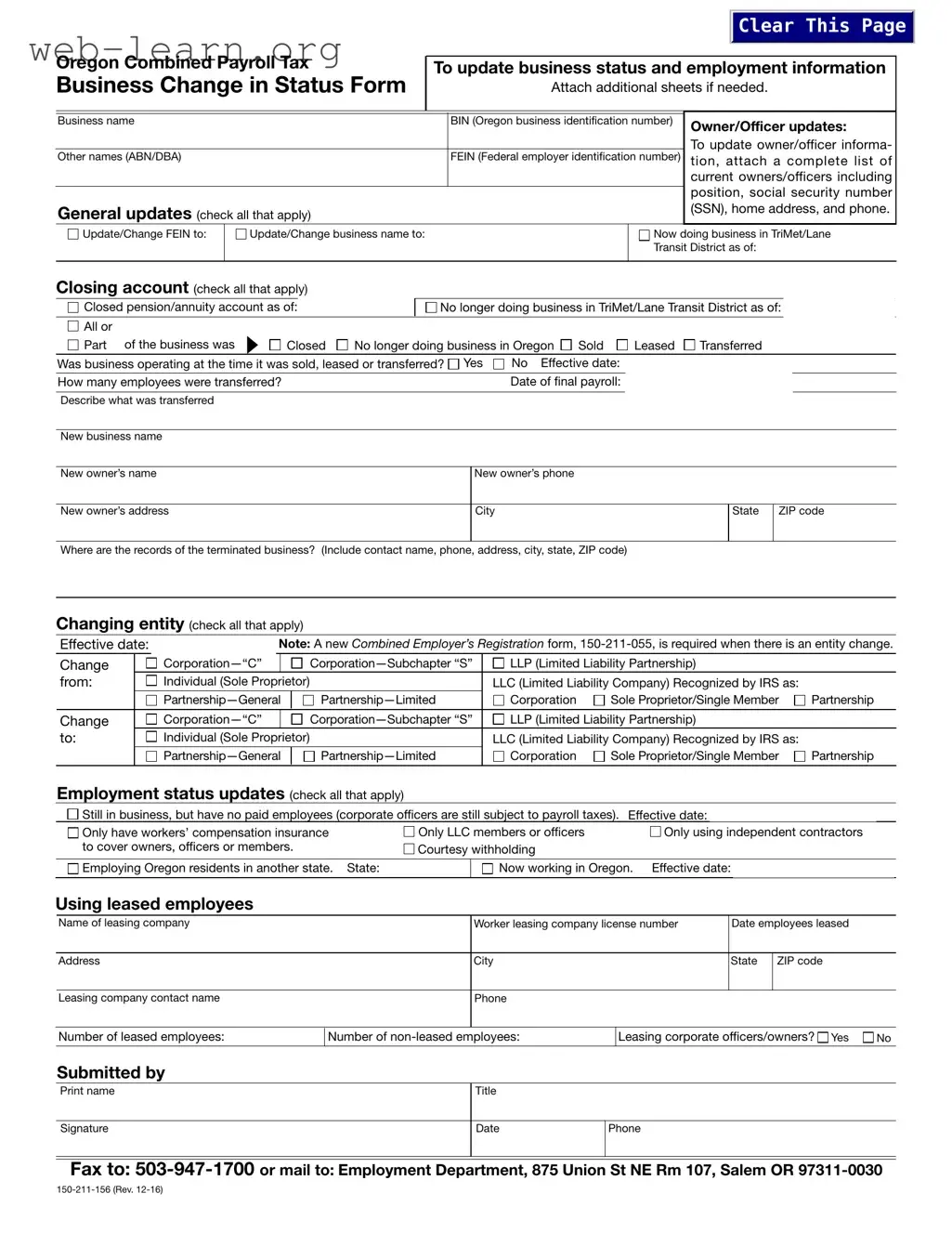
The Bin Oregon form, formally known as the Oregon Combined Payroll Tax Business Change in Status Form, serves as a vital tool for businesses operating within the state. This form allows business owners to communicate essential updates regarding their employment status and business information to various state departments, including the Employment Department, Department of Revenue, and Department of Consumer and Business Services. Key aspects of the form include sections for updating the business name, Federal Employer Identification Number (FEIN), and details about owners or officers, ensuring that the state has accurate records. Additionally, it provides options for reporting changes in employment status, such as the number of employees, whether the business is still operational, and if there are any leased employees involved. The form also addresses the closing of accounts and the cessation of business activities, offering specific checkboxes for various scenarios. For those undergoing changes in business structure, such as transitioning from a sole proprietorship to a corporation, the form outlines the necessary steps, including the requirement for a new Combined Employer’s Registration. By completing this form, businesses can ensure compliance with state regulations while maintaining accurate records of their operational status.

Sample - Bin Oregon Form

150-211-156 (Rev. 12-16)
Oregon Combined Payroll Tax
Business Change in Status Form
To update business status and employment information
Attach additional sheets if needed.
Business name
Other names (ABN/DBA)
BIN (Oregon business identification number)
FEIN (Federal employer identification number)
General updates (check all that apply)
Owner/Officer updates:
To update owner/officer informa-
tion, attach a complete list of
current owners/officers including
position, social security number
(SSN), home address, and phone.
Update/Change FEIN to: Update/Change business name to: Now doing business in TriMet/Lane
Transit District as of:
Closing account (check all that apply)
Closed pension/annuity account as of:
No longer doing business in TriMet/Lane Transit District as of:
All or
Closed No longer doing business in Oregon Sold Leased Transferred
Was business operating at the time it was sold, leased or transferred?
Yes No
How many employees were transferred?
Effective date:
Date of final payroll:
Describe what was transferred
New business name
New owner’s name
New owner’s address
Where are the records of the terminated business? (Include contact name, phone, address, city, state, ZIP code)
New owner’s phone
Changing entity (check all that apply)
Effective date:
Note: A new Combined Employer’s Registration form, 150-211-055, is required when there is an entity change.
Change
from:
Change
to:
Corporation —“C” Corporation—Subchapter “S”
Individual (Sole Proprietor)
Partnership —General Partnership—Limited
LLP (Limited Liability Partnership)
Corporation Sole Proprietor/Single Member Partnership
LLC (Limited Liability Company) Recognized by IRS as:
Employment status updates (check all that apply)
Still in business, but have no paid employees (corporate officers are still subject to payroll taxes).
Effective date:
Only have workers’ compensation insurance
to cover owners, officers or members.
Only LLC members or officers
Courtesy withholding
Only using independent contractors
Employing Oregon residents in another state. State: Now working in Oregon. Effective date:
Using leased employees
Name of leasing company
Leasing company contact name
Address City
City
State
State
ZIP code
ZIP code
Phone
Date employees leased
Number of leased employees:
Worker leasing company license number
Number of non-leased employees: Leasing corporate officers/owners?
Yes
No
Fax to: 503-947-1700 or mail to: Employment Department, 875 Union St NE Rm 107, Salem OR 97311-0030
Signature
Print name Title
Date Phone
Submitted by
Corporation —“C” Corporation—Subchapter “S”
Individual (Sole Proprietor)
Partnership —General Partnership—Limited
LLP (Limited Liability Partnership)
Corporation Sole Proprietor/Single Member Partnership
LLC (Limited Liability Company) Recognized by IRS as:
Part
of the business was
Clear This Page
150-211-156 (Rev. 12-16)
Business Change in Status Form Instructions
Use this form to notify the Employment Department (OED), Department of Revenue (DOR), and Department of Consumer
and Business Services (DCBS) of changes to your business or employment status. Attach additional sheets if needed.
General updates
NOTE: Some federal employer identification number (FEIN)
and name changes may require a new Combined Employers
Registration, 150-211-055, form to be completed.
Provide the correct FEIN for your business.
Correct the business name and spelling errors as needed.
Check the “Now doing business in TriMet/Lane Transit
District” box and include the effective date if you’re an
employer paying wages earned in the TriMet or Lane
Transit District. You must register and file with the Oregon
Department of Revenue. Wages include salaries, commis-
sions, bonuses, fees, payments to a deferred compensation
plan, or other items of value.
For boundary questions, see the Oregon Combined Payroll
Tax booklet, 150-211-155, for the list of cities and ZIP codes.
The TriMet district includes parts of Multnomah, Wash-
ington, and Clackamas counties. For TriMet boundary
questions call 503-962-6466.
Lane Transit District serves the Eugene-Springfield
area. For Lane Transit District boundary questions call
541-682-6100.
Re-opened business
To re-open your business that you’ve closed for:
Less than one year, file a:
Business Change in Status Form, 150-211-156.
One year or more, file a:
Combined Employers Registration, 150-211-055.
For more questions contact DOR at 503-945-8091.
Owner/officer updates
Attach a separate sheet to update or change corporate officer
or owner information.
Compensation for services performed by corporate officers
and shareholders is subject to payroll taxes (withholding,
transit, and unemployment). If owners and officers are
covered by Workers’ Compensation insurance, the hours
worked are also subject to Workers’ Benefit Fund (WBF)
assessment.
Employment status updates
Check each box that applies to your business and include
the effective date of change.
If Oregon residents are working out of Oregon, indicate
which state.
Check box and indicate effective date of employees now
working in Oregon that previously worked in another state.
Using leased employees
If you lease your employees from a Professional Employer
Organization (PEO)/Worker Leasing Company, fill in the
information requested.
Changing entity
Include the effective date of change, check the box of the
entity you’re changing from and the box of the entity chang-
ing to.
NOTE: Entity changes require the completion of a new Com-
bined Employers Registration form.
Examples include, but aren’t limited to:
Changing from a sole proprietorship to a partnership or
corporation.
Changing from a partnership to a sole proprietorship or
corporation.
Changing from a corporation to a sole proprietorship or
partnership.
Changing of members in a partnership of five or fewer
partners.
Adding or removing a spouse as a liable owner.
Changing from a sole proprietorship, corporation, or part-
nership to a limited liability company.
Closing account
Check the box if you closed a pension and annuity account.
Include the effective date of change.
Check the “No longer doing business in TriMet/Lane Tran-
sit District” box and include the effective date if you moved
your business from the TriMet or Lane transit district and
are no longer subject to this tax.
Check the box if you closed the business or dissolved a
sole proprietorship, partnership, corporation, or limited
liability company, and no longer have payroll to report.
Fill in the date of final payroll.
If you sold your business, leased your employees, or trans-
ferred your business assets, indicate whether the transac-
tion applied to all or part of the business.
If you leased all or part of the business, fill out the section
“Using Leased Employees.”
NOTE: New or reorganized businesses must complete a
Combined Employers Registration, 150-211-055, which can be
found in pdf format at: www.oregon.gov/dor/bus
or elec-
tronically at
sos.oregon.gov/business
.
Fax to: 503-947-1700 or
Mail to: Employment Department
875 Union St NE Rm 107
Salem OR 97311-0030
For additional copies of this form, download at:
www.oregon.gov/dor/bus or call: 503-947-1488

Form Information

Fact Name Description
Purpose The Bin Oregon form is used to notify relevant state departments about changes in business status and employment information.
Governing Laws This form is governed by the Oregon Employment Department, Department of Revenue, and Department of Consumer and Business Services regulations.
Required Attachments When updating owner or officer information, a complete list of current owners/officers must be attached, including their positions and contact details.
Submission Details Submit the completed form by fax to 503-947-1700 or by mail to the Employment Department at 875 Union St NE Rm 107, Salem, OR 97311-0030.

Detailed Guide for Filling Out Bin Oregon

To fill out the Bin Oregon form, you will need to gather specific information about your business and any changes in status. This includes details about your business name, identification numbers, and employment status. Be prepared to provide accurate information and attach additional sheets if necessary. Once completed, you can submit the form via fax or mail.

  1. Start with the Business name field and enter your current business name.
  2. Next, provide your BIN (Oregon business identification number).
  3. If there are updates regarding Owner/Officer information, attach a separate list including names, positions, Social Security numbers, home addresses, and phone numbers.
  4. For General updates, check all applicable boxes. If you are changing the FEIN, enter the new number.
  5. If your business name is changing, fill in the new name in the provided space.
  6. If applicable, indicate the date you began doing business in the TriMet/Lane Transit District.
  7. For Closing account updates, check the relevant boxes and provide effective dates where required.
  8. If you sold, leased, or transferred part of your business, specify the effective date and how many employees were affected.
  9. For Changing entity updates, check the appropriate boxes and provide the effective date of the change.
  10. In the Employment status updates section, check all relevant boxes and indicate effective dates.
  11. If using leased employees, fill in the leasing company’s information, including contact name and number.
  12. Complete the Submitted by section with your name, signature, title, date, and phone number.
  13. Finally, submit the form by faxing it to 503-947-1700 or mailing it to the Employment Department at the specified address.

Obtain Answers on Bin Oregon

  1. What is the purpose of the Bin Oregon form?

    The Bin Oregon form, officially known as the Oregon Combined Payroll Tax Business Change in Status Form, is used to notify various state departments, including the Employment Department, Department of Revenue, and Department of Consumer and Business Services, about changes in your business or employment status. This form is essential for updating business details such as ownership, business name, and employment information. It helps ensure compliance with state regulations and keeps your business records accurate.

  2. When should I use the Bin Oregon form?

    You should use the Bin Oregon form whenever there are significant changes to your business. This includes, but is not limited to:

    • Updating or changing the Federal Employer Identification Number (FEIN).
    • Changing the business name or any other identifying information.
    • Reporting changes in ownership or corporate officers.
    • Indicating if you are closing your business or no longer operating in specific transit districts.
    • Making updates related to employment status, such as changes in the number of employees or transitioning to using leased employees.

    Filing this form ensures that all relevant state agencies are informed and can assist you appropriately.

  3. What should I include when updating owner or officer information?

    When updating information about owners or officers, it is important to provide a complete list of current individuals in these positions. This list should include:

    • The name of each owner or officer.
    • Their respective positions within the company.
    • Social Security Numbers (SSN).
    • Home addresses.
    • Phone numbers for contact purposes.

    Providing this information helps maintain accurate records and ensures compliance with payroll tax regulations.

  4. How do I submit the Bin Oregon form?

    You can submit the Bin Oregon form either by fax or by mail. To fax the completed form, send it to 503-947-1700. If you prefer to mail it, address it to:

    Employment Department
    875 Union St NE Rm 107
    Salem, OR 97311-0030

    Make sure to keep a copy of the submitted form for your records. This will help you track any changes made and provide a reference in case of future inquiries.

Common mistakes

Filling out the Bin Oregon form can be a straightforward process, but many people make common mistakes that can lead to delays or complications. One frequent error is not providing the correct Oregon Business Identification Number (BIN). This number is essential for identifying your business with the state. Double-check that you have entered it accurately; a simple typo can cause significant issues.

Another common mistake is failing to update the Federal Employer Identification Number (FEIN) when it changes. If your business structure has changed or if you have restructured your company, you may need a new FEIN. Not updating this information can lead to tax problems down the line.

Many individuals also overlook the importance of listing all current owners and officers. This section requires a complete list, including names, positions, and social security numbers. Omitting any of this information can result in incomplete processing of your form. It’s crucial to provide a thorough and accurate representation of your business leadership.

Some people forget to check the appropriate boxes regarding their business status. For instance, if you are now doing business in the TriMet or Lane Transit District, you must indicate this on the form. Failing to do so could lead to unexpected tax obligations or penalties.

Additionally, not including effective dates for changes is a common oversight. Whether you are closing an account or changing your business name, specifying the effective date is vital. This helps the state track your business changes accurately and ensures compliance with state regulations.

Many also neglect to include information about leased employees. If you are using a leasing company, you must fill out that section completely. This includes the name of the leasing company and the number of employees leased. Missing this information can complicate your payroll reporting.

Another mistake involves not providing a contact name and phone number for the records of a terminated business. This detail is important for the state to reach out if they have questions regarding your business status. Without it, you may face unnecessary delays.

Lastly, failing to sign and date the form is a common, yet easily avoidable, error. Remember that your signature confirms the accuracy of the information provided. Submitting an unsigned form could result in it being returned or rejected, causing further delays in processing.

By being aware of these common mistakes and taking the time to double-check your form, you can ensure a smoother process and avoid potential pitfalls. Attention to detail is key when it comes to submitting important business documents.

Documents used along the form

When managing a business in Oregon, several forms and documents are often used alongside the Bin Oregon form. These documents help ensure compliance with state regulations and facilitate smooth business operations. Below is a list of commonly associated forms.

  • Combined Employer’s Registration Form (150-211-055): This form is essential for businesses to register with the Oregon Department of Revenue. It's required when there are changes in business structure, such as forming a corporation or partnership.
  • Business Identification Number (BIN) Application: This document is necessary for obtaining a BIN, which is used to identify your business for tax purposes in Oregon.
  • Payroll Tax Reporting Form: Businesses use this form to report payroll taxes to the state. It's important for maintaining compliance with tax obligations.
  • Employment Status Update Form: This form allows businesses to update their employment status, including the number of employees and changes in employment structure.
  • Workers’ Compensation Insurance Form: This document is required to confirm that a business has the necessary workers’ compensation insurance, which protects employees in case of work-related injuries.
  • Business Closure Notification: If a business is closing, this form notifies the state and ensures that all tax obligations are settled before closure.
  • Entity Change Notification Form: This form is used to report changes in the legal structure of a business, such as switching from a sole proprietorship to a corporation.
  • Owner/Officer Update Form: Businesses need this form to update information about their owners or officers, including changes in contact details or ownership structure.
  • Tax Exemption Application: Certain businesses may qualify for tax exemptions. This application is used to request such exemptions from the state.
  • Leased Employees Information Form: If a business uses leased employees, this form provides necessary details about the leasing arrangement and the employees involved.

Using these forms correctly can help maintain compliance and avoid potential issues with state authorities. Each document plays a vital role in the overall management of business operations in Oregon.

Similar forms

The Bin Oregon form serves a specific purpose in updating business status and employment information in Oregon. Several other documents share similarities with this form, as they also facilitate changes in business or employment status. Here are seven documents that are similar to the Bin Oregon form, along with an explanation of how they are alike:

  • Combined Employer's Registration Form (150-211-055): This form is required when there is a change in the business entity type, such as transitioning from a sole proprietorship to a corporation. Like the Bin Oregon form, it captures essential business information and updates for compliance with state regulations.
  • Business License Application: When starting a new business or changing ownership, a business license application is necessary. This document, similar to the Bin Oregon form, collects details about the business and its owners to ensure proper registration and compliance with local laws.
  • Employer Identification Number (EIN) Application (Form SS-4): This form is used to obtain a federal employer identification number. It is akin to the Bin Oregon form in that both documents require detailed information about the business and its owners, which is essential for tax identification purposes.
  • State Business Registration Form: This form is needed to register a business with the state. Like the Bin Oregon form, it includes information about the business structure, ownership, and contact details, ensuring that the business is recognized by state authorities.
  • Change of Address Form: When a business relocates, this form is required to update the address on record with state agencies. Similar to the Bin Oregon form, it ensures that all relevant parties are informed of the new business location for correspondence and compliance purposes.
  • Annual Report Filing: Many states require businesses to file annual reports that provide updates on business status and ownership. This document shares similarities with the Bin Oregon form as it also serves to keep state agencies informed about the business's current status and any changes that may have occurred.
  • Payroll Tax Registration Form: This form is used to register for state payroll taxes. Like the Bin Oregon form, it collects information about the business and its employees, ensuring compliance with tax obligations and accurate reporting of employee status.

Dos and Don'ts

When filling out the Bin Oregon form, here are some important do's and don'ts:

  • Do provide your correct Oregon Business Identification Number (BIN).
  • Do check all applicable boxes regarding changes to your business status.
  • Do attach additional sheets if you need more space for information.
  • Do ensure that the Federal Employer Identification Number (FEIN) is accurate.
  • Do include the effective date for any changes you are reporting.
  • Don’t leave any required fields blank; this may delay processing.
  • Don’t forget to sign and date the form before submitting it.
  • Don’t ignore the instructions for specific updates, such as owner or officer changes.
  • Don’t submit the form without reviewing it for accuracy first.

Misconceptions

  • Misconception 1: The Bin Oregon form is only for businesses that are closing.
  • This is incorrect. The Bin Oregon form is designed for a variety of business status changes, including updates to ownership, employment status, and business name changes. It serves multiple purposes, not just for closing a business.

  • Misconception 2: You do not need to update your FEIN when changing business structure.
  • This is false. If you change your business structure, such as from a sole proprietorship to a corporation, you may need to obtain a new Federal Employer Identification Number (FEIN). It’s important to ensure all your records are accurate and up-to-date.

  • Misconception 3: Only businesses with employees need to file this form.
  • Not true. Even if your business has no employees, you still need to file the Bin Oregon form to report changes in ownership or business status. Corporate officers are still subject to payroll taxes regardless of employee status.

  • Misconception 4: You can submit the form without any supporting documents.
  • This is misleading. If you are updating ownership or officer information, you must attach a complete list of current owners or officers. Supporting documents are essential for processing your changes accurately.

  • Misconception 5: The form is only for businesses located in Oregon.
  • This is incorrect. While the form is specifically for Oregon businesses, it also applies to businesses that may have employees working in Oregon, even if the business is based elsewhere. Understanding your obligations is crucial.

  • Misconception 6: You can ignore the form if your business name changes.
  • This is not advisable. If your business name changes, you must complete the Bin Oregon form to update the state records. Failing to do so can lead to compliance issues and potential penalties.

  • Misconception 7: Submitting the form is a one-time requirement.
  • This is misleading. The Bin Oregon form must be submitted whenever there are changes in your business status, including ownership, structure, or employment status. Regular updates are necessary to stay compliant.

  • Misconception 8: You don’t need to notify the state if you sell your business.
  • This is false. If you sell your business, you must inform the state using the Bin Oregon form. This includes details about the sale and whether the business was operating at the time of the transaction.

  • Misconception 9: You can file the form online.
  • This is not accurate. Currently, the Bin Oregon form must be submitted via fax or mail. While online options may be convenient, it’s important to follow the prescribed submission methods to ensure your changes are processed correctly.

Key takeaways

Filling out the Bin Oregon form is a crucial step for businesses in Oregon when they experience changes in their status or employment information. Here are some key takeaways to keep in mind:

  • Purpose of the Form: This form is used to notify the Employment Department, Department of Revenue, and Department of Consumer and Business Services about changes in your business or employment status.
  • Owner/Officer Updates: If there are changes in ownership or corporate officers, you must attach a complete list that includes their names, positions, social security numbers, and contact information.
  • General Updates: Be sure to provide the correct Federal Employer Identification Number (FEIN) and update any spelling errors in your business name.
  • TriMet/Lane Transit District: If you are now doing business in these districts, check the appropriate box and provide the effective date. This registration is necessary for tax purposes.
  • Employment Status: Indicate if your business is still operating, if you have no paid employees, or if you are using independent contractors. Include effective dates for any changes.
  • Leased Employees: If you lease employees from a Professional Employer Organization, fill out the specific section with the leasing company’s details.
  • Closing Accounts: If you are closing your business or a pension account, check the relevant boxes and provide the effective dates. Indicate whether the business was sold, leased, or transferred.

By following these guidelines, you can ensure that your Bin Oregon form is completed accurately and submitted on time. This will help maintain compliance with state regulations and avoid potential issues in the future.