Homepage Blank Arkansas Et 1 Form
Outline

The Arkansas ET-1 form plays a critical role in the state's tax reporting framework, specifically for sales and excise taxes. This form is designed for reporting all state and local taxes levied under the Gross Receipts (Sales) Tax and Compensating Use Tax Acts. Taxpayers must round all figures to the nearest whole dollar, ensuring accuracy in their submissions. The form includes sections for various types of taxes, such as Gross Receipts Tax, Food Tax, Manufacturing Utility Tax, and Aviation Tax, among others. Each section guides users through reporting their taxable sales, calculating the gross tax due, and applying any eligible discounts or credits. The ET-1 form also allows for the reporting of local sales and use taxes, ensuring that all obligations are met for both state and local jurisdictions. Additionally, taxpayers can file amended returns if necessary, making it a versatile tool for compliance. With the introduction of the Arkansas Taxpayer Access Point (ATAP), managing tax accounts has become more streamlined, offering online access to tax-related information and services. Understanding the ET-1 form is essential for Arkansas businesses to navigate their tax responsibilities effectively.
Sample - Arkansas Et 1 Form

JANUARY 2022 ARKANSAS SALES AND USE TAX REPORTING INSTRUCTIONS
1
Sales Tax for 2022
The Arkansas Department of Finance and Administration would like to remind you about the new Arkansas Taxpayer
Access Point (ATAP). ATAP is a web-based service that gives taxpayers, or their designated representative, online access
to their tax accounts and related information. ATAP is available for most taxes administered by the Revenue Division. If
you are not currently using ATAP, go to atap.arkansas.gov to sign up and learn about the services available.
ATAP operates in a secure environment where you will set your password and account access information, and only you
can update or change this information. Arkansas taxpayers will be provided with secure access to their tax accounts 24
hours a day, seven days a week, and will afford users the ability to perform the following functions:
File and amend returns* Store banking information for use during payment submission
Make payments Register for additional tax types
Change name and address Maintain all tax account types via a single login
View correspondence Assign 3rd party logins (CPA, power of attorney, responsible
View payments submitted party, etc.)
View recent account activity File a return using XML return upload for selected taxes
View tax period nancial information (tax, penalty, File an Annual Reconciliation for Withholding Tax
interest, credits, balance, etc.) Upload W-2 information
*Individual Income Tax returns are not available to File or Amend on ATAP at this time
What’s New in Sales Tax for 2022
Effective: January 1, 2022
Act 776: Provides that the Department prepare and deliver a report of the awarded amounts of credit or rebate of
sales and use tax in Ark. Code §§ 26-52-427, 26-52-523, and 26-53-138 to each city government and county government
impacted by the award of the credit or rebate. The report will be delivered electronically on a monthly basis and shall
include the name of the taxpayers which were awarded the credit or rebate and the amount. The Department shall not
discuss any details of the individual claims in the report with the city government, the county government, or a third party.
The information received by a city government or county government under this subsection shall remain condential and
is not subject to disclosure.
Act 1013: Provides a reduced State sales and use tax rate of 3.5% on the sale of a used motor vehicle, trailer, or
semitrailer that has a sales price of at least four thousand dollars ($4,000) but less than ten thousand dollars ($10,000).
Act 1059: Provides that the Department prepare and deliver an electronic report upon request to a municipality or
county of the revenues generated within the boundaries of the city or county. The report shall provide the total number
of sales and use tax permit holders and the tax amounts reported to the Department by North American Industry
Classication System four-digit code. The Department shall not discuss any details of the report with the city government,
the county government, or a third party. The information received by a city government or county government under this
subsection shall remain condential and is not subject to disclosure.
All of the Acts referenced above can be located on the Arkansas General Assembly’s website at
http://www.arkleg.state.ar.us/SearchCenter/Pages/historicalbil.aspx for further review.
ET-1 ARKANSAS EXCISE TAX RETURN INSTRUCTIONS
Form ET-1 is used to report all state and local taxes levied under the Gross Receipts (Sales) Tax and Compensating Use
Tax Acts. ALL FIGURES ON THIS REPORT ARE TO BE ROUNDED TO THE NEAREST WHOLE DOLLAR. If the cents
amount is 49¢ or less, the cents are dropped. Example, $10.47 would be $10.00. If the cents is 50¢ or more, round up to
the next dollar. Example, $11.56 would be $12.00.
Please use blue or black ink in completing the form. Do not use pencil.
Gross Receipts Tax
This section of the reporting form is used to report all sales by In-State Sellers.
State Tax
Line 1A Taxable Sales - Insert your state taxable sales from the Taxable Sales Worksheet on this line.
Line 1C Gross Tax Due - Multiply your Taxable Sales in column A by the state rate of 6.5%. Enter amount here.
07ARS127719
2
JANUARY 2022 ARKANSAS SALES AND USE TAX REPORTING INSTRUCTIONS
Line 1D 2% Discount - Multiply Line 1C by 2% (.02) and enter amount here. If the report is postmarked by the 20
th
of the month
due and full payment is made with the report, the 2% discount will be allowed. The discount for state taxes (Lines 1D, 2D,
3D, and 4D) cannot exceed $1000.
Line 1E Tourism Credit - Enter the amount of Tourism Credit if applicable on this line.
Line 1F Net Tax Due -Subtract any amounts shown on line 1D and 1E from the amount on line 1C. Enter the difference on
this line.
Food Tax
Line 2A Taxable Sales - (Food & Food Ingredients) Insert your state taxable sales from the Taxable Sales Worksheet on this line.
Line 2C Gross Tax Due - Multiply your Taxable Sales in column A by the state rate of 0.125%. Enter the amount here.
Line 2D 2% Discount - Multiply Line 2C by 2% (.02) and enter here. If the report is postmarked by the 20
th
of the month due and
full payment is made with the report, the 2% discount will be allowed. The discount for state taxes (Lines 1D, 2D, 3D, and
4D) cannot exceed $1000.
Line 2E Tourism Credit - Enter the amount of Tourism Credit if applicable here.
Line 2F Net Tax Due - Subtract any amounts shown on line 2D and 2E from the amount on line 2C. Enter the difference here.
Mfg. Utility Tax
Line 3A Taxable Sales - Insert your state taxable sales from the Taxable Sales Worksheet on this line.
Line 3C Gross Tax Due - Multiply your Taxable Sales in column A by the state rate of 0.625%. Enter amount here.
Line 3D 2% Discount - Multiply Line 3C by 2% (.02) and enter amount here. If the report is postmarked by the 20
th
of the month
due and full payment is made with the report, the 2% discount will be allowed. The discount for state taxes (Lines 1D, 2D,
3D, and 4D) cannot exceed $1000.
Line 3F Net Tax Due - Subtract any amounts shown on line 3D from the amount on line 3C. Enter the difference here.
Aviation Tax
Line 4A Taxable Sales - Insert your state taxable sales from the Taxable Sales Worksheet on this line.
Line 4C Gross Tax Due - Multiply your Taxable Sales in column A by the state rate of 6.5%. Enter amount here.
Line 4D 2% Discount - Multiply Line 4C by 2% (.02) and enter amount here. If the report is postmarked by the 20
th
of the month
due and full payment is made with the report, the 2% discount will be allowed. The discount for state taxes (Lines 1D, 2D,
3D, and 4D) cannot exceed $1000.
Line 4F Net Tax Due - Subtract any amounts shown on line 4D from the amount on line 4C. Enter the difference here.
Vendor Use Tax
This section of the reporting form is used to report all sales by Out-Of-State Sellers selling into the State of Arkansas.
State Tax
Line 5A Taxable Sales - Insert your state taxable sales from the Taxable Sales Worksheet on this line.
Line 5C Gross Tax Due - Multiply Line 5A by 6.5% and enter amount here.
Food Tax
Line 6A Taxable Sales - Insert your state taxable sales from the Taxable Sales Worksheet on this line.
Line 6C Gross Tax Due - Multiply Line 6A by 0.125% and enter amount here.
Mfg. Utility Tax
Line 7A Taxable Sales - Insert your state taxable sales from the Taxable Sales Worksheet on this line.
Line 7C Gross Tax Due - Multiply Line 7A by 0.625% and enter amount here.
Aviation Tax
Line 8A Taxable Sales - Insert your state taxable sales from the Taxable Sales Worksheet on this line.
Line 8C Gross Tax Due - Multiply Line 8A by 6.5% and enter amount here.
Consumer Use Tax
This section of the reporting form is used to report all taxable purchases by all taxpayers. Taxable purchases are purchases from out-of-
state which are for use, storage, consumption, or distribution in Arkansas during a reporting period.
State Tax
Line 9A Taxable Purchases - Insert your state taxable sales from the Taxable Sales Worksheet on this line.
Line 9C Gross Tax Due - Multiply your Taxable Sales in column A by the state rate of 6.5%. Enter amount here.
Line 9D Economic Dev Credit - Enter the amount of Economic Dev Credit if applicable on this line.
Line 9E Net Tax Due - Subtract any amounts shown on line 9D from the amount on line 9C. Enter the difference.
Food Tax
Line 10A Taxable Purchases - Insert your state taxable sales from the Taxable Sales Worksheet on this line.
Line 10C Gross Tax Due - Multiply your Taxable Sales in column A by the state rate of 0.125%. Enter amount here.
JANUARY 2022 ARKANSAS SALES AND USE TAX REPORTING INSTRUCTIONS
3
Line 10D Economic Dev Credit - Enter the amount of Economic Dev Credit if applicable here.
Line 10E Net Tax Due - Subtract any amounts shown on line 10D from the amount on line 10C. Enter the difference here.
Mfg. Utility Tax
Line 11A Taxable Purchases - Insert your state taxable sales from the Taxable Sales Worksheet on this line.
Line 11C Gross Tax Due - Multiply your Taxable Sales in column A by the state rate of 0.625%. Enter amount here.
Line 11D Economic Dev Credit - Enter the amount of Economic Dev Credit if applicable on this line.
Line 11E Net Tax Due - Subtract any amounts shown on line 11D from the amount on line 11C. Enter the difference here.
Aviation Tax
Line 12A Taxable Purchases - Insert your state taxable sales from the Taxable Sales Worksheet on this line.
Line 12C Gross Tax Due - Multiply your Taxable Sales in column A by the state rate of 6.5%. Enter amount here.
Line 12D Economic Dev Credit - Enter the amount of Economic Dev Credit if applicable on this line.
Line 12E Net Tax Due - Subtract any amounts shown on line 12D from the amount on line 12C. Enter the difference here.
Mfg. Repair Tax
Line 13A Taxable Purchases - Insert your state taxable sales from the Taxable Sales Worksheet on this line.
Line 13C Gross Tax Due - Multiply your Taxable Sales in column A by the state rate of 1.5%. Enter amount here.
Line 13D Economic Dev Credit - Enter the amount of Economic Dev Credit if applicable on this line.
Line 13E Net Tax Due - Subtract any amounts shown on line 13D from the amount on line 13C. Enter the difference here.
Special Additional Excise Taxes
This section of the reporting form is used to report any of the Special Additional Taxes led on the ET-1 form.
For Future Use
Line 14 For Future Use.
Tourism Tax
Line 15A Taxable Sales & Purchases - Insert your state taxable sales from the Taxable Sales Worksheet on this line.
Line 15C Gross Tax Due - Multiply Column A by the state rate of 2%. Enter amount here.
Line 15D 2% Discount - Multiply Line 15C by 2% (.02) and enter amount here. If the report is postmarked by the 20
th
of the month
due and full payment is made with the report, the 2% discount will be allowed. Discount cannot exceed $1,000.00.
Line 15E Net Tax Due - Subtract any amounts shown on line 15D from the amount on line 15C. Enter the difference here.
Short Term Rental Tax
Line 16A Taxable Sales - Insert your state taxable sales from the Taxable Sales Worksheet on this line.
Line 16C Gross Tax Due - Multiply Column A by the state rate of 1%. Enter amount here.
Line 16D 2% Discount - Multiply Line 16C by 2% (.02) and enter amount here. If the report is postmarked by the 20
th
of the month
due and full payment is made with the report, the 2% discount will be allowed. Discount cannot exceed $1,000.00
Line 16E Net Tax Due - Subtract any amounts shown on line 16D from the amount on line 16C. Enter the difference here.
Short Term Rental Vehicle Tax
Line 17A Taxable Sales - Insert your state taxable sales from the Taxable Sales Worksheet on this line.
Line 17C Gross Tax Due - Multiply Column A by the state rate of 10%. Enter amount here.
Line 17D 2% Discount - Multiply Line 17C by 2% (.02) and enter amount here. If the report is postmarked by the 20
th
of the month
due and full payment is made with the report, the 2% discount will be allowed. Discount cannot exceed $1,000.00.
Line 17E Net Tax Due - Subtract any amounts shown on line 17D from the amount on line 17C. Enter the difference here.
For Future Use
Line 18 For Future Use.
Residential Moving Tax
Line 19A Taxable Sales - Insert your state taxable sales from the Taxable Sales Worksheet on this line.
Line 19C Gross Tax Due - Multiply Column A by the state rate of 4.5%. Enter amount here.
Line 19D 2% Discount - Multiply Line 19C by 2% (.02) and enter amount here. If the report is postmarked by the 20
th
of the month
due and full payment is made with the report, the 2% discount will be allowed. Discount cannot exceed $1,000.00.
Line 19E Net Tax Due - Subtract any amounts shown on line 19D from the amount on line 19C. Enter the difference here.
Wholesale Vending Tax
Line 20A Taxable Sales - Insert your state taxable sales from the Taxable Sales Worksheet on this line.
Line 20E Gross Tax Due - Multiply Line 20A by 7% and enter amount here.
Alcoholic Beverage Taxes
This section of the reporting form is used to report any of the Alcoholic Beverage Taxes led on the ET-1 form.
10% Mixed Drink Tax
Line 21A Taxable Sales - Insert your state taxable sales from the Taxable Sales Worksheet on this line.
Line 21E Gross Tax Due - Multiply Line 21A by 10% and enter amount here.
4
JANUARY 2022 ARKANSAS SALES AND USE TAX REPORTING INSTRUCTIONS
4% Additional Mixed Drink Tax
Line 22A Taxable Sales - Insert your state taxable sales from the Taxable Sales Worksheet on this line.
Line 22E Gross Tax Due - Multiply Line 22A by 4% and enter amount here.
Liquor & Wine Excise Tax
Line 23A Taxable Sales - Insert your state taxable sales from the Taxable Sales Worksheet on this line.
Line 23E Gross Tax Due - Multiply Line 23A by 3% and enter amount here.
Beer Excise Tax
Line 24A Taxable Sales - Insert your state taxable sales from the Taxable Sales Worksheet on this line.
Line 24E Gross Tax Due - Multiply Line 24A by 1% and enter amount here.
Line 25 Total Special & Alcoholic Beverage Taxes - Add the net tax due from lines 14 thru 24 and enter here. Place this amount
on Line 34 on the front page of the tax return.
Local Sales and Use Taxes
Column A City & County - Insert the name of each city or each county you want to report if it is not pre-printed on your forms. (1 per
line please)
Column B Code - Insert the Local Tax code for each city and each county. These codes can be found in this instruction packet and on
our Website at www.arkansas.gov/salestax.
Column C Type Tax - depending on what type of transaction you are reporting, this designates which line you should use in column D,
F, H, and I. Use tax is for out-of-state purchases or sales made by out-of-state vendors.
Column D Taxable Sales & Purchases - (Lines 26 thru 31) – Report sales tax in the top portion of each line and use tax in the bottom
portion of each line. A local rental vehicle tax is also due and should be combined with the amount remitted for local sales
tax. Round all gures to the nearest whole dollar. If you have more than six (6) cities and counties to report, attach
Schedule L, located at www.arkansas.gov/salestax.
Column E Tax Rate - Enter the appropriate tax rate (found on the attached list) for the city and the county you are reporting. This list
is updated quarterly; please check for possible rate changes.
Column F Gross Tax Due – Multiply the taxable sales or purchases by the applicable tax rate (Column E) and enter the calculated
amount here.
Column G 2% Discount – For Sales Tax accounts only, multiply the Gross Sales Tax Due by 2% (.02) and enter the amount here. If
the report is postmarked by the 20
th
of the month due and full payment is made with the report, the 2% discount will be
allowed. The discount shall not exceed one thousand dollars ($1,000) per city and county reported. Use Tax accounts are
not eligible for the 2% discount.
Column H Local Tax Rebate – Enter the amount of additional local taxes paid in excess of $2,500 to a seller on qualifying purchases
which are eligible for the local tax rebate.
Column I Net Tax Due – Subtract the 2% Discount Amount and any amounts entered in Column H from the Gross Tax Due Amount
for the applicable line. Enter the difference here.
Line 32 Total Local Sales and Use Tax – Add the local taxes from all schedules and enter here. Place this amount on Line 35 on
the front page of the tax report.
TOTALS (Lines 33 - 38)
Line 33 Total State Tax – Add Net Tax Due for Lines 1 through 13 and place the total on this line.
Line 34 Total Special & Alcoholic Beverage Tax – Amount from Line 25 should be entered here.
Line 35 Total Local Tax – Amount from Line 32 should be entered here.
Line 36 Total Tax Due – Add Lines 33, 34, and 35 and place the total amount here.
Line 37 Less Prepayments (if required) – Those businesses which are required to make prepayments of sales and/or vendor use
tax should take a deduction for those prepayments here.
Line 38 Net Tax Due – Subtract Line 37 from Line 36 and enter the amount here.
Sign Here: Return must be signed by a responsible party.
Payment Voucher Instructions
Insert the amount being paid with the return in the Amount Paid boxes. Also, to ensure payment gets credited to your account, please
write your account number on your check. PLEASE LEAVE VOUCHER ATTACHED TO FORM.
JANUARY 2022 ARKANSAS SALES AND USE TAX REPORTING INSTRUCTIONS
5
Amended Returns
Form ET-1 allows taxpayers to le an amended return if needed. Check the “Amended Return” box at the top of the return and complete
the return as it would be amended. Attach a letter of explanation and fully explain all of the changes and the reason for the changes.
Failure to attach your explanations will delay the processing of your amended return. The fastest and easiest way to le an
amended return is via ATAP: https://atap.arkansas.gov/.
Tax Types reported on form ET-1:
Below are brief descriptions of the taxes remitted and collected on form ET-1. For further information on the collection of these taxes,
please visit our Website, www.arkansas.gov/salestax or contact our ofce at (501) 682-7104.
Sales Tax (Gross Receipts Tax)
Sales or gross receipts tax is levied on retail sales and is collected by the retailer from customers and remitted by the retailer to the
State. The retailer gets to retain 2% of the tax collected ($1,000 per month maximum) as a collection fee if the retailer’s remittance is on
or before the dates due.
Current Tax Rate is 6.5% (non-food items).
Use Tax (Compensating Use Tax)
The compensating or use tax is levied on retail sales to every person in this State for the privilege of storing, using, distributing or
consuming, within the State, any article of tangible personal property or taxable service purchased from outside the State. The tax is
in lieu of the State sales tax. It is collected by out-of-state vendors from Arkansas customers and is remitted by them to the State or is
reported directly by an in-state purchaser if the tax is not collected by an out-of-state seller.
Current Tax Rate is 6.5% (non-food items).
Food Tax
As of January 1, 2019, the state tax rate on sales of food and food ingredients is one eighth of one percent (0.125%) of the gross re-
ceipts or gross proceeds derived from the sale. See Rule 2007-3 on our Website, www.arkansas.gov/salestax or contact our ofce at
(501) 682-7104.
Current Tax Rate is 0.125%.
Manufacturing Utility Tax
As of July 1, 2015, the state tax rate on sales of natural gas or electricity to a manufacturer for use directly in the manufacturing process
is ve eighths of one percent (0.625%) of the gross receipts or gross proceeds derived from the sale. See Rule 2007-5 on our Website,
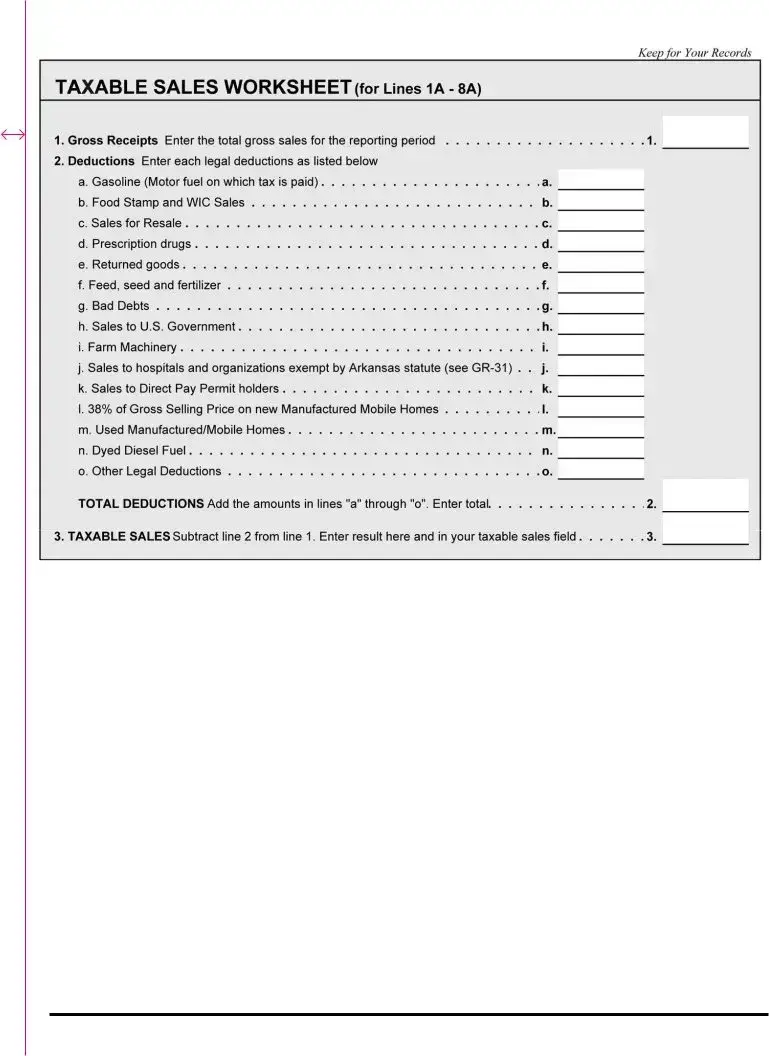
NOTE: In order to determine your taxable sales, we have provided the following worksheet for you to use:
1/4” tear perf
6
JANUARY 2022 ARKANSAS SALES AND USE TAX REPORTING INSTRUCTIONS
www.arkansas.gov/salestax or contact our ofce at (501) 682-7104.
Current Tax Rate is 0.625%.
Aviation Sales Tax
The sales tax on aircraft and aviation fuel, aviation services, parts, accessories and other sales taxes remitted by aircraft dealers,
airports and ying elds are collected by the Commissioner of Revenues and remitted to the State Treasury.
Current Tax Rate is 6.5%.
Aviation Use Tax
The use tax on aircraft and aviation fuel, aircraft parts and accessories is collected by the Commissioner of Revenues and remitted to
the State Treasury.
Current Tax Rate is 6.5%.
2% Tourism Tax
The tax is levied upon the gross receipts or gross proceeds derived from admissions to tourist attractions or the sale or rental on items
related to tourism. The tax is collected, reported and paid in the same manner as all other gross receipts taxes. The monies collected
are deposited as special revenues and credited to the Tourism Development Trust Fund. Current Tax Rate is 2% and is levied upon the
gross receipts of the following:
Admission to theme parks, water parks, water slides, river and lake boat cruises and excursions, local sightseeing and excursion
tours, helicopter tours, excursion railroads, carriage rides, horse racing, dog racing, indoor or outdoor plays or music shows,
folk centers, observation towers, privately owned or operated museums, privately owned historic sites or buildings, and natural
formations; the services of furnishing hotel and motel rooms, lodging houses, condominiums and tourist camps or courts
to transient guests; camping fees at public or private campgrounds; rentals of watercraft, boats, motors, and related motor
equipment; life jackets and cushions, water skis, oars, and paddles.
Short Term Rental Tax
In addition to the Gross Receipts and Compensating Use Tax, there is levied an additional tax of 1% on all tangible personal property
that is rented or leased for a period of less than 30 days. The tax is applicable to all rentals or leases regardless of whether tax was
paid on the rental property at the time of purchase.
Current Tax Rate is 1%.
Short Term Rental Vehicle Tax
A rental vehicle tax is levied on the gross receipts or gross proceeds derived from rentals of licensed motor vehicles for a period of less
than 30 days. A local rental vehicle tax is also due and should be combined with the amount remitted for local sales tax. The rate will
be equal to the local tax rate in effect for the jurisdiction where the rental occurs.
Current Tax Rate is 10% plus the local rental vehicle tax.
Residential Moving Tax
A gross receipts tax is levied upon the rental of gasoline or diesel powered trucks rented or leased for residential moving or shipping.
Current Tax Rate is 4.5%.
Wholesale Vending Tax
Vending machine operators have three options with regard to the payment of tax. Sales made through vending machines are not
subject to the gross receipts tax, but the vending device operator must (1) pay a “wholesale vending tax” of 7% on property purchased
for resale through a vending device, (2) pay sales tax on all purchases from vendors with no sales for resale exemption or (3) purchase
a vending machine decal instead of paying sales tax or wholesale tax. If a vending machine operator chooses this option, all machines
operated must have decals on them.
Current Tax Rate is 7%.
Mixed Drink Tax
In addition to the gross receipts tax, holders of mixed drink permits (except private club permits) issued by the Alcoholic Beverage
Control Division must collect and remit the ten percent (10%) supplemental gross receipts tax on all sales of alcoholic beverages except
beer and wine.
In addition to the gross receipts tax, holders of private club permits issued by the Alcoholic Beverage Control Division must collect and
remit the 10% supplemental gross receipts tax upon all charges to members for the preparation and serving of mixed drinks or for the
cooling and serving of beer and wine. A private club which also has a beer permit should collect the state and local sales tax but not the
ten percent (10%) supplemental tax on its sales of beer.
Current Tax Rate is 10%.
Additional Mixed Drink
In addition to the gross receipts tax and ten percent (10%) supplemental tax, holders of mixed drink permits must collect and remit the
four percent (4%) supplemental gross receipts tax on all sales of alcoholic beverages except beer and wine.
In addition to the gross receipts tax and ten percent (10%) supplemental tax, holders of private club permits must collect and remit the
four percent (4%) supplemental gross receipts tax upon all charges to members for the preparation and serving of mixed drinks only.
Current Tax Rate is 4%.
Liquor & Wine Excise Tax
A special Alcoholic Beverage Excise Tax of 3% is levied upon all retail receipts or proceeds derived from the sale of liquor, cordials,
liqueurs, specialties, sparkling and still wines. The tax is collected by the retailer in addition to the retail price of such products and
remitted to the Commissioner of Revenues. This tax is in addition to the Gross Receipts Tax.
Current Tax Rate is 3%.
1/4” tear perf
JANUARY 2022 ARKANSAS SALES AND USE TAX REPORTING INSTRUCTIONS
7
Beer Excise Tax
The tax is levied on the retail sales of beer for off premises consumption. This tax is in addition to the Gross Receipts Tax.
Current Tax Rate is 1%.
Local Sales and Use Taxes
Local taxes are collected and remitted similar to the state sales and use tax. You must report each city tax or county tax separately on
the form.
Businesses that hold an active Arkansas Sales and Use Tax permit and le Excise Tax returns with DFA may deduct the amount of
additional city or county tax on business purchases on which the full amount of local tax has been collected by the seller. The total
amount of the additional tax for a qualifying rebate for each city and county for which the tax was paid must be listed on the form.
When completing the form, a credit for any additional tax paid will be deducted from the local tax due for that reporting period.
Lines 26 – 31
Report sales tax or local rental vehicle tax in the top portion of each line and use tax in the bottom portion of each line. Round all
gures to the nearest whole dollar. If you have more than six (6) cities and counties to report, attach additional Schedule L, located at
www.arkansas.gov/salestax.
Column A (City & County) – Enter the name of the city or county for which you are reporting tax.
Column B (Code) – Enter the local code as assigned by the Department of Finance and Administration (See enclosed list.) This list is
updated quarterly and can be obtained from the Sales and Use Tax Section’s website at www.arkansas.gov/salestax.
Column D (Taxable Sales or Purchases) – Enter the taxable amount of sales or purchases.
Column E (Rate) – Enter the appropriate tax rate (found on the attached list) for the city or county you are reporting. This list is updated
quarterly; please check for any possible rate changes.
Column F (Gross Tax Due) – Multiply the taxable sales or purchases by the tax rate and enter here.
Column G (2% Discount) – Multiply the Gross Sales Tax Due by 2% (.02) if paid and postmarked by the 20
th
of the month due. The
discount does not apply to use tax or local rental vehicle tax. The discount shall not exceed one thousand dollars ($1,000) per city and
county reported.
Column H (Local Tax Rebate) – Enter the amount of additional local tax paid to a seller on qualifying purchases eligible for the local
tax rebate. (See Local Tax Rebate Computation below)
Column I (Net Tax Due) – Subtract the 2% Discount amount from the Gross Tax Due amount. Enter the difference here.
Line 32 Total Local Sales & Use Tax – Add the local taxes from all schedules and enter here.
EXAMPLE:
Local Sales and Use Taxes (If you have additional local taxes to report, please attach a supplemental schedule)
A. City & County B. Code
Tax
C. Type
Taxable Sales
D. & Purchases E. Rate F. Gross Tax Due
Less 2%
G. Discount
Local Cap
H. Rebate I. Net Tax Due
26.
LITTLE ROCK
6005
SALES
10,000
1.125%
113.00 2.00 111.00
USE
27.
PULASKI CO.
6000
SALES
10,000
1.000%
100.00 2.00 98.00
USE
28.
CONWAY
2301
SALES
0
2.125%
0 99.75 -99.75
USE
29.
FAULKNER CO.
2300
SALES
0
0.500%
0 28.50 -28.50
USE
30. SALES
USE
31. SALES
USE
8
JANUARY 2022 ARKANSAS SALES AND USE TAX REPORTING INSTRUCTIONS
RECENT LOCAL TAX CHANGES
The following cities and counties have recent tax CHANGES. Please refer to the city and county local tax listing for the complete listing
and current rates in local taxes. This list contains rate change information based on information available January 1, 2022.
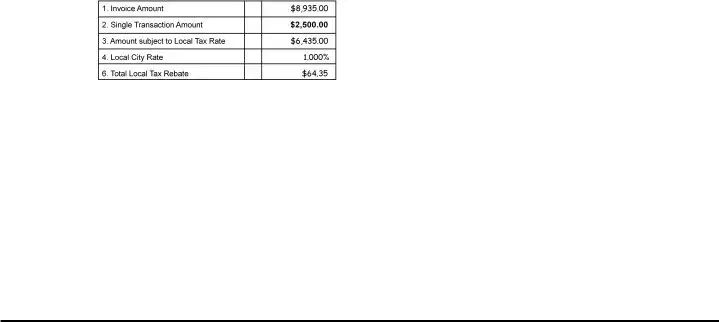
Local Tax Rebate Computation
To compute the amount of rebate, take the invoice amounts exceeding $2,500 (not including tax) and subtract $2,500 from the total
Invoice amount. This result is multiplied by the local tax rate that is applicable and the product is the local tax rebate.
You must use this method to compute each Rebate for each local tax. For more information, visit our website: www.arkansas.gov/salestax
Please Note (Texarkana):
In Accordance with Arkansas statute 26-52-523, only the .5% portion of the 2.5% Texarkana City tax is eligible for the local tax rebate
allowed on business purchases.
To claim a local tax rebate on the available .5% portion of the Texarkana City tax on business purchases, complete and submit the
ET-179A, Local Tax Rebate Form according to the instructions on the form. The ET-179A, Local Tax Rebate Form may be printed from on
our website www.arkansas.gov/salestax. You may not claim the local tax rebate for the city of Texarkana on the ET-1 Excise Tax Return.
Local Tax Rebate EXAMPLE
*Denotes multiple changes for this jurisdiction.
**Denotes jurisdiction is in multiple Counties.
City or County Name Code Date Rate County Recent Action
Cotter 03-02 1/1/2022 2.000% Baxter Increased
Siloam Springs 04-01 1/1/2022 2.000% Benton Annexation
Bentonville* 04-03 1/1/2022 2.000% Benton Annexation
Gravette 04-07 1/1/2022 2.000% Benton Annexation
Pea Ridge* 04-10 1/1/2022 2.000% Benton Increased
Concord 12-01 1/1/2022 1.000% Cleburne Enacted
Brookland 16-04 1/1/2022 3.000% Craighead Annexation
Van Buren 17-02 1/1/2022 1.500% Crawford Annexation
Cushman 32-03 1/1/2022 0.000% Independence Annexation
Cabot* 43-11 1/1/2022 2.000% Lonoke Annexation
Little Rock 60-05 1/1/2022 1.125% Pulaski Decreased
Fort Smith 65-01 1/1/2022 2.000% Sebastian Annexation
Manseld** 65-03 1/1/2022 2.500% Sebastian Deannexation
Johnson 72-07 1/1/2022 3.000% Washington Increased
Fayetteville* 72-14 1/1/2022 2.000% Washington Annexation
Beebe 73-02 1/1/2022 1.250% White Increased
Sebastian County 65-00 1/1/2022 1.000% - Decreased
Bentonville* 04-03 4/1/2022 2.000% Benton Annexation
Gentry 04-06 4/1/2022 2.000% Benton Annexation
Centerton 04-09 4/1/2022 2.000% Benton Annexation
Pea Ridge* 04-10 4/1/2022 2.000% Benton Annexation
Rockport 30-03 4/1/2022 3.000% Hot Spring Increased
Grady 40-03 4/1/2022 1.000% Lincoln Annexation
Cabot* 43-11 4/1/2022 2.000% Lonoke Annexation
Manila 47-13 4/1/2022 1.250% Mississippi Annexation
Rosston 50-06 4/1/2022 1.000% Nevada Enacted
Springdale** 72-10 4/1/2022 2.000% Washington Annexation
West Fork 72-12 4/1/2022 3.000% Washington Annexation
Fayetteville* 72-14 4/1/2022 2.000% Washington Annexation
JANUARY 2022 ARKANSAS SALES AND USE TAX REPORTING INSTRUCTIONS
9
1/4” tear perf
10
JANUARY 2022 ARKANSAS SALES AND USE TAX REPORTING INSTRUCTIONS
1/4” tear perf

Form Information

Fact Name Fact Description Governing Law
Purpose of ET-1 The ET-1 form is used to report all state and local taxes under the Gross Receipts (Sales) Tax and Compensating Use Tax Acts. Arkansas Code Annotated § 26-52-101 et seq.
Filing Method Taxpayers can file their ET-1 form online through the Arkansas Taxpayer Access Point (ATAP) for convenience. Arkansas Code Annotated § 26-18-101 et seq.
Discount Eligibility A 2% discount is available for timely filed reports if full payment is made, capped at $1,000. Arkansas Code Annotated § 26-52-507.
Amended Returns Taxpayers can file an amended return by checking the "Amended Return" box and providing an explanation for changes. Arkansas Code Annotated § 26-18-303.

Detailed Guide for Filling Out Arkansas Et 1

Filling out the Arkansas ET-1 form can seem daunting at first, but by following a series of straightforward steps, you can complete it accurately. This form is essential for reporting various state and local taxes, and ensuring that all required information is submitted correctly will help you avoid any potential issues.

  1. Begin by gathering all necessary documents, including your Taxable Sales Worksheet, to reference your taxable sales figures.
  2. Use blue or black ink to fill out the form; avoid using pencil.
  3. In the Gross Receipts Tax section, enter your state taxable sales on Line 1A.
  4. Calculate the Gross Tax Due for Line 1C by multiplying the taxable sales from Line 1A by the state rate of 6.5%.
  5. Determine the 2% Discount for Line 1D by multiplying the amount on Line 1C by 0.02. Ensure this discount does not exceed $1,000.
  6. If applicable, enter the amount of Tourism Credit on Line 1E.
  7. Calculate the Net Tax Due for Line 1F by subtracting the amounts on Lines 1D and 1E from Line 1C.
  8. Proceed to the Food Tax section. Enter your taxable sales on Line 2A, then calculate the Gross Tax Due for Line 2C by multiplying Line 2A by 0.125%.
  9. Repeat the discount calculation for Line 2D and enter any applicable Tourism Credit on Line 2E. Calculate the Net Tax Due for Line 2F.
  10. Continue this process for the Manufacturing Utility Tax, Aviation Tax, Vendor Use Tax, Consumer Use Tax, and any other relevant sections, following the same pattern of entering taxable sales, calculating gross tax due, applying discounts, and determining net tax due.
  11. In the Local Sales and Use Taxes section, list each city or county you are reporting, along with the corresponding local tax code and rates.
  12. Calculate the Gross Tax Due and any applicable discounts for local taxes, ensuring all figures are rounded to the nearest whole dollar.
  13. Complete the TOTALS section by adding the net tax due from all relevant lines and ensure that the final Net Tax Due is accurately calculated.
  14. Sign the form where indicated, ensuring that it is signed by a responsible party.
  15. Attach the payment voucher if you are making a payment with the return. Write your account number on your check to ensure proper credit.

After completing these steps, review the form for accuracy. It’s essential to ensure all calculations are correct and that all required information is included. Once verified, you can submit the form to the Arkansas Department of Finance and Administration, either by mail or electronically through the Arkansas Taxpayer Access Point (ATAP).

Obtain Answers on Arkansas Et 1

  1. What is the Arkansas ET-1 form?

    The Arkansas ET-1 form is an excise tax return used to report state and local taxes under the Gross Receipts (Sales) Tax and Compensating Use Tax Acts. This form is essential for businesses operating in Arkansas to ensure compliance with tax obligations. It encompasses various tax types, including sales tax, food tax, and manufacturing utility tax, among others.

  2. Who needs to file the ET-1 form?

    Any business or individual who sells taxable goods or services in Arkansas is required to file the ET-1 form. This includes in-state sellers and out-of-state sellers making sales into Arkansas. If you have taxable sales or purchases during the reporting period, you must complete and submit this form.

  3. How do I complete the ET-1 form?

    To complete the ET-1 form, start by gathering your taxable sales data from the Taxable Sales Worksheet. Ensure that all figures are rounded to the nearest whole dollar. Use blue or black ink for clarity. The form consists of various sections where you will report different types of taxes, such as gross receipts tax and food tax. Follow the instructions carefully for each line, and remember to calculate any applicable discounts or credits.

  4. What discounts are available when filing the ET-1 form?

    If you file your report by the 20th of the month due and make full payment, you may qualify for a 2% discount on certain state taxes. However, this discount cannot exceed $1,000. Be sure to calculate this discount accurately and include it on the appropriate lines of the form.

  5. Can I amend my ET-1 form if I made a mistake?

    Yes, you can amend your ET-1 form if necessary. To do this, check the "Amended Return" box at the top of the form and complete it as you would for an original submission. Attach a letter explaining the changes and the reasons behind them. It's important to include this explanation to avoid delays in processing your amended return.

  6. What is the Arkansas Taxpayer Access Point (ATAP)?

    The Arkansas Taxpayer Access Point (ATAP) is an online service that provides taxpayers with secure access to their tax accounts. Through ATAP, you can file and amend returns, make payments, and view your tax account information anytime, day or night. If you haven’t signed up yet, visit atap.arkansas.gov to create your account and explore the available services.

  7. Where can I find more information about the taxes reported on the ET-1 form?

    For detailed information about the various taxes reported on the ET-1 form, you can visit the Arkansas Department of Finance and Administration's website at www.arkansas.gov/salestax. Additionally, you can contact their office directly at (501) 682-7104 for any specific questions or assistance you may need.

Common mistakes

Filling out the Arkansas ET-1 form can be a straightforward process, but many individuals make common mistakes that can lead to delays or inaccuracies in their tax submissions. One significant error occurs when taxpayers fail to round figures correctly. The instructions clearly state that all figures must be rounded to the nearest whole dollar. For instance, amounts with cents below 50 should be dropped, while amounts of 50 cents or more should be rounded up. Neglecting this rule can result in discrepancies in the total tax due.

Another frequent mistake is using the wrong ink color. The form specifically instructs users to complete it in blue or black ink only. Using pencil or any other color can render the form invalid, leading to potential processing issues. It is essential to adhere to this guideline to ensure that the form is accepted without complications.

Additionally, many individuals overlook the importance of checking for pre-printed information on the form. Failing to verify the accuracy of pre-printed names, addresses, or account numbers can lead to misfiled returns. Taxpayers should always double-check these details before submission to avoid any potential issues with their tax accounts.

Another common error involves the calculation of discounts. Taxpayers often miscalculate the 2% discount allowed for timely submissions. This discount applies only if the report is postmarked by the 20th of the month due, and the full payment is made with the report. If the discount exceeds the maximum allowable amount, it can lead to incorrect tax calculations.

Lastly, many taxpayers forget to sign the form. The signature of a responsible party is required for the return to be valid. Without a signature, the form cannot be processed, which can result in penalties or additional fees. It is vital to ensure that the form is signed before submission to avoid any unnecessary complications.

Documents used along the form

The Arkansas ET-1 form is a crucial document for reporting state and local taxes related to sales and use. Alongside this form, several other documents and forms are commonly utilized to ensure compliance with Arkansas tax regulations. Below is a list of these documents, each with a brief description.

  • Taxable Sales Worksheet: This worksheet assists taxpayers in calculating their taxable sales and purchases. It is essential for accurately completing the ET-1 form and helps ensure that all figures reported are correct.
  • Amended Return Form: This form is used when a taxpayer needs to correct errors on a previously submitted ET-1 form. It requires checking the "Amended Return" box and attaching a letter explaining the changes made.
  • Payment Voucher: A payment voucher accompanies the ET-1 form when submitting payment. It specifies the amount being paid and helps ensure that payments are credited to the correct tax account.
  • Local Tax Rate Schedule: This document lists the current local tax rates applicable to various cities and counties in Arkansas. Taxpayers must refer to this schedule to report local taxes accurately on the ET-1 form.
  • Sales Tax Exemption Certificate: This certificate is used by purchasers to claim exemption from sales tax on qualifying purchases. It must be presented to the seller at the time of purchase to avoid tax charges.
  • Taxpayer Access Point (ATAP): ATAP is an online platform that provides taxpayers with access to their tax accounts. Through ATAP, users can file returns, make payments, and manage their tax information conveniently.

Understanding these forms and documents is essential for taxpayers in Arkansas to maintain compliance and effectively manage their tax obligations. Utilizing these resources can streamline the reporting process and minimize errors.

Similar forms

  • Sales Tax Return (Form ST-1): Similar to the ET-1, the ST-1 is used to report sales tax collected by retailers. Both forms require taxpayers to calculate gross tax due based on taxable sales and provide information on discounts and credits.
  • Use Tax Return (Form UT-1): This form is used for reporting use tax on purchases made outside of Arkansas. Like the ET-1, it involves calculating tax based on taxable sales and includes provisions for discounts.
  • Monthly Tax Report (Form MTR): The MTR is similar in that it is used to report various taxes on a monthly basis. Taxpayers must detail taxable sales and calculate the net tax due, similar to the ET-1 process.
  • Annual Reconciliation for Withholding Tax (Form AR-3): This form reconciles withholding tax for employees. It shares the ET-1's requirement for accurate reporting of taxable amounts and calculating tax due.
  • Amended Tax Return (Form AR-1000): This form is used to amend previously filed tax returns. Like the ET-1, it requires taxpayers to explain changes and recalculate tax amounts.
  • Franchise Tax Report (Form FT-1): The FT-1 is used to report franchise taxes for businesses. It shares similarities with the ET-1 in that it requires accurate reporting of financial figures and tax calculations.
  • Property Tax Return (Form PT-1): This form is used to report property taxes owed. Both forms require taxpayers to provide detailed financial information and calculate the total tax due.
  • Excise Tax Return (Form EX-1): The EX-1 is similar as it is used to report excise taxes on specific goods. Taxpayers must calculate taxes owed based on sales, akin to the ET-1.
  • Consumer Use Tax Return (Form CUT-1): This form is for reporting consumer use tax on out-of-state purchases. It parallels the ET-1 in that it requires detailed reporting of taxable purchases and tax calculations.

Dos and Don'ts

When filling out the Arkansas ET-1 form, it’s important to follow certain guidelines to ensure accuracy and compliance. Here’s a list of things to do and avoid:

  • Do use blue or black ink when completing the form.
  • Do round all figures to the nearest whole dollar.
  • Do ensure that all required fields are filled out completely.
  • Do submit the form by the due date to avoid penalties.
  • Don't use pencil to fill out the form.
  • Don't forget to attach any necessary documentation, such as letters of explanation for amended returns.
  • Don't leave any fields blank; if a section does not apply, indicate that clearly.
  • Don't forget to sign the form before submitting it.

Misconceptions

Misconceptions about the Arkansas ET-1 form can lead to confusion and mistakes in tax reporting. Here are nine common misunderstandings, along with clarifications to help you navigate this important document.

  • Only large businesses need to file the ET-1 form. Many believe that only larger entities are required to submit the ET-1 form. In reality, any business engaging in taxable sales or purchases in Arkansas must file this form, regardless of size.
  • The ET-1 form is only for sales tax. Some think the ET-1 is limited to sales tax reporting. However, it covers various taxes, including use tax, food tax, and manufacturing utility tax, among others.
  • Filing the ET-1 form is optional. A common misconception is that filing is optional. In truth, if your business has taxable sales or purchases, filing the ET-1 form is mandatory.
  • Discounts are automatically applied. Many assume that discounts for timely filing will be automatically applied. It's essential to calculate and claim these discounts on the form to receive the benefits.
  • All figures can be reported as is. Some individuals believe they can report figures without rounding. The ET-1 form requires that all amounts be rounded to the nearest whole dollar, which is crucial for accurate reporting.
  • There’s no penalty for late filing. Some may think that late filing incurs no consequences. In reality, late submissions can result in penalties and interest, making timely filing critical.
  • Amended returns can be filed without explanation. A misconception exists that amended returns can be submitted without providing a reason. To process an amended return, a detailed explanation must accompany the submission.
  • The form can be filled out in pencil. Many believe they can use any writing instrument. However, the ET-1 form must be completed in blue or black ink only; pencil is not acceptable.
  • Third-party representatives cannot access the account. Some think only the taxpayer can manage their tax account. In fact, taxpayers can assign third-party logins, allowing representatives like CPAs to access the necessary information.

Understanding these misconceptions can help ensure accurate tax reporting and compliance with Arkansas tax laws. Always consult the official guidelines or a tax professional if you have questions.

Key takeaways

Understanding the Arkansas ET-1 Form is crucial for accurate tax reporting. Here are some key takeaways to help you navigate the process:

  • Ensure you use blue or black ink when filling out the form. Avoid using pencil, as it may lead to errors or complications in processing.
  • All figures must be rounded to the nearest whole dollar. For instance, if you have $10.47, report it as $10.00, while $11.56 should be reported as $12.00.
  • Take advantage of the 2% discount on state taxes if you postmark your report by the 20th of the month and include full payment. However, keep in mind that this discount cannot exceed $1,000.
  • Utilize the Arkansas Taxpayer Access Point (ATAP) for online access to your tax accounts. This service allows you to file returns, make payments, and manage your tax information securely.