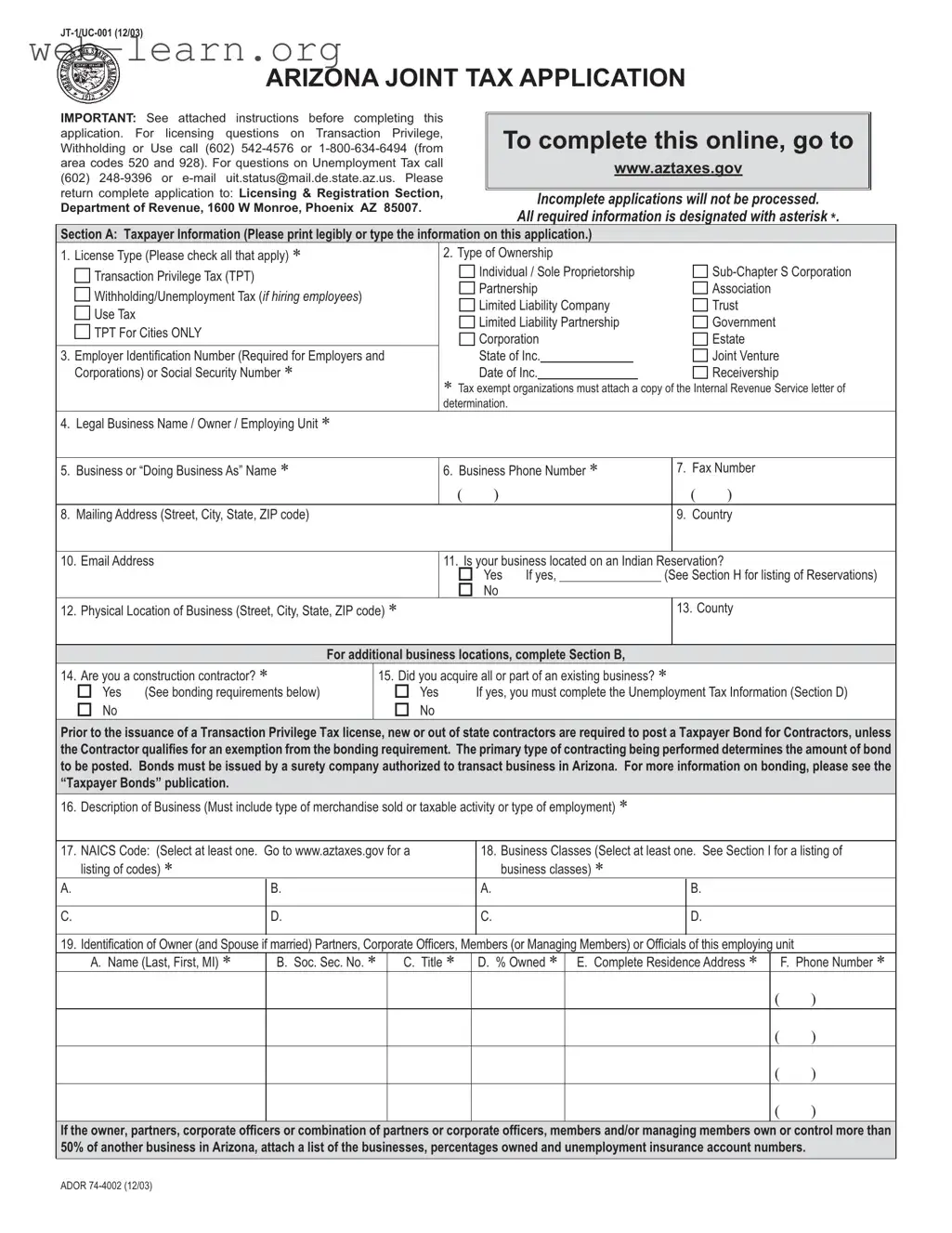
The Arizona Joint Tax Application, known as the JT-1/UC-001 form, is a critical document for individuals and businesses seeking to establish or modify their tax obligations within the state. This form facilitates the licensing process for various tax types, including Transaction Privilege Tax (TPT), Withholding Tax, and Unemployment Tax. It requires applicants to provide essential information, such as the legal business name, ownership type, and physical location of the business. Additionally, the form prompts applicants to disclose their anticipated annual income, business activities, and any previous ownership details if applicable. Understanding the requirements of this form is vital, as incomplete submissions may lead to delays in processing. Specific sections address licensing for new businesses, changes in ownership, and the need for bonds for contractors. Furthermore, the form includes sections dedicated to withholding and unemployment tax information, ensuring that employers are compliant with state regulations. By carefully completing the JT-1/UC-001 form, applicants can effectively navigate the complexities of Arizona's tax system and fulfill their obligations to the state.






| Fact Name | Details |
|---|---|
| Form Purpose | The Arizona JT-1/UC-001 form is used to apply for various business licenses, including Transaction Privilege Tax, Withholding Tax, and Unemployment Tax registration. |
| Governing Laws | This form is governed by Arizona Revised Statutes, specifically Title 23, Chapter 4, which pertains to unemployment insurance and tax obligations. |
| Submission Requirements | Applicants must ensure that all sections of the form are completed and signed. Incomplete applications will be returned and not processed. |
| Contact Information | For questions regarding Transaction Privilege Tax, call (602) 542-4576. For Unemployment Tax inquiries, contact (602) 248-9396 or email [email protected]. |
| Business Types | The form accommodates various ownership structures, including sole proprietorships, partnerships, corporations, and limited liability companies. |
| Tax Identification | Applicants must provide either a Federal Employer Identification Number (EIN) or a Social Security Number, which is mandatory for processing the application. |
Completing the Arizona Joint Tax Application (JT-1/UC-001) is an essential step for businesses operating in the state. This form gathers important information about your business, including ownership structure, tax obligations, and contact details. It is crucial to ensure that all sections are filled out accurately to avoid any delays in processing your application.
The Arizona JT-1/UC-001 form is a Joint Tax Application used for registering various types of taxes in Arizona. This includes the Transaction Privilege Tax (TPT), Withholding Tax, and Unemployment Tax. Businesses must complete this form to obtain the necessary licenses to operate legally within the state. It is essential for both new businesses and those changing ownership or structure.
Any individual or business entity planning to engage in taxable activities in Arizona must complete this form. This includes sole proprietors, partnerships, corporations, and other business types. If a business is hiring employees, it also needs to register for withholding and unemployment taxes using this application.
Several key pieces of information are necessary when filling out the JT-1/UC-001 form:
It is crucial to provide accurate and complete information, as incomplete applications may be returned and not processed.
Once the JT-1/UC-001 form is completed, it must be mailed to the Licensing & Registration Section of the Arizona Department of Revenue. The address is 1600 W Monroe, Phoenix, AZ 85007. Ensure that all required sections are filled out and that the form is signed by the appropriate individuals to avoid delays in processing.
If the application is found to be incomplete, it will not be processed. The Department of Revenue will return the application to the sender, which can delay the issuance of necessary licenses. It is advisable to review the form carefully and ensure all required fields are completed before submission.
Completing the Arizona JT-1/UC-001 form accurately is crucial for ensuring a smooth application process. One common mistake is failing to provide all required information. Each section of the form includes fields marked with an asterisk (*) that must be completed. Omitting these details can lead to delays or rejection of the application.
Another frequent error is not printing or typing the information clearly. The form requests that applicants print legibly or type their responses. Illegible handwriting can result in misunderstandings or misinterpretations of the provided information, which may affect the processing of the application.
Many applicants also overlook the importance of providing the correct Taxpayer Identification Number (TIN). This number is required for all businesses and must be accurate to avoid penalties. Failing to include a TIN or submitting an incorrect number can lead to additional fees and complications.
Additionally, some individuals neglect to indicate the type of ownership accurately. The form includes various ownership types, such as individual, partnership, or corporation. Selecting the wrong option can have legal implications and may result in the application being processed incorrectly.
Another mistake involves not attaching necessary documentation. For instance, tax-exempt organizations must include a copy of their IRS letter of determination. Failing to provide this documentation can lead to the application being deemed incomplete.
Applicants sometimes forget to sign the form. The application requires signatures from individuals legally responsible for the business, such as owners or corporate officers. Without these signatures, the application cannot be processed.
Finally, some individuals do not review the instructions carefully. The form includes specific guidelines for completing each section. Ignoring these instructions can lead to mistakes that could have been easily avoided. Taking the time to read and understand the requirements can save applicants from unnecessary complications.
The Arizona Joint Tax Application (JT-1/UC-001) is a crucial document for businesses in Arizona, but it is often accompanied by other forms that provide additional information or fulfill specific requirements. Understanding these documents can help streamline the application process and ensure compliance with state regulations.
These forms and documents work together to ensure that businesses comply with Arizona's tax regulations. Completing each one accurately is essential for smooth operations and avoiding potential penalties.
When filling out the Arizona JT 1 UC 001 form, keep these tips in mind:
Additionally, avoid the following common mistakes:
This form is applicable not just for new businesses but also for existing businesses that are changing ownership or structure. It serves multiple purposes, including licensing and updating business information.
In fact, the form is designed for various types of ownership structures, including sole proprietorships, partnerships, and limited liability companies. Any entity conducting business in Arizona may need to complete this application.
Incomplete applications will not be processed. It is essential to provide all required information, marked with an asterisk, to ensure timely processing.
While there is an option to complete the form online, applicants must still follow specific instructions and may need to contact relevant departments for questions regarding licensing or taxes.
Applicants should be aware that there are fees associated with licensing, which can vary based on the type of business and the number of locations. A state fee of $12.00 is standard, in addition to any applicable city fees.
This form is relevant for a variety of business activities, including services. The description of the business must accurately reflect the type of merchandise sold or services provided.
Providing a TIN is mandatory for all applicants. This includes either a Federal Employer Identification Number (EIN) or a Social Security Number (SSN), depending on the business structure.
Businesses on Indian Reservations must still complete the form, but they may have different tax obligations. It is crucial to indicate the location accurately and refer to the specific reservation codes provided.
After submission, businesses must remain compliant with ongoing tax obligations and may need to file additional forms or updates as circumstances change, such as hiring employees or changing business locations.
Key Takeaways for Filling Out and Using the Arizona JT 1 UC 001 Form: