Homepage Blank Arizona 285 Form
Outline

The Arizona 285 form, officially known as the Disclosure Authorization Form, plays a crucial role for taxpayers in the state. This form allows individuals to authorize the Arizona Department of Revenue to share their confidential tax information with designated appointees. It's important to note that this form does not function as a power of attorney; it simply grants access to specific tax details without allowing the appointee to act on behalf of the taxpayer. When filling out the form, taxpayers must provide their personal information, including names, Social Security numbers, and contact details. Additionally, they can specify the appointees who will receive this information, along with the types of tax matters involved, such as income tax or transaction privilege tax. The form also includes a section to confirm that previous authorizations remain valid, ensuring that taxpayers maintain control over their tax representation. Finally, the form requires a signature to certify the accuracy of the information provided and to affirm the authority to execute the authorization.

Sample - Arizona 285 Form

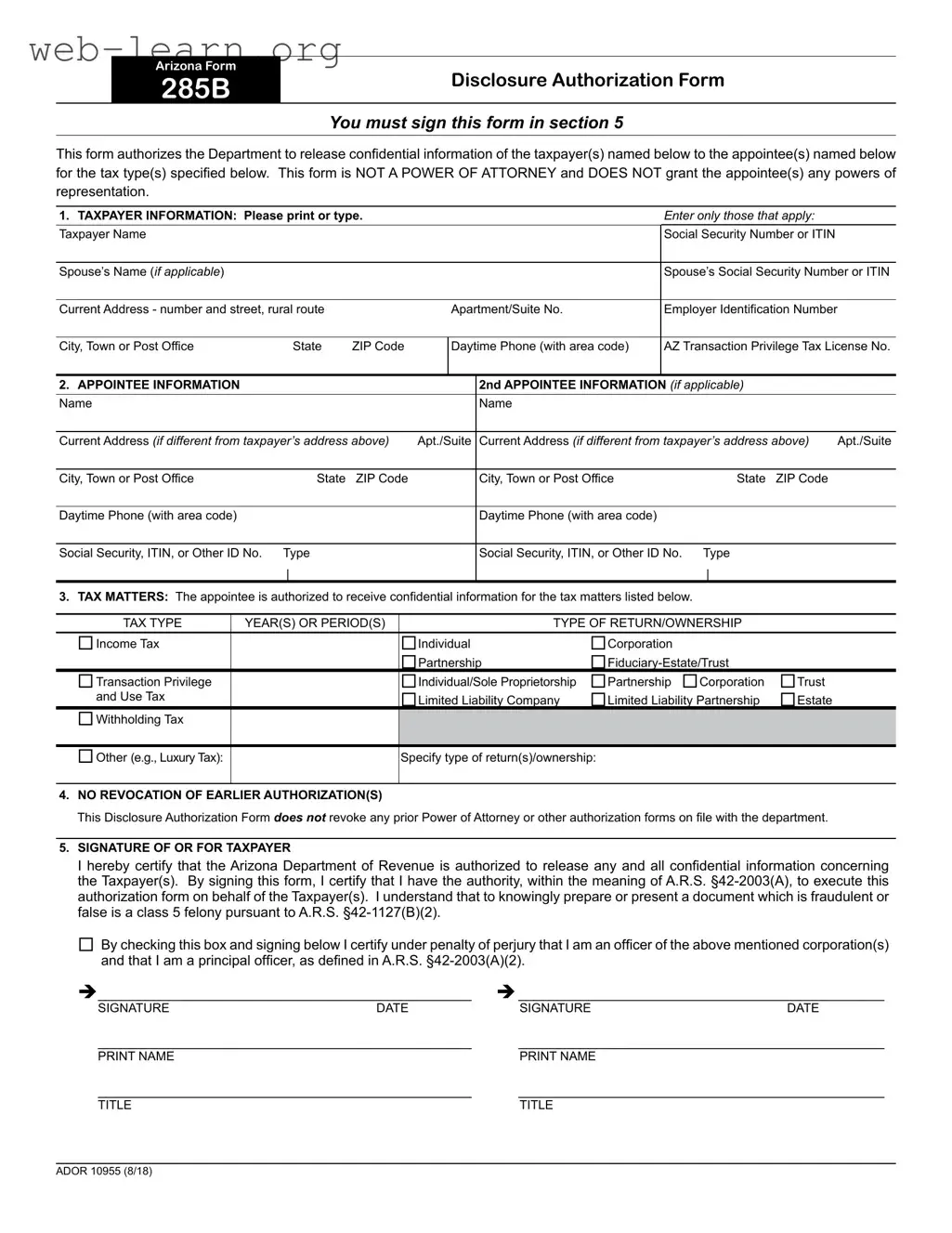
This form authorizes the Department to release condential information of the taxpayer(s) named below to the appointee(s) named below
for the tax type(s) specied below. This form is NOT A POWER OF ATTORNEY and DOES NOT grant the appointee(s) any powers of
representation.
ADOR 10955 (8/18)
1. TAXPAYER INFORMATION: Please print or type. Enter only those that apply:
Taxpayer Name Social Security Number or ITIN
Spouse’s Name (if applicable) Spouse’s Social Security Number or ITIN
Current Address - number and street, rural route Apartment/Suite No. Employer Identification Number
City, Town or Post Office State ZIP Code Daytime Phone (with area code) AZ Transaction Privilege Tax License No.
2. APPOINTEE INFORMATION 2nd APPOINTEE INFORMATION (if applicable)
Name Name
Current Address (if different from taxpayer’s address above) Apt./Suite Current Address (if different from taxpayer’s address above) Apt./Suite
City, Town or Post Office State ZIP Code City, Town or Post Office State ZIP Code
Daytime Phone (with area code) Daytime Phone (with area code)
Social Security, ITIN, or Other ID No. Type
|
Social Security, ITIN, or Other ID No. Type
|
3. TAX MATTERS: The appointee is authorized to receive confidential information for the tax matters listed below.
TAX TYPE YEAR(S) OR PERIOD(S) TYPE OF RETURN/OWNERSHIP
Income Tax
 
Individual
 Partnership
 Corporation
 Fiduciary-Estate/Trust
Transaction Privilege
and Use Tax
Individual/Sole Proprietorship
 Limited Liability Company
 Partnership
Corporation
 Limited Liability Partnership
Trust
 Estate
Withholding Tax
Other (e.g., Luxury Tax): Specify type of return(s)/ownership:
4. NO REVOCATION OF EARLIER AUTHORIZATION(S)
This Disclosure Authorization Form does not revoke any prior Power of Attorney or other authorization forms on file with the department.
5. SIGNATURE OF OR FOR TAXPAYER
I hereby certify that the Arizona Department of Revenue is authorized to release any and all condential information concerning
the Taxpayer(s). By signing this form, I certify that I have the authority, within the meaning of A.R.S. §42-2003(A), to execute this
authorization form on behalf of the Taxpayer(s). I understand that to knowingly prepare or present a document which is fraudulent or
false is a class 5 felony pursuant to A.R.S. §42-1127(B)(2).
By checking this box and signing below I certify under penalty of perjury that I am an ofcer of the above mentioned corporation(s)
and that I am a principal ofcer, as dened in A.R.S. §42-2003(A)(2).
________________________________________________ _______________________________________________
SIGNATURE DATE SIGNATURE DATE
________________________________________________ _______________________________________________
PRINT NAME PRINT NAME
________________________________________________ _______________________________________________
TITLE TITLE
Arizona Form
285B
Disclosure Authorization Form
You must sign this form in section 5

Form Information

Fact Name Details
Form Title Arizona Form 285B Disclosure Authorization Form
Signature Requirement This form must be signed in section 5 by the taxpayer.
Purpose The form allows the Department to release confidential taxpayer information to designated appointees.
Not a Power of Attorney This form does not grant any powers of representation to the appointee(s).
Taxpayer Information Taxpayer details, including name and Social Security Number or ITIN, must be provided.
Appointee Information Information for one or two appointees can be included, including their contact details.
Tax Matters The appointee can receive information for specific tax types and periods as listed on the form.
No Revocation This form does not revoke any prior Power of Attorney or authorization forms.
Governing Law Relevant Arizona Revised Statutes include A.R.S. §42-2003(A) and A.R.S. §42-1127(B)(2).

Detailed Guide for Filling Out Arizona 285

Filling out the Arizona 285 form requires careful attention to detail to ensure that all necessary information is provided accurately. This form allows for the disclosure of confidential taxpayer information to designated appointees. Following the steps below will help ensure that the form is completed correctly.

  1. Obtain the Form: Download or print the Arizona 285 form from the official Arizona Department of Revenue website.
  2. Fill in Taxpayer Information: In Section 1, provide the following details:
    • Taxpayer Name
    • Social Security Number or ITIN
    • Spouse’s Name (if applicable)
    • Spouse’s Social Security Number or ITIN
    • Current Address (number and street, rural route)
    • Apt/Suite No.
    • Employer Identification Number
    • City, Town or Post Office
    • State
    • ZIP Code
    • Daytime Phone (with area code)
    • AZ Transaction Privilege Tax License No.
  3. Provide Appointee Information: In Section 2, fill out the details for the primary appointee. If there is a second appointee, complete the additional fields:
    • Name
    • Current Address (if different from taxpayer’s address)
    • Apt/Suite
    • City, Town or Post Office
    • State
    • ZIP Code
    • Daytime Phone (with area code)
    • Social Security, ITIN, or Other ID No.
  4. Specify Tax Matters: In Section 3, indicate the tax types and relevant years or periods for which the appointee is authorized to receive information. Check the appropriate boxes and provide any necessary specifications.
  5. Review Revocation Clause: In Section 4, understand that this form does not revoke any prior authorizations on file with the department.
  6. Sign the Form: In Section 5, the taxpayer must sign and date the form. If applicable, check the box indicating the signatory is an officer of a corporation and provide the necessary signatures and printed names.

Once the form is completed, it should be submitted to the appropriate department as instructed on the form. Ensure that all information is accurate and legible to avoid any delays in processing. Keep a copy of the completed form for your records.

Obtain Answers on Arizona 285

  1. What is the purpose of the Arizona 285 form?

    The Arizona 285 form, also known as the Disclosure Authorization Form, is used to authorize the Arizona Department of Revenue to release confidential taxpayer information to designated appointees. It is important to note that this form does not grant the appointee any powers of representation, as it is not a Power of Attorney.

  2. Who needs to fill out the Arizona 285 form?

    Taxpayers who wish to allow someone else to access their confidential tax information must complete this form. This includes individuals, corporations, partnerships, and other entities that need to designate an appointee for specific tax matters.

  3. What information is required on the form?

    • Taxpayer's name and Social Security Number or ITIN
    • Spouse's name and Social Security Number or ITIN (if applicable)
    • Current address and daytime phone number
    • Appointee's information, including name, address, phone number, and identification number
    • Details about the tax matters for which the appointee is authorized to receive information
  4. Can I designate more than one appointee?

    Yes, the Arizona 285 form allows for the designation of a second appointee. If you wish to appoint more than one individual, you must provide their information in the designated section of the form.

  5. Does this form revoke previous authorizations?

    No, the Arizona 285 form does not revoke any prior Power of Attorney or other authorization forms that may be on file with the Arizona Department of Revenue. It is essential to maintain any existing authorizations if you still require them.

  6. What happens if I do not sign the form?

    Failure to sign the Arizona 285 form will prevent the Department of Revenue from releasing any confidential information to the designated appointee(s). The form must be signed in section 5 for it to be valid.

  7. Is there a penalty for providing false information on this form?

    Yes, knowingly preparing or presenting a fraudulent or false document is considered a class 5 felony under Arizona law. It is crucial to provide accurate and truthful information when completing the form.

  8. How can I submit the Arizona 285 form?

    The completed Arizona 285 form can be submitted to the Arizona Department of Revenue. It is advisable to keep a copy for your records. Check the Department's website for specific submission instructions, as they may vary based on the method of filing.

Common mistakes

When filling out the Arizona 285 form, individuals often make several common mistakes that can lead to delays or complications. One frequent error is failing to sign the form in section 5. This section is crucial, as it authorizes the Department to release confidential information. Without a signature, the form is incomplete and cannot be processed.

Another common mistake involves incorrect taxpayer information. It is essential to ensure that the taxpayer's name, Social Security Number or ITIN, and current address are accurately entered. Any discrepancies can cause issues in verifying identity and may delay processing. Additionally, omitting the spouse’s information when applicable is another oversight that can complicate matters.

People also often neglect to provide complete appointee information. If there is a second appointee, their details must be filled out correctly. Missing information such as the appointee's address or phone number can hinder communication and the overall process. Furthermore, individuals frequently forget to specify the correct tax types and years for which the appointee is authorized to receive information. This section should be filled out carefully to ensure that all relevant tax matters are covered.

Another mistake is misunderstanding the nature of the form itself. The Arizona 285 form is a disclosure authorization and not a power of attorney. Many individuals mistakenly believe that this form grants the appointee powers of representation, which it does not. Clarifying this distinction is vital to avoid confusion.

Additionally, individuals may overlook the section regarding prior authorizations. The form states that it does not revoke any earlier authorizations. Failing to understand this can lead to misunderstandings regarding the authority granted to the appointee.

Lastly, not reviewing the form for accuracy before submission can lead to significant issues. Simple typos or missing information can result in the form being returned or delayed. Taking the time to double-check all entries can prevent these unnecessary complications.

Documents used along the form

The Arizona 285 form is a Disclosure Authorization Form that allows taxpayers to authorize the release of their confidential information to designated appointees. This form is often used in conjunction with several other documents that facilitate tax-related matters. Below is a list of commonly associated forms and documents.

  • Arizona Form 2848: This is a Power of Attorney form that grants an appointee the authority to represent a taxpayer before the Arizona Department of Revenue. Unlike the 285 form, it allows the appointee to act on behalf of the taxpayer.
  • Arizona Form 140: This is the Individual Income Tax Return form used by residents of Arizona to report their income and calculate their state tax liability.
  • Arizona Form 140NR: This form is for non-residents who need to file an Arizona income tax return. It is specifically designed for individuals who earn income in Arizona but do not reside in the state.
  • Arizona Form 120: This is the Corporate Income Tax Return form that corporations use to report their income and calculate their tax obligations in Arizona.
  • Arizona Form 165: This form is used for partnership income tax returns. Partnerships must file this form to report their income, deductions, and credits.
  • Arizona Transaction Privilege Tax (TPT) License Application: This document is necessary for businesses that engage in taxable activities in Arizona. It allows them to collect and remit transaction privilege tax.
  • Arizona Form 502: This form is used for the Fiduciary Income Tax Return, which is required for estates and trusts to report their income and pay taxes owed.
  • Arizona Form 109: This is the Withholding Tax Return form that employers use to report and remit withholding taxes from employees’ wages to the state.
  • Arizona Form 204: This form is for the annual report of a Limited Liability Company (LLC) to maintain its good standing with the Arizona Corporation Commission.

These documents serve various purposes related to tax reporting, representation, and compliance in Arizona. Each form plays a crucial role in ensuring that taxpayers meet their obligations while allowing for the proper handling of their confidential information.

Similar forms

The Arizona 285 form is used to authorize the release of confidential taxpayer information to designated individuals. It shares similarities with several other documents. Below is a list of eight documents that are similar to the Arizona 285 form, along with a brief explanation of how they are alike:

  • IRS Form 2848 - Power of Attorney and Declaration of Representative: This form allows taxpayers to appoint someone to represent them before the IRS, similar to how the Arizona 285 allows for the designation of an appointee to receive information.
  • IRS Form 4506 - Request for Copy of Tax Return: This form enables taxpayers to request copies of their tax returns, akin to the Arizona 285’s purpose of allowing access to confidential information.
  • IRS Form 8821 - Tax Information Authorization: This form permits an individual to receive a taxpayer's confidential information from the IRS, similar to the Arizona 285's function of disclosing taxpayer data to an appointee.
  • California Form 3520 - Power of Attorney: This form grants authority to a representative to act on behalf of a taxpayer, much like the authorization given in the Arizona 285.
  • Florida Form DR-835 - Power of Attorney: This document allows taxpayers to designate someone to handle their tax matters, paralleling the appointee designation in the Arizona 285.
  • New York Form POA-1 - Power of Attorney: This form enables taxpayers to appoint a representative to act on their behalf for tax matters, similar to the Arizona 285's authorization process.
  • Texas Form 05-102 - Power of Attorney: This document allows taxpayers to designate an agent for tax purposes, akin to the appointee role in the Arizona 285 form.
  • Virginia Form PPT-1 - Power of Attorney: This form authorizes an individual to act on behalf of a taxpayer, similar to the Arizona 285's intent to allow an appointee access to confidential information.

Dos and Don'ts

When filling out the Arizona Form 285, it's essential to approach the task with care. This form is crucial for authorizing the release of confidential tax information. Here’s a list of things you should and shouldn’t do to ensure a smooth process.

  • Do read the entire form carefully before starting to fill it out. Understanding each section will help you provide the correct information.
  • Do provide accurate and complete taxpayer information. This includes names, Social Security Numbers or ITINs, and addresses.
  • Do ensure that the appointee's information is filled out correctly. This will help in avoiding any delays in processing.
  • Do sign the form in Section 5. Your signature is necessary for the form to be valid.
  • Do keep a copy of the completed form for your records. This will be useful for future reference.
  • Don’t leave any required fields blank. Incomplete forms may be rejected or delayed.
  • Don’t use nicknames or abbreviations for names. Always use the full legal names as they appear on official documents.
  • Don’t sign the form without verifying that all information is correct. Mistakes can lead to complications.
  • Don’t forget to check the box if you are certifying as an officer of a corporation. This is crucial for corporate filers.
  • Don’t submit the form without double-checking for any errors or omissions. Taking a moment to review can save you time later.

Misconceptions

Understanding the Arizona Form 285 can be challenging, and several misconceptions often arise. Here are seven common misunderstandings:

  • This form is a power of attorney. Many people mistakenly believe that the Arizona Form 285 grants the appointee the same powers as a power of attorney. In reality, it only allows the release of confidential tax information and does not grant any representation powers.
  • Only one appointee can be named. Some individuals think they can designate only one person to receive tax information. However, the form allows for multiple appointees, as long as their information is properly filled out.
  • The form revokes previous authorizations. There is a misconception that submitting this form cancels any prior authorizations. In fact, the Arizona Form 285 explicitly states that it does not revoke any earlier authorizations on file.
  • It can be signed by anyone. Another common belief is that any individual can sign the form. Only the taxpayer or an authorized representative can legally sign the form to ensure its validity.
  • It is only for individual taxpayers. Some people assume that the form is only applicable to individual taxpayers. This is incorrect; it can also be used for businesses, partnerships, and trusts.
  • Filling out the form is optional. There is a misconception that submitting the form is optional. If a taxpayer wants their appointee to receive confidential tax information, completing and submitting the form is necessary.
  • All tax types can be included on one form. Many believe that they can list any tax type on the form. However, the form is designed for specific tax types, and taxpayers must indicate which tax matters they wish to authorize.

Being aware of these misconceptions can help ensure that taxpayers properly navigate the process of using the Arizona Form 285.

Key takeaways

Here are some key takeaways about filling out and using the Arizona 285 form:

  • Signature Requirement: You must sign the form in section 5. This is crucial for the authorization to be valid.
  • Not a Power of Attorney: The Arizona 285 form does not give your appointee any powers of representation. It simply allows them to receive confidential information.
  • Complete Taxpayer Information: Fill in all applicable taxpayer details. This includes names, Social Security numbers, and current addresses.
  • Appointee Information: If you have more than one appointee, provide their details as well. This ensures that all authorized individuals are recognized.
  • Tax Matters Section: Clearly specify the tax types and periods for which the appointee is authorized to receive information. This helps avoid confusion later.