Homepage Blank Alabama Eoo Form
Outline

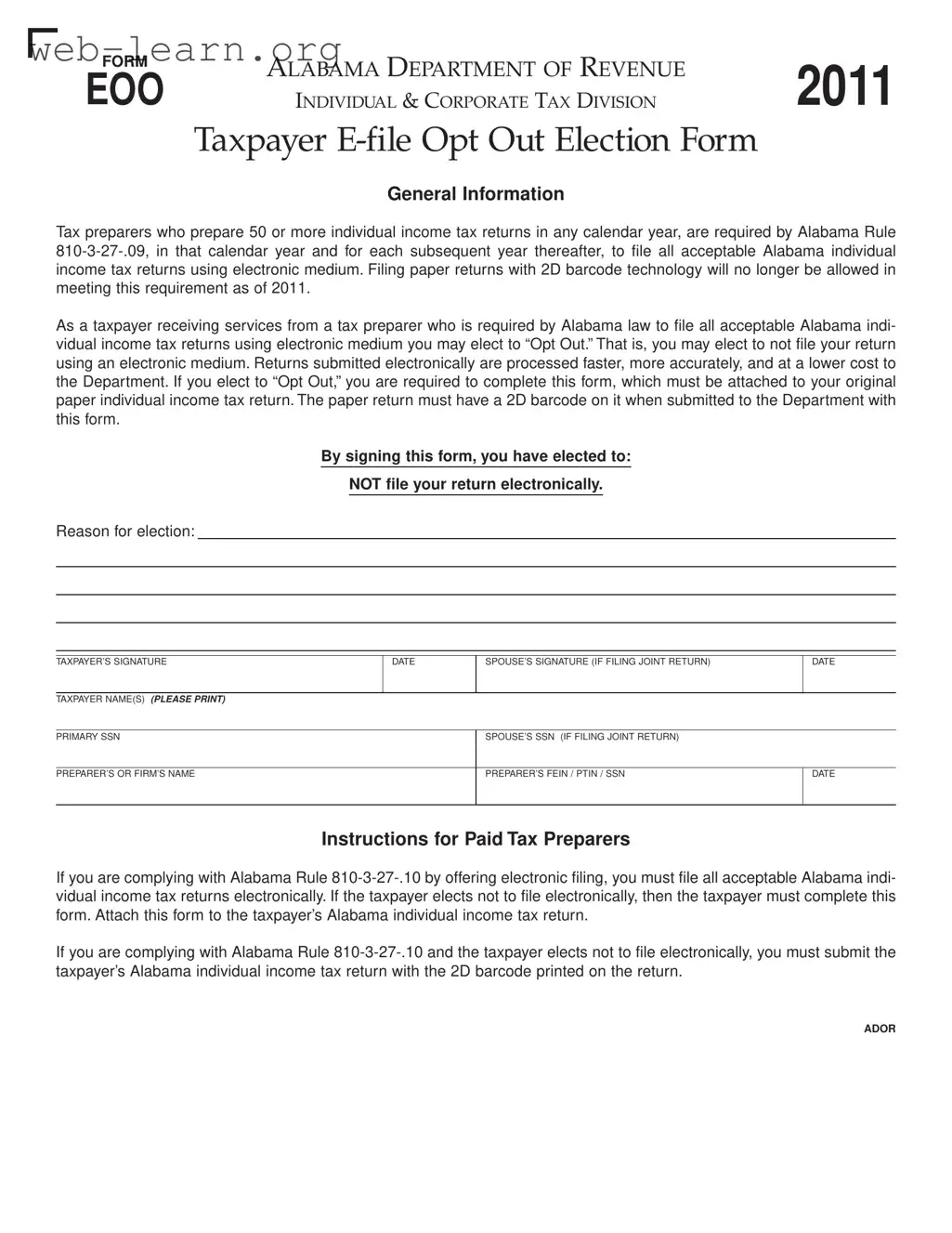
The Alabama Eoo form serves as a crucial tool for taxpayers who wish to opt out of electronic filing for their individual income tax returns, particularly when their tax preparer is mandated to file electronically. Under Alabama law, specifically Rule 810-3-27-.09, tax preparers who handle 50 or more individual income tax returns in a calendar year are required to submit these returns electronically. This shift to electronic filing aims to enhance the efficiency, accuracy, and cost-effectiveness of tax processing for the Alabama Department of Revenue. However, for those taxpayers who prefer to file using traditional paper methods, the Eoo form provides a means to formally express this choice. By completing this form, taxpayers indicate their decision to not file electronically, which must be attached to their paper return that includes a 2D barcode. The form also requires signatures from both the taxpayer and, if applicable, the spouse, along with essential identifying information such as Social Security numbers and the tax preparer's details. This ensures that the Department of Revenue has a clear record of the taxpayer's election and can process their return accordingly.

Sample - Alabama Eoo Form

General Information
Tax preparers who prepare 50 or more individual income tax returns in any calendar year, are required by Alabama Rule
810-3-27-.09, in that calendar year and for each subsequent year thereafter, to file all acceptable Alabama individual
income tax returns using electronic medium. Filing paper returns with 2D barcode technology will no longer be allowed in
meeting this requirement as of 2011.
As a taxpayer receiving services from a tax preparer who is required by Alabama law to file all acceptable Alabama indi-
vidual income tax returns using electronic medium you may elect to “Opt Out. That is, you may elect to not file your return
using an electronic medium. Returns submitted electronically are processed faster, more accurately, and at a lower cost to
the Department. If you elect to “Opt Out, you are required to complete this form, which must be attached to your original
paper individual income tax return. The paper return must have a 2D barcode on it when submitted to the Department with
this form.
By signing this form, you have elected to:
NOT file your return electronically.
Reason for election:
ALABAMA DEPARTMENT OF REVENUE
INDIVIDUAL & CORPORATE TAX DIVISION
Taxpayer E-file Opt Out Election Form
FORM
EOO
2011
Instructions for Paid Tax Preparers
If you are complying with Alabama Rule 810-3-27-.10 by offering electronic filing, you must file all acceptable Alabama indi-
vidual income tax returns electronically. If the taxpayer elects not to file electronically, then the taxpayer must complete this
form. Attach this form to the taxpayer’s Alabama individual income tax return.
If you are complying with Alabama Rule 810-3-27-.10 and the taxpayer elects not to file electronically, you must submit the
taxpayer’s Alabama individual income tax return with the 2D barcode printed on the return.
TAXPAYER’S SIGNATURE DATE SPOUSE’S SIGNATURE (IF FILING JOINT RETURN) DATE
TAXPAYER NAME(S) (PLEASE PRINT)
PRIMARY SSN SPOUSE’S SSN (IF FILING JOINT RETURN)
PREPARER’S OR FIRM’S NAME PREPARER’S FEIN / PTIN / SSN DATE
ADOR

Form Information

Fact Name Details
Governing Law This form is governed by Alabama Rule 810-3-27-.09 and Alabama Rule 810-3-27-.10.
Purpose The Alabama EOO form allows taxpayers to opt out of electronic filing when their preparer is required to file electronically.
Eligibility Tax preparers who file 50 or more individual income tax returns in a calendar year must use electronic filing.
Filing Requirement If opting out, taxpayers must complete the EOO form and attach it to their paper return.
2D Barcode The paper return submitted with the EOO form must include a 2D barcode.
Processing Benefits Returns filed electronically are processed faster, more accurately, and at a lower cost to the Department.
Signature Requirement Both the taxpayer and, if applicable, the spouse must sign the form to validate the opt-out election.
Tax Preparer's Responsibility Tax preparers must comply with Alabama rules and ensure the taxpayer's return is submitted with the necessary documentation.

Detailed Guide for Filling Out Alabama Eoo

Filling out the Alabama EOO form is essential for taxpayers who wish to opt out of electronic filing when their tax preparer is required to submit returns electronically. This process ensures that your preference is formally documented and attached to your paper return. Follow these steps carefully to complete the form accurately.

  1. Obtain the Alabama EOO form from the Alabama Department of Revenue website or your tax preparer.
  2. Print the form and gather necessary information, including your personal details and tax preparer's information.
  3. Fill in the Taxpayer Name(s) section. Write your name as it appears on your tax return.
  4. Provide your Primary SSN (Social Security Number).
  5. If filing jointly, include your Spouse's Name and Spouse's SSN.
  6. Enter your Preparer’s or Firm’s Name.
  7. Fill in the Preparer’s FEIN / PTIN / SSN as applicable.
  8. Indicate the Reason for Election to opt out of electronic filing. This could be a personal preference or specific circumstances.
  9. Sign and date the form in the designated area for the Taxpayer’s Signature.
  10. If filing jointly, have your spouse sign and date the form as well.
  11. Ensure the form is attached to your original paper individual income tax return.
  12. Confirm that your paper return includes a 2D barcode before submission.

Once the form is completed and attached to your tax return, you can submit it to the Alabama Department of Revenue. This process will ensure that your election to opt out of electronic filing is officially recognized.

Obtain Answers on Alabama Eoo

  1. What is the Alabama Eoo form?

    The Alabama Eoo form is a document that allows taxpayers to opt out of electronic filing of their individual income tax returns. Tax preparers who file 50 or more individual income tax returns in a year are required to file electronically. If a taxpayer prefers not to file electronically, they must complete this form and attach it to their paper return.

  2. Who needs to use the Alabama Eoo form?

    This form is specifically for taxpayers who are working with a tax preparer that is required to file electronically. If you are a taxpayer and your preparer has to submit returns electronically, but you choose to file a paper return instead, you must use the Eoo form.

  3. What are the steps to complete the Alabama Eoo form?

    • First, fill in your name and Social Security number.
    • If you are filing jointly, include your spouse’s name and Social Security number.
    • Provide the name and identification number of your tax preparer.
    • Sign and date the form to indicate your choice to opt out of electronic filing.
    • Attach the completed form to your paper tax return, ensuring that your return has a 2D barcode.
  4. What happens if I do not use the Alabama Eoo form?

    If you do not complete and attach the Eoo form when you choose to opt out of electronic filing, your tax return may not be processed correctly. It is essential to follow the guidelines to avoid delays or issues with your tax submission.

Common mistakes

Filling out the Alabama EOO form can be straightforward, but mistakes can lead to delays or complications. One common error is failing to provide a signature. Both the taxpayer and, if applicable, the spouse must sign the form. Without these signatures, the form cannot be processed, and the opt-out request may be denied.

Another frequent mistake involves the incorrect Social Security Number (SSN). Taxpayers often transpose numbers or enter incorrect digits. This can create confusion and may result in the form being rejected. Always double-check the SSN before submission to ensure accuracy.

Some individuals overlook the requirement to include the 2D barcode on their paper return. The Alabama Department of Revenue mandates that the return must have this barcode to be accepted. Failing to include it means the return may not be processed properly, causing unnecessary delays.

Additionally, taxpayers sometimes forget to specify their reason for opting out. This section is crucial as it provides context for the election. A blank or incomplete reason can lead to questions from the tax authorities and may complicate the processing of the return.

Another common error is not attaching the EOO form to the original paper return. Some taxpayers mistakenly send the form separately or forget to include it altogether. This form must accompany the return to be valid, so ensure it is stapled or securely attached.

Using outdated information can also be problematic. Taxpayers should ensure they have the most current version of the EOO form. Regulations can change, and using an old form may lead to issues with compliance.

Moreover, individuals sometimes neglect to provide the preparer’s information. If a tax preparer is involved, their name, FEIN, or PTIN must be included. Omitting this information can lead to questions about who prepared the return, potentially delaying processing.

Lastly, not reviewing the entire form before submission can lead to errors. Taking a moment to read through the completed form can catch mistakes that might otherwise go unnoticed. A careful review ensures that all required fields are filled out correctly and completely.

Documents used along the form

The Alabama EOO form is essential for taxpayers who wish to opt out of electronic filing. However, several other documents often accompany this form to ensure compliance with state tax regulations. Below is a list of these important forms and documents.

  • Alabama Individual Income Tax Return (Form 40): This is the primary form used by residents to report their income and calculate their tax liability. It must be submitted along with the EOO form if opting out of electronic filing.
  • 2D Barcode Attachment: This attachment is required for paper returns. It helps in processing the return efficiently, even when the taxpayer opts out of electronic submission.
  • Taxpayer Identification Number (TIN) Documentation: This document verifies the taxpayer's identification number, which is crucial for processing the tax return accurately.
  • Preparer’s Signature Authorization: If a tax preparer is involved, this document authorizes them to submit tax documents on behalf of the taxpayer. It ensures that the preparer has the necessary permissions.
  • Schedule A (Itemized Deductions): If taxpayers choose to itemize deductions rather than take the standard deduction, this form must be included with their return.
  • W-2 Forms: These forms report the taxpayer's annual wages and the taxes withheld. They must be attached to the income tax return for accurate reporting.

Understanding these documents is crucial for a smooth tax filing process. Ensure all necessary forms are completed and submitted together to avoid delays or issues with your tax return.

Similar forms

  • IRS Form 8948: This form is used by taxpayers who wish to opt out of e-filing their federal tax returns. Similar to the Alabama Eoo form, it requires a declaration from the taxpayer to file a paper return instead.
  • California Form 8453: This form allows taxpayers in California to submit their e-filed returns while opting to send in certain documents by mail. It shares the same purpose of facilitating a paper submission alongside electronic filings.
  • New York Form IT-201: This is the state income tax return form that includes an option for taxpayers to choose between electronic and paper filing. Like the Alabama Eoo form, it requires specific information to be submitted with the paper return.
  • Texas Form 1040: Although Texas does not have a state income tax, this form is similar in that it provides taxpayers with the option to file their returns in a traditional manner rather than electronically, reflecting a similar choice as the Alabama Eoo form.
  • Florida Form DR-501: This form is used for property tax returns and allows taxpayers to choose how they want to file. It reflects the same principle of providing an option for non-electronic filing.
  • Georgia Form 500: This is the individual income tax return form for Georgia, which includes provisions for opting out of electronic filing, mirroring the Alabama Eoo form's intent.
  • Illinois Form IL-1040: Similar to the Alabama Eoo form, this form allows taxpayers to file their state income tax returns either electronically or on paper, giving them the flexibility to choose their preferred method.
  • Virginia Form 760: This is the Virginia individual income tax return form that includes an option for taxpayers to file by mail rather than electronically, aligning with the Alabama Eoo form's purpose.
  • Ohio Form IT 1040: This form is for individual income tax returns in Ohio, allowing taxpayers to opt for paper filing, similar to the Alabama Eoo form’s function of providing an alternative to electronic filing.

Dos and Don'ts

When filling out the Alabama EOO form, there are several important steps to keep in mind. Here’s a list of things you should and shouldn’t do to ensure a smooth process.

  • Do read the instructions carefully before starting. Understanding the requirements will help you avoid mistakes.
  • Do provide accurate information. Double-check names, Social Security numbers, and any other details to ensure they are correct.
  • Do sign the form. Your signature confirms your decision to opt out of electronic filing.
  • Do attach the form to your paper return. Make sure it is included when you submit your tax return to the Department.
  • Don’t forget to include the 2D barcode on your paper return. This is a crucial requirement for submission.
  • Don’t leave any sections blank. Fill out every required field to prevent processing delays.
  • Don’t ignore the deadlines. Submitting your form on time is essential to avoid penalties.
  • Don’t submit the form without reviewing it. A quick check can save you from potential errors.

Misconceptions

Understanding the Alabama EOO form can be challenging due to common misconceptions. Here are seven of those misconceptions explained:

  • All taxpayers must file electronically. This is not true. Taxpayers can opt out of electronic filing by completing the EOO form.
  • The EOO form is only for corporate taxpayers. In fact, the EOO form applies to individual taxpayers as well as corporations.
  • Filing a paper return is always slower. While electronic returns are processed faster, the EOO form allows for a paper return when opting out.
  • Only tax preparers can file the EOO form. Taxpayers themselves can complete and submit the form if they choose to opt out.
  • The 2D barcode is optional when filing with the EOO form. The barcode is required on the paper return submitted along with the EOO form.
  • Once you opt out, you cannot file electronically in the future. Opting out is a choice for a specific tax year, and taxpayers can choose to file electronically in subsequent years.
  • The EOO form must be submitted separately from the tax return. This is incorrect; the EOO form must be attached to the original paper tax return when submitted.

Key takeaways

When filling out and using the Alabama EOO form, consider the following key takeaways:

  • Mandatory E-filing: Tax preparers who handle 50 or more individual income tax returns in a year must file electronically.
  • Opting Out: Taxpayers have the option to "Opt Out" of electronic filing if they prefer to submit a paper return.
  • Form Requirement: If opting out, taxpayers must complete the EOO form and attach it to their paper return.
  • 2D Barcode: The paper return submitted must include a 2D barcode to be accepted by the Department.
  • Faster Processing: Electronic returns are processed more quickly and accurately than paper returns.
  • Signature Needed: The form requires the taxpayer's signature and, if applicable, the spouse's signature for joint returns.
  • Tax Preparer Compliance: Tax preparers must comply with Alabama rules and offer electronic filing unless the taxpayer opts out.
  • Information Accuracy: Ensure all personal information, such as names and Social Security Numbers, is correctly filled out on the form.
  • Submission Deadline: Be mindful of filing deadlines to avoid penalties or delays in processing your return.