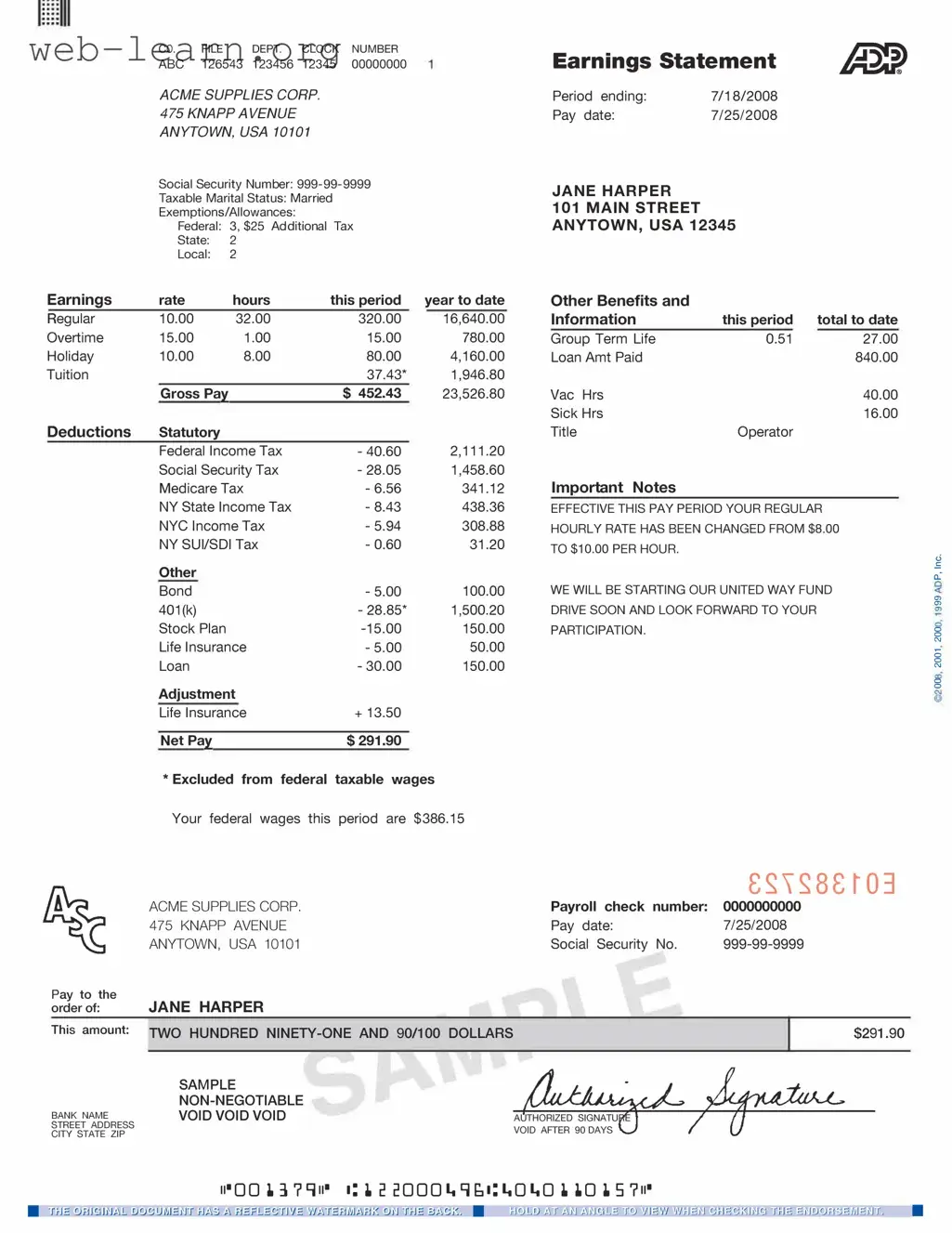
The ADP Pay Stub form serves as a crucial document for employees and employers alike, providing a clear breakdown of earnings, deductions, and net pay for each pay period. This form typically includes essential information such as the employee's name, identification number, and pay date, ensuring that all parties have access to accurate records. Additionally, it outlines gross pay, which reflects total earnings before any deductions are applied, and net pay, the amount an employee takes home after taxes and other withholdings. Deductions may encompass federal and state taxes, Social Security contributions, and benefits like health insurance or retirement savings. Understanding the details within the ADP Pay Stub form can empower employees to manage their finances more effectively and ensure compliance with tax obligations. By reviewing this document regularly, individuals can also verify their earnings and identify any discrepancies, fostering transparency and trust in the employer-employee relationship.
| Fact Name | Details |
|---|---|
| Purpose | The ADP Pay Stub form provides employees with a detailed summary of their earnings, deductions, and net pay for a specific pay period. |
| Components | The form typically includes information such as gross wages, taxes withheld, benefits deductions, and year-to-date totals. |
| State-Specific Regulations | In California, for example, employers must comply with the California Labor Code Section 226, which requires detailed pay stubs that include specific information. |
| Access | Employees can access their pay stubs electronically through ADP's online portal or receive them in paper format, depending on employer preferences. |
Filling out the ADP Pay Stub form is a straightforward process. After completing the form, you will have a clear record of your earnings and deductions for the pay period. This information is essential for your personal records and may be needed for various financial transactions.
What is an ADP Pay Stub?
An ADP Pay Stub is a document that outlines an employee's earnings and deductions for a specific pay period. It is generated by ADP, a popular payroll processing company. The pay stub provides detailed information about gross pay, taxes withheld, benefits contributions, and net pay.
How can I access my ADP Pay Stub?
You can access your ADP Pay Stub through the ADP employee portal. To do this, you need to log in using your credentials. Once logged in, navigate to the 'Pay' section where you can view and download your pay stubs. If you are a new user, you may need to register for an account first.
What information is included on my ADP Pay Stub?
Your ADP Pay Stub typically includes the following information:
Why is my net pay different from my gross pay?
Your net pay differs from your gross pay because of various deductions. These can include federal and state taxes, Social Security, Medicare, and any voluntary deductions such as health insurance or retirement plan contributions. Each deduction reduces your gross pay to arrive at the net pay you receive.
Can I get a copy of a past pay stub?
Yes, you can obtain copies of past pay stubs through the ADP employee portal. After logging in, you should find an option to view or download previous pay stubs. If you encounter any issues, contact your HR department for assistance.
What should I do if I find an error on my pay stub?
If you notice an error on your pay stub, it’s important to address it promptly. First, double-check the figures to ensure it’s indeed an error. If you confirm a mistake, reach out to your HR or payroll department. They can investigate the issue and make necessary corrections.
Is my ADP Pay Stub secure?
Yes, ADP takes security seriously. The employee portal is designed with robust security measures to protect your personal and financial information. Always ensure you use a secure connection when accessing your pay stub online and keep your login credentials confidential.
Filling out the ADP Pay Stub form can seem straightforward, but there are common pitfalls that many individuals encounter. One frequent mistake is neglecting to double-check personal information. This includes your name, address, and Social Security number. Even a small typo can lead to significant issues down the line, such as tax complications or problems with your employer.
Another common error involves miscalculating hours worked. When reporting hours, it’s essential to ensure that you accurately reflect all hours, including overtime. Failing to do so can result in underpayment or discrepancies in your pay. Always take a moment to review your time records before submitting the form.
Many people also overlook the importance of checking deductions. The ADP Pay Stub form includes various deductions for taxes, benefits, and retirement contributions. Failing to verify these amounts can lead to unexpected surprises in your paycheck. Make sure you understand each deduction and how it affects your overall earnings.
Additionally, some individuals forget to include all relevant income sources. If you have multiple jobs or additional forms of income, it’s crucial to report them accurately. Omitting any income can result in an incorrect tax filing, which may lead to penalties or audits.
Another mistake is not keeping copies of submitted forms. It’s wise to maintain a record of all forms you submit. This practice not only helps in tracking your earnings but also provides documentation if any disputes arise in the future. Always save a copy for your records.
Sometimes, people rush through the form without reading the instructions. Each section of the ADP Pay Stub form has specific guidelines that must be followed. Taking the time to read these instructions can help prevent errors and ensure that your form is completed correctly.
Moreover, failing to update the form when personal circumstances change can be detrimental. Life events such as marriage, divorce, or the birth of a child can affect your tax situation and deductions. Always update your information promptly to reflect these changes.
Lastly, many individuals underestimate the importance of seeking help if needed. If you find yourself confused about any part of the form, don’t hesitate to ask for assistance. Whether it’s from a supervisor, HR representative, or a knowledgeable colleague, getting clarification can save you from making costly mistakes.
By being aware of these common mistakes and taking steps to avoid them, you can ensure that your ADP Pay Stub form is filled out correctly. A little diligence goes a long way in protecting your financial well-being.
The ADP Pay Stub form is an essential document for employees, as it provides a detailed breakdown of their earnings and deductions for a specific pay period. In addition to this form, several other documents are commonly used in conjunction with it. Each of these documents serves a unique purpose in the payroll and financial management process.
When filling out the ADP Pay Stub form, it is important to follow certain guidelines to ensure accuracy and compliance. Here are some key points to consider:
Following these guidelines will help ensure that your ADP Pay Stub form is filled out correctly and processed without issues.
Understanding the ADP Pay Stub form is crucial for employees and employers alike. However, several misconceptions often cloud the clarity of this important document. Below are eight common misunderstandings regarding the ADP Pay Stub form, along with explanations to clarify each point.
Many believe that the pay stub solely reflects gross earnings. In reality, it provides a detailed breakdown, including deductions for taxes, benefits, and other withholdings, giving a comprehensive view of take-home pay.
This is not true. Pay stubs are essential for all employees, including part-time workers and contractors. They serve as a record of earnings and deductions, regardless of employment status.
While both documents relate to earnings, they serve different purposes. The pay stub provides a snapshot of a specific pay period, whereas the W-2 summarizes annual earnings and tax withholdings for tax filing.
Deductions can vary from pay period to pay period. Factors such as changes in benefits enrollment, tax withholding adjustments, or new deductions can affect the amounts displayed.
In many states, employers are legally required to provide pay stubs to employees. This requirement ensures transparency regarding earnings and deductions, fostering trust in the employer-employee relationship.
While tracking earnings is one function, pay stubs also help employees monitor their deductions, understand their tax liabilities, and verify that they are being compensated correctly.
Many companies offer electronic pay stubs, which can be accessed online. This digital format often allows for easier tracking and storage of pay information.
On the contrary, the information on a pay stub is critical. It can affect tax filings, eligibility for loans, and even retirement planning. Understanding this information empowers employees to make informed financial decisions.
By dispelling these misconceptions, individuals can better understand the ADP Pay Stub form and utilize it effectively for their financial well-being.
When filling out and using the ADP Pay Stub form, keep the following key takeaways in mind: