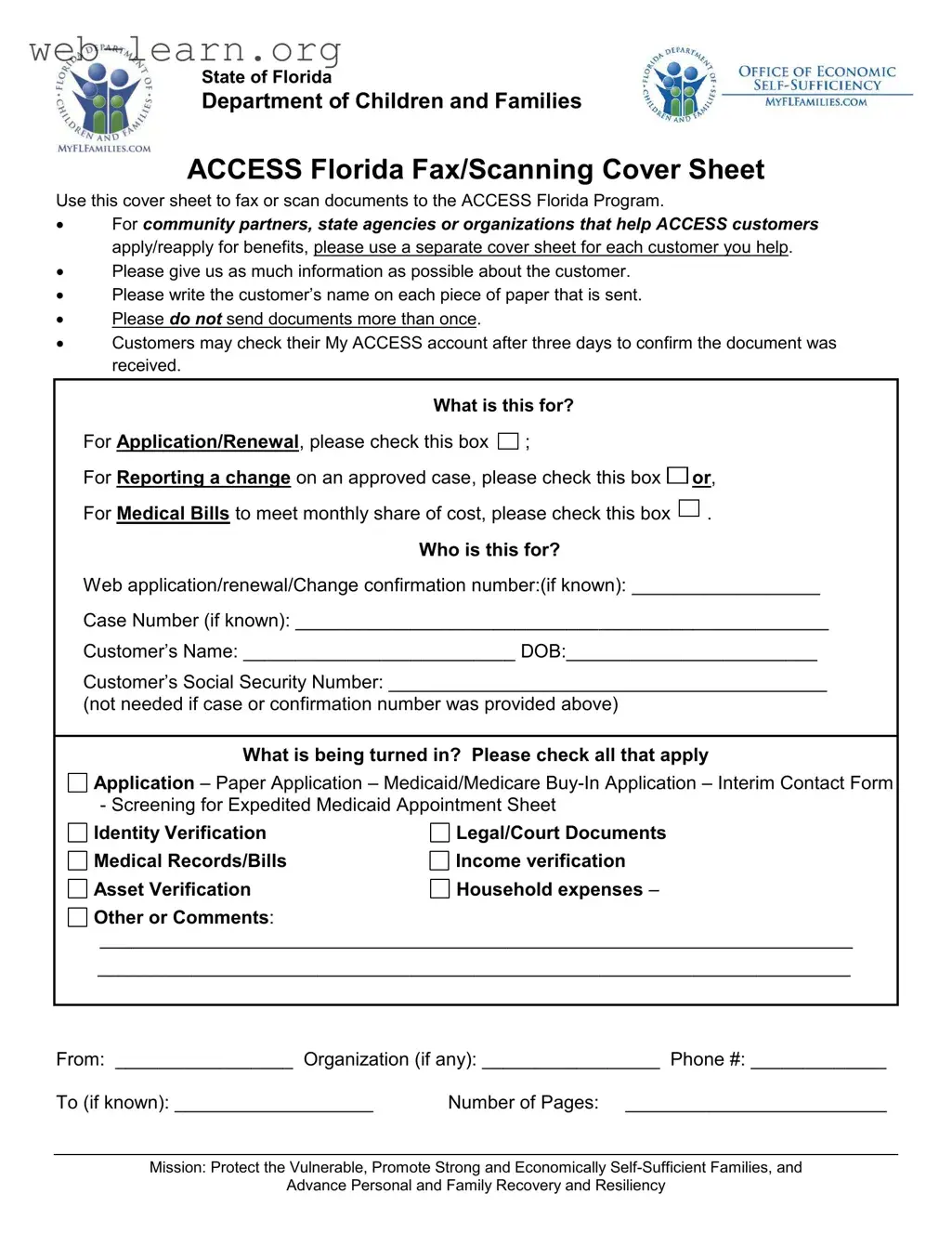
The Access Florida Fax form serves as a crucial tool for individuals and organizations involved in the application and renewal process for various benefits through the ACCESS Florida Program. This form is designed to streamline the submission of essential documents, ensuring that all necessary information is collected efficiently. For community partners and state agencies assisting ACCESS customers, it’s important to use a separate cover sheet for each individual to maintain clarity and organization. The form prompts users to provide detailed information about the customer, including their name on every document submitted, which helps in tracking and processing requests effectively. It also emphasizes the importance of not resending documents, as this can lead to confusion and delays. Customers are encouraged to check their My ACCESS account after three days to verify that their documents have been received. The form includes options for various purposes, such as applications, renewals, and reporting changes, making it versatile for different situations. Additionally, it gathers personal details like the customer’s name, date of birth, and social security number, ensuring that all submissions are accurately linked to the right cases. By facilitating the collection of necessary documentation—ranging from identity verification to income statements—the Access Florida Fax form plays a pivotal role in helping families access vital resources and support.
| Fact Name | Details |
|---|---|
| Purpose of the Form | The ACCESS Florida Fax form is used to fax or scan documents related to applications or renewals for benefits. |
| Who Should Use It | Community partners, state agencies, and organizations assisting ACCESS customers must use this form for each customer they help. |
| Information Requirement | It is important to provide as much information as possible about the customer on the cover sheet. |
| Document Identification | Each document sent should include the customer’s name to ensure proper identification. |
| Duplicate Submissions | Customers should not send the same document more than once to avoid confusion. |
| Document Confirmation | After three days, customers can check their My ACCESS account to confirm receipt of their documents. |
| Application Types | The form allows users to specify the type of application or change being reported, such as for medical bills or renewals. |
| Personal Information | Customers are required to provide their name, date of birth, and social security number, unless a case or confirmation number is provided. |
| Types of Documents | Various documents can be submitted, including applications, identity verification, medical records, and income verification. |
| Governing Law | This form is governed by Florida Statutes, Chapter 409, which pertains to public assistance programs. |
Completing the Access Florida Fax form requires attention to detail to ensure that all necessary information is provided. After filling out the form, it can be faxed or scanned and sent to the appropriate department for processing. Make sure to follow the steps carefully to avoid delays in your application or request.
What is the Access Florida Fax form used for?
The Access Florida Fax form is designed to facilitate the submission of documents to the ACCESS Florida Program. It is particularly useful for community partners, state agencies, or organizations that assist customers in applying or reapplying for benefits. The form helps ensure that all necessary information is collected and organized for efficient processing.
Who should use this form?
This form is intended for anyone who is helping an ACCESS Florida customer, including community partners and organizations. Each customer should have a separate cover sheet to ensure their documents are processed correctly. If you are a customer submitting your own documents, you can also use this form.
What information is required on the form?
When filling out the form, it is important to provide as much information as possible. This includes:
How should documents be submitted?
Documents should be faxed or scanned and sent along with the completed Access Florida Fax form. It is crucial to write the customer’s name on each piece of paper submitted to avoid any confusion during processing.
Can I send the same documents multiple times?
No, it is advised not to send documents more than once. Duplicate submissions can lead to confusion and delays in processing. If you are unsure whether your documents were received, it is best to wait for confirmation.
How can customers confirm receipt of their documents?
Customers can check their My ACCESS account after three days to confirm whether their documents have been received. This online account allows for easy tracking of application status and document submissions.
What types of documents can be submitted using this form?
The form allows for the submission of various types of documents, including:
What is the mission of the ACCESS Florida Program?
The mission of the ACCESS Florida Program is to protect vulnerable individuals, promote strong and economically self-sufficient families, and advance personal and family recovery and resiliency. This mission guides the program in serving the community effectively.
Filling out the Access Florida Fax form can be straightforward, but many people make common mistakes that can delay their application or renewal process. One frequent error is failing to provide the customer’s name on each page submitted. Each document should clearly identify the individual it pertains to. This helps ensure that the documents are processed correctly and attributed to the right case.
Another mistake is not using a separate cover sheet for each customer when multiple applications are submitted by community partners or organizations. Each submission should be distinct, as combining documents can lead to confusion and misprocessing of information. This is particularly important for organizations assisting multiple clients.
Many individuals also overlook the importance of checking the appropriate boxes for the type of submission. Whether it’s for application renewal, reporting a change, or submitting medical bills, selecting the correct option is crucial. Failing to do so may result in the documents being directed to the wrong department, causing unnecessary delays.
Additionally, people often forget to include the case number or confirmation number, if known. This information can significantly expedite the processing of the documents. If these identifiers are not provided, it may lead to longer wait times for confirmation that the documents were received.
Another common oversight is sending duplicate documents. The instructions clearly state not to send documents more than once. Repeated submissions can clutter the system and may result in confusion, ultimately slowing down the processing time.
Furthermore, individuals frequently neglect to check their My ACCESS account after three days to confirm receipt of their documents. This step is essential for ensuring that everything was submitted correctly and to follow up if necessary.
Lastly, some people do not provide complete contact information for the sending organization or individual. Including a phone number and organization name is important for any follow-up communication. This information can facilitate quicker resolutions to any issues that may arise during the processing of the application or renewal.
The Access Florida Fax form is an essential document used to submit various materials related to the ACCESS Florida Program. Alongside this form, several other documents are commonly required to facilitate the application or renewal process for benefits. Below is a list of these documents, each with a brief description.
Each of these documents plays a vital role in ensuring that the application process runs smoothly and efficiently. Properly completing and submitting these forms can help avoid delays in receiving benefits.
The Access Florida Fax form is similar to several other documents used in social services and benefits applications. Here are six documents that share similarities with the Access Florida Fax form:
When filling out the Access Florida Fax form, it is crucial to follow specific guidelines to ensure that your submission is processed smoothly. Here are six essential do's and don'ts to keep in mind:
By adhering to these guidelines, you can help ensure a more efficient process for accessing benefits through the ACCESS Florida Program. Remember, clarity and completeness are key!
Misconceptions about the Access Florida Fax form can lead to confusion and delays in processing. Here are five common misunderstandings:
Filling out and using the Access Florida Fax form requires attention to detail and adherence to specific guidelines. Here are four key takeaways to keep in mind: