Homepage Blank 300A Osha Form
Outline

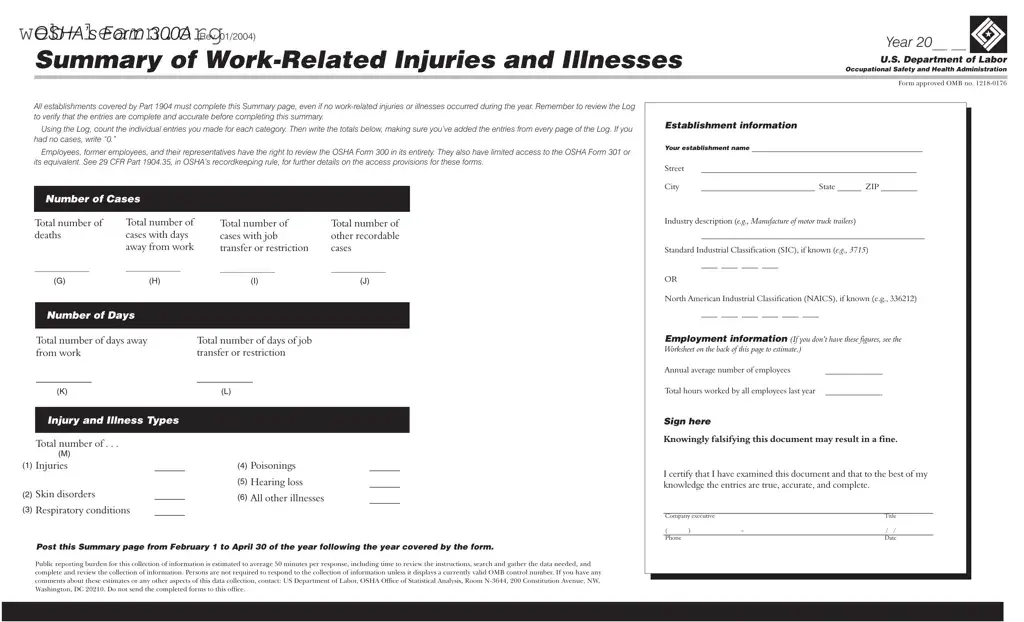
The OSHA Form 300A serves as a critical tool for tracking work-related injuries and illnesses within an organization. This summary form must be completed by all establishments covered under Part 1904, regardless of whether any incidents occurred during the reporting year. Accuracy is essential; therefore, it is important to review the detailed Log of injuries and illnesses to ensure that all entries are complete before finalizing the summary. Each category must be tallied, and if there were no cases, a “0” should be noted. The form requires specific information about the establishment, including its name, address, and industry classification. Additionally, it captures vital statistics such as the total number of deaths, cases with days away from work, and other recordable cases. Employers must also report the total hours worked and the annual average number of employees. This summary is not just a requirement; it is a resource for employees, former employees, and their representatives, who have the right to review the Form 300 in its entirety. Transparency and compliance with OSHA regulations are crucial, as the information collected can impact workplace safety and health standards. The completed form must be posted prominently from February 1 to April 30 of the following year, ensuring that all employees have access to this important data.

Sample - 300A Osha Form

U.S. Department of Labor
Occupational Safety and Health Administration
OSHA’s Form 300A
(Rev. 01/2004)
Year 20__ __
Summary of Work-Related Injuries and Illnesses
Form approved OMB no. 1218-0176
Total number of
deaths
__________________
Total number of
cases with days
away from work
__________________
Number of Cases
Total number of days away
from work
___________
Total number of days of job
transfer or restriction
___________
Number of Days
Post this Summary page from February 1 to April 30 of the year following the year covered by the form.
All establishments covered by Part 1904 must complete this Summary page, even if no work-related injuries or illnesses occurred during the year. Remember to review the Log
to verify that the entries are complete and accurate before completing this summary.
Using the Log, count the individual entries you made for each category. Then write the totals below, making sure you’ve added the entries from every page of the Log. If you
had no cases, write “0.”
Employees, former employees, and their representatives have the right to review the OSHA Form 300 in its entirety. They also have limited access to the OSHA Form 301 or
its equivalent. See 29 CFR Part 1904.35, in OSHA’s recordkeeping rule, for further details on the access provisions for these forms.
Establishment information
Employment information
Your establishment name
__________________________________________
Street _________________________ _______
City ____________________________ State ______ ZIP _________
Industry description ( )
_______________________________________________________
Standard Industrial Classification (SIC), if known ( )
____ ____ ____ ____
North American Industrial Classification (NAICS), if known (e.g., 336212)
e.g., Manufacture of motor truck trailers
e.g., 3715
(I ee the
Worksheet on the back of this page to estimate.)
_____________________
OR
____ ____ ____ ____ ____ ____
Annual average number of employees ______________
Total hours worked by all employees last year ______________
f you don’t have these figures, s
Sign here
Knowingly falsifying this document may result in a fine.
I certify that I have examined this document and that to the best of my
knowledge the entries are true, accurate, and complete.
___________________________________________________________
___________________________________________________________
Company executive Title
Phone Date
( ) - / /
Public reporting burden for this collection of information is estimated to average 50 minutes per response, including time to review the instructions, search and gather the data needed, and
complete and review the collection of information. Persons are not required to respond to the collection of information unless it displays a currently valid OMB control number. If you have any
comments about these estimates or any other aspects of this data collection, contact: US Department of Labor, OSHA Office of Statistical Analysis, Room N-3644, 200 Constitution Avenue, NW,
Washington, DC 20210. Do not send the completed forms to this office.
Total number of . . .
Skin disorders ______
Respiratory conditions ______
Injuries ______
Injury and Illness Types
Poisonings ______
Hearing loss
All other illnesses ______
______
(G) (H) (I) (J)
(K) (L)
(M)
(1)
(2)
(3)
(4)
(5)
(6)
Total number of
cases with job
transfer or restriction
__________________
Total number of
other recordable
cases
__________________

Form Information

Fact Name Description
Purpose Form 300A summarizes work-related injuries and illnesses for a given year.
Mandatory Completion All establishments covered by OSHA's Part 1904 must complete this form, even if no incidents occurred.
Access Rights Employees and their representatives can review the entire OSHA Form 300.
Filing Period This summary must be posted from February 1 to April 30 of the following year.
Reporting Burden The estimated time to complete the form is about 50 minutes.
State-Specific Forms States may have additional requirements; check local laws for compliance.
Consequences of Falsification Knowingly providing false information can result in fines.

Detailed Guide for Filling Out 300A Osha

Filling out the OSHA Form 300A is a crucial step in ensuring workplace safety and compliance. After completing the form, it must be posted in a visible area from February 1 to April 30 of the following year. This process allows employees and their representatives to review the information regarding work-related injuries and illnesses.

  1. Gather your Log of Work-Related Injuries and Illnesses (Form 300) to ensure all entries are complete and accurate.
  2. Count the total number of cases for each category listed in the Log.
  3. Write the establishment name, street address, city, state, and ZIP code in the designated fields.
  4. Enter the total number of deaths in the appropriate box.
  5. Fill in the total number of cases with days away from work.
  6. Record the total number of cases with job transfer or restriction.
  7. Provide an industry description and, if known, the Standard Industrial Classification (SIC) or North American Industrial Classification (NAICS) code.
  8. Input the total number of days away from work and the total number of days of job transfer or restriction.
  9. Estimate and write down the annual average number of employees.
  10. Enter the total number of injuries, skin disorders, respiratory conditions, poisonings, hearing loss, and all other illnesses.
  11. Record the total hours worked by all employees during the last year.
  12. Sign the document, certifying the accuracy of the information provided.
  13. Post the completed Summary page in a visible location from February 1 to April 30 of the following year.

Obtain Answers on 300A Osha

  1. What is the OSHA Form 300A?

    The OSHA Form 300A is a summary of work-related injuries and illnesses that occurred in your workplace during the previous calendar year. It is a requirement for all establishments covered by OSHA regulations, even if no incidents occurred.

  2. Who needs to complete the Form 300A?

    All employers who are covered by OSHA regulations must complete this form. This includes businesses of various sizes and industries. If you had no work-related injuries or illnesses, you still need to submit the form with “0” entries.

  3. When should the Form 300A be posted?

    You must post the completed Form 300A from February 1 to April 30 of the year following the year covered by the form. This allows employees and their representatives to review the information.

  4. What information do I need to fill out the Form 300A?

    You will need to gather several pieces of information, including:

    • Your establishment name and address
    • Total number of deaths
    • Total number of cases with days away from work
    • Total number of other recordable cases
    • Industry description and classification codes (SIC or NAICS)
    • Annual average number of employees
    • Total hours worked by all employees
  5. What if I made a mistake on the Form 300A?

    If you discover an error after submitting the form, you can correct it by submitting a new form with the correct information. It’s important to ensure that all entries are accurate to avoid any potential fines.

  6. Can employees access the Form 300A?

    Yes, employees, former employees, and their representatives have the right to review the Form 300A in its entirety. This transparency helps ensure workplace safety and accountability.

  7. What happens if I fail to complete or post the Form 300A?

    Failing to complete or post the Form 300A can result in penalties from OSHA. It’s crucial to comply with the requirements to avoid fines and ensure workplace safety standards are met.

  8. What is the purpose of the Form 300A?

    The purpose of the Form 300A is to provide a summary of workplace injuries and illnesses. This information helps employers identify safety issues and improve workplace conditions, ultimately protecting employees.

  9. How long should I keep the Form 300A records?

    You are required to keep the Form 300A records for at least five years following the year it covers. This retention period allows for proper review and analysis of workplace safety over time.

  10. Where do I send the completed Form 300A?

    You do not need to send the completed Form 300A to OSHA. Instead, you should keep it on file and post it in your workplace during the designated period.

Common mistakes

Filling out the OSHA Form 300A can seem straightforward, but many people make common mistakes that can lead to inaccuracies. One frequent error is neglecting to complete the form entirely, even if no work-related injuries or illnesses occurred during the year. It’s essential to remember that every establishment must submit a summary page, regardless of incident numbers. If there were no cases, simply writing “0” is necessary.

Another mistake is failing to verify the entries in the Log before summarizing. This step is crucial. Without checking for completeness and accuracy, you risk reporting incorrect data. Take the time to count the individual entries for each category carefully. If you skip this step, you might overlook important details that could affect your summary.

People often forget to include all pages of the Log when calculating totals. Each page may contain entries that contribute to the overall numbers. Make sure to add up the entries from every page to ensure your totals reflect the complete picture of injuries and illnesses.

Some individuals misinterpret the definitions of injury and illness types. Understanding what qualifies as an injury versus an illness is vital for accurate reporting. For instance, skin disorders and respiratory conditions fall under different categories, and misclassifying them can lead to misleading data.

Additionally, many make the mistake of omitting the establishment information. This includes the name, address, and industry description. Without this information, the form lacks context, making it difficult for others to understand the data presented.

Another common error involves the annual average number of employees. This figure is essential for calculating rates and trends. Failing to provide an accurate count can skew your data and misrepresent the safety performance of your establishment.

Some people overlook the total hours worked by all employees last year. This number is critical for determining injury and illness rates. Without it, the data lacks the necessary context to assess safety performance effectively.

Signing the form is another area where mistakes occur. Individuals sometimes forget to sign or fail to include the date. This certification is not just a formality; it confirms that the information is accurate to the best of your knowledge. Neglecting this step can lead to compliance issues.

Finally, failing to post the summary page during the required timeframe is a common oversight. Remember, the summary must be displayed from February 1 to April 30 of the year following the reporting year. Missing this deadline can result in penalties and a lack of transparency for employees and stakeholders.

Documents used along the form

When managing workplace safety and health documentation, several forms accompany OSHA’s Form 300A. Each document serves a specific purpose in ensuring compliance with safety regulations and maintaining accurate records of workplace injuries and illnesses. Below is a list of commonly used forms that work in conjunction with the 300A form.

  • OSHA Form 300: This form is the Log of Work-Related Injuries and Illnesses. It details each incident, including the nature of the injury, the affected body part, and the outcome. Employers must maintain this log throughout the year.
  • OSHA Form 301: Known as the Injury and Illness Incident Report, this form provides a more detailed account of each incident recorded on the Form 300. It includes specifics such as how the incident occurred and the treatment received.
  • OSHA Form 300A: This is the Summary of Work-Related Injuries and Illnesses. It summarizes the information from the Form 300 and is posted in the workplace for employee review.
  • First Report of Injury (FROI): This document is often required by state workers' compensation boards. It must be completed promptly after an injury occurs and includes details about the injured employee and the circumstances of the incident.
  • Safety Data Sheets (SDS): These documents provide information on the properties of hazardous materials used in the workplace. They are essential for ensuring employee safety and compliance with chemical safety regulations.
  • Incident Report Form: This form captures details of any workplace incident, regardless of whether an injury occurred. It helps organizations analyze incidents to improve safety protocols.
  • Return-to-Work Form: This document is used to facilitate the employee's transition back to work after an injury. It may include medical clearance and any necessary accommodations.
  • Employee Training Records: Maintaining records of safety training sessions is crucial. These documents demonstrate compliance with OSHA training requirements and help ensure employees are knowledgeable about workplace safety practices.
  • Workplace Safety Inspection Checklist: This form is used during safety inspections to identify potential hazards in the workplace. It helps ensure that safety measures are in place and functioning correctly.

Each of these documents plays a vital role in maintaining workplace safety and compliance with OSHA regulations. Proper recordkeeping not only protects employees but also supports employers in creating a safer work environment.

Similar forms

The OSHA Form 300A is an important document for summarizing work-related injuries and illnesses. It shares similarities with several other documents used in workplace safety and health reporting. Here’s a list of nine documents that are similar to the OSHA Form 300A:

  • OSHA Form 300: This form serves as a detailed log of work-related injuries and illnesses, providing specific information about each incident, including the nature of the injury and the affected employee.
  • OSHA Form 301: This form is used to report individual work-related injuries and illnesses in more detail. It includes information about the incident and the affected employee, and it is often used alongside the 300A form.
  • Incident Report: Many companies create their own incident reports to document workplace accidents. These reports often include details about the event, witness statements, and corrective actions taken.
  • Workers' Compensation Claim Form: This form is submitted to insurance companies when an employee files a claim for work-related injuries. It captures essential details similar to those in the OSHA forms.
  • First Report of Injury: This document is typically required by state laws to notify authorities of a workplace injury. It includes initial details about the incident and is often the first step in the claims process.
  • Safety Incident Log: Many organizations maintain a safety incident log to track all safety-related events, including near misses. This log can help identify trends and improve workplace safety.
  • Return-to-Work Program Documentation: This documentation outlines the process for bringing injured employees back to work. It may include details about modified duties or accommodations, similar to the restrictions noted in the OSHA forms.
  • Employee Safety Training Records: These records document the safety training employees have received. They can be crucial for understanding safety practices and compliance with regulations.
  • Annual Safety Reports: Companies often compile annual safety reports that summarize their safety performance, including injury statistics and safety initiatives, paralleling the summary aspect of the OSHA Form 300A.

Understanding these documents can help ensure compliance with safety regulations and improve workplace safety overall.

Dos and Don'ts

When filling out the OSHA Form 300A, it’s important to follow certain guidelines to ensure accuracy and compliance. Here’s a list of things you should and shouldn’t do:

  • Do review the Log to ensure all entries are complete and accurate.
  • Do count individual entries for each category before writing the totals.
  • Do include “0” if there were no work-related injuries or illnesses.
  • Do post the Summary page from February 1 to April 30 of the following year.
  • Do sign the document to certify that the information is true and complete.
  • Don’t forget to include the establishment name and address.
  • Don’t leave any sections blank if they apply to your establishment.
  • Don’t submit the completed forms to the OSHA office.
  • Don’t provide false information, as this can lead to penalties.
  • Don’t overlook the requirement to allow employees access to the form.

Misconceptions

  • Misconception 1: The 300A form is only required if there are work-related injuries or illnesses.
  • This is not true. Every establishment covered by OSHA must complete the 300A form, even if there were no injuries or illnesses during the year. It is essential to report “0” cases if none occurred.

  • Misconception 2: Employees cannot access the 300A form.
  • In reality, employees, former employees, and their representatives have the right to review the entire OSHA Form 300. This access promotes transparency and accountability in workplace safety.

  • Misconception 3: The 300A form only needs to be posted if there are recorded injuries.
  • This is incorrect. The summary must be posted from February 1 to April 30 of the year following the reporting year, regardless of whether injuries occurred. This ensures that all employees are informed about workplace safety records.

  • Misconception 4: Completing the 300A form is a simple task that requires no verification.
  • On the contrary, it is crucial to review the Log for accuracy before completing the summary. This step ensures that all entries are correct and complete, which is vital for maintaining proper records.

Key takeaways

Filling out the OSHA Form 300A is an essential task for every establishment covered by OSHA regulations. Here are four key takeaways to keep in mind:

  • Complete the Form Accurately: Even if no work-related injuries or illnesses occurred, it is crucial to fill out the form. Ensure that all entries in the Log are complete and correct before summarizing the data.
  • Know Your Rights: Employees and their representatives have the right to access the OSHA Form 300. This transparency helps promote a safer workplace.
  • Post the Summary: Remember to display the completed summary from February 1 to April 30 of the year following the reporting year. This visibility is important for employee awareness.
  • Accurate Reporting is Key: When counting cases, include all relevant entries from the Log. If there were no cases, simply write "0" in the appropriate fields.